
8 Shopify SEO Tips to Boost Organic Traffic in 2026

Is your Shopify store invisible on Google?
You can have a clean theme, strong products, polished photography, and fast checkout, and still get almost no organic traffic. That's the part most generic SEO advice misses. A Shopify store doesn't rank because it looks good. It ranks because search engines can crawl it, understand it, and trust that each page deserves to appear for a specific query.
The hard truth is simple. Without SEO, your store is like a great boutique hidden in a basement with no sign on the street. People might love what you sell once they arrive, but Google still has to find the door first.
This isn't another list of recycled advice about “write better content” and “add keywords.” These Shopify SEO tips are ordered like a working merchant would tackle them. Start with visibility, fix what blocks indexing, improve the pages closest to revenue, then scale the parts that usually get ignored because they're tedious.
AI helps here, but only if you use it like an assistant, not an autopilot. Tools like wRanks can make advanced SEO practical inside Shopify, especially if you don't have an in-house SEO team or a developer on standby. The main win is not automation by itself. It's getting good work done consistently on product pages, collections, blog content, images, redirects, and indexing without turning SEO into a full-time job.
Table of Contents
- 1. Optimize Product Titles and Meta Descriptions with AI-Generated Copy
- 2. Implement Structured Data JSON-LD for Products and FAQs
- 3. Create SEO-Optimized Blog Content with AI Assistance
- 4. Optimize Image Alt Text at Scale with AI Vision Models
- 5. Monitor Keyword Rankings and Implement Geo-Targeting Strategy
- 6. Implement 301 Redirects and Fix Broken Links for Link Equity Preservation
- 7. Speed Up Google and Bing Indexing with Indexing APIs
- 8. Audit Your Entire Store with Shopify SEO Scoring and Fix High-Priority Issues
- Shopify SEO: 8-Point Comparison
- Your Action Plan for Shopify SEO Success
1. Optimize Product Titles and Meta Descriptions with AI-Generated Copy
Why do so many Shopify stores spend hours tweaking homepage copy while product pages keep generic titles like “Everyday Tee” or “Hydration Serum”? That's usually where search intent and buying intent meet. If your title is vague, you make Google guess and you make shoppers work harder than they should.
On Shopify, this is one of the fastest SEO fixes because it sits inside a workflow merchants can manage. You do not need a developer to start. You need clearer inputs, a review process, and a way to scale without turning every product page into the same recycled template.

Use AI for volume, not for blind publishing
If you sell a small catalog, manual writing is realistic. If you run a Shopify store with hundreds of SKUs, seasonal drops, and variant-heavy collections, consistency breaks first. Titles drift. Meta descriptions get skipped. Teams fall back on manufacturer copy, which is usually weak for search and worse for click-throughs.
AI helps handle that repetition. Tools like wRanks can draft title and meta description options from product attributes, then you review the pages that matter most first. That is the trade-off. You save time on first drafts, but you still need human judgment on phrasing, brand fit, and search intent.
A good title usually includes the product type, the main modifier, and one detail that helps a shopper self-select. “Women's Organic Cotton T-Shirt in Navy” gives Google and the buyer something useful to work with. “Everyday Tee” belongs in an internal catalog, not in a search result.
What to feed the model
AI output gets better when your inputs are specific. Give it the details a shopper would care about at the search stage:
- product type
- material or ingredient
- color or finish
- audience or use case
- standout feature
- brand tone
- target keyword
That sounds simple because it is. The mistake I see is asking AI to “write SEO copy” with no structure, then wondering why the result sounds like filler.
If you want a practical starting point, this AI product description generator for Shopify stores shows the kind of workflow that makes bulk optimization manageable for non-experts.
What usually works
Start with your top sellers, high-margin products, and collection leaders. Those pages give you the fastest return. A merchant with 500 products does not need a perfect rewrite of all 500 this week. They need the first 50 pages that already have demand or clear revenue potential.
Meta descriptions deserve the same treatment. They do not carry ranking weight the way titles and page content do, but they still shape clicks. A strong meta description clarifies what the product is, who it is for, and why the result is worth opening. It works like shelf signage in a crowded aisle. The product may be good, but the label still has to get someone to pick it up.
What usually fails
Keyword stuffing still fails. So does letting AI write titles with no constraints. A title like “Best Cheap Premium Organic Sustainable Cotton Navy Blue Shirt for Men Women Summer Casual” reads like a spam filter test, not a product page.
Use a tighter workflow instead:
- Rewrite titles and meta descriptions for priority products first
- Generate 3 to 5 AI options, not 1
- Choose the version that matches real search language
- Keep titles readable in search results
- Remove repeated wording across similar SKUs
- Check that each page targets a distinct query pattern
Truth is that Shopify SEO often improves through disciplined page-level edits, not flashy tactics. Clean titles and sharper meta descriptions will not solve every ranking problem, but they make the rest of your SEO work easier because they give search engines and shoppers a clearer page to evaluate.
2. Implement Structured Data JSON-LD for Products and FAQs
Search engines don't “see” your product page the way a shopper does. They see hints, labels, and relationships. Structured data gives them those labels directly. Without it, Google has to infer what your product is, what category it belongs to, and which supporting information matters.
That's why structured data is one of the most useful Shopify SEO tips for merchants who want cleaner search visibility without changing the front-end design. It's the digital equivalent of putting labeled shelves in a stockroom instead of tossing inventory into random boxes.
Why this matters more on Shopify than merchants think
Shopify's current SEO checklist for online stores emphasizes structured product data, specialized collection pages, and strategic internal linking. The same guidance also highlights performance thresholds, including Largest Contentful Paint within 2.5 seconds and Interaction to Next Paint under 200 milliseconds. That combination tells you where Shopify SEO has gone. It's no longer just about matching a keyword. It's about making your store machine-readable and fast enough to support the search experience.
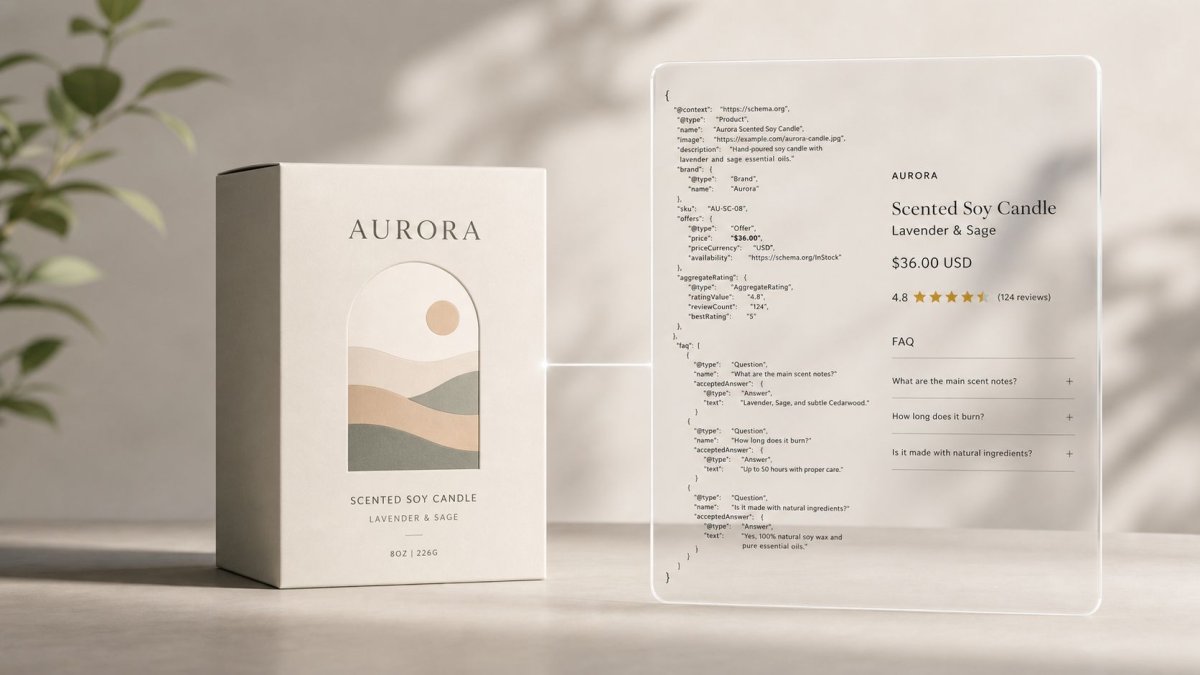
For a product page, JSON-LD helps search engines interpret essential context. For an FAQ section, it helps connect customer questions to the page in a structured way. A home goods store selling an “Aurora Scented Soy Candle” can use product schema to define the item cleanly, then add FAQ markup for common pre-purchase questions like burn time, scent profile, or gift suitability.
Keep it accurate, not decorative
Merchants often treat schema like a box to tick. That's a mistake. Bad schema is worse than no schema if it becomes inaccurate or drifts away from the page content.
Use structured data where it mirrors the page truthfully:
- Product pages: Mark up the actual product details shown on the page.
- FAQ sections: Add real customer questions that appear visibly on the page.
- Collections: Use structure to help search engines understand category intent, not to force unrelated snippets.
- Validation: Test output before and after changes in Google's rich result tools and monitor Search Console for issues.
Structured data should clarify the page you already built. It shouldn't try to invent a different one for Google.
3. Create SEO-Optimized Blog Content with AI Assistance
Why do so many Shopify blogs publish articles that get impressions but never drive sales?
The usual problem is workflow. Merchants publish broad posts with weak search intent, little product relevance, and no clear path into the store. On Shopify, blog SEO works best when each post supports a specific stage of the buying journey. Product pages convert shoppers who know what they want. Blog content brings in people who are still comparing, learning, or trying to solve a problem.
A furniture merchant might target “how to choose a dining table for a small apartment” and guide readers toward extendable tables. A pet brand can publish a care guide around chewing behavior, then point readers to the right toy type or material. That is the core job of blog content on Shopify. It should answer the pre-purchase question that product pages usually cannot cover well on their own.
Use AI to speed up production, not to decide the strategy
AI helps you publish consistently, but it does not fix weak topic selection. Start with a simple Shopify-friendly workflow: pick a keyword with clear intent, map it to a collection or product family, brief the article around one reader problem, then use AI to draft the first version.
Tools like wRanks make this much easier for non-experts because they reduce the blank-page problem. Instead of staring at a content brief and guessing what Google wants, you can build around the actual query, the likely intent, and the commercial page you want the post to support. For a skincare store, that might be “how to layer hyaluronic acid with retinol.” For a coffee brand, it could be “French press grind size for beginners.”

Good prompts matter here. If you want better AI drafts, study how to deconstruct images into prompts and apply the same logic to content inputs. Break the job into components: audience, intent, product angle, objections, examples, and desired next action. AI usually performs better with that level of structure than with a vague request like “write an SEO blog post about coffee.”
What strong Shopify blog content actually does
Strong ecommerce content helps a shopper make a decision. Weak content pads word count and repeats definitions.
Build posts around practical intent such as:
- Buying guidance: “best dining table shape for narrow rooms”
- How-to education: “how to wash linen duvet covers”
- Problem solving: “why does my dog destroy plush toys”
- Styling and use cases: “how to style a navy overshirt in warm weather”
Then connect the post to the right products or collections. Keep the handoff natural. If the article genuinely helps the reader narrow options, the click into the store feels useful instead of forced.
One trade-off is speed versus accuracy. AI can give you a fast draft, but Shopify merchants still need to add product knowledge, examples, and brand judgment. That is usually where rankings improve. Generic advice sounds like every other store in the category. Specific advice sounds like it came from a merchant who has directly helped customers buy the product.
4. Optimize Image Alt Text at Scale with AI Vision Models
Most merchants know alt text exists. Fewer treat it like part of SEO operations. On Shopify, that's a missed opportunity because product imagery does real work. It helps accessibility, supports page context, and gives search engines more clues about what's on the page.
If you run a store with hundreds of products, writing alt text manually often becomes one of those jobs everyone agrees is important and nobody finishes. AI vision tools make it realistic. They can inspect the image, describe the product, and draft a usable starting point that your team can review.
Write for people first, then search
Good alt text is descriptive, not bloated. If a furniture store uploads a walnut dresser image, “Mid-century modern walnut six-drawer dresser in bedroom setting” is useful. “dresser furniture buy dresser modern dresser walnut dresser online” is not.
A beauty merchant selling multiple shades of lipstick should describe the visible variation, not just repeat the product name on every image. A fashion store should note the cut, color, or angle when those details help distinguish images.

A simple scaling workflow
AI is useful here because image tasks are repetitive. A vision model can identify a “black leather crossbody bag with gold hardware” much faster than a human team can do it one image at a time.
Use it in order:
- Prioritize product images: Start with product detail pages and collection thumbnails.
- Describe what's visible: Product type, material, color, shape, and context when relevant.
- Skip decorative assets: Divider graphics and purely decorative visuals don't need the same treatment.
- Review edge cases: AI can confuse variants, bundles, and lifestyle shots if the image is visually dense.
If you want to improve how you prompt image-focused AI systems, this guide on how to deconstruct images into prompts is useful for understanding how visual elements get translated into language.
The best alt text sounds like something a helpful store associate would say if a shopper couldn't see the photo.
5. Monitor Keyword Rankings and Implement Geo-Targeting Strategy
SEO gets sloppy when you don't measure it. Merchants start changing titles, publishing blog posts, and editing collections without knowing which pages are already close to winning. That leads to busy work instead of prioritization.
Rank tracking fixes that. It shows where you already have traction and where you're invisible. If your “pour over kettle” collection sits just outside the strongest positions while your blog posts are buried, you know where to spend the next block of effort.
Use ranking data to make decisions, not to panic
Don't watch rankings like a day trader watches stock charts. Weekly checks are enough for awareness. Monthly decisions are where the value is. Search positions move around, and overreacting to every fluctuation usually creates more noise than progress.
Geo-targeting matters if you serve different regions through Shopify Markets or if your demand differs by location. A merchant selling winter outerwear, golf accessories, or region-specific gifts can't assume one keyword pattern tells the whole story. Search behavior changes with market, season, and local competition.
A practical reporting rhythm
You don't need a giant dashboard. You need a short list of commercial terms, collection terms, and informational terms tied to revenue.
Focus on signals like these:
- Near-win keywords: Terms where collection or product pages are already showing promise
- Regional gaps: Queries that perform differently across target markets
- Content opportunities: Questions where blog content could support product discovery
- Competitive overlap: Keywords where rival Shopify stores consistently outrank you
A focused keyword ranking tracking workflow for Shopify helps non-experts turn search data into page-level action instead of drowning in reports.
One practical reality makes this even more important. Common Shopify SEO advice repeats the same broad fixes, but it rarely answers the harder operational question of which issues to prioritize first when time is limited, as seen in this Shopify Community discussion on improving SEO performance. Ranking data helps answer that because it shows where a small change could matter now.
6. Implement 301 Redirects and Fix Broken Links for Link Equity Preservation
A lot of Shopify SEO damage happens during normal store maintenance. You discontinue a product. You rename a collection. You clean up URLs. You launch a new taxonomy. Then traffic drops and nobody connects it to that “small update” from three weeks earlier.
That's why redirects are not cleanup work. They are asset protection. Shopify itself recommends using 301 redirects when products are moved or discontinued in its SEO guidance. If an old URL has backlinks, internal links, or any search history attached to it, deleting it without a plan is like throwing away a shelf location while customers are still walking toward it.
A common example is a seasonal apparel store that retires an old “linen-shirts-men” URL and launches a cleaner collection path for the new season. If the old page just dies, users hit a dead end and search engines lose continuity. If the old URL redirects to the closest matching live destination, you preserve context and reduce waste.
To see the issue in action, this short walkthrough is useful:
Redirect to the closest match, not the homepage
Homepage redirects are the lazy fix. They also tell search engines very little. If an old “ceramic mug set” product is gone, send users to the nearest relevant category or successor product, not your front page.
Merchants often make avoidable mistakes:
- Deleted product pages: Redirect to the most relevant replacement or parent collection.
- Renamed collections: Preserve intent by matching the old topic to the new structure.
- Internal link updates: Fix links inside blogs, menus, and featured product sections after the redirect is live.
- Redirect chains: Keep paths direct. Old URL to final destination is better than multiple hops.
Field note: The best redirect map is built before you remove URLs, not after customers and crawlers start hitting 404s.
A visual guide to broken links and SEO on Shopify can make this process much easier when your catalog changes often.
7. Speed Up Google and Bing Indexing with Indexing APIs
Publishing a page isn't the same as getting it indexed. That gap frustrates merchants all the time. You add a new collection, rewrite a key product page, or publish a timely blog post, and then nothing seems to happen. The page exists, but it isn't participating in search yet.
Shopify's own guidance says merchants should submit their full sitemap URL to Google Search Console so the store can be crawled and indexed effectively in the Shopify SEO overview. That should happen early, not after you “get around to SEO.” Search Console is one of the first operational tools a serious Shopify merchant should set up.
Why indexing speed matters in real stores
This matters most when your store changes often. A trend-driven fashion merchant launching a seasonal collection wants search engines to discover those pages quickly. A gift store updating holiday landing pages doesn't want old versions lingering while fresh ones wait to be crawled. A brand publishing educational content tied to current demand loses momentum if discovery lags.
Indexing APIs and similar submission workflows help reduce that lag by actively notifying search engines about new or updated content. They don't replace quality. They just remove some of the waiting.
What to submit first
Not every page deserves urgent indexing. Prioritize the pages that can create the fastest business value.
Submit in this order:
- New product pages: Especially for products backed by search demand or campaigns
- Collection pages: When they represent category changes or seasonal pivots
- High-intent blog posts: Guides that support commercial discovery
- Major page updates: Substantial rewrites, not tiny edits
Don't use indexing tools as a bandage for thin pages. Faster discovery of weak content still gives you weak content in the index. Pair submissions with internal linking so the page isn't isolated inside your store structure.
8. Audit Your Entire Store with Shopify SEO Scoring and Fix High-Priority Issues
If you only take one action from this list, start here. Most Shopify stores don't lose organic traffic because of one dramatic flaw. They lose it through dozens of small issues stacked together. Missing alt text. weak title tags. inconsistent internal linking. outdated redirects. unoptimized collection copy. schema gaps. slow templates. pages that are technically live but strategically invisible.
That's why audits matter. Not as vanity reports. As prioritization systems.
A useful benchmark is that only about 60% of Shopify stores are optimized for search engines, leaving roughly 40% with a visibility gap. In plain terms, many stores still have foundational issues sitting in plain sight. If you fix the right ones, you're often not fighting for tiny edge-case gains. You're correcting obvious weaknesses.
Score issues by impact, not by annoyance
Merchants often fix the easiest issue first because it feels productive. That's understandable. It's also why stores can spend weeks “doing SEO” without moving pages that are important.
A better audit workflow sorts issues by likely impact:
- Critical issues: Indexing blocks, broken redirects, major duplicate problems, missing core metadata on priority pages
- High-value issues: Product and collection page optimization, schema coverage, internal links, image alt text on commercial pages
- Lower-priority cleanup: Minor copy inconsistencies, low-value pages, cosmetic metadata on URLs that don't drive business
wRanks is built for this kind of workflow inside Shopify. It audits your store, scores issues by severity, and connects fixes to the Shopify editor so merchants can act without turning every SEO task into a dev project.
For a broader technical perspective, this Shopify optimization guide from Clickstera Solutions is a useful companion read.
The real goal of an audit
An audit isn't a one-time event. It's the system that keeps SEO from decaying while your catalog changes.
A healthy rhythm looks like this:
- Run a baseline audit: See the full scope of issues before changing anything
- Fix revenue-adjacent pages first: Products, collections, and blog posts that already earn or could earn traffic
- Batch similar fixes: Handle metadata, schema, and image issues in groups
- Recheck after implementation: Confirm that problems were resolved
Stores rarely need more SEO ideas. They need a better order of operations.
Shopify SEO: 8-Point Comparison
| Item | 🔄 Implementation Complexity | ⚡ Resource Requirements | 📊 Expected Outcomes | 💡 Ideal Use Cases | ⭐ Key Advantages |
|---|---|---|---|---|---|
| Optimize Product Titles and Meta Descriptions with AI-Generated Copy | Low–Medium: quick setup (15–30 min), requires review workflow | AI title/meta tool, keyword data, human QA (2–5 hrs for 100+ products) | Higher CTR and improved rankings on product pages; measurable CTR lift | Large catalogs, high-traffic product pages, seasonal updates | Scales optimization across catalog; consistent, data-driven copy |
| Implement Structured Data (JSON-LD) for Products and FAQs | Medium: injection + validation; low frontend impact | Schema generator/validator, occasional maintenance | Increased rich snippets, better SERP visibility and eligibility for product features | Stores needing rich results, product-heavy sites, voice/search optimization | Improves eligibility for rich snippets and AI Overviews; minimal performance cost |
| Create SEO-Optimized Blog Content with AI Assistance | Medium: content process setup and editorial review | AI writer, keyword research tool, editor time (20–30 min edit/post) | More organic traffic over weeks; builds topical authority and internal linking | Stores lacking content teams; competitive niches targeting long-tail queries | Fast content production; supports topical authority and product discovery |
| Optimize Image Alt Text at Scale with AI Vision Models | Low–Medium: batch processing; requires spot checks | Vision model, batch tools, editorial review for accuracy | Improved image search traffic, accessibility compliance, on-page SEO lift | Large image catalogs, accessibility-focused stores, image-driven products | Massive time savings; enhances accessibility and image discoverability |
| Monitor Keyword Rankings and Implement Geo-Targeting Strategy | Medium: tracking setup and ongoing analysis | Rank tracker with geo, analytics integration, analyst time weekly | Identifies quick wins, informs content priorities, measures SEO ROI | Multi-region stores, Shopify Markets, competitive keyword monitoring | Data-driven prioritization; reveals geographic and competitive gaps |
| Implement 301 Redirects and Fix Broken Links for Link Equity Preservation | Low–Medium: visual tools simplify process; critical timing during migrations | Redirect manager, spreadsheet imports, monitoring tools | Preserves ~90% link equity, reduces 404s, prevents traffic loss during changes | Migrations, URL restructures, seasonal removals, large inventory churn | Protects existing rankings; direct measurable impact on retained traffic |
| Speed Up Google and Bing Indexing with Indexing APIs | Low: API integration and event triggers; straightforward once set up | API credentials, webhook/automation, monitoring | Faster indexing (hours vs weeks); quicker traffic acquisition for new content | Time-sensitive product launches, high-velocity catalogs, news/trends | Reduces index lag substantially; improves ranking velocity (not guaranteed ranking) |
| Audit Your Entire Store with Shopify SEO Scoring and Fix High-Priority Issues | Medium–High: full-site crawl and staged remediation | Audit tool, implementation time (varying), cross-team fixes | Identifies critical issues; fixing high-priority items often yields 20–40% traffic gains | Stores with unknown SEO problems, pre/post-migration checks, growth-focused sites | Prioritized roadmap with ROI estimates; actionable fixes linked to editor |
Your Action Plan for Shopify SEO Success
Good Shopify SEO isn't about doing everything. It's about doing the next right thing in the right order.
If you've been stuck in the cycle of reading tips, installing apps, and hoping rankings improve on their own, the reset is simple. Start with your store's foundation. Make sure search engines can crawl and index the site properly. Confirm your sitemap is in Search Console. Clean up redirects. Check whether key product, collection, and blog pages are discoverable. If your technical base is shaky, advanced tactics won't save you.
Then move closer to revenue. Improve product titles and meta descriptions for the pages that matter most. Add structured data so search engines can interpret your catalog cleanly. Tighten internal links between blog posts, collections, and products. These are not glamorous fixes, but they often do more than trendy SEO hacks because they help both crawlers and shoppers understand the store.
After that, build scale. That's where AI becomes useful. Not as a magic wand, but as an asset. Use it to draft product copy, generate alt text, support blog production, track rankings, and manage routine SEO tasks that otherwise stay half-finished for months. This is especially valuable on Shopify because many merchants don't have a dedicated SEO team. They have a store to run. The best system is the one you'll reliably maintain.
What doesn't work is trying to optimize every page equally. Your homepage, your lowest-priority blog tag page, and your top-selling collection should not receive the same attention. Prioritize pages by business value and search opportunity. If a page can bring qualified traffic and drive purchases, it deserves faster action. If it can't, it can wait.
This is also where many merchants get tripped up by generic advice. A generic checklist tells you what exists. A working Shopify SEO process tells you what to do first. That difference matters. Especially when you have limited time, limited developer access, or a catalog that changes every week.
The most practical approach is this:
- audit first
- fix technical barriers
- optimize your money pages
- scale content and metadata with AI
- monitor rankings and indexing
- repeat the cycle
That's how organic growth compounds. Not from one perfect blog post or one schema tweak, but from a store that becomes easier to crawl, easier to understand, and easier to trust month after month.
If you want one Shopify-focused system to handle that workflow, wRanks is built for it. It helps you audit your store, prioritize fixes, generate optimized content, manage structured data, track rankings, improve indexing, and handle technical SEO tasks inside Shopify without adding unnecessary complexity.

About David Chen
Technical SEO engineer focused on structured data, indexing optimization, and Core Web Vitals. David turns complex technical requirements into actionable Shopify solutions.