Broken Links and SEO: Fix 404s for Shopify Success

You're probably looking at a Shopify store that has changed a lot over time. Products were removed. Collections were renamed. Blog posts linked to products that no longer exist. Maybe you migrated themes, cleaned up URLs, or merged seasonal pages. Then the 404s started piling up.
Most store owners react in one of two ways. They either ignore broken links completely, or they panic and try to fix every single one. Neither approach is great for revenue. In practice, broken links and SEO are an 80/20 problem. A small set of broken URLs can block rankings, waste strong backlinks, and send ready-to-buy visitors into dead ends. The rest are often just maintenance noise.
If you run a Shopify store, the job isn't to eliminate every 404 on principle. The job is to identify which broken links are costing you traffic, authority, or sales, and fix those first.
Table of Contents
- Why Broken Links Can Hurt Your Shopify SEO (and When They Don't)
- How to Find Every Broken Link in Your Shopify Store
- Fixing Broken Links The Right Way with 301 Redirects
- Recovering Lost Link Equity from High-Value Broken Pages
- Building a Proactive Link Monitoring and Prevention System
- Frequently Asked Questions About Broken Links and SEO
Why Broken Links Can Hurt Your Shopify SEO (and When They Don't)
The biggest misconception around broken links and SEO is simple: people assume every 404 is a crisis. It isn't.
Google's John Mueller has said 404s are normal and you do not need to fix every broken URL, a point discussed in Moz's piece on whether fixing broken links matters for SEO. That matters for Shopify stores because catalogs change constantly. Some products disappear. Some seasonal pages expire. Some old campaign URLs never need to come back.
Why some broken links matter a lot more than others
A broken link becomes serious when it affects one of these things:
- Crawl paths: If your store links internally to dead pages from navigation, collections, blog posts, or featured product modules, you're creating bad paths for both users and crawlers.
- Revenue paths: If a shopper clicks from a buying guide to a product page and lands on a 404, that session often ends there.
- Link equity: If another site linked to an old collection or a popular product page and that URL now returns a 404, you may be wasting authority you already earned.
- Trust signals: A few isolated dead pages are normal. Repeated broken journeys make the store feel neglected.
A low-traffic discontinued product with no backlinks and no internal prominence is usually noise. A broken collection page that had links from press coverage or affiliate content is not noise. That's where the 80/20 mindset matters.
Practical rule: Don't sort broken URLs by how many there are. Sort them by what they can still do for the business.
The broken links that deserve immediate attention
If I'm auditing a Shopify store, I push these to the top of the queue first:
| Broken link type | Why it matters | Priority |
|---|---|---|
| Broken URLs with backlinks | They may still carry authority from other sites | Highest |
| Broken internal links on high-intent pages | They interrupt product discovery and buying flow | Highest |
| Broken collection or evergreen blog URLs | These often support category rankings | High |
| Old product pages with no links or traffic | Usually limited upside unless they still convert via other paths | Lower |
Many stores waste time this way. They spend hours cleaning up harmless junk while a valuable broken URL keeps bleeding authority.
The right question isn't “How many broken links do we have?” It's “Which broken links are blocking traffic or money?”
How to Find Every Broken Link in Your Shopify Store
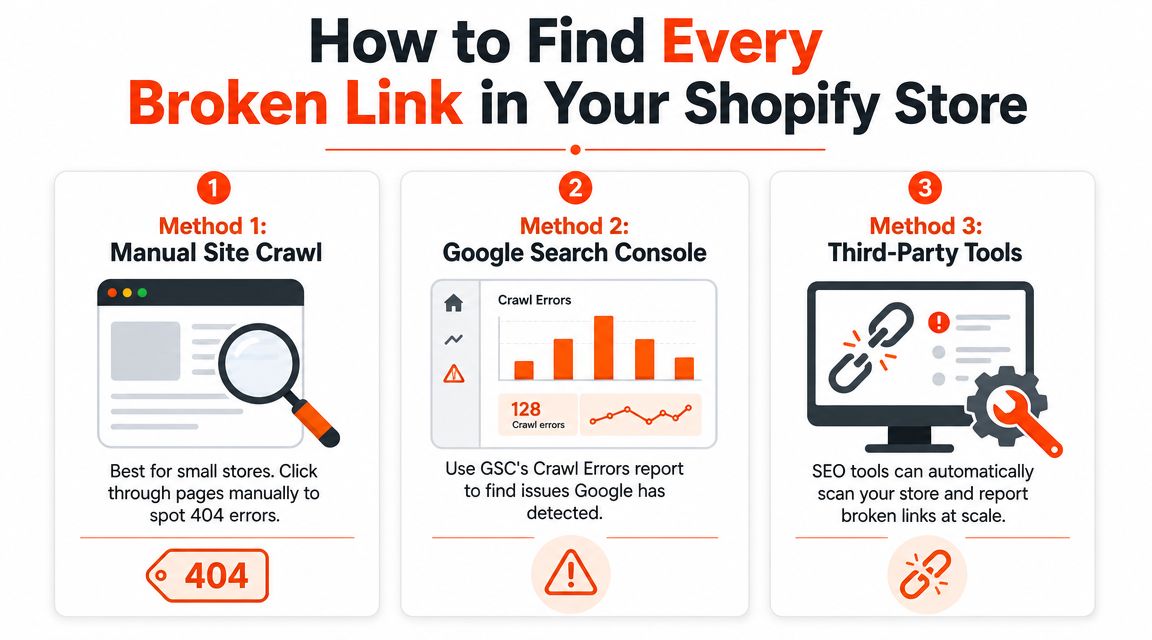
You need three kinds of visibility: what Google sees, what a crawler sees, and what your team can realistically act on. For most stores, that means combining a free method with a proper crawl.
Google Search Console for free visibility
Google Search Console is the easiest place to start because it shows you URLs Google has encountered. It won't replace a full crawl, but it gives you real-world signals.
Use it like this:
- Open the indexing reports and review pages that return errors.
- Look for patterns such as deleted products, outdated collections, or malformed URLs.
- Cross-check intent before fixing anything. Some dead URLs are harmless leftovers. Others point to pages that should still exist in some form.
Search Console is useful when you want a quick read on broken URLs that could affect indexing. It's less useful when you need to trace the exact source page that contains the bad internal link.
Screaming Frog for deep audits
For a technical pass, Screaming Frog is still one of the most practical tools. Its SEO Spider is built to flag broken links by isolating “Client Error (4XX)” URLs, as shown in its guide to using the broken link checker in Screaming Frog.
For Shopify stores, I'd crawl with a simple goal: identify the dead URLs, then identify where they're linked from.
A useful workflow looks like this:
- Crawl the store fully so you pick up templates, collections, blogs, products, and utility pages.
- Filter to 4XX URLs so you're not mixing broken pages with redirects or server errors.
- Review inlinks to see exactly which internal pages still point to the dead URL.
- Separate internal from external breakage because the fix is different.
If you want a broader framework around this kind of audit work, Netco Design has a solid technical SEO guide for businesses that helps put broken links in the larger context of crawlability and site health.
For Shopify-specific cleanup priorities, this technical SEO for ecommerce overview is also useful because broken links rarely live in isolation. They usually show up alongside indexing problems, weak internal linking, and migration leftovers.
A simple triage workflow for Shopify teams
The biggest operational mistake is exporting a giant list of broken URLs and treating them all the same. That creates backlog, not progress.
Use this triage order instead:
- Start with URLs linked from key templates: navigation, featured collections, blog CTAs, and internal product recommendations.
- Then check broken pages with backlinks: these often deserve redirects, not deletion.
- Then review external outbound links in blog content: these affect trust and user experience more than rankings in most stores.
- Leave the leftovers for last: random tag URLs, typo variants, and dead campaign pages with no value can wait.
A broken URL list is only useful when it includes context. You need the dead URL, the source page, and whether the page still matters commercially.
That context is what turns broken links and SEO from a messy spreadsheet problem into a fixable workflow.
Fixing Broken Links The Right Way with 301 Redirects
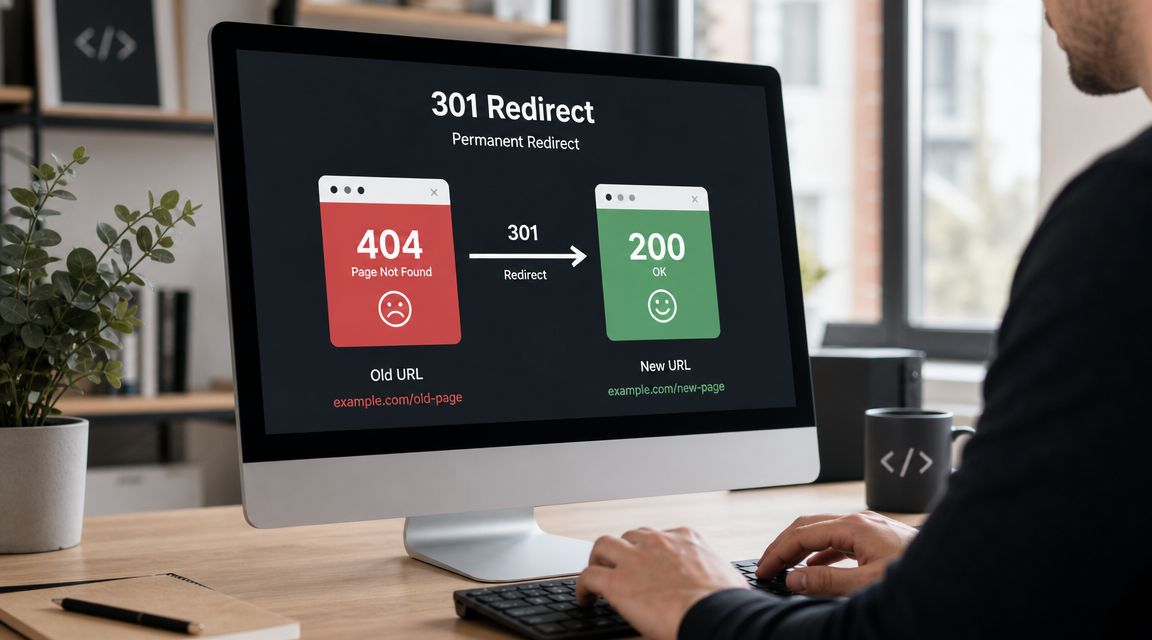
A redirect is not a bandage for every 404. It's a way to send users and search engines from an old URL to the most relevant live replacement when that replacement exists.
When a 301 redirect is the right fix
Use a 301 redirect when the old page has a clear successor. Common Shopify examples include:
- a discontinued product replaced by a newer version
- a merged collection with a new URL
- a renamed page or changed handle
- a migrated blog article that now lives elsewhere on the store
If the old page has no relevant alternative, don't force a redirect just to make the error disappear. A poor redirect creates a worse experience than an honest 404.
Before you build redirects, make sure the URL is broken. Screaming Frog's broken link building workflow recommends filtering for 4XX response codes and using the “always follow redirects” setting so you don't waste time fixing URLs that only look broken at first glance because of redirect behavior.
How to add redirects in Shopify
Shopify makes basic redirects fairly straightforward.
Go to your Shopify admin, then create a URL redirect from the old path to the new path. Keep the match tight. If /products/leather-weekender-bag is gone and /products/carry-on-weekender-bag is the true replacement, redirect there. Don't send it to a generic collection unless that's the closest valid destination.
This is especially important during catalog cleanup and replatforming work. If your team is dealing with old handles, deleted products, or collection changes, Grumspot's guide on understanding Shopify migration redirects is a useful reference for mapping old URLs to relevant destinations.
There's also a practical systems angle here. If you're comparing tools that help with technical maintenance on Shopify, this roundup of best Shopify apps is worth reviewing for workflow fit, especially if your store changes URLs often.
Here's a simple redirect decision framework:
| Situation | Best action |
|---|---|
| Product replaced by near-equivalent product | 301 redirect to replacement |
| Collection renamed or restructured | 301 redirect to updated collection |
| Evergreen guide moved to new URL | 301 redirect to new guide |
| Product removed with no close substitute | Usually leave as 404 and remove internal links |
| Old sale page with current equivalent campaign hub | 301 redirect if the intent matches |
A quick walkthrough can help if your team hasn't set these up before:
What to avoid when cleaning up 404s
The most common redirect mistake is sending everything to the homepage. That looks tidy in a report, but it usually confuses shoppers and weakens relevance.
Avoid these shortcuts:
- Homepage dumping: A deleted product should not automatically redirect to
/. - Loose topic matching: Don't redirect an informational guide to a product page just because both mention the same keyword.
- Redirect chains: If URL A redirects to B, and B redirects to C, clean that up.
- Forgetting internal links: Redirects help, but updating the original internal link is better.
Fix the source when you can. Redirects are useful, but a clean internal link is better than asking users and crawlers to take a detour.
Recovering Lost Link Equity from High-Value Broken Pages
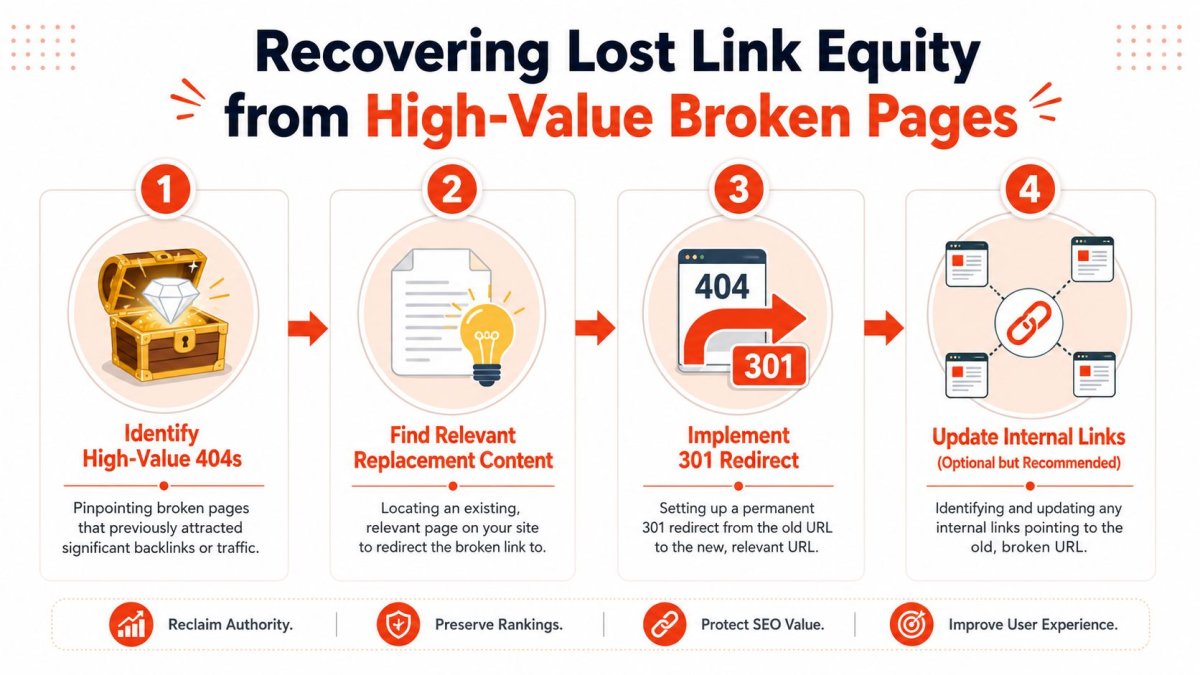
Broken links and SEO stop being routine maintenance and start becoming an opportunity. Some 404s are just cleanup. Others are abandoned assets with authority attached.
A page can be dead and still be valuable. If it earned backlinks before it broke, that URL may still deserve careful recovery work.
How to spot a valuable broken page
Vazoola's broken link building guidance makes the core point clearly: the strongest opportunities are the broken pages that already have backlink equity, and the best process is to rank those URLs by link value signals, then use archival review to understand what the original page covered before choosing a replacement destination. You can review that approach in its guide to broken link building and prospecting.
For a Shopify store, valuable broken pages often fall into a few buckets:
- Old collection pages that bloggers or gift guides linked to
- Retired product URLs that picked up mentions over time
- Evergreen blog content that used to attract links consistently
- Seasonal landing pages that earned press coverage and then got removed
The mistake is treating all of these as standard redirects. They're not. You need to understand the old page's intent first.
Redirect mapping for relevance, not convenience
Start by asking three questions:
- What was the original page about?
- What page on the store now satisfies that same intent?
- If no equivalent exists, should you create one instead of forcing a weak redirect?
That last question matters more than many teams realize. If a broken guide about “how to choose a cast iron teapot” earned quality links, redirecting it to a generic teapot collection may be weaker than rebuilding a proper guide and redirecting there.
A strong redirect map usually looks like this:
- Old buying guide to updated buying guide
- Retired product to successor product
- Old collection to current equivalent collection
- Linkable resource to rebuilt resource hub
Weak redirect maps usually look like this:
- old guide to homepage
- old product to unrelated category
- discontinued collection to random bestsellers page
Relevance is the filter. If the destination doesn't match the original topic, don't expect the redirect to preserve much value.
If you have a broken page with strong backlinks and no suitable replacement, rebuilding the missing content is often the better move. That's especially true for informational pages that supported category authority, not just direct conversions.
One more practical step gets skipped too often. After the redirect goes live, update any internal links still pointing at the dead URL. Redirects preserve access. Internal link updates restore structure.
Building a Proactive Link Monitoring and Prevention System
Reactive cleanup is expensive because it happens after rankings, sessions, or user journeys are already damaged. Prevention is cheaper. It also puts less pressure on your team.
For Shopify stores, most broken links come from normal operations: deleting products, changing handles, merging collections, retiring campaigns, or rewriting content. That means prevention lives inside your publishing process, not in a once-a-year SEO project.
The operating habits that prevent most breakage
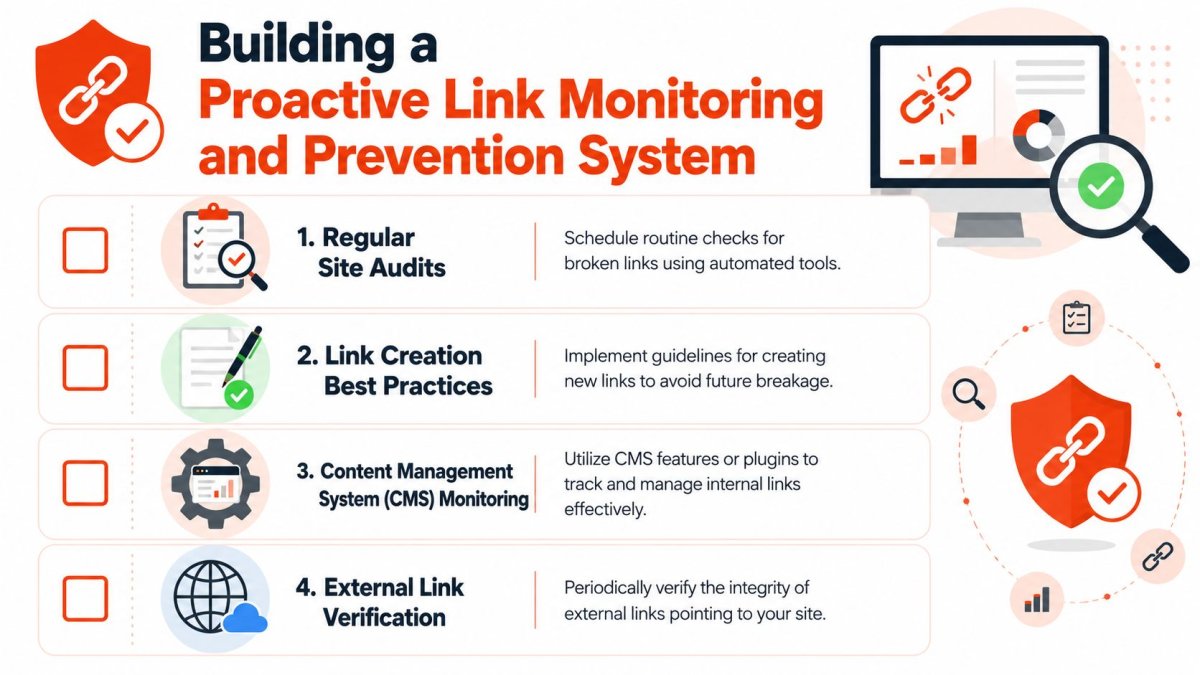
DubBot's guidance on broken links points to the right operational mindset: prevention matters most during changes, regular audits matter, and redirects should point only to relevant destinations because that protects both user experience and link equity. You can see that approach in its article on the impact of broken links on accessibility and SEO.
The stores that stay clean usually follow a few habits:
- Before deleting a product, check whether it has inbound links or internal prominence.
- Before changing a handle, map the old URL to the new one immediately.
- Before launching a new collection structure, test menus, breadcrumbs, and featured links.
- After publishing content, verify every product and collection link in the article.
This doesn't need a huge SOP. It needs a checklist that the content team, merchandiser, or developer utilizes.
A lightweight audit rhythm that actually gets done
Most store owners don't need a massive technical ritual. They need a maintenance rhythm they'll keep.
A practical routine looks like this:
| Timing | What to review | Why |
|---|---|---|
| After major catalog changes | Deleted or renamed product and collection URLs | These create the most immediate breakage |
| After content updates | Links inside blog posts, guides, and landing pages | Editorial links age faster than most teams expect |
| On a recurring schedule | New 4XX issues and top-priority internal link errors | Keeps the backlog small |
| Before peak campaigns | Navigation, collection hubs, and conversion paths | Broken links hurt more when paid or seasonal traffic spikes |
If you're tying this work back to store performance, connect your link checks to page behavior in analytics. For Shopify teams that want a better measurement setup, this guide to Google Analytics 4 for Shopify is useful for identifying which pages and journeys deserve tighter monitoring.
Consistency is the true victory. Small checks done regularly beat heroic cleanups done too late.
A prevention system also makes prioritization easier. When your store already tracks high-value pages, core collections, and important content hubs, it's much easier to decide whether a new 404 is a fire or just clutter.
Frequently Asked Questions About Broken Links and SEO
How often should a Shopify store check for broken links
If your catalog changes often, check after every meaningful batch of changes. That includes product deletions, handle edits, collection restructuring, and content refreshes.
If your store is relatively stable, a recurring audit cadence is usually enough. What matters most is that link checks become routine, not occasional panic work.
Is it ever okay to leave a page as a 404
Yes. A page can stay a 404 when it has no meaningful traffic, no useful backlinks, no important internal links, and no relevant replacement.
That's especially common with old campaign pages, typo URLs, or discontinued items that don't map cleanly to anything current. A clean 404 is often better than a misleading redirect.
Should you redirect every broken URL to the homepage
No. This is one of the most common cleanup mistakes on Shopify.
The homepage is rarely the best substitute for a deleted product, retired guide, or old collection. If the destination doesn't match the original intent, the redirect becomes confusing for users and weak from an SEO standpoint.
What is the difference between a 404 and a 410
A 404 means the page isn't found. A 410 means the page is gone intentionally.
For most Shopify stores, the practical difference is less important than the decision behind it. A key question is whether the old URL should have a relevant replacement. If yes, redirect it. If no, it can remain gone.
What should you fix first if you have a long list of broken links
Work in this order:
- Broken internal links on revenue-driving pages
- Broken URLs with quality backlinks
- Broken collection and evergreen content pages
- Low-value leftovers
That order keeps you focused on what can improve rankings, preserve authority, or protect conversions.
Do outbound broken links matter too
Yes, especially in blog content, resource pages, and trust-building pages. They make the store feel outdated and can break the user journey even when your own pages are fine.
They're usually not the first issue I'd fix on a Shopify store with major internal problems, but they shouldn't be ignored forever.
If you want a faster way to spot the broken URLs that matter, prioritize them by business impact, and manage technical cleanup without bouncing between spreadsheets and Shopify admin, take a look at wRanks. It's built for Shopify stores, which makes it much more practical when you're trying to turn technical SEO fixes into revenue-focused action.

About Sarah Mitchell
Senior SEO strategist with 8+ years in e-commerce search optimization. Sarah helps Shopify merchants turn organic traffic into revenue through data-driven content strategies.