Shopify Page Builders: The Ultimate 2026 Comparison
You're probably in one of two situations right now. Your Shopify theme feels too rigid for the campaigns you want to run, or you've opened the app store, searched page builders, and realized there are far too many options to compare without losing a day.
That confusion makes sense. Shopify's app marketplace lists 348 page builder apps in the category, which tells you this is no longer a niche add-on but a crowded submarket inside Shopify itself (Shopify page builder category). The problem is that most advice still treats page builders like a template beauty contest. It usually comes down to who has more blocks, more templates, or a slicker editor demo.
That's not how experienced merchants should evaluate Shopify page builders.
What matters most is simpler and more consequential. First, what does the builder do to your store's speed and SEO? Second, is it the right fit for your current business stage, team, and workflow? A builder that helps you launch campaign pages fast can be a great tool. The same builder used across core templates can inadvertently create performance debt, design inconsistency, and SEO problems.
Here's the practical way to think about it.
| Builder | Best fit | Main strength | Main risk | Use it for |
|---|---|---|---|---|
| PageFly | Newer stores and lean teams | Familiar drag-and-drop workflow and broad adoption | Can become overused across too many templates | Landing pages, promos, selected custom sections |
| Shogun | Teams with more process and technical support | Structured workflows and deeper team use cases | May feel heavier for simple campaign needs | Content-rich pages, multi-stakeholder workflows |
| GemPages | Merchants who want a middle ground | Accessible editing with useful design flexibility | Easy to build too much, too quickly | Campaign pages, merchandising pages, selective PDP enhancements |
Table of Contents
- Why Most Shopify Page Builder Advice Is Wrong
- What Page Builders Do and When to Avoid Them
- Comparing PageFly Shogun and GemPages
- A Head-to-Head Feature and Usability Matrix
- Performance SEO and The Page Builder Speed Tax
- Choosing Your Builder A Framework for Merchants
- How Page Builders and SEO Tools Work Together
Why Most Shopify Page Builder Advice Is Wrong
A merchant installs a page builder to launch landing pages faster. Three months later, the store has inconsistent layouts, slower pages, and a theme that nobody wants to touch. I see this pattern often, and it usually starts with advice that treats page builders like design tools first and operating decisions second.
A lot of published comparisons focus on templates, widgets, and app integrations. Those details matter, but they are rarely what determines whether a builder helps or creates problems. The bigger questions are simpler. How much front-end weight does it add? How easy is it to keep pages consistent as more people publish? And does it fit the stage your business is in?
More features rarely means better outcomes
The appeal is obvious. Marketing teams want to ship pages without waiting on a developer, especially for campaigns, promotions, and landing page conversion tips they want to test quickly.
That speed can be useful.
It can also hide expensive trade-offs. A builder with more design freedom often produces more layout variation, more duplicated sections, and more code running on the front end. If the team lacks clear rules for who builds what and where the builder should be used, page quality drifts fast. Conversion pages start looking inconsistent. Performance gets harder to diagnose. Simple theme updates become riskier because key revenue pages now live inside a separate editing system.
That is why feature lists are a weak way to buy.
A better evaluation starts with three practical checks:
- Output quality: Does the builder publish clean enough code to keep page speed in a healthy range?
- Scope control: Will it be used for campaign pages only, or will the team push it into core templates and product pages?
- Maintenance burden: Can your team keep designs consistent without creating a mess six months from now?
Practical rule: Judge a builder by the constraints it gives your team, not just the freedom it advertises.
Better buying criteria
The right choice for a solo founder is different from the right choice for a scaling DTC brand with designers, marketers, and an agency all touching the storefront. Early-stage stores usually need speed and simplicity. Larger teams need repeatable systems, permission control, and tighter oversight on performance.
That is the part weak advice skips. It treats all merchants like they are solving the same problem.
They are not. A newer brand may only need a fast way to publish a few campaign pages without touching the theme. A larger store may need to protect site speed, preserve design standards, and stop every campaign from introducing another one-off layout. In both cases, the best builder is the one that matches the business stage and limits damage to SEO and performance.
That is the lens that matters. Not which app has the longest feature list, but which one fits how your store grows.
What Page Builders Do and When to Avoid Them
A page builder gives non-developers control over layouts that would otherwise require theme edits, Liquid work, or developer time. That's the appeal. A founder can spin up a campaign page, a marketer can build a seasonal promotion, and a brand team can create a richer About page without opening a sprint ticket.
That value is real. It's also where many stores stop thinking critically.
Where they help
The strongest use case for Shopify page builders is focused execution. They work best when you need pages that are temporary, campaign-specific, or visually distinct from your default templates.
Good fits usually include:
- Paid traffic landing pages where message matching matters and you want fast iteration
- Seasonal campaign pages for launches, bundles, gifting, or limited promotions
- Selective product page enhancements where a standard theme template doesn't tell the story well enough
- Brand storytelling pages like About, press, wholesale, or retail location pages
If you're building these pages, layout freedom helps. So does the ability to test headlines, reorder sections, and publish quickly. For this reason, practical landing page conversion tips can matter, because builders are often used on pages with a single conversion goal.
Where they usually create problems
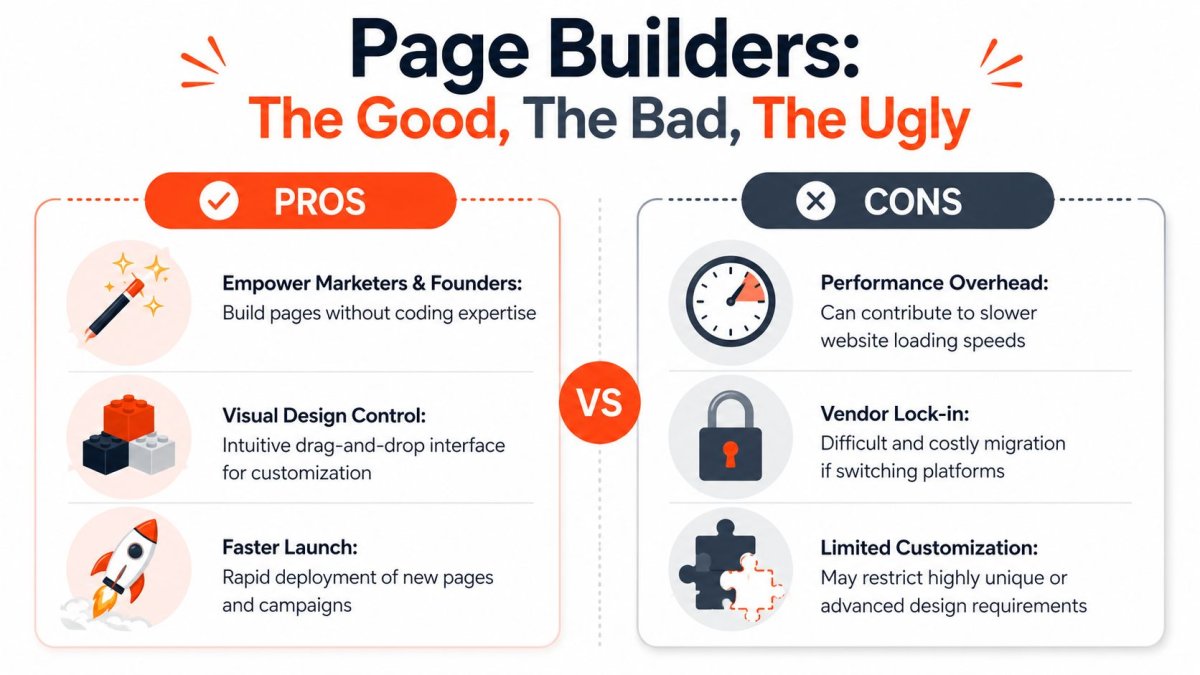
Independent guidance is unusually clear on this point. Experienced teams often limit builder usage to ad landing pages, campaign pages, and selective PDP enhancements, while avoiding core product templates, navigation-heavy pages, and pages that already convert or rank well (guidance on when to avoid Shopify page builders).
That advice lines up with what happens in real stores. Merchants start with one campaign page, see that the editor is easy, then begin rebuilding more of the storefront inside the builder. A few months later, the store has inconsistent templates, duplicated sections, and pages that are longer than they need to be.
Keep the builder at the edge of the storefront first. Don't let it become the storefront by default.
Governance matters more than capability
The decision becomes strategic, not technical. A capable builder can still be the wrong tool if your team has no usage rules.
Set simple constraints:
- Protect proven pages: Leave native templates alone if they already rank or convert well.
- Limit ownership: Decide who can publish and who can create reusable sections.
- Review page length: Watch for key CTAs getting pushed below proof, pricing, or product value.
- Audit mobile first: Builder pages often look fine on desktop and awkward on phones.
The merchants who get strong results from Shopify page builders don't use them everywhere. They use them selectively and keep a hard line between experimentation and infrastructure.
Comparing PageFly Shogun and GemPages
A merchant usually compares these three after the same moment: the theme editor starts feeling slow, campaigns need custom layouts, and every app page claims it can solve the problem.
The useful question is not which builder has the longest feature list. It is which one fits your team without adding more page weight, more workflow friction, or more cleanup six months from now. For Shopify stores, those trade-offs matter more than template counts.
PageFly
PageFly is the easiest starting point for many merchants because the editor is quick to grasp and the app feels close to standard Shopify workflows. A founder can usually get a landing page live without pulling a developer into every small change.
That ease is the main benefit and the main risk.
PageFly tends to work well for:
- Stores that launch promotional pages often
- Lean teams that need speed more than process control
- Merchants who want visual editing without much training
I usually recommend PageFly when the business is still proving offers, testing bundles, or spinning up paid traffic pages fast. It is a practical choice at that stage.
The downside shows up later. Because it is easy to use, teams often start building too much inside it. That can lead to inconsistent layouts, duplicated sections, and pages that look good in the editor but load heavier than the native theme version.
Shogun
Shogun fits a different type of store. It usually makes more sense for brands that already have a content workflow, multiple contributors, or an agency involved in production.
The editor is less about getting the first page live in an hour and more about giving a growing team a clearer system for building and reusing content. That matters if marketing, design, and ecommerce operations all need to work in the same store without editing theme files every week.
Shogun is often a better fit for:
- Brands with a more established content operation
- Teams that care about structure and reuse
- Stores where page creation is a repeatable process, not an occasional task
The trade-off is straightforward. If the store only needs a few campaign pages each month, Shogun can feel heavier than necessary. You pay for more control, but you only get value from that control if the team will use it.
GemPages
GemPages usually lands between those two positions. It gives merchants a visual editor with enough flexibility to build sales pages, collection-style landing pages, and promotional layouts without feeling as process-driven as Shogun.
That middle position is appealing for a reason. Many Shopify teams want more freedom than the theme allows, but they are not ready for a stricter operating model.
GemPages often suits:
- Merchants who want flexibility without a long setup period
- Teams that need better-looking pages quickly
- Stores that are past the earliest stage but still working with a small team
The catch is governance. GemPages can make publishing fast, and fast publishing is only helpful when someone is still protecting consistency, mobile usability, and page length. Without that discipline, the store ends up with too many one-off designs.
The real differences that matter
The practical gap between these tools is less about headline features and more about business stage, team shape, and tolerance for builder overhead.
| Tool | Best fit | Main strength | Main risk |
|---|---|---|---|
| PageFly | Early-stage and lean teams | Fast adoption and quick campaign execution | Easy to overuse across too many page types |
| Shogun | Scaling brands with more contributors | Better structure for repeatable workflows | Can feel too heavy for simple use cases |
| GemPages | Mid-stage merchants wanting flexibility | Good balance of usability and visual control | Can create inconsistency if no one governs templates |
If your store is still testing offers, speed usually matters more than process. If the team is growing and pages are being touched by several people, process starts to matter more than editor simplicity.
That is the part feature roundups usually miss. A builder is not valuable because it can do more. It is valuable when it helps your current team ship faster without hurting speed, SEO, or store consistency.
A Head-to-Head Feature and Usability Matrix
Feature checklists can be misleading, but a side-by-side matrix is still useful if you read it the right way. The point isn't to count boxes. The point is to understand how each builder affects daily work inside a Shopify store.
Page Builder Feature Matrix PageFly vs Shogun vs GemPages
| Feature | PageFly | Shogun | GemPages |
|---|---|---|---|
| Editor experience | Usually the easiest starting point for merchants who want quick visual control | Better fit for teams comfortable with more structured workflows | Accessible editor with a balance of speed and flexibility |
| Learning curve | Lower for first-time builder users | Moderate, especially if your team wants process and reuse | Moderate, often friendly for non-technical users |
| Template approach | Helpful for getting campaign pages live quickly | Better when templates need to support broader team use | Useful for merchants who want a guided visual starting point |
| Reusable sections | Strong fit if you want repeatable promo or content blocks | Valuable for teams managing consistency across multiple pages | Useful, but depends on how disciplined the team is with reuse |
| Design freedom | Good for most marketing needs, but can encourage one-off layouts | Better suited to teams that plan structure before building | Flexible enough for most stores without feeling overly rigid |
| Custom code comfort | Works for merchants who occasionally need technical help | Usually a stronger fit for teams with technical resources | Fine for mixed teams, though not always the first pick for highly custom work |
| Best use case | Landing pages, promos, quick launches | Structured content operations, brand teams, agencies | Campaign pages and branded merchandising experiences |
| Main caution | Easy to overuse across core store templates | Can feel like more tool than smaller teams need | Can lead to design inconsistency if governance is weak |
What these differences mean in practice
The editor matters more than most merchants think. If the interface slows your team down, pages don't get updated often enough. If it's too open-ended, people make avoidable design mistakes because the builder doesn't force discipline.
What matters most: The best editor isn't the one that can do everything. It's the one your team can use repeatedly without creating maintenance problems.
Consider these practical lenses.
Editor experience
A good editor reduces friction between idea and publish. That matters for ad landing pages, flash promotions, and campaign pages where speed has real business value.
PageFly usually wins on immediate familiarity. Shogun often appeals more when teams need repeatable workflows. GemPages tends to sit in the middle, which can be a plus if you want capability without too much complexity.
Template quality
Merchants often overvalue template quantity. A huge template library sounds attractive, but what you need are a few usable starting points that don't force awkward rebuilds later.
Strong templates should help your team structure content around conversion logic, not just aesthetics. If a builder gives you attractive templates but weak section hierarchy, the final page still underperforms.
Elements and blocks
Many evaluations tend to become shallow. More elements don't automatically create better pages. In fact, too many novelty blocks often encourage clutter.
Look for blocks that support actual ecommerce behavior:
- Social proof sections that are easy to place near decision points
- Offer framing blocks that help explain bundles, subscriptions, or promos
- Media layouts that support real product understanding
- FAQ and reassurance sections that reduce hesitation without burying the CTA
Advanced features
Some merchants need advanced capabilities. Others just like seeing them on a pricing page.
Page builder “power” is only useful if someone on your team will actually use it consistently.
For example, built-in experimentation features sound compelling. But if your team never has time to define hypotheses, review outcomes, and ship learnings, that capability won't move the business. The same goes for AI features inside builders. They may speed up first drafts, but they don't replace offer clarity, merchandising judgment, or conversion-focused page structure.
The practical test is simple. Ask whether a feature shortens your path to a better page or adds another layer of software to manage.
Performance SEO and The Page Builder Speed Tax
The hidden cost of page builders isn't the subscription. It's the speed tax.
That tax shows up when a builder outputs extra JavaScript, layered containers, remote dependencies, or bloated markup that your store didn't need before. Merchants often miss it because the page looks good in the editor and still loads “well enough” on a fast connection. But storefront performance problems rarely announce themselves dramatically. They show up as friction.
What the speed tax looks like
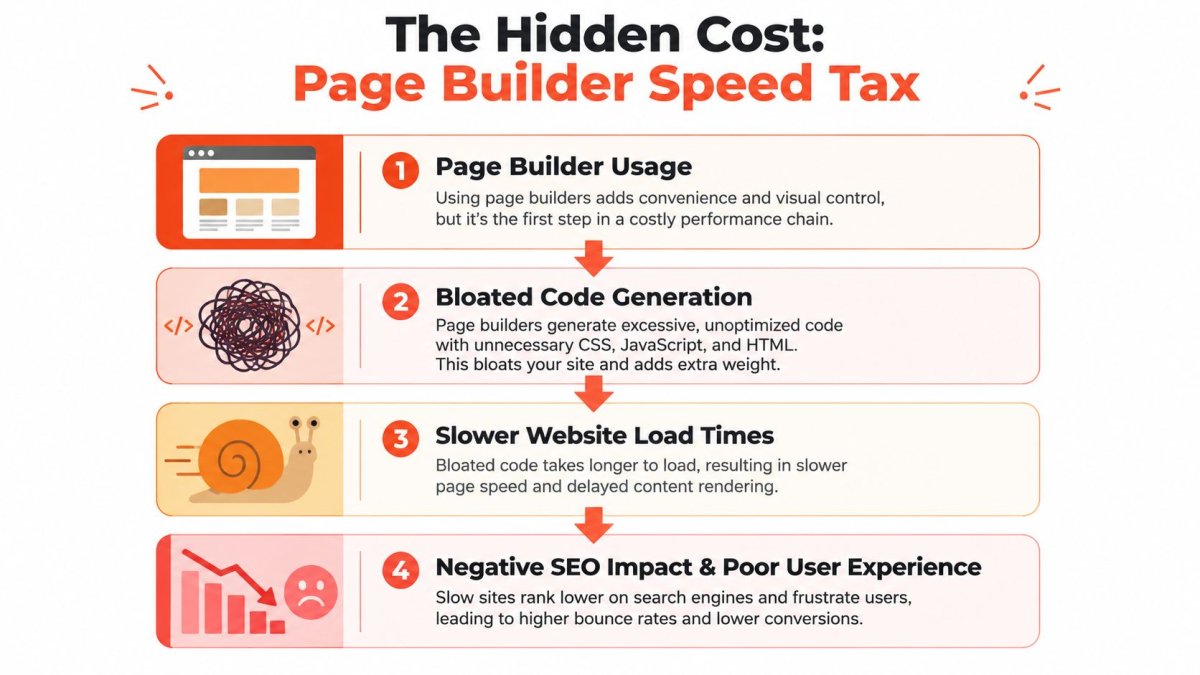
Shopify gives merchants a useful benchmark here. Its theme performance guidance sets a minimum average Lighthouse performance score of 60 across the home page, product page, and collection page for Theme Store acceptance, and it recommends reducing parser-blocking JavaScript, avoiding unnecessary third-party frameworks, and lazy-loading only below-the-fold images (Shopify theme performance guidance).
That benchmark isn't a direct rating of any one builder. It is a practical standard for how you should think about builder output. If your page builder adds enough overhead to drag your key templates down, the design flexibility isn't free. You're paying for it in speed, crawl efficiency, user experience, and in some cases search visibility.
For a deeper technical cleanup process, this guide on how to optimize Shopify speed is worth reviewing alongside any builder evaluation.
A useful explainer on speed trade-offs is below.
How to evaluate a builder before committing
Don't rely on demo stores. Test your own use case.
Build one realistic page, not a blank sample. Add the sections you use, including reviews, media, trust content, and any app embeds. Then compare it against a similar native theme page. Look at speed, but also inspect what happened structurally.
Check these areas:
- Script load: Are extra scripts loading for simple sections?
- DOM complexity: Did the builder create layouts with undue nesting for no reason?
- Mobile behavior: Is the page still smooth when images, sliders, and accordions stack?
- App interaction: Do your review, upsell, or personalization tools play nicely with the builder page?
SEO impact is often indirect but real
Most builder-related SEO issues are second-order effects. The builder doesn't “break SEO” by itself. The problem is that slower pages, weaker hierarchy, messy internal linking, and overbuilt layouts create avoidable search and usability problems.
If you want a clean mental model, think of page builders as controlled exceptions. They can be excellent for pages where layout flexibility drives revenue. They become a liability when they replace stable, efficient theme architecture across your store.
Choosing Your Builder A Framework for Merchants
The right builder depends less on features than on business stage. A solo founder, a scaling DTC brand, and an agency partner are solving different problems even if they all say they want “more flexibility.”
The bootstrapped startup
A newer store usually needs speed, simplicity, and restraint. You're trying to launch pages without paying for custom development every time a campaign changes.
In that situation, PageFly often makes the most practical sense because it's approachable and widely used. The key is to keep the scope tight. Use it for landing pages, hero campaign pages, and a few controlled enhancements. Don't start rebuilding the whole storefront because the first experiments go well.
What matters most at this stage:
- Publishing speed
- Low learning friction
- Enough flexibility without opening design chaos
The scaling DTC brand
A growing team has a different challenge. You're no longer just trying to ship pages. You're trying to create repeatable workflows, maintain consistency, and measure whether page changes improved the business.
Shopify helps here by providing Benchmarks inside Reports so merchants can compare store metrics against similar shops, which makes it easier to evaluate page changes against peer context instead of staring only at raw internal numbers (Shopify Benchmarks in Reports).
That's the point where a more process-friendly builder can make sense. You want a tool that supports repeatability, not just creativity. You also need each page to serve a search and conversion role. Before you build new page clusters, solid keyword research for Shopify helps prevent the common mistake of publishing attractive pages with no clear search intent.
A scaling brand shouldn't ask, “Which builder has more templates?” It should ask, “Which builder helps us run a cleaner page operation?”
The agency or freelance developer
Agencies and freelancers care about different things again. Reusability matters. Handoffs matter. The ability to keep clients out of theme code while still giving them controlled editing power matters even more.
That usually means choosing a builder that supports stronger repeatable systems over one-off page creativity. A flashy editor is less valuable than a builder that lets you create dependable templates, reusable sections, and a workflow clients won't break after launch.
If you manage multiple stores, the wrong builder creates support debt fast. The right one reduces it because your team can standardize what gets built, how it gets built, and where merchants are allowed to edit.
How Page Builders and SEO Tools Work Together
A page builder helps you publish faster. It does not keep your SEO clean as your catalog, campaign pages, and landing pages start piling up.
That distinction matters once a store is publishing at any real pace. I see the same pattern often. The team launches better-looking pages, then rankings stall because titles are duplicated, internal links are weak, images are heavy, or important pages sit outside the crawl path. The builder did its job. The SEO process did not.
A practical workflow that holds up
Keep the roles separate.
- Build the page in your chosen builder for layout, messaging, and conversion design.
- Run an SEO check before publishing so the page has a clear target keyword, a usable title tag, one H1, clean image alt text, and internal links from relevant pages.
- Review the live page after publishing to confirm indexing settings, canonicals, schema output, and mobile rendering.
- Track performance over time so you can update pages that attract impressions but fail to convert, or pages that convert well but never gain search visibility.

For lean teams, splitting creation from optimization is usually the right call. A builder handles layout. A dedicated SEO tool handles audits, metadata, indexing checks, and content gaps. If you're comparing options, this roundup of best SEO software for small businesses is a useful starting point. For Shopify-specific use cases, this guide to SEO tools for ecommerce is more relevant because collection architecture, product discovery, and template-driven pages create different SEO problems than a standard content site.
The trade-off is operational. More tools can mean more process. That is still better than expecting a page builder to handle jobs it was never built for.
Where merchants get this wrong
The common mistake is treating SEO as a final polish step after design approval. By then, the structural problems are harder to fix. The page may already rely on oversized media, weak heading hierarchy, or blocks that bury key copy below the fold. Some builders also make it easy to publish pages that look finished but miss basic search signals.
The better approach is to build with SEO constraints in mind from the start. Decide the keyword target first. Map the internal links before the page goes live. Check whether the builder outputs clean HTML and whether your app stack is adding extra scripts that slow the page down.
That last point affects more than speed scores. Slow pages reduce crawl efficiency, hurt user experience, and make paid traffic less efficient too.
Stores that get real value from Shopify page builders treat them as one layer in a larger system. The builder handles presentation. SEO tools handle discoverability and quality control. Analytics tells you which pages deserve another round of work and which ones should be consolidated or removed.
If you're building more pages in Shopify and want them to do more than just look better, wRanks helps close the gap between design and discoverability. It's built specifically for Shopify, so you can audit pages, improve metadata and content, handle technical SEO tasks, and keep optimization centralized without adding storefront JavaScript.

About James Rodriguez
AI & GEO specialist helping brands maximize visibility across AI platforms like ChatGPT, Gemini, and Claude. James pioneers generative engine optimization techniques for e-commerce.