Boost Shopify Sales: Content Gap Analysis Guide
You've probably been there. You publish a few blog posts, clean up product descriptions, add some collection copy, and wait for organic sales to move. A few pages climb. Most don't. Support keeps answering the same pre-purchase questions. Shoppers use your site search for things you thought were obvious, but they still don't convert.
That usually isn't a writing problem. It's a coverage problem.
A good content gap analysis helps you spot where your Shopify store is thin, where competitors are answering questions you aren't, and where your own customers are signaling demand before it ever shows up in a keyword tool. Done well, it stops content from feeling like guesswork and turns it into a practical revenue strategy.
Table of Contents
- Why Your Content Strategy Feels Like Guesswork
- Your Three Types of Shopify Content Gaps
- Uncovering What Your Competitors Know
- Turning Your Gap List Into an Action Plan
- Finding Gaps Your Competitors Also Missed
- From Brief to Published How to Track Your ROI
Why Your Content Strategy Feels Like Guesswork
Most Shopify stores don't have a content production problem. They have a prioritization problem.
A founder writes a post about product care because a customer asked about it. Then the team publishes a gift guide before the holidays. Then someone rewrites category copy after noticing a competitor outranking them. Each decision sounds reasonable on its own, but together they create a patchwork strategy. You end up with content, not coverage.
That's why results feel random. You're publishing into the dark.
A proper content gap analysis gives you a way out. It compares what your store currently covers against what your customers need across discovery, evaluation, and purchase. Instead of asking, “What should we publish next?” you start asking, “Where are buyers getting stuck, and which pages are missing or underpowered?”
Practical rule: If your content calendar is driven by whoever shouted loudest in the last meeting, you don't have a strategy yet.
This same issue shows up outside SEO. Social teams often think they have a posting problem when the problem is missing coverage, inconsistent messaging, or weak channel fit. That's why these social media auditing insights from Scheduler.social are useful. The logic is similar. Audit what exists, compare it to what should exist, then fix the holes first.
For Shopify stores, those holes usually show up in familiar places:
- Product pages that describe features but don't answer buying objections
- Collection pages that target broad categories but don't help shoppers compare options
- Blog content that attracts casual traffic but doesn't support product discovery
- Help content that lives in support inboxes instead of on indexable pages
When content gap analysis works, it changes how you think about organic growth. It stops being “write more content” and becomes “cover the moments that drive the sale.”
Your Three Types of Shopify Content Gaps
Most store owners hear “gap” and think “missing keywords.” That's only one part of the picture.
Content gap analysis became a standard SEO planning method because it formalized a simple comparison: current content versus desired content, then identifying the difference and defining actions to close it. It matters because search visibility often depends on coverage depth across intent stages, from informational queries to comparison and purchase-stage searches, as explained in Conductor's content gap analysis glossary.
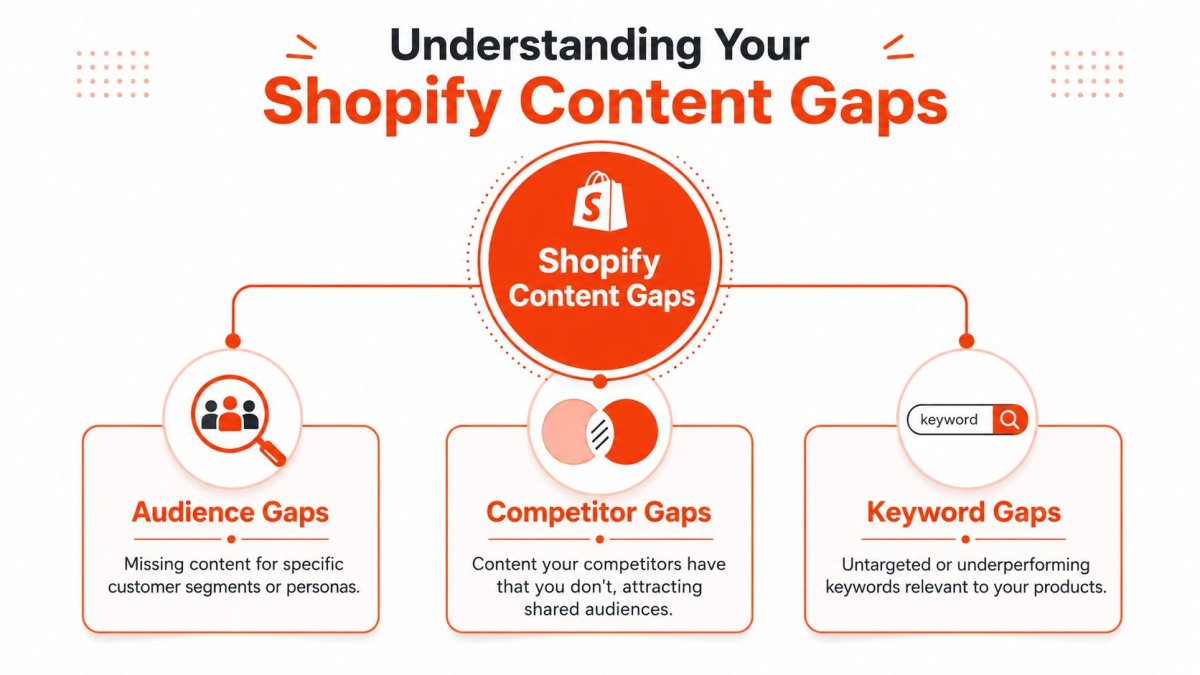
For Shopify, I find it most useful to sort gaps into three buckets. That keeps the audit practical instead of turning it into one giant spreadsheet nobody wants to touch again.
Keyword gaps
This is the obvious one. Competitors rank for terms tied to your products, and you don't.
Sometimes the gap is total absence. You sell leather tote bags but have no page that deserves to rank for care, size comparison, work use, travel use, or gift intent. Other times the page exists, but it's too thin to compete. A collection page might target “running socks” broadly while missing subtopics like cushioning, blister prevention, or material differences.
Keyword gaps are useful because they reveal search demand already proven in your market.
Format gaps
Some stores have the right topics in the wrong format.
A competitor may rank because they built a detailed comparison page, a buying guide, a fit guide, a video review hub, or an FAQ-rich collection page. You may have the same information scattered across product tabs, returns pages, and support macros. Google sees a weak page. Shoppers see friction.
A few Shopify-specific format gaps show up often:
| Gap type | What it looks like | Why it matters |
|---|---|---|
| Product page gap | Thin descriptions, weak FAQs, no usage context | Buyers can't resolve objections |
| Collection page gap | No intro copy, no comparison help, weak internal links | Category pages struggle to rank and convert |
| Comparison content gap | No “X vs Y” or “best for” pages | Mid-funnel shoppers leave for reviewers and competitors |
| Policy explanation gap | Returns, shipping, sizing, subscriptions explained poorly | Support volume rises and trust drops |
Journey gaps
This is the one most merchants miss.
You may have decent money pages but no content for earlier-stage intent. Or you may have top-of-funnel posts with no bridge to category and product pages. In both cases, the journey breaks.
A healthy content system usually covers more than one intent type:
- Problem aware searches such as care questions, fit issues, ingredient concerns, or compatibility checks
- Comparison intent where shoppers want differences, alternatives, pros and cons, or “best for” guidance
- Purchase support intent that helps a ready buyer feel safe, such as shipping timing, returns, sizing, warranty, or use-case validation
Buyers rarely move from first search to checkout in one step. Your content has to give them a path.
If your store only publishes blogs for awareness, you'll get traffic that doesn't buy. If you only optimize product pages, you'll miss shoppers still researching. The best content gap analysis spots both problems at once.
Uncovering What Your Competitors Know
A lot of Shopify stores waste time studying the wrong competitors.
The brand you admire is not always the site taking your traffic. The pages that keep showing up for your revenue terms are the ones teaching you how Google interprets buyer intent in your category. That is the competitor set that matters.
Start with your priority product and collection queries, then look at who ranks. Use the terms tied to sales, not vanity searches. If you need a cleaner process for building that keyword set first, this guide to keyword research for Shopify will help.
Start with search competitors not business rivals
For a Shopify store, real search competitors usually include a mix of brands, marketplaces, publishers, Reddit threads, and review sites. That mix tells you something important. Google is ranking page types, not just companies.
If you sell premium bedding, your gap is rarely just "we need more blog posts." It might be that competing stores have stronger collection copy, better comparison pages, or product pages that answer material, sizing, care, and shipping questions in one place. A publisher outranking you can also reveal a missing mid-funnel page your store never created.
I build a competitor set in four steps:
- Pick your money topics. Focus on top collections, best sellers, high-margin product types, and recurring pre-purchase questions.
- Search those topics and note which domains appear repeatedly across several queries.
- Keep the comparison set tight. A short list of recurring domains is more useful than a giant export full of weak overlaps.
- Export ranking keywords for your domain and those competing domains from your SEO tool.
Wheelhouse DMG recommends filtering out brand terms and irrelevant queries before scoring opportunities in its content gap process. That matters because noisy exports make weak opportunities look bigger than they are.
Clean the export before you trust it
Raw gap reports are supposed to be messy. The problem is that store owners often treat the first export like a content roadmap.
It is not.
For Shopify, the cleaning pass should answer two business questions. Are you missing a page entirely, or do you already have the page and it is not competitive? Those are very different problems, and they lead to different fixes.
Use a simple filter pass:
- Remove branded terms unless you are intentionally planning comparison content
- Cut irrelevant intent such as careers, definitions, wholesale-only queries, or DIY topics that do not match your offer
- Tag informational queries that belong on product pages, collection pages, FAQs, or help content instead of the blog
- Separate missing URLs from weak URLs so your team knows whether to create or improve
Shopify stores can gain an edge over generic SEO playbooks. A phrase like "best sheets for hot sleepers" may belong in a buying guide, but "linen sheets shrink after wash" might be a product page FAQ gap. "King vs California king for tall people" may fit a collection intro or comparison hub. The keyword alone does not tell you the page type. The buying journey does.
If your team is juggling briefs across collections, PDP updates, and editorial content, choosing a content planning solution can make the workflow easier to manage.
Clean inputs lead to better page decisions. Dirty exports create a backlog of content that never helps revenue.
Review the live results before assigning work
Before anyone writes a brief, open the search results and study what already wins.
A keyword gap only becomes useful after you confirm three things. The intent, the page type, and the depth of coverage. If the top results are collection pages, publishing a generic article is usually a miss. If the winners are detailed product pages with FAQs, reviews, shipping information, and use-case copy, adding a thin blog post will not close the gap.
A quick walkthrough helps if you want to see the process in action:
During the live review, focus on what the ranking pages do for the shopper:
- Intent match. Are they helping someone compare, choose, validate, or buy?
- Page type. Is Google favoring product pages, collection pages, editorial guides, or support content?
- Coverage depth. Which recurring questions, objections, and subtopics show up across the top results?
- Trust signals. Look for reviews, specs, shipping details, sizing help, returns information, ingredients, materials, and compatibility notes
- Next-step path. Where does the page send the shopper after it answers the question?
That last point gets overlooked. Plenty of pages rank and still fail as ecommerce assets because they do not move the visitor toward a collection, a product, or an email capture. Good competitor analysis is not about copying topics. It is about seeing how other sites turn search demand into buyer confidence, then deciding where your Shopify store has page-level gaps that are costing sales.
Turning Your Gap List Into an Action Plan
A spreadsheet full of opportunities feels productive. It isn't.
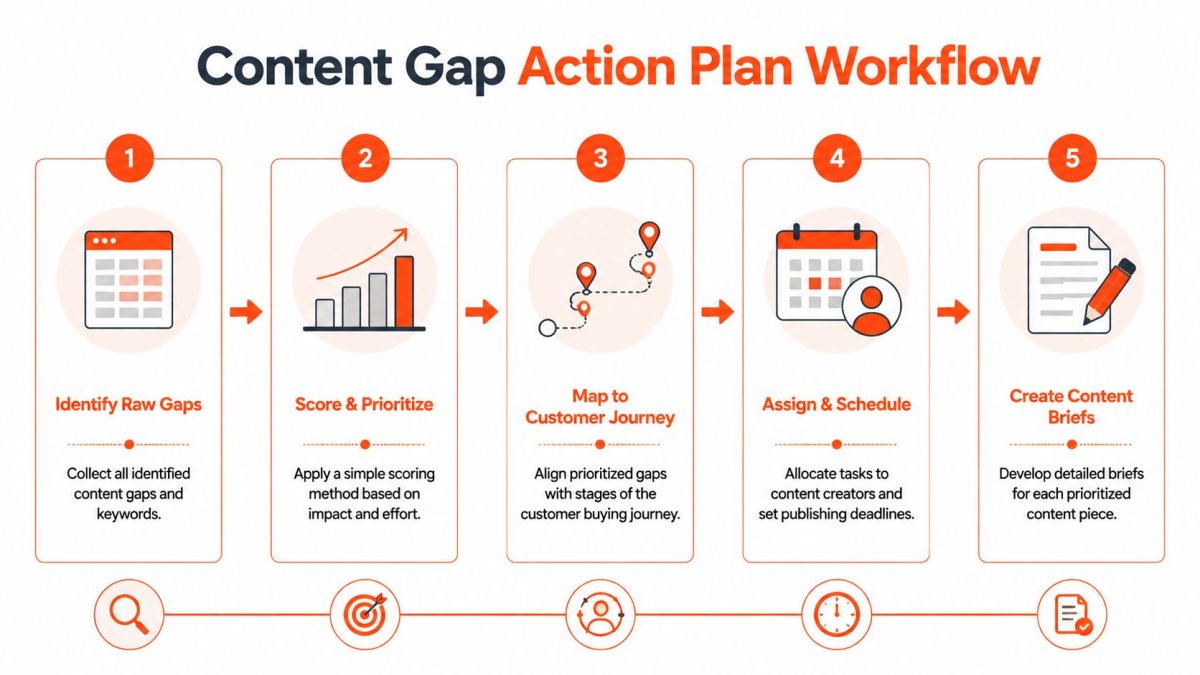
The gap list only becomes valuable when it turns into an execution queue. That means choosing what to tackle first, deciding where each gap belongs, and giving whoever creates the page enough direction to avoid a rewrite cycle.
A strong workflow separates volume opportunity from ranking difficulty. Semrush recommends narrowing content gap outputs with Position, Competitor, and KD filters so you can isolate terms that are commercially relevant and realistically winnable. It also warns against treating the keyword list as the deliverable, because the actual deliverable is a prioritized action queue tied to intent and page type in Semrush's content gap analysis workflow.
Prioritize by business value not spreadsheet size
You don't need a fancy formula. You need a sane one.
For Shopify, I like to score gap clusters using three lenses:
| Lens | What to ask | Typical outcome |
|---|---|---|
| Commercial intent | Could this topic influence a sale soon? | Product, collection, comparison, and pre-purchase FAQ topics rise |
| Winnability | Do you already have topical relevance or a page to improve? | Existing URLs often beat net-new content for speed |
| Journey value | Does this close an important buyer question? | Mid-funnel and bottom-funnel gaps usually move up |
This helps prevent a common mistake. Teams chase broad informational traffic because the keyword looks exciting, while leaving obvious conversion blockers untouched on collection and product pages.
If you need a cleaner planning system for managing editorial decisions after the audit, this guide to choosing a content planning solution is a useful companion. The best plan is the one your team will keep updated.
Decide whether to update or create
Not every gap deserves a new URL.
If the store already has a relevant collection, product, article, or evergreen page, expanding that asset is often the smarter move. You consolidate authority, keep internal linking cleaner, and avoid cannibalization. New pages make sense when the intent is meaningfully different or when no existing page can satisfy the query without becoming unfocused.
Use this simple decision filter:
- Update an existing page when the topic is already present but thin, outdated, or poorly structured
- Create a new page when the search intent differs enough to justify its own destination
- Fix internal linking when the page exists and is decent, but nobody can find it from related pages
- Merge overlapping content when multiple weak pages target nearly the same need
For merchants who need a stronger foundation before this step, a solid process for Shopify keyword research makes the mapping work much easier.
The best action plan usually contains fewer items than the raw export. That's a sign of discipline, not missed opportunity.
Build briefs that are hard to misunderstand
A weak brief creates weak content, even with a capable writer.
Good briefs don't just name a target term. They define the job of the page. That means intent, page type, required talking points, internal links, and what the page should help a shopper do next.
A practical brief template for a Shopify content gap usually includes:
- Primary topic and supporting cluster
- Page type such as collection expansion, comparison page, product page refresh, or blog article
- Search intent in plain English
- Competing URLs to study for structure and missing angles
- Must-cover subtopics pulled from SERP review, product knowledge, and customer questions
- Internal linking targets including collections, products, and related guides
- Conversion role such as educate, compare, reassure, or assist checkout
That last field matters. A page that reassures buyers should read differently from a page designed to attract first-touch traffic.
Finding Gaps Your Competitors Also Missed
Competitor gap tools are great at showing where you're behind. They're weaker at showing where the whole market is blind.
That's why the highest-value opportunities often come from first-party data. A frequently missed angle in content gap analysis is support-log and onsite-search mining. Yotpo's guidance frames natural-language queries from internal search and support logs as direct content gaps, which is especially useful for Shopify merchants because product, shipping, and policy questions often appear there first in Yotpo's modern content gap analysis article.
Mine your site search for unmet demand
Your onsite search box is one of the best honesty tools in the business.
People use it when navigation fails, when product naming is confusing, or when they want an answer faster than browsing can provide. If shoppers repeatedly search for terms that don't map cleanly to existing products, collections, or help content, that's a gap. If they search with natural language questions, that's an even better clue.
Look for patterns like these:
- Attribute searches such as scent-free, extra wide, refillable, dishwasher safe, or travel size
- Use-case searches like gifts for runners, office-friendly, postpartum, small apartment, or sensitive skin
- Policy and logistics searches including returns, shipping speed, exchanges, subscription skip, or warranty
- Compatibility questions around fit, dimensions, ingredients, materials, or device matching
These are often closer to revenue than generic keyword opportunities because they come from people already on your site.
Turn support conversations into revenue pages
Support teams hear objections before SEO tools do.
If customers repeatedly ask whether a fabric shrinks, whether a supplement can be taken at night, whether a case fits a specific model, or how long shipping takes, you don't just have a support issue. You have a content gap.
I like to sort support tickets and live chat logs into three groups:
| Signal type | Best page format | Why it works |
|---|---|---|
| Pre-purchase objections | Product FAQ, comparison page, collection copy | Removes friction close to sale |
| Repeated confusion | Help page, policy explainer, blog post | Reduces support load and improves trust |
| Use-case questions | Buying guide, quiz support page, curated collection | Helps shoppers self-select faster |
If you want a broader toolkit for analyzing ecommerce search opportunities after these themes surface, this overview of SEO tools for ecommerce can help you validate and expand the ideas.
Your customers often tell you what page to create. They just don't say it in SEO language.
Blend first party signals with SEO research
The smartest workflow isn't “keyword tools or customer data.” It's both.
Here's the sequence I recommend:
- Pull competitor and keyword gaps.
- Pull onsite search queries.
- Pull recurring support and live chat themes.
- Merge overlapping patterns.
- Decide the correct page type for each theme.
Shopify-specific strategy sharpens. A competitor tool might suggest an informational article, but your support logs may reveal the actual issue belongs on a product page or shipping page. Or the reverse. Your team thinks a question is “just support,” but search demand shows it deserves an indexable comparison guide.
That's how you find gaps competitors also missed. You stop looking only at what ranks today and start looking at what buyers struggle to understand before they bounce.
From Brief to Published How to Track Your ROI
A Shopify store publishes a new guide, sees some traffic, and calls it a win. Two months later, nothing changed where it counts. Revenue is flat, support questions are the same, and the page that looked promising never pushed more shoppers into products.
That gap between publishing and commercial impact is where good content programs separate from expensive busywork.
A content gap analysis only pays off if you track what happens after the brief is approved and the page goes live. The goal is not to publish more URLs. The goal is to create pages that remove hesitation, support product discovery, and influence sales. On Shopify, that often means measuring more than blog traffic. A refreshed product page, a stronger collection page, or a comparison guide may produce fewer visits than a top-of-funnel article and still be worth far more.
Track rankings, traffic, and revenue on the same scorecard
Use one simple view for every new or updated page:
- Keyword movement for the terms the page was built to target
- Organic sessions to that specific URL
- Clicks into products or collections from the page
- Add-to-cart activity or assisted conversions from sessions that touched the page
That mix matters because ranking alone can fool you. I have seen buying guides bring in modest traffic but drive strong assisted revenue because they answer the last question holding a shopper back. I have also seen informational posts rank well and do almost nothing for sales because the path into products was weak or missing.
If you need a practical process for monitoring search visibility, this guide on how to track keyword rankings covers the setup clearly.
Review pages like a merchandiser, not just an SEO
Set a review rhythm for newly published and recently updated pages. Weekly works well at the start, then monthly once patterns are clear.
Look at three questions. Did rankings improve for the right terms? Did the page attract shoppers with matching intent? Did those visitors move deeper into the store, or did they stop cold?
When performance stalls, the problem is usually practical. The page may answer the wrong question. Internal links may point nowhere useful. The collection page may still be thin. The product page may still lack comparison details, shipping clarity, material specs, or FAQs that reduce friction near purchase.
This is why Shopify content measurement should include page type. A support article and a collection page should not be judged the same way. One may reduce repeated pre-sale questions. The other should help shoppers browse, compare, and click into products faster.
The same discipline applies across channels. If your team also needs a better way to solve your social media ROI problem, the core principle is the same: connect marketing work to business outcomes you can measure.
Content earns trust when it answers the right question. It earns budget when you can show how it influenced revenue.
Run that process consistently and content stops feeling like a side project. It becomes a revenue system for finding buying friction, fixing it with the right page, and proving which updates deserve more investment.
If you want a faster way to audit your Shopify store, spot SEO and GEO gaps, track rankings, and turn findings into publishable content, wRanks is built for exactly that workflow. It gives Shopify merchants one place to identify issues, prioritize fixes, create optimized pages, and monitor results without stitching together a stack of separate tools.

About Amira Hassan
Digital growth consultant specializing in AI-powered commerce strategies. Amira bridges the gap between cutting-edge AI tools and practical Shopify store growth.