AI Product Description Generator: Boost Shopify Sales In
Your Shopify store probably doesn't have a traffic problem first. It has a product page problem.
I've seen this over and over. A merchant spends weeks choosing products, fixing the theme, polishing the homepage, and tweaking apps. Then they leave product descriptions as a rushed afterthought. Half the catalog uses supplier copy. A quarter of it is thin, repetitive, or vague. The rest says almost nothing that helps a shopper decide.
That's where an AI product description generator can help, but only if you stop treating it like a magic button. The stores that get useful output do three things well. They clean their product data before generation. They prompt with structure instead of wishful thinking. Then they measure whether the new copy improved search visibility and sales behavior after publish.
Table of Contents
- Why Your Product Descriptions Might Be Holding You Back
- Prepare Your Product Data for Flawless AI Generation
- Write Prompts That Turn Features into Benefits
- Supercharge Your Descriptions with SEO and CRO
- Streamline Your Workflow with Shopify Integration
- Test, Refine, and Avoid Common AI Pitfalls
Why Your Product Descriptions Might Be Holding You Back
You launch a product, run traffic to it, and the page looks fine at first glance. There's a title, a few photos, a price, and a block of copy under the fold. Then the clicks come in, shoppers skim for a few seconds, and nothing happens. The problem usually isn't the product. The problem is that the description leaves too much work for the buyer.
That gap hurts more than merchants admit. Weak product copy doesn't just fail to persuade. It creates doubt. If the page doesn't explain what the product does, who it's for, what makes it different, and what concerns a buyer should stop worrying about, people leave and keep comparing.
I see the same pattern across growing Shopify catalogs. Once a store moves beyond a small product line, the writing process falls apart. Teams copy supplier text, patch together inconsistent brand language, or hand off product pages to someone who has never spoken to a customer. The result is predictable. Generic descriptions, repeated phrases, and pages that blur together.
A weak description doesn't just fail to persuade. It forces the customer to do the interpretation work you should've done for them.
AI product description generators are getting attention for a simple reason. They help merchants produce draft copy faster across large catalogs. If you're comparing the best AI tools for e-commerce, speed will be the first promise you hear.
Speed is useful. It is not the fix.
The stores getting real results from AI are not just prompting better. They clean up product data before generation, publish with a clear SEO and conversion goal, and review performance after the copy goes live. That full workflow matters more than the model you pick. It also works better when the rest of the product page carries its weight, including optimized Shopify product images that support the copy.
The symptoms show up in plain sight
You do not need a formal audit to spot weak descriptions. Look for product pages that:
- Read like supplier feeds and use wording any competitor could paste in.
- List features without buyer context so the shopper still has to guess why those details matter.
- Skip obvious objections like fit, feel, setup, compatibility, care, or durability.
- Change tone from one SKU to the next because nobody defined a repeatable process.
- Rely on photos to do all the selling even though the images and the copy are supposed to work together.
If this sounds familiar, stop treating product descriptions as a small content task. They sit closer to sales enablement than blog writing. Fixing them starts with the raw product information you feed into the system, then continues with how you measure search visibility, engagement, and conversion after publishing.
Prepare Your Product Data for Flawless AI Generation
Most bad AI output starts before the prompt. The issue isn't the model. The issue is the mess you fed it.
The primary bottleneck is often data preparation, not writing. Better results require rich inputs like product names, images, specifications, materials, and even CSV uploads, which is a gap many surface-level guides ignore, as noted by the U.S. Chamber's advice on AI tools for product descriptions.
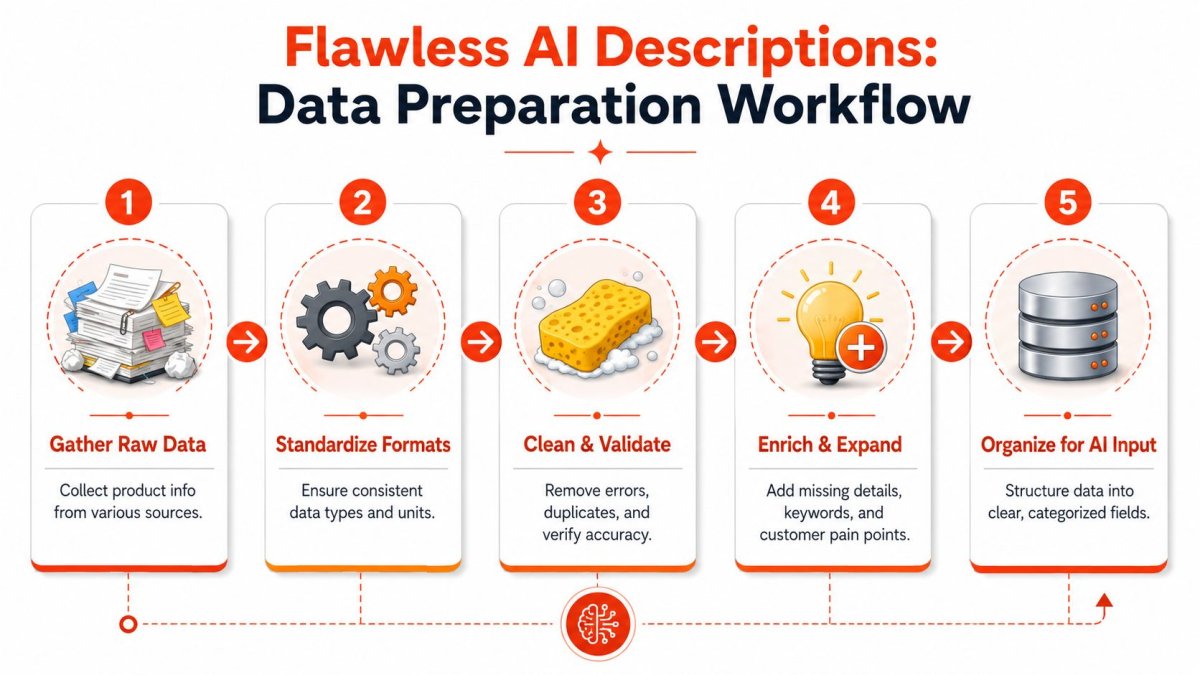
Why messy inputs create weak descriptions
If your supplier sheet says “Material: cotton blend” and “Feature: premium quality,” the AI has nothing useful to work with. It will fill the gaps with generic language. That's not because it's broken. It's because you asked it to improvise where it should've been informed.
I'd rather see a merchant spend time cleaning attributes than endlessly rewriting prompts. Prompting can't rescue bad source data.
Here's what usually breaks the workflow:
| Problem in catalog data | What it causes in AI output |
|---|---|
| Inconsistent units | Confusing or contradictory specs |
| Missing materials or dimensions | Vague descriptions with filler language |
| Duplicate attributes across variants | Repetitive copy that sounds templated |
| No customer use case | Feature-heavy text with no buying motivation |
| Mixed formatting from suppliers | Hard-to-batch prompts and uneven results |
Build a source of truth for every product
You need one clean record per product or per variant family. Not five conflicting versions spread across emails, spreadsheets, and your Shopify admin.
Use a simple structure:
Core identity
Product name, brand, category, variant names, and primary use.Technical facts
Materials, dimensions, compatibility, care instructions, included parts, sizing details.Commercial angles
Unique selling points, intended audience, use cases, objections to answer.Search inputs
Primary keyword, secondary phrases, and any must-include terminology.Brand guardrails
Tone, banned claims, phrases to avoid, formatting preferences.
Practical rule: If a human merchandiser can't understand the product from one row or one sheet, your AI won't produce reliable copy from it either.
What your AI input sheet should include
You don't need a fancy PIM to get this right. A disciplined spreadsheet is enough for many stores. The key is consistency.
Include fields like these:
- Product name: Use the exact customer-facing name, not an internal abbreviation.
- Key features: Write factual inputs such as fabric type, closure, battery life, capacity, or finish.
- Dimensions and fit: Especially for apparel, furniture, decor, and equipment.
- Materials: Be specific. “Full-grain leather” is useful. “Premium material” is useless.
- Target audience: New parents, remote workers, apartment dwellers, frequent travelers, gift buyers.
- Primary use case: Everyday carry, summer layering, desk organization, post-workout recovery.
- Top objections: Runs small, requires assembly, not dishwasher safe, only fits certain models.
- Tone instruction: Minimalist, expert, playful, luxury, practical.
- SEO phrase: The primary query the page should support.
If your store depends on visuals to sell, treat image inputs as part of the same workflow. Better image naming, alt text planning, and media consistency make the page easier to understand for both shoppers and search engines. For that side of the job, this guide on how to optimize Shopify images is worth reviewing alongside your copy workflow.
A clean input sheet does two things. It improves generation quality, and it makes bulk operations realistic. Once your fields are standardized, you can process large chunks of the catalog without every prompt becoming a custom writing project.
Write Prompts That Turn Features into Benefits
Once your product data is clean, prompting gets much easier. Not easy. Easier.
Most merchants still prompt like this: “Write a product description for a leather wallet.” That's lazy input, so it gets lazy output. Generic prompts produce descriptions that could fit a hundred competing stores.
The better workflow is structured. Guidance on AI product description generation consistently recommends feeding inputs in a specific order: product name, key features, target audience, tone, format, and examples, then iterating on the first draft instead of treating it as final, as explained in Djust's prompt workflow for AI product descriptions.
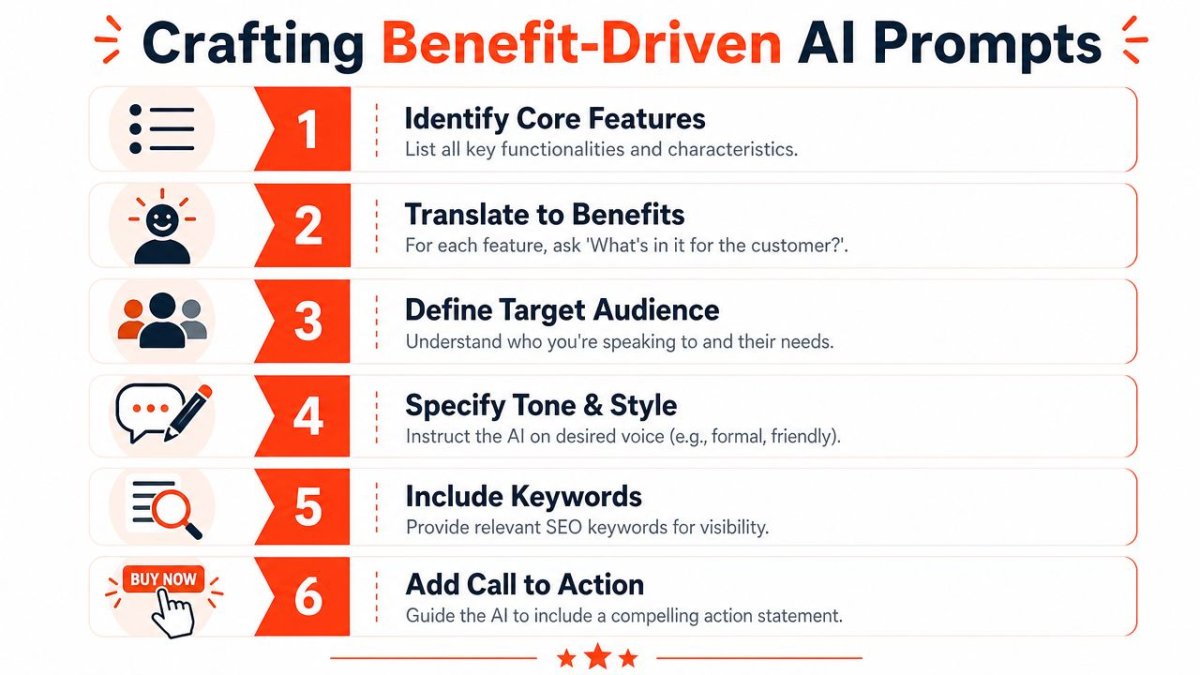
Use a prompt structure that removes guesswork
A reliable prompt template looks like this:
- Product name
- Category
- Key features
- Target customer
- Main use case
- Tone of voice
- Required format
- Primary keyword
- Claims to avoid
- Example of a strong brand-style paragraph
That last part matters more than is often realized. If you want the copy to sound like your store, show the model what “good” looks like.
Here's a practical prompt skeleton:
Write a Shopify product description for [product name].
Category: [category].
Features: [list factual details].
Target audience: [who it's for].
Use case: [when or why they use it].
Tone: [brand voice].
Format: [short intro, bullet benefits, closing CTA].
SEO phrase: [keyword].
Avoid: [banned words, exaggerated claims, competitor references].
Use this style example: [insert sample paragraph].
Before and after prompt example
A weak prompt:
Write a description for a leather wallet.
That gives the model almost nothing. It'll default to clichés like sleek, stylish, premium, timeless, and everyday essential.
A better prompt:
Write a Shopify product description for the Alder Fold Wallet.
Category: men's everyday wallet.
Features: full-grain leather, six card slots, one cash sleeve, slim profile, hand-stitched edges, develops patina over time.
Target audience: professionals who want a slim wallet that still carries daily essentials.
Use case: fits comfortably in front or jacket pockets for daily commuting and travel.
Tone: refined but plainspoken.
Format: one short opening paragraph, three benefit-led bullets, one closing line.
SEO phrase: full-grain leather wallet.
Avoid words like premium, best, luxury, and innovative.
Emphasize durability, comfort in-pocket, and aging character.
That prompt gives direction, boundaries, and commercial intent.
Add constraints so the copy sounds like your brand
You'll get stronger output when you also define what the model should not do.
Use constraints like these:
- Avoid filler adjectives: Ban words your category has exhausted.
- Don't invent proof: If you don't have evidence, the model shouldn't imply it.
- Set reading style: Short sentences for practical brands. More sensory language for lifestyle brands.
- Specify paragraph count: This helps for template consistency across collections.
- Require benefit translation: Ask the model to convert each feature into customer value.
If you want more depth on prompting mechanics, AdCrafty on effective AI prompts is a useful companion read.
Good prompts don't just describe the product. They narrow the range of bad choices the model can make.
That's the true job. You're not trying to inspire the AI. You're trying to control it.
Supercharge Your Descriptions with SEO and CRO
A product description has two jobs. It has to help the page show up, and it has to help the shopper decide.
Most merchants separate those jobs. SEO gets handled with awkward keyword stuffing. Conversion gets handled with generic persuasion language. That split creates weak pages.

Stop stuffing keywords and start guiding intent
If your target phrase is “ergonomic office chair,” don't just tell the AI to repeat it. Tell it what searcher intent sits behind that phrase. Is the buyer trying to reduce back strain, improve posture, fit a chair in a small workspace, or compare features for long workdays?
That changes the copy completely.
A stronger SEO and CRO brief includes:
- Primary keyword: The main phrase the page targets.
- Secondary phrases: Closely related wording that supports the topic naturally.
- Customer pain points: Discomfort, clutter, fit, maintenance, gifting uncertainty, durability concerns.
- Desired persuasion framework: AIDA, objection handling, comparison-driven, feature-to-benefit.
This is also where product page structure matters. The description shouldn't carry the whole burden alone. Supporting headings, bullets, FAQs, and on-page signals all help the page do its job. If you want a broader framework, review these ecommerce product page SEO practices alongside your copy prompts.
Use proof instead of empty adjectives
Most AI-assisted copy falls apart, as it sounds polished but says nothing verifiable.
Many guides say AI improves SEO, but few address how you should measure the actual impact. Jasper's guidance also makes an important point: stronger copy relies on concrete proof, such as a 99.7% reliability claim when you have evidence for it, instead of vague language like “premium,” which is essential when judging whether AI-generated product text is helping conversions or just speeding up publishing, as noted in Jasper's product description guidance.
That's the standard to use. If you have proof, use it. If you don't, don't let the AI fake conviction.
Compare these:
| Weak phrasing | Stronger phrasing |
|---|---|
| Innovative design | Designed for small desks and long work sessions |
| Premium comfort | Padded seat and supportive back for extended sitting |
| High performance | Built for daily use with features relevant to the category |
The second column isn't magical. It's just clearer and more credible.
Measure what changed after publishing
Don't judge success by whether the copy sounds better to you. Judge it by what happens on the page after launch.
Track changes in:
- Search visibility signals: Which queries start surfacing the page more often.
- Engagement behavior: Time on page, deeper scroll behavior, clicks into variant selectors.
- Commercial actions: Add-to-cart behavior, movement to checkout, assisted revenue contribution.
- Segment differences: New visitors versus returning visitors, mobile versus desktop, branded versus non-branded traffic.
If you can't tell whether new descriptions improved buying behavior, you haven't finished the job. You've only published text.
That's the uncomfortable truth. Faster publishing is useful. Better performance is what matters.
Streamline Your Workflow with Shopify Integration
A merchandiser finishes a batch of AI descriptions, then the actual mess starts. One tab for the generator, one doc for edits, Shopify open in another window, a spreadsheet for localization, and a separate checklist for SEO fields. That workflow wastes time and creates avoidable errors.
Keep the process inside Shopify as much as possible.

Reduce copy paste chaos inside Shopify
The best setup is boring. Product data comes in clean, AI drafts from that source, a human reviews the output, and the approved copy goes live in the same place your team already manages products.
That gives you practical benefits fast:
- Fewer formatting mistakes because text is not bouncing between tools
- Shorter review cycles because merchandisers and marketers work from the same record
- Better consistency because titles, bullets, descriptions, and metadata follow one standard
- Bulk publishing that your team can control instead of a manual paste marathon
This matters even more on larger catalogs. Once you have dozens or hundreds of SKUs in motion, small process flaws turn into delayed launches, broken formatting, and inconsistent product pages.
Use AI for more than body copy
Do not stop at the description field. If you are already building an AI-assisted workflow, use it across the rest of the page too.
A useful Shopify workflow should also cover:
- Image alt text based on the actual product and visual context
- Meta titles and meta descriptions that match category intent and buying language
- Structured product fields that support cleaner search visibility and richer page data
- Collection and landing page copy that matches the same merchandising logic
Stores that separate these tasks usually end up with pages that feel stitched together. The description says one thing, the meta description says another, and the collection copy sounds like it belongs to a different brand.
For a walkthrough of how merchants are using AI in a more embedded Shopify workflow, this video is worth a look:
Build localization into the workflow, not around it
Localization breaks weak systems first. If every market requires manual rewriting in separate tools, the team slows down, quality drops, and updates never stay in sync.
Use a tighter process:
- Start with a clean source record that has accurate attributes, materials, dimensions, and usage notes.
- Generate locale-specific drafts with the right terminology for that market.
- Review for nuance and compliance before anything goes live.
- Publish from the same product workflow your team uses for the primary store.
That keeps translated copy tied to the underlying product data instead of turning every market into a separate content project.
You should also connect publishing to measurement. If your team updates descriptions in Shopify but cannot track what happened next, you are still running half a system. Set up reporting that shows how product page changes affect behavior, using a Google Analytics 4 for Shopify setup guide your team can reference during implementation.
The point is simple. AI writing helps, but workflow discipline is what keeps catalog operations fast, accurate, and measurable.
Test, Refine, and Avoid Common AI Pitfalls
You publish 50 AI-written product descriptions on Friday because they sound clean, polished, and fast. On Monday, customer service is answering avoidable questions, paid traffic is landing on weak pages, and half the copy reads like it came from the same template.
That is the actual failure point. Merchants do not lose because AI writes badly. They lose because nobody puts a hard review process around the draft, then nobody measures what changed after publish.
The first draft is only raw material
Treat AI output like a junior copywriter with no product context. Fast, useful, and unreliable without review.
Your team should edit every draft against a fixed checklist. Not a vague brand review. A real operational check that catches mistakes before they hit the storefront. That is how you keep speed without filling the catalog with generic copy.
Review each description for:
- Product accuracy: materials, dimensions, fit, included parts, compatibility, care instructions
- Customer usefulness: does the copy answer buying questions or just restate features
- Brand consistency: does it sound like your store, not a random app
- Search intent alignment: does it reflect the phrases shoppers use for this product type
- Claim discipline: does it promise anything you cannot prove
- SKU differentiation: does this product sound distinct from the other items in the same collection
One clean workflow beats endless rewriting. Fix the draft once, publish with confidence, then measure the result.
Common mistakes that weaken trust
These errors show up constantly in AI-assisted product copy. Assume they are present until someone checks.
Repetitive phrasing
Batch-generated copy often repeats the same sentence structure, adjectives, and benefit lines across a category. Shoppers notice. The catalog starts to feel synthetic, and product pages stop helping users compare items meaningfully.
Empty superlatives
Words like ultimate, premium, and top-tier usually add nothing. They inflate the tone without adding proof. Replace them with specifics, such as material quality, construction details, or actual use-case benefits.
Generic benefit claims
“Soft fabric” and “designed for comfort” are filler unless tied to a real outcome. Say what changes for the customer. Better layering in cold weather. Less stiffness during all-day wear. Easier care after repeated washes.
Voice drift
This happens when prompts are loose and source data is messy. A practical brand starts sounding dramatic. A technical product suddenly gets lifestyle fluff. If the copy does not match the brand customers already know, trust drops.
Hidden factual errors
AI will confidently fill gaps when product inputs are incomplete. That is why this guide starts with data prep, not prompts. Bad source fields create bad descriptions, even when the writing sounds polished.
A review loop your team will actually use
Do not build a bloated approval chain. Build a simple one that survives a busy week.
| Stage | Owner | What to check |
|---|---|---|
| Draft generation | Content or merchandising lead | Required inputs, prompt quality, missing product data |
| Product review | Category owner | Specs, use cases, objections, factual gaps |
| Brand pass | Marketing lead | Tone, banned phrasing, clarity, duplicate language |
| Post-publish review | Growth or ecommerce lead | Search visibility, engagement, conversion behavior |
The last step is where merchants usually fail. They publish copy and move on.
Track product page performance before and after major description updates. Use a Google Analytics 4 setup for Shopify reporting so your team can see whether the new copy changes engagement, add-to-cart behavior, and product page exits. If you do not measure after publishing, you are guessing.
A simple test is enough. Update one product group with the same workflow, leave a comparable group unchanged for a period, and review the page-level differences. Look for stronger engagement and cleaner conversion behavior, not internal praise about how polished the copy sounds.
If you want AI product descriptions that effectively help a Shopify store grow, hold the process to a higher standard. Clean inputs first. Tight review before publish. Measurement after launch. That is the workflow that gets results.
If you want one place to handle Shopify SEO content, product-page optimization, technical fixes, alt text, schema, and measurement without stitching together a pile of tools, take a look at wRanks. It's built for Shopify merchants who want a faster workflow without giving up control over quality.

About Priya Sharma
Content marketing expert and Shopify ecosystem authority. Priya has helped 200+ stores grow organic traffic through strategic blog content and keyword targeting.