
Ecommerce Product Page SEO: Shopify Guide 2026
Your Shopify store looks good. The photography is clean, the pricing is competitive, and the products are live. Then you search Google for the exact thing you sell and your product pages are nowhere useful.
That's the reality for a lot of stores. The problem usually isn't that the products are bad. It's that the product pages weren't built to compete in search. They were built to exist.
Good ecommerce product page SEO fixes that, but only if you do the right work in the right order. Most guides dump every tactic into one giant checklist. That's not how stores get results. Some tasks matter far more than others, and some “best practices” waste time if your crawl setup, page structure, or schema is broken.
This guide is the practical version. Start with the highest-impact actions first, especially the ones Shopify owners can implement quickly without a custom dev team.
Table of Contents
- Why Product Pages Are Your Most Valuable SEO Asset
- The Content Blueprint for High-Ranking Product Pages
- Technical SEO for a Flawless Shopping Experience
- Winning Rich Results with Product and FAQ Schema
- Optimizing Images and Page Speed for Conversions
- Advanced Ecommerce SEO Questions Answered
Why Product Pages Are Your Most Valuable SEO Asset
A product page sits closest to revenue. Someone landing there usually isn't browsing for entertainment. They're comparing, checking trust signals, and deciding whether to buy.
That's why product SEO deserves more attention than it usually gets. SeoProfy's ecommerce marketing statistics report that 23.6% of ecommerce orders come from organic search, while global retail ecommerce sales are projected to reach $6.42 trillion in 2025. The same source also notes that 53% of mobile visitors abandon a site that takes more than 3 seconds to load. If your product pages rank poorly or load slowly, you lose both discovery and conversion.
The usual mistake is treating SEO and conversion as separate projects. On product pages, they're the same job. Google wants pages it can parse clearly. Shoppers want pages they can trust quickly. The overlap is bigger than most store owners think.
Product pages don't need more “SEO tricks.” They need cleaner signals, better content, and fewer points of friction.
That also means product page work can improve more than rankings. Better images, clearer offers, stronger FAQs, and faster load times help improve e-commerce sales conversion even when traffic stays flat.
Here's the useful way to think about ecommerce product page SEO on Shopify:
- First, protect crawl efficiency. Don't let variants, filters, and duplicate URLs create chaos.
- Then, improve page content. Make the page answer buying intent, not just describe the SKU.
- Then, add structured data. Help Google pull product details into richer search results.
- Finally, trim speed issues. Especially image bloat and app-heavy templates.
That order matters. It's the difference between polishing one page and improving the whole store.
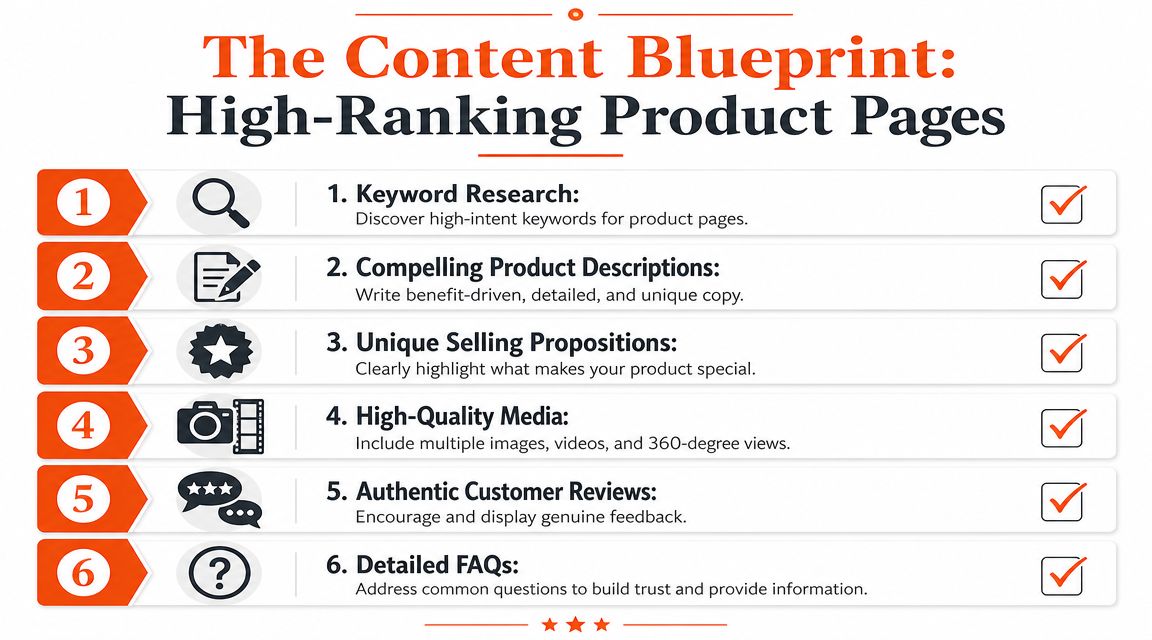
The Content Blueprint for High-Ranking Product Pages
The strongest product pages aren't written like manufacturer spec sheets. They're built around the way people shop. That means your page has to match intent before it tries to rank for a keyword.
Start with search intent, not product names
Many Shopify stores optimize product pages only for the exact product title. That's too narrow. Buyers often search with modifiers like material, use case, compatibility, problem, or comparison.
A store selling a “walnut standing desk” shouldn't stop at that phrase. Real searches often sound more like:
- Use case terms like “standing desk for small apartment”
- Feature terms like “solid wood standing desk cable management”
- Comparison terms like “walnut vs bamboo standing desk”
- Need-based terms like “desk for back pain home office”
Those searches tell you what the page needs to explain. If your product page never addresses assembly, dimensions, cable routing, surface finish, wobble, or room fit, it may miss the exact concerns that drive purchase decisions.
Build the page around buying questions
A product page should answer the objections that stop someone from buying. That's where unique copy comes from. It also keeps your descriptions from sounding like every other Shopify catalog page.
Hashmeta's ecommerce SEO guide says modern product pages should satisfy both search engines and shoppers, and recommends 300 to 500 words of original description, 5 to 8 images, and 5 to 10 FAQs. That's a useful benchmark because it forces enough depth to explain the product properly without turning the page into a novel.
A solid workflow looks like this:
- Pull language from real shoppers. Reviews, support tickets, live chat logs, and on-site search terms are better than brainstorming in a vacuum.
- Write the title for search and clarity. Lead with the product name and important qualifier. Don't bury the actual item behind brand fluff.
- Use the meta description to pre-sell the click. Mention the core benefit, a key feature, and a clear reason to visit the page.
- Write body copy in sections. Start with what it is, then who it's for, then why it's better, then practical details.
- Finish with FAQs that remove doubt. Shipping, sizing, compatibility, care, setup, returns, and warranty questions usually belong here.
Practical rule: If a customer would ask it before buying, your product page should answer it before they leave.
What a strong Shopify product page should include
Shopify gives you enough native fields to do the basics well. The problem is that most stores leave them half-finished.
Use this as your content template:
| Element | What to do |
|---|---|
| Product title | Keep it specific, readable, and aligned with how people search |
| URL handle | Make it short and clean, without filler words |
| Meta title | Keep the key phrase early and avoid repeating the brand if it adds no value |
| Meta description | Write for clicks, not stuffing |
| Product description | Use original, benefit-led copy instead of supplier text |
| Media | Show angles, context, details, and use cases |
| FAQs | Answer pre-purchase objections clearly |
For example, a weak title is “The Classic Chair.” A better one is “Oak Dining Chair with Curved Back.” The second one gives Google and shoppers something useful immediately.
If you use AI to speed up product copy, the draft still needs editing. AI can help structure, summarize specs, and expand rough notes. It won't know your actual differentiators unless you feed them in. Stores get into trouble when they generate hundreds of descriptions that all sound interchangeable.
The best product copy feels specific to the item. It mentions details a buyer would care about, not generic ecommerce filler like “premium quality” or “designed for modern lifestyles.”
Technical SEO for a Flawless Shopping Experience
A lot of product page SEO problems aren't content problems. They're architecture problems. If Google keeps crawling duplicate URLs, thin variants, and faceted navigation junk, your best pages get less attention than they should.

Fix duplication before you write more copy
Visionary Marketing's ecommerce technical SEO checklist puts crawl-control and duplication management ahead of content work. That matches what happens in real Shopify stores. Structural fixes affect the whole site. Rewriting one product description doesn't.
The biggest culprits are usually:
- Filter and sort URLs that create endless combinations
- Variant URLs that split one product into multiple near-identical pages
- Collection paths that expose the same product through different URL patterns
- Tag pages or search pages that accidentally become indexable
Canonical tags matter here. So does deciding whether variants deserve separate pages at all. If red, blue, and black versions of the same water bottle differ only by color, one indexable page is usually cleaner than separate URLs competing with each other.
For stores dealing with AI-assisted catalog generation, this becomes even more important. Spotlight Group LLC has a useful piece on ecommerce SEO best practices for AI that's worth reading if your team is scaling content and metadata with automation.
Choose which page should rank
One of the most common Shopify SEO mistakes is trying to make product pages rank for broad head terms when collection pages are the better fit.
If you sell “linen dresses,” the collection page usually has the stronger claim on that term because it serves browsing intent. A product page is a better target for something narrower like “sleeveless linen midi dress in sage” or a product-specific branded query.
That means your internal linking should support the hierarchy:
- Category or collection pages target broader commercial terms
- Product pages target specific, long-tail, or item-level intent
- Blog content supports both by answering earlier-stage questions
Many stores often falter at this point. They optimize every product page in isolation and ignore the parent collection. Then they wonder why Google keeps ranking the collection instead.
If you need a broader technical framework for store architecture and crawl efficiency, this guide to technical SEO for ecommerce is a useful reference.
If two pages target the same query and one gives the user a better shopping path, Google usually chooses that one.
Shopify checks worth doing this week
Shopify limits some low-level technical control, but you can still clean up a lot.
- Review canonicals: Make sure product canonicals point to the preferred version of the page.
- Audit indexable clutter: Check whether internal search results, tags, or odd parameter URLs are getting indexed.
- Standardize internal links: Link to the preferred product URL consistently across navigation, collections, related products, and blog posts.
- Reduce thin variants: Don't create separate pages for every minor option unless each has unique value.
- Check collection strategy: Make sure broad keywords point toward collections, not random products.
Technical SEO isn't glamorous. It's often the reason the glamorous work doesn't pay off.
Winning Rich Results with Product and FAQ Schema
Plain blue links still exist, but they're weak compared with listings that show product information directly in search. If your competitor shows price, stock status, and ratings while your result shows only a title and description, you're asking the click to work harder.

What rich results change
Schema is no longer optional for serious ecommerce product page SEO. Recent analysis estimates that product schema accounts for as much as 35% of visibility in rich SERP features, making it one of the strongest levers on a product page.
Here's the practical difference.
Without schema
- Blue link
- Basic meta description
- Minimal product context
With strong product schema
- Product name
- Price
- Availability
- Rating information
- Additional search enhancements where eligible
That extra information changes click behavior because it pre-qualifies the traffic. Shoppers can tell whether the page is relevant before they visit.
A related tactic is expanding your search footprint beyond product details. If your page includes useful buying questions, pairing that content with FAQ schema can reinforce clarity and improve how search engines interpret the page. If you want a broader SERP visibility playbook, this article on how to optimize for featured snippets is a good companion read.
To see the mechanics in action, this short video gives a helpful visual overview:
The schema fields that actually matter
You don't need to obsess over every possible property. Start with the fields that help search engines understand the product commercially.
- Name: Match the actual product naming on the page
- Brand: Useful when brand matters in search behavior
- Description: Keep it aligned with on-page copy
- Image: Use valid, crawlable image URLs
- Offers: Include price, currency, and availability
- Aggregate rating: Only when it reflects real visible reviews
- FAQ markup: Use it only for genuine question-and-answer content on the page
Schema rule: Mark up what exists visibly on the page. Don't invent fields just because a schema generator allows them.
Why Shopify themes often fall short
Many Shopify themes include basic schema, but “basic” is the problem. Theme markup is often incomplete, inconsistent across templates, or broken after app conflicts and theme edits.
I've seen stores assume schema is covered because a theme added JSON-LD years ago. Then they run a test and find missing offer data, invalid review markup, or duplicate schema blocks.
A more reliable approach is to validate key product templates after any theme change, app installation, or review widget update. If you use a schema app or custom implementation, make sure one clean version is being output. Multiple competing schema blocks create more confusion than benefit.
Rich results aren't a bonus layer anymore. They're part of the product page itself.
Optimizing Images and Page Speed for Conversions
Product pages live or die on visuals. That creates a built-in tension. You need enough media to sell the item, but too much unoptimized media can drag the page down.
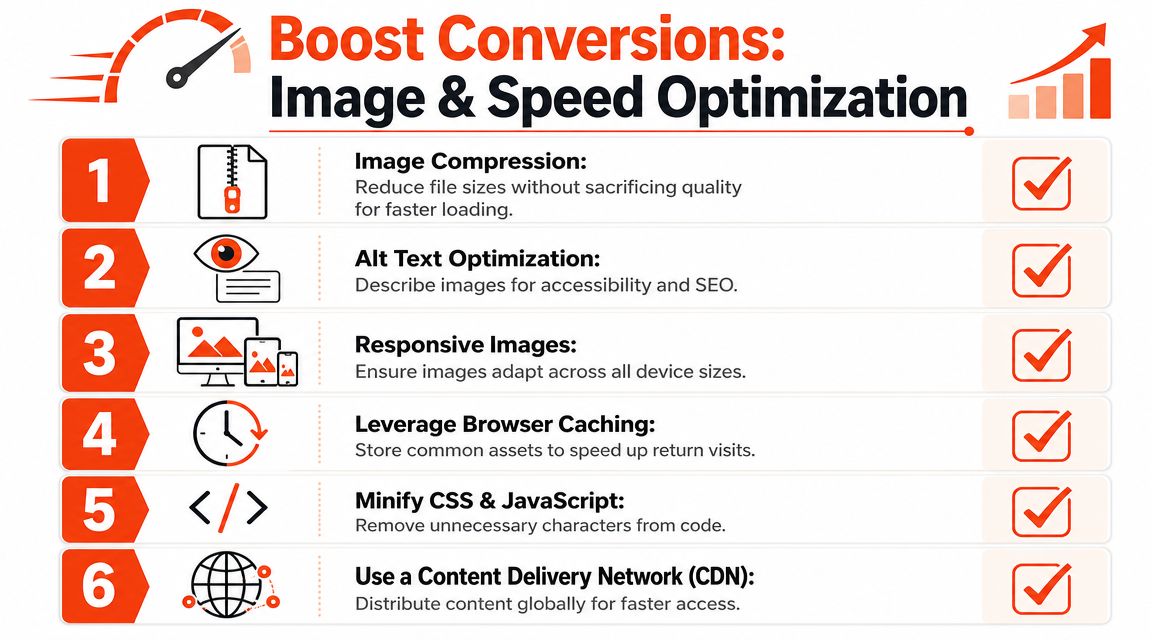
Image SEO that helps ranking and buying
The most useful product images do more than look attractive. They answer purchase questions. Show scale, texture, fit, packaging, close-up detail, and context of use.
Alt text matters, but not as a dumping ground for keywords. Describe the image plainly and specifically. “Brown leather messenger bag side pocket detail” is better than “best leather messenger bag for men brown bag sale.”
A few image rules pay off quickly:
- Name files clearly: Use readable filenames before upload
- Keep alt text descriptive: Write for accessibility first, then relevance
- Use varied visuals: Hero image, close-ups, lifestyle shots, detail views, packaging, and dimensions
- Avoid oversized uploads: Large original files often create avoidable weight
If your team needs a practical sizing reference, FurnitureConnect's image size guide is a handy Shopify-specific resource. For a broader image SEO workflow, this guide on how to optimize Shopify images is also useful.
Speed problems that usually come from Shopify apps
Page speed issues on Shopify rarely come from one thing. They usually come from accumulation. A review widget, upsell app, heatmap script, chat tool, bundle app, sticky cart app, and tracking layer can all land on the same template.
The commercial downside is clear. A 1-second delay can reduce conversions by up to 20%, which is why speed work belongs in any serious product page optimization process.
Here's the order I use when auditing slow product pages:
- Check app bloat first. Remove scripts tied to apps you no longer use.
- Review media payloads. Product galleries and video embeds often carry the biggest weight.
- Test the theme template. Some themes load too much by default on every product page.
- Delay non-essential scripts. Especially tools that don't need to fire before interaction.
- Re-test mobile performance. That's where most product-page friction shows up first.
Fast pages convert better because shoppers can act before hesitation turns into abandonment.
Shopify's CDN helps with image delivery, but it won't save a page overloaded with third-party code. Store owners often focus on compression and ignore the scripts causing the most damage.
Advanced Ecommerce SEO Questions Answered
Should out-of-stock pages stay live
It depends on whether the product is coming back and whether the page has value on its own.
If the item is temporarily unavailable, keep the page live. Preserve the URL, clearly show stock status, and guide users to alternatives or restock alerts. That keeps any existing SEO value intact and still gives shoppers a next step.
If the product is gone for good and there's a close replacement, redirecting to the most relevant alternative usually makes sense. If there isn't a good replacement, sometimes it's better to keep the page live for a period with a clear discontinuation message and links to related products, then decide later based on traffic and demand.
How unique do variant pages need to be
Here, many stores either overbuild or underbuild.
Recent guidance from Conductor's product page SEO resource emphasizes a mix of unique copy, distinct crawlable image sets, and self-referencing canonicals to help variant-heavy product detail pages signal value and avoid thin or duplicated content issues, especially when AI-generated descriptions are involved.
That doesn't mean every size or color needs a separate essay. It means separate variant pages need a real reason to exist. If the page changes only a dropdown value and one swatch, it probably shouldn't compete as its own SEO asset.
A useful decision test:
| Scenario | Better approach |
|---|---|
| Only size changes | One canonical product page |
| Only color changes, same buyer intent | Usually one canonical page with variant options |
| Material, fit, or use case changes | Separate pages can make sense if content and media are meaningfully distinct |
| Marketplace-style copied catalog content | Consolidate aggressively and rewrite priority pages |
How do you get changes indexed faster
Indexing isn't purely about speed. It's about making the page worth revisiting.
If Google isn't indexing or re-indexing product pages quickly, check the basics first. Make sure the URL is internally linked, canonicalized correctly, not blocked, and not one of many duplicates. Then make the update substantive. Fresh images, better copy, clearer schema, and stronger internal links give crawlers more reason to process the page again.
For large Shopify catalogs, priority matters. Don't chase instant indexing for every SKU. Push your highest-value products first, then work down through collections and supporting pages. In practice, stores get better results by improving fewer important pages properly than by making shallow edits across the entire catalog.
The fastest way to get ignored is to publish hundreds of pages that say almost the same thing.
If you want help applying this checklist inside Shopify, wRanks gives merchants one place to handle product content, technical fixes, schema, indexing, and ongoing SEO monitoring without slowing down the storefront. It's built specifically for Shopify teams that need to prioritize what matters and ship improvements faster.

About Sarah Mitchell
Senior SEO strategist with 8+ years in e-commerce search optimization. Sarah helps Shopify merchants turn organic traffic into revenue through data-driven content strategies.