
Fix Shopify SEO Problems: A 2026 Guide
You launched the store. The design looks sharp, the products are solid, and the copy is better than most of what your competitors are publishing. Then you search Google and your store barely shows up, or worse, the wrong pages show up.
That disconnect is where most Shopify SEO frustration starts. You did the visible work. What usually holds stores back is the invisible layer underneath: how Shopify generates URLs, how Google decides what to index, how themes output technical signals, and how new apps or Markets setups create unanticipated problems you never intended.
Most advice about Shopify SEO problems misses the part store owners need. Not every issue deserves your attention first. If Google is indexing the wrong URLs, rewriting product descriptions won't help much. If your store is slow because of app bloat, publishing another blog post won't fix the leak. The fastest path is prioritization: fix what blocks discovery first, then what hurts usability, then what weakens page-level signals.
Table of Contents
- Why Your Perfect Store Is Invisible on Google
- Fixing Indexing Bloat and Duplicate Content
- Solving Page Speed and Core Web Vitals Errors
- Navigating International SEO and Shopify Markets
- Uncovering On-Page SEO Mistakes in Your Theme
- Your Action Plan for Continuous SEO Health
Why Your Perfect Store Is Invisible on Google
You launch a store with strong products, clean branding, and solid conversion rates from paid traffic. Then Google barely sends anything. That usually points to a prioritization problem, not a product problem.
On Shopify, stores often lose visibility because Google is spending time on the wrong pages, missing the pages that drive revenue, or getting mixed signals about which URLs deserve to rank. If crawling and indexing are messy, even a well-designed store can stay buried.
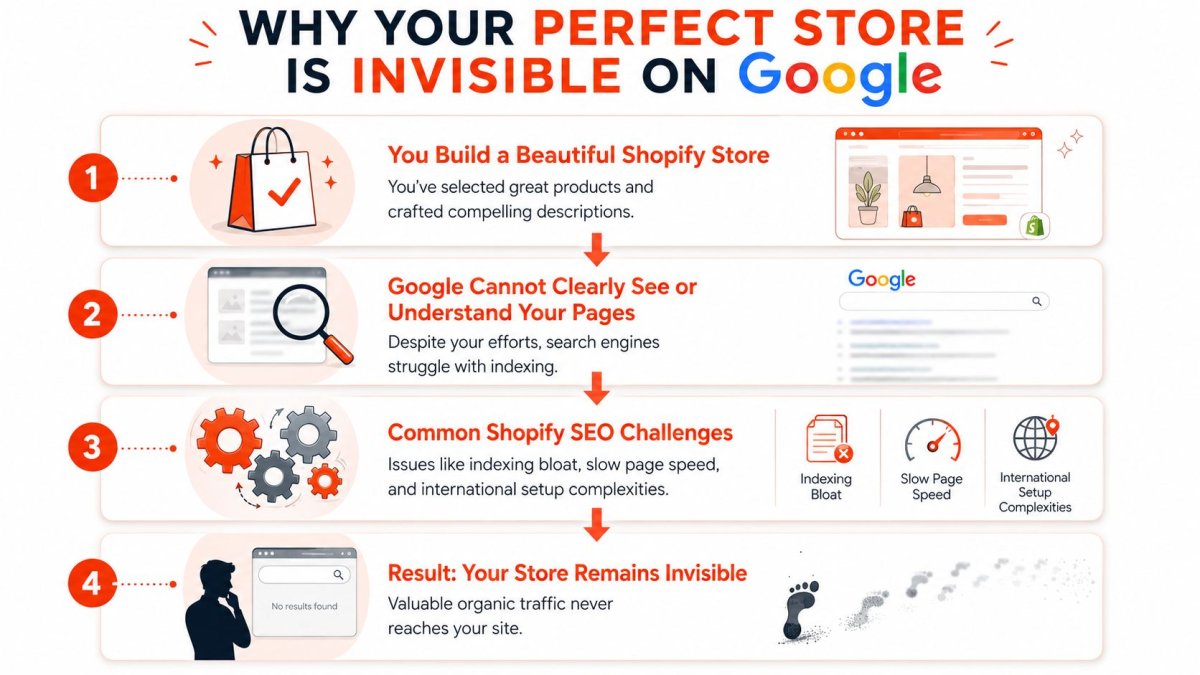
The biggest mistake I see is treating every Shopify SEO issue like it deserves equal attention. It does not. The stores that recover fastest usually fix indexation first, then crawl access, then theme and template signals, which aligns with OuterBox's breakdown of Shopify SEO issues.
That order affects revenue. If Google keeps finding low-value URLs, duplicate paths, or weak template pages, your product and collection pages get less attention than they should. Rankings stall, and teams end up polishing pages that are not even being treated as the primary version.
What usually goes wrong first
In practice, the first failures are usually structural:
- Indexing confusion: multiple URLs compete for the same product or category intent.
- Crawl waste: faceted, filtered, search, or parameterized pages absorb attention that should go to commercial pages.
- Theme-level signal problems: internal links, schema, headings, and templates send inconsistent cues.
- Market expansion side effects: new country or language versions introduce duplicate or misaligned signals.
Practical rule: If Google is not favoring your main product and collection pages, every other SEO task gets harder.
A quick structural check is page depth. Important pages should be easy to reach through your navigation and internal links, ideally within a few clicks from the homepage. If they sit too deep, discovery slows down and authority gets diluted. If you need a clearer framework for that audit, our guide to technical SEO for ecommerce sites walks through the signals worth checking first.
The order that usually works
Use this sequence if you want the fastest path to improvement:
| Priority | What to check | Why it matters |
|---|---|---|
| First | Indexed URL patterns | Google needs one clear version of each important page |
| Second | Crawl access and navigation | Revenue-driving pages need direct internal paths |
| Third | Speed and UX blockers | Slow, unstable pages hurt visibility and conversion |
| Fourth | On-page and theme signals | These sharpen relevance after the foundation is stable |
| Fifth | International setup | This becomes urgent after adding Markets or localized storefronts |
I often see store owners spend weeks rewriting copy on pages that Google has not fully prioritized or is barely crawling. That is backwards. Fix the pages Google can access, understand, and index first.
If you want to diagnose this at scale, especially on larger catalogs, an advanced web scraping solution can help you map URL patterns, pagination, canonicals, and indexable templates before you start changing themes or apps. wRanks fits best as the fast path here. It helps you spot what is suppressing visibility, sort those issues by likely impact, and work through the fixes in the order that gives you the best chance of getting revenue back sooner.
Fixing Indexing Bloat and Duplicate Content
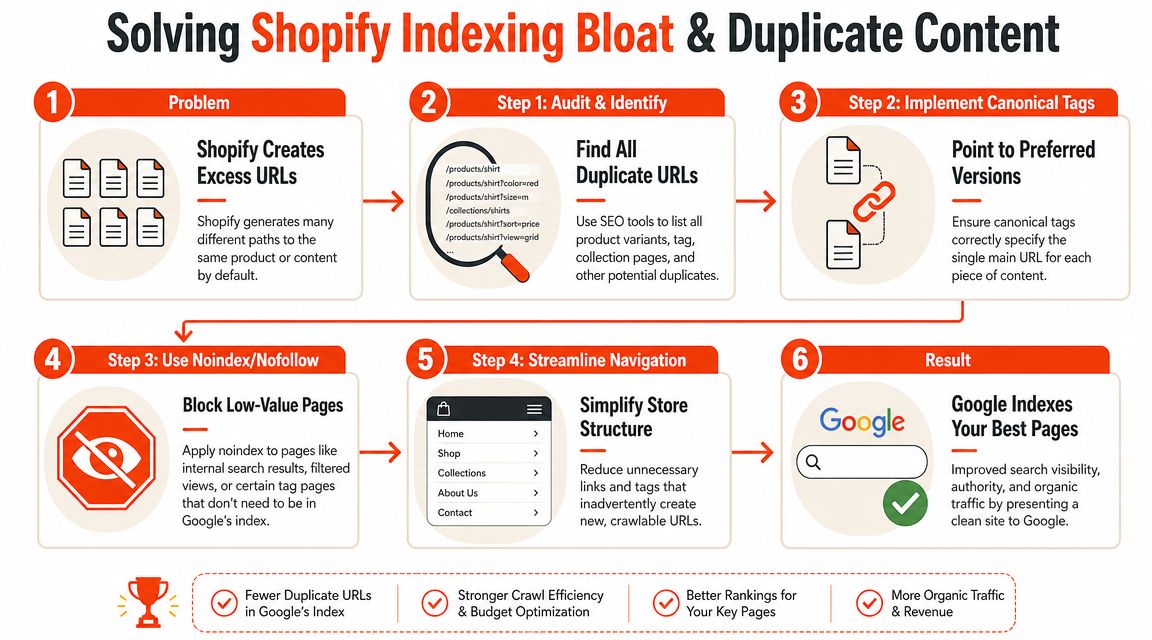
A common Shopify pattern looks harmless at first. One product, several URLs, and Google has to guess which one matters. That guess often goes wrong.
This is why indexing bloat deserves an early fix. If Google spends time crawling duplicate product paths, tag pages, and filtered collections, it spends less time on the pages that drive sales. You do not just get a messy index. You get diluted signals, weaker canonical consolidation, and important pages competing with their own duplicates.
The problem Shopify creates by default
The usual culprit is the same product loading at its main product URL and through a collection path. To you, it is one SKU. To Google, those paths can look like separate documents unless your canonical tags, internal links, and sitemap signals all point in the same direction.
Filters and tags make the situation worse. A collection can expand into dozens or hundreds of thin URL variations with little standalone search value. If those pages stay indexable, they crowd your index and pull crawl attention away from category and product pages with real ranking potential.
The first win here is reducing ambiguity.
Store owners often respond by blocking sections with robots.txt. I get the instinct, but that move can backfire. If Google cannot crawl duplicate versions, it has fewer signals to understand your preferred URL. A noindex tag can help in the right places, but it does not fix conflicting canonicals or internal links pointing to the wrong version.
How to diagnose the right pages to keep
Start in Google Search Console and look for patterns across templates, not one-off errors. Search for indexed URLs that include collection paths, tags, sort parameters, or filters. Then inspect a sample of your highest-value products to see which canonical Google selected.
Next, review your internal links. Collection grids, breadcrumbs, related product blocks, and app-generated widgets often reinforce duplicate paths without anyone noticing. I see this a lot after a theme customization or app install. The canonical tag says one thing, but the site architecture says another.
If you need a broader process for checking crawl paths, canonicals, and indexable templates, our guide to technical SEO for ecommerce stores gives you the framework.
For larger catalogs, spot checks are not enough. An advanced web scraping solution helps you map URL patterns, internal links, and canonical behavior across the whole store so you can find duplicate clusters before you start editing theme code.
What to fix first
Prioritization matters. Not every duplicate URL problem deserves the same urgency.
- Standardize product canonicals. Make sure alternate product paths point to the preferred
/products/URL or your chosen primary version. - Clean up internal links. Update collection templates, breadcrumbs, featured products, and navigation elements so they consistently link to the preferred URL.
- Noindex low-value filter and tag pages. Keep indexation for pages that can rank on their own. Remove the rest from the index.
- Verify Google's chosen canonical. Use URL Inspection on important pages after changes go live.
- Remove stale index clutter. Old collection pages, retired tags, and outdated parameter URLs should not stay indexable if they no longer serve a purpose.
If you only fix canonicals but leave internal links messy, the problem usually comes back. If you noindex filter pages but keep generating endless crawlable combinations, Google still wastes time on them. The stores that recover fastest handle this as a system, not a single tag fix.
wRanks is useful here because it shortens the diagnosis step. Instead of guessing whether you have a duplicate content issue, you can identify which URL patterns are bloating the index, sort them by likely revenue impact, and fix the pages that matter first. That is the fast path.
Solving Page Speed and Core Web Vitals Errors
Once Google can find the right pages, the next question is whether those pages are fast enough to deserve the traffic. Slow Shopify stores usually don't have one dramatic failure. They have layers of friction: extra scripts from apps, oversized media, and theme code that does too much before the page becomes usable.
Debugging proves more effective than guessing. You don't need another generic reminder to "optimize images." You need to know what on your store is heavy, when it loads, and whether it belongs there.
What usually slows a Shopify store down
Three culprits show up again and again.
First, apps. Many Shopify apps inject JavaScript, CSS, widgets, event listeners, and third-party calls. You install them for reviews, upsells, subscriptions, loyalty, popups, or analytics. Over time, the storefront becomes a stack of competing scripts.
Second, images. Product photography matters, but uncompressed hero assets, oversized gallery files, and poorly cropped thumbnails can weigh pages down. If your team needs a practical reference before resizing assets, this master Shopify image sizes guide is useful for setting cleaner standards.
Third, the theme itself. Some themes are visually attractive but overloaded with sliders, animation, dynamic sections, and deferred logic that still blocks key rendering moments.
How to troubleshoot without guessing
Open your browser's developer tools and review the Network and Performance tabs on a few high-value templates: homepage, collection page, product page, and cart. You're looking for files that are large, scripts that fire early, and resources loaded on pages where they don't add value.
Use this quick decision grid:
| Symptom | Likely cause | First check |
|---|---|---|
| Hero area loads late | image weight or render-blocking script | main banner image, app scripts in theme |
| Product page feels laggy | app widgets or variant logic | reviews, bundles, upsells, chat |
| Layout jumps while loading | theme elements or media sizing | banners, product galleries, announcement bars |
| Mobile feels heavy | too many scripts and oversized assets | third-party apps and image delivery |
A lot of merchants uninstall an app and assume the problem is gone. Sometimes it isn't. Leftover code can remain in the theme even after the app is removed. That means the store keeps paying the performance cost without getting any value.
Remove the feature if it doesn't affect revenue. Optimize it if it does. Don't keep paying a speed penalty for a maybe.
For a practical store-level workflow, this article on optimizing Shopify speed is a helpful checklist to run through after you've identified the worst offenders.
A short visual walkthrough can also help if you're debugging Core Web Vitals and script weight in the browser:
What a good fix looks like
A good speed fix is selective. It doesn't strip your store bare. It removes what doesn't earn its place.
- Audit apps by page type: not every script needs to load on every template.
- Resize and modernize media: serve appropriately sized images and avoid loading huge assets where smaller files will do.
- Simplify above-the-fold sections: carousels, autoplay elements, and stacked widgets often hurt more than they help.
- Review theme changes after every install: new functionality often adds hidden weight.
The stores that improve speed fastest usually make one mindset shift. They stop asking, "Can we add this?" and start asking, "Does this feature deserve to load before the customer can shop?"
Navigating International SEO and Shopify Markets
Adding new countries feels like growth. In search, it can also create confusion fast. The moment you expand with Shopify Markets, you introduce new URL variations, localized versions, and decisions about how search engines should interpret those pages.
That matters because merchants in Shopify's own community report that creating a new market can trigger sudden SEO drops tied to duplicate content and new URL variations, as discussed in this Shopify Markets SEO thread. This is one of the most under-discussed Shopify SEO problems because generic advice usually stays focused on titles, blogs, and images instead of market-level indexation.

Why rankings can drop after adding a market
Google now has multiple versions of similar content to evaluate. If the language and regional targeting signals aren't clear, search engines may struggle to understand which page belongs in which market.
That can lead to familiar symptoms:
- Wrong regional page appearing for users in another country
- Unexpected ranking drops after a market launch
- Localized duplicates competing with the primary market version
- Inconsistent canonicals that point away from the intended local page
This is why international SEO isn't just "translate the page and publish it." You need the store to explain page relationships clearly.
If two pages target different markets, they need distinct purpose and clean signals. If they target the same intent with the same content, you'll create avoidable overlap.
A practical Markets checklist
The goal is simple: make each market version easy for Google to classify.
Confirm your URL structure
Keep your market setup consistent. Whether you're using subfolders or another structure, don't mix approaches without a clear reason.
Check hreflang output
Make sure the page points to the correct regional or language alternatives. Missing or mismatched hreflang often causes the "wrong country page" problem.
Review canonicals in context
A local page shouldn't accidentally canonicalize back to a different market unless that's your actual intent.
Compare real content, not just templates
If every market page is nearly identical, search engines have less context for why separate versions exist. Local language, currency framing, shipping details, and market-specific messaging help.
Inspect indexed pages after launch
Don't assume a clean setup in Shopify admin means Google interpreted everything correctly. Check what entered the index and what Google selected.
A useful way to think about Markets SEO is this: your store is no longer one site with one audience. It's one platform serving several audiences, and each audience needs a version of the page that is technically clear and commercially intentional.
Uncovering On-Page SEO Mistakes in Your Theme
Some Shopify SEO problems don't show up in Search Console first. They sit inside the theme and subtly weaken how search engines interpret your pages. You can write strong copy and still underperform because the template sends weak or inconsistent signals.
These issues are less dramatic than duplicate indexation, but they matter once the foundation is stable. They affect how your products appear in search, how authority flows through the site, and how much value each template contributes.
Structured data problems that stay hidden
A product page can look perfectly fine to a shopper and still be incomplete for Google. Missing or broken Product schema limits how clearly search engines understand your page details. That can affect eligibility for richer search presentation and make your results look less compelling than competitors.
Check a few representative product pages, not just one. Review products with variants, out-of-stock states, reviews, and sale pricing. Theme code often handles those conditions inconsistently.
What to look for:
- Product details present in HTML but missing in schema
- Review markup that doesn't match visible content
- Variant logic that outputs confusing product data
- Template apps injecting conflicting schema blocks
If you're tightening product page quality overall, this guide on ecommerce product page SEO gives a practical lens for reviewing copy, structure, and technical page signals together.
Internal links that work against you
Internal linking isn't just a navigation exercise. It's how you tell Google which pages matter most and how they relate to one another. In Shopify, theme elements often create weak links by default: related products that aren't strategic, collection grids that reinforce alternate paths, and menu structures that bury high-value pages.
A quick audit often reveals problems like these:
| Theme element | Common issue | Better approach |
|---|---|---|
| Main navigation | broad but shallow categories | link clearly to priority collections |
| Breadcrumbs | inconsistent path logic | keep hierarchy stable and useful |
| Related products | random or app-driven links | favor relevance and commercial intent |
| Footer links | cluttered low-value links | keep only pages that support trust or discovery |
The benchmark worth remembering from earlier is access depth. Important pages should be reachable within a few clicks, not hidden behind layered collections and filters. If a strong collection or product family is hard to reach, fix that before adding more content.
Thin pages and template leftovers
Thin content on Shopify often isn't about product pages. It's usually collection pages with almost no useful context, auto-generated pages that shouldn't compete in search, or boilerplate pages left indexable when they add no organic value.
A healthy review asks three blunt questions:
- Does this page deserve to rank on its own?
- Would a shopper learn something useful here?
- Does this page support a real search journey, or is it just a platform byproduct?
Strong SEO themes don't just look clean. They reduce ambiguity.
Theme SEO work is part editorial, part technical. You improve it by cutting low-value templates, strengthening internal paths, and making sure every important page communicates clearly in both visible content and machine-readable markup.
Your Action Plan for Continuous SEO Health
You fix a batch of Shopify SEO problems, rankings stabilize, and then a theme edit, app install, or market launch creates a fresh mess two weeks later. That cycle is common. It is also expensive, because the biggest losses usually come from a few recurring issues that sit unnoticed until traffic or revenue slips.
The way out is a maintenance plan built around priority, not busywork. You do not need a long checklist every week. You need a repeatable rhythm that catches high-impact problems early and keeps small issues from turning into indexation, speed, or template failures on revenue-driving pages.
A simple operating rhythm
Run one focused review each month. Run a lighter check after any major theme change, app rollout, migration, or market expansion.
Start with the pages that matter most to sales. Key collections, top product families, high-traffic product pages, and any landing pages that already pull qualified search traffic.
Then review four areas in order:
- Indexation: check Google Search Console for newly indexed low-value URLs, odd parameter pages, duplicate paths, and unexpected exclusions on important pages.
- Template performance: test homepage, collection, and product templates after changes to apps, scripts, or theme code.
- New page quality: review new collections, landing pages, and blog content to confirm they support a real search intent and fit your site structure.
- Market behavior: confirm country or language versions are showing the right URLs, metadata, and page versions in search.
If you want a broader process for turning site reviews into business decisions, this guide to boosting revenue through website audits is a useful companion read because it frames audits around commercial outcomes rather than vanity tasks.
How to decide what deserves attention
Treat every issue like a triage decision.
Fix problems that block crawling or create index bloat first. Those are the issues most likely to suppress visibility across large parts of the store. Next, fix speed and access problems on commercial pages, especially collections and products that already rank or convert. After that, clean up clarity issues such as weak metadata, thin supporting copy, or template elements that make pages harder for search engines and shoppers to understand.
This order matters. Store owners often spend hours refining titles, FAQs, or blog content while duplicate URLs, poor template performance, or broken market signals keep the pages from competing properly in the first place.
A good SEO process should feel boring. That is a compliment. Monitor, prioritize, fix, verify, repeat.
wRanks gives Shopify merchants a faster way to work through that process. Instead of jumping between separate tools and scattered reports, you can audit technical issues, improve content, monitor rankings, and keep ongoing SEO health under control with far less manual work.

About David Chen
Technical SEO engineer focused on structured data, indexing optimization, and Core Web Vitals. David turns complex technical requirements into actionable Shopify solutions.