How to Improve Organic Search Traffic: Shopify SEO 2026
If you're running a Shopify store, you've probably felt this already. You publish products, tweak a few titles, maybe write a blog post, and organic traffic still feels stubborn. Big brands dominate broad terms, apps create clutter, and your catalog keeps changing faster than your SEO plan can keep up.
That's why most advice on how to improve organic search traffic falls flat for Shopify merchants. It tells you to “do SEO” without helping you decide what to fix first. On a real store, priority matters more than theory. The right sequence saves time, protects crawl budget, and gives your best pages a better shot at ranking.
Table of Contents
- Your Starting Point A Store-Wide SEO Diagnostic
- Fix High-Impact Shopify Technical Issues First
- Develop Your On-Page Content and Keyword Strategy
- Build Authority Through Site Structure and Off-Site Signals
- Measure, Iterate, and Prepare for AI Search
Your Starting Point A Store-Wide SEO Diagnostic
Most Shopify owners don't have an SEO problem. They have a prioritization problem.
A store with hundreds or thousands of URLs can hide issues everywhere. Broken links, thin collection pages, duplicate metadata, outdated blog posts, tag pages that shouldn't compete in search, and products that no longer deserve to stay indexed. If you try to fix everything at once, you usually end up fixing the wrong things first.
That's why a store-wide diagnostic comes before strategy. Recent Shopify-focused SEO guidance points to the core operational question merchants face: not just what to publish, but which pages should you consolidate, noindex, refresh, or delete to protect crawl budget and improve indexation as catalogs grow and change, especially as Google continues to emphasize page-level quality and clean architecture for low-value URLs in this Shopify SEO guidance.
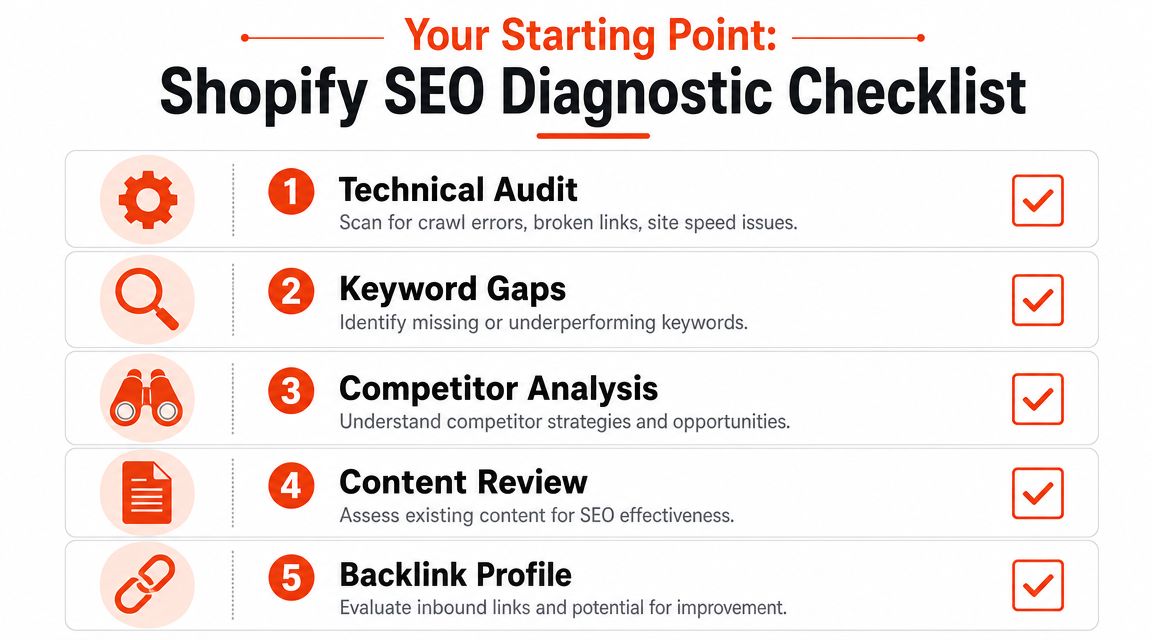
What a useful diagnostic should actually cover
A real diagnostic shouldn't dump a giant spreadsheet on your desk. It should separate issues into buckets that affect visibility differently.
| Area | What to look for | Why it matters |
|---|---|---|
| Technical health | Broken links, crawl issues, redirect problems, duplicate URLs | Search engines can't rank pages well if crawling is messy |
| Index quality | Thin pages, obsolete products, weak tag pages, duplicate intent | Low-value URLs can waste crawl capacity |
| On-page signals | Titles, meta descriptions, headers, internal links | These help engines understand page intent |
| Content fit | Product, collection, and blog pages targeting the wrong queries | Wrong page type often leads to poor rankings |
| Authority signals | Internal link gaps and weak backlink concentration | Important pages need support |
The fastest wins usually aren't glamorous
Store owners often want to jump straight into content creation. That can work, but it often ignores easier gains already sitting inside the site.
Look for pages that already have some visibility but are held back by obvious issues. A collection page with weak copy. A product page with duplicated manufacturer text. A blog post that ranks but doesn't link to any collection page. These are usually better bets than publishing another generic article.
Practical rule: Audit first, then choose the smallest set of fixes that can improve crawling, indexing, and page quality on pages that already matter to revenue.
A strong diagnostic also gives you a deletion and consolidation lens. Not every URL deserves improvement. Some pages should stay. Some should merge. Some should disappear with a redirect.
If you want to see how structured audits get applied in practice, this example of optimizing brands like Megagear is a useful reference because it shows how a store can be evaluated as a system, not just as a list of isolated pages.
How to leave this stage with a workable plan
By the end of your diagnostic, you should be able to answer five questions:
- Which pages drive commercial intent and deserve immediate protection.
- Which pages are competing with each other for the same keyword theme.
- Which technical problems block crawling or weaken trust.
- Which URLs should be pruned or merged instead of rewritten.
- Which page templates repeat the same issue across the store.
That's when SEO stops feeling chaotic. You're no longer asking how to improve organic search traffic in the abstract. You're looking at a ranked list of problems with a clear order of attack.
Fix High-Impact Shopify Technical Issues First
Technical SEO doesn't need to be mysterious. On Shopify, the highest-impact fixes usually come from cleaning up the parts of the site that confuse crawlers or dilute relevance.
The reason this deserves early attention is simple. Technical maintenance has a direct mathematical impact on traffic because expected traffic can be estimated as search volume multiplied by CTR for a target rank. That means even modest ranking gains from fixing errors and updating stale content can create measurable lifts. For large Shopify catalogs, improving crawlability and pruning low-value URLs can compound by concentrating search equity on valuable pages, as explained in this organic traffic analysis.
The Shopify issues that deserve attention first
Not every technical issue is urgent. Some are noise. Others impede growth.
Broken links and bad redirects
If internal links point to removed products or outdated collections, both users and crawlers hit dead ends. Fix these early. They're easy wins and they clean up site pathways fast.Duplicate intent across URLs
Shopify stores often create too many ways to reach similar content. Filter combinations, duplicate collection themes, and near-identical pages can split relevance. If two pages target the same idea, one usually needs to become the primary version.Thin or low-value indexed pages
Not every page should be indexable. Old seasonal collections, empty category pages, and weak content hubs can crowd the index without adding search value.Weak image implementation
Heavy product imagery is common on Shopify. It helps conversion, but it can slow pages if poorly handled. Image optimization matters for both performance and discoverability. This guide to Shopify image optimization is a practical place to tighten that up.
What to fix now versus later
A simple triage model works better than a giant backlog.
| Priority | Fix now | Can wait |
|---|---|---|
| High | Crawl errors, broken links, redirect chains, duplicate primary pages | Cosmetic metadata improvements on low-value URLs |
| Medium | Slow-loading image-heavy templates, weak internal linking to collections | Minor template refinements |
| Low | Pages with no strategic purpose and no search value | Experimental content ideas |
Shopify trade-offs that owners often miss
A cleaner index sometimes means removing pages you spent time building. That feels painful, but keeping weak URLs live just because they exist is usually a mistake.
Merchants also overestimate the value of auto-generated archive pages. Search engines don't reward clutter. They reward useful, distinct pages with clear intent.
If a page doesn't help a customer choose, compare, buy, or learn, it may not deserve to stay in the index.
Another common mistake is over-focusing on homepage authority while neglecting collection pages. For most stores, collections are the pages that should capture non-branded category demand. If those pages are technically weak, product pages end up carrying too much of the SEO load.
A practical cleanup order
Use this order if your store feels messy:
- First pass removes obvious crawl blockers like broken links and poor redirects.
- Second pass reviews indexable page types and removes low-value URL patterns.
- Third pass improves collection templates, internal links, and image handling.
- Fourth pass refreshes stale pages that already have some visibility.
That sequence works because it fixes the infrastructure before asking content to do more work.
Develop Your On-Page Content and Keyword Strategy
Once the site is technically cleaner, you can work on the pages that earn rankings. At this stage, many Shopify stores either make real progress or accidentally create keyword cannibalization.
The core mistake is giving every page the same job. A product page, a collection page, and a blog post should not target search the same way. If they do, Google gets mixed signals and your own pages start competing with each other.
Give each page type one clear job
The easiest way to improve organic search traffic is to map intent to the right template.
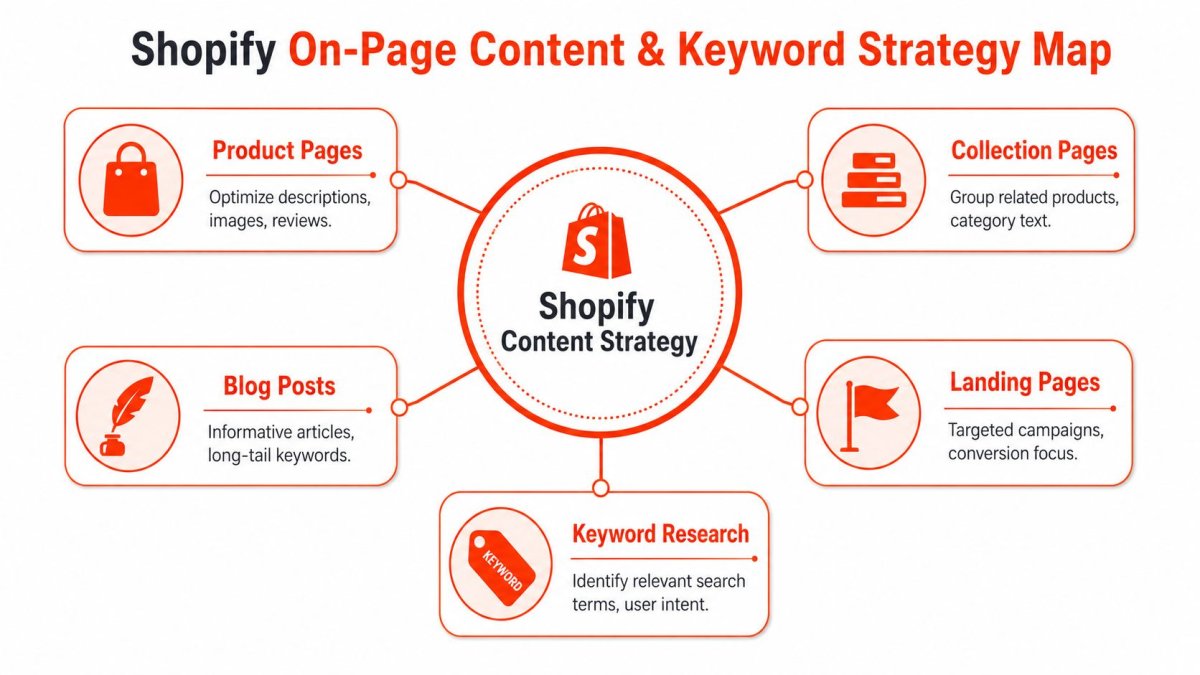
| Page type | Best fit | What to avoid |
|---|---|---|
| Product page | Specific transactional queries tied to one item | Trying to rank it for broad category terms |
| Collection page | Category and subcategory demand | Thin text and duplicated collection copy |
| Blog post | Informational and comparison-driven queries | Writing posts that should really be collections |
| Landing page | Seasonal, campaign, or brand-specific targeting | Letting it overlap with permanent collections |
A product page should help someone decide whether this exact item is right for them. A collection page should help someone browse a category. A blog post should answer a question or help narrow a choice.
That distinction sounds basic, but it solves a lot of ranking confusion.
Start with keywords you already rank for
One of the best ways to estimate organic traffic potential is to analyze keywords where your site already ranks in positions 2 to 40, because moving those pages up can generate significant incremental visits. Re:signal also points to strategic keyword placement in titles, meta descriptions, URLs, and headers, along with topic clusters, as the practical route for building topical authority as semantic search matured in their SEO methodology.
That means you shouldn't begin with blank-page brainstorming. Begin with pages that already have traction.
Look inside Search Console and ask:
- Which collection pages already get impressions but need stronger copy?
- Which blog posts rank for useful long-tail terms but don't connect to products?
- Which product pages show up for descriptive searches but need better metadata and structure?
Most stores have more upside in under-optimized existing pages than in brand-new articles.
A strong content workflow can also speed execution. If you're building product copy, metadata, and blog support content at scale, tools that generate first drafts can help. For example, an AI article generator for Shopify stores can reduce blank-page time, but it still needs editorial judgment. Good SEO content isn't just fluent. It has to match intent, support a business goal, and fit the right page type.
How to build topic clusters without bloating your blog
A lot of stores hear “topic clusters” and respond by publishing loosely related content every week. That usually creates noise.
A better model is tighter:
- Choose one commercial topic tied to a category you sell.
- Make the collection page the commercial hub.
- Create supporting blog content that answers adjacent questions.
- Link those articles back to the collection or product pages that solve the problem.
Here's a simple example.
If you sell travel camera accessories, your collection page might target a category theme. Supporting blog posts could answer packing, compatibility, or use-case questions. The blog earns discovery. The collection converts it.
This walkthrough is useful if you want a visual take on modern Shopify content workflows:
What works and what doesn't
What works:
- Specific long-tail targeting on products and articles
- Collection pages with meaningful copy and strong internal links
- Metadata written for humans first, not just keyword insertion
- Support content that answers real pre-purchase questions
What doesn't:
- Dozens of thin blog posts around slight keyword variations
- Copying manufacturer descriptions
- Using one keyword map across every template
- Publishing content with no internal path to product discovery
If you're serious about how to improve organic search traffic, content strategy on Shopify isn't about volume. It's about assigning the right intent to the right URL and strengthening the pages that can realistically win.
Build Authority Through Site Structure and Off-Site Signals
Authority isn't just backlinks. On Shopify, authority starts with how your own site distributes trust.
If your strongest pages don't link to your most important revenue pages, you force search engines to guess what matters. Then merchants try to compensate by chasing links, even though the internal structure is still weak.
Internal authority comes before outreach
Start with the pages on your own domain that already attract attention. These might be older blog posts, useful guides, strong category pages, or popular products. Use them to support the URLs that matter most now.
A practical internal linking pattern looks like this:
- Link informational content to commercial pages when the next step is natural.
- Link parent collections to sub-collections where the hierarchy helps browsing.
- Link related products carefully when intent stays consistent.
- Update old articles so they pass relevance to current collections and products.
This is also where content audits matter. A rigorous audit process improves traffic by merging pages that compete for the same keywords and removing pages with no links, traffic, or conversions, which directly addresses keyword cannibalization and wasted crawl budget, especially on larger Shopify catalogs where product, collection, and blog URLs multiply quickly in Robbie Richards' audit framework.
Which pages deserve consolidation
Not all overlap is harmful. Some overlap is normal in eCommerce. The problem is duplicate intent.
Use this decision guide:
| Situation | Better move |
|---|---|
| Two blog posts target the same question | Merge them into one stronger asset |
| Two collections describe nearly the same category | Keep the stronger one and redirect the weaker |
| Old seasonal page has backlinks but no longer fits current merchandising | Refresh or redirect it to the nearest relevant page |
| Product page is unique but underwritten | Improve it, don't delete it automatically |
Off-site authority that still works
You don't need gimmicky link schemes. You need legitimate reasons for people to mention your store.
The off-site signals that tend to hold up best are:
- Digital PR around useful stories or distinctive products
- Collaborations with creators, publications, or communities in your niche
- Unlinked brand mentions that can become citations
- Retail or industry roundups where your products belong
The cleanest link-building strategy is still building pages worth citing, then promoting them to people with a reason to care.
For Shopify merchants, this often means your best “linkable asset” isn't the homepage. It's a category guide, a comparison resource, a gift guide, a sizing resource, or a useful blog article that sits close to a collection.
The trap is chasing authority at the domain level while ignoring page-level support. Search engines rank pages, not brand aspirations. Build a cleaner structure first, then earn mentions that reinforce it.
Measure, Iterate, and Prepare for AI Search
SEO work compounds, but only if you keep measuring the right things.
Too many Shopify teams stop at “traffic went up” or “rankings moved.” Those are useful signals, but they don't tell you whether the right pages improved, whether non-branded visibility expanded, or whether your best commercial pages are gaining traction in the markets that matter.
What to track every month
A practical review cycle should focus on page groups, not vanity snapshots.

Track these consistently:
- Keyword movement by page type so you can see whether products, collections, or blogs are improving.
- Impressions and clicks for non-branded queries to spot real demand expansion.
- Index coverage changes after pruning or consolidation work.
- Internal link impact on pages you intentionally supported.
- Commercial page visibility by geography if you sell across multiple markets.
If your reporting setup is messy, cleaning up attribution and baseline tracking inside Shopify is worth the time. This guide to Google Analytics 4 for Shopify can help tighten the measurement side before you draw conclusions from incomplete data.
Why iteration beats one-off optimization
Organic growth rarely comes from one perfect launch. It comes from repeated cycles:
- Audit
- Fix
- Measure
- Refresh
- Consolidate again where needed
That loop matters because search results change, inventory changes, and customer language changes. A category page that was “good enough” last year may now need better copy, better links, or cleaner supporting content.
SEO on Shopify works best when you treat the store like a living catalog, not a finished website.
The next visibility challenge is already here
The search environment has changed. The question for merchants is no longer just how to rank higher. It's how to earn visibility when the click may be bypassed by answer engines. A 2024 study found Google's AI Overviews appeared on a large fraction of informational queries, which changes how merchants should think about discovery across search, AI answers, and shopping results in Trustpilot's analysis of post-SERP visibility.
That doesn't mean classic SEO is obsolete. It means the output has to do more.
Pages should be easy to summarize, easy to cite, and clearly structured. Product and collection pages need clean facts, clear headings, and useful context. Informational content needs direct answers, not padded intros. If AI systems extract and summarize value from your pages, clarity becomes a visibility advantage.
That's the broader answer to how to improve organic search traffic now. You're not only optimizing for clicks. You're optimizing for discoverability across multiple surfaces.
If you want a faster way to turn this roadmap into action, wRanks brings the core Shopify SEO workflow into one place. It helps merchants audit store-wide issues, improve on-page content, manage technical cleanup, track rankings, and monitor visibility across both search and AI discovery surfaces without adding unnecessary complexity.

About James Rodriguez
AI & GEO specialist helping brands maximize visibility across AI platforms like ChatGPT, Gemini, and Claude. James pioneers generative engine optimization techniques for e-commerce.