The Best SEO Apps for Shopify in 2026: A Buyer's Guide

You open the Shopify App Store to find one SEO app. Ten minutes later, you've got a dozen tabs open, every app promises automation, and half of them seem to do the same thing with slightly different labels.
That confusion is normal. Most store owners don't need more features. They need fewer repetitive SEO chores, fewer technical mistakes, and a setup that fits the way the store runs day to day. If your team already struggles to keep product pages updated, publish content consistently, and clean up broken links before they pile up, the wrong app won't help. It just gives you another dashboard to ignore.
The better way to choose from the best SEO apps for Shopify is to ask a simpler question: what happens to your workflow after installation? Does the app remove recurring tasks, or does it create new ones? Does it help the person uploading products, writing collection copy, fixing technical issues, and checking rankings? Or does it only look good on a feature checklist?
Table of Contents
- Navigating the Maze of Shopify SEO Apps
- The Three Pillars of Shopify SEO Success
- Understanding the Main Types of SEO Apps
- Feature Comparison of Leading Shopify SEO Apps
- Choosing the Right App for Your Business Stage
- How to Implement and Migrate SEO Apps Safely
- Frequently Asked Questions About Shopify SEO Apps
Navigating the Maze of Shopify SEO Apps
A search for SEO tools in Shopify doesn't produce a short shortlist. It produces a market.
The Shopify App Store lists 782 SEO apps in its store-design/site-optimization category, which tells you two things at once: the market is crowded, and merchants are trying to solve very different problems with the same three-letter label, SEO (Shopify App Store SEO category). Some apps focus on image ALT text. Some handle schema. Some chase broken links, redirects, metadata, or automation across the whole store.
That's why choosing an app feels high-stakes. You're not buying a single feature. You're picking a workflow. If you run a small catalog and update pages manually, you might need lightweight help with metadata and error cleanup. If you manage a large catalog, frequent launches, or multiple markets, you need automation that keeps pages aligned without forcing your team into constant maintenance.
Why feature lists mislead store owners
Most app listings look good when you scan them fast. They all mention meta tags, speed, schema, AI, and rankings. But the real question isn't whether a feature exists. It's how the app behaves after week one.
A few examples:
- A metadata tool sounds useful until you realize it still expects someone to review every product title by hand.
- A schema tool helps until it conflicts with markup already injected by your theme or another app.
- An image optimizer can be the right answer if your storefront is photo-heavy, but a poor fit if your larger problem is duplicate templates and weak collection content.
Practical rule: Don't choose the app with the longest feature list. Choose the one that removes the most recurring work from your team.
Independent roundups reflect that shift. Merchants aren't comparing “SEO apps” as one generic category anymore. They're comparing specialized tools and bundled platforms by pricing, automation depth, and fit for store complexity. If you want a wider view of where optimization tools are heading beyond Shopify alone, DLL Studios has a useful overview on how to master your search rankings in 2026.
A better filter for choosing
When clients ask me which app is best, I usually narrow it down with operational questions first:
- Who owns SEO work internally? A founder, a marketer, an agency, or nobody.
- Where does work break down now? Product uploads, content creation, redirects, image handling, or technical cleanup.
- How often does the catalog change? Stable stores can live with lighter tools. Fast-moving stores usually can't.
- How much review capacity do you have? AI output still needs oversight, but strong automation lowers the pile.
That's how you cut through the noise. The best SEO apps for Shopify aren't the ones with the loudest listing. They're the ones that match your store's operating reality.
The Three Pillars of Shopify SEO Success
Before you compare apps, it helps to separate SEO into jobs your store needs done. For Shopify, I group them into three pillars: technical SEO, content SEO, and monitoring.
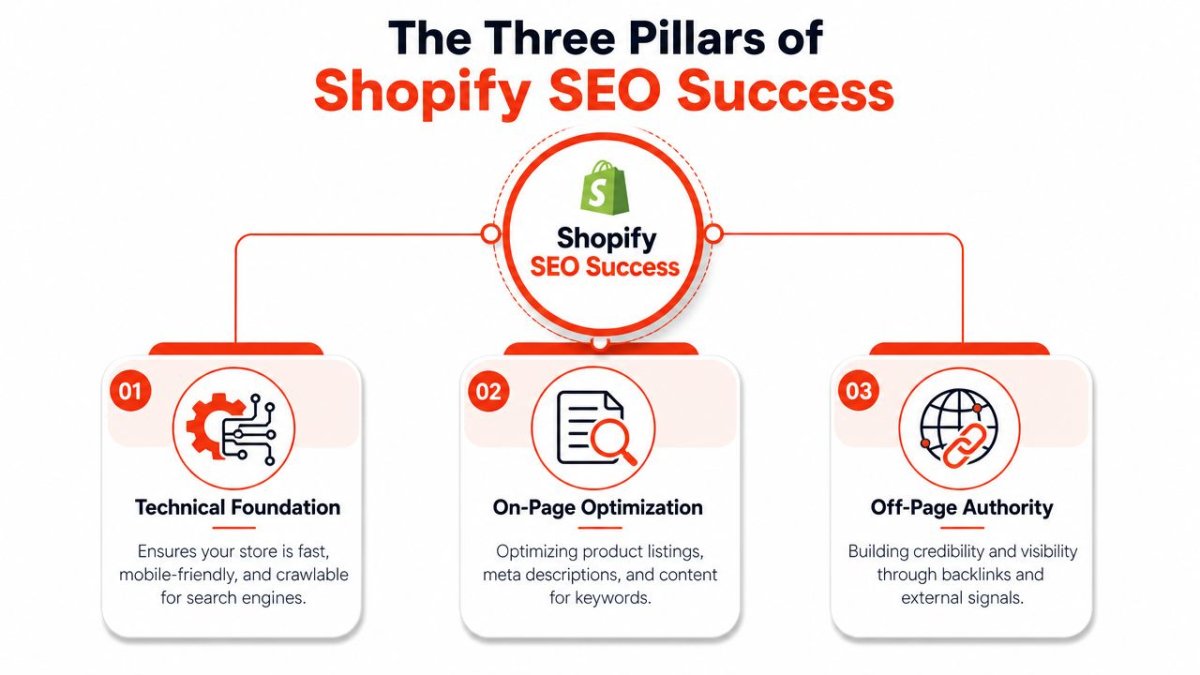
If you miss one pillar, the other two have to work harder. Good content can't compensate for broken indexing signals forever. Clean technical setup won't rank empty category pages. Reporting without action is just a nicer spreadsheet.
Technical SEO keeps your store discoverable
Technical SEO is the plumbing. Customers never praise it, but they notice when it fails.
For a Shopify store, this usually means:
- Crawlability: Search engines can access and understand your products, collections, blogs, and pages.
- Structured data: Product and content schema are applied consistently.
- Error cleanup: Broken links, unnecessary redirects, and duplicate signals are handled before they accumulate.
- Page weight: Heavy images and bloated templates don't make every page harder to load.
A lot of app buyers over-prioritize keyword features and under-prioritize technical consistency. That's backwards. If your store keeps publishing new products with weak canonical handling, missing schema, or unresolved 404s, you're building on a shaky floor.
Content SEO turns pages into entry points
Content SEO is what helps your store win searches beyond branded traffic. This includes product titles, meta descriptions, collection copy, blog content, FAQ sections, and internal linking.
The challenge isn't knowing that content matters. It's operational capacity. Merchants often have the right intent and no repeatable process. The product team uploads items. The marketing team writes campaign copy. Blog articles sit in draft. Collections remain thin because no one has time to improve them.
Useful apps help at this layer by making content production faster and more consistent. Weak apps just give you a text box and call it AI.
If you want a broader companion resource on Shopify SEO fundamentals, UPQODE has a solid guide on Shopify SEO which explains the basics clearly.
Good Shopify content works like shelf signage in a store. It helps people find the aisle, understand the product, and move forward without asking for help.
Monitoring tells you what to fix next
Monitoring is the least glamorous pillar, but it decides whether your SEO work compounds or drifts.
You need visibility into:
- Rank movement: Are important pages gaining or losing position?
- Page-level changes: Did a collection improve after optimization, or did nothing happen?
- Competitive pressure: Are other stores publishing deeper content or improving technical coverage faster?
- Operational blind spots: Are new products going live without ALT text, metadata, or schema?
Many merchants install an SEO app, fix a batch of issues, and stop checking. That's where momentum dies. SEO isn't a one-time cleanup. It's store maintenance plus growth work.
What an app should cover across all three pillars
When judging the best SEO apps for Shopify, use this simple checklist:
- Technical foundation: Can it reduce repetitive technical cleanup and apply structured data reliably?
- Content support: Can it help your team create and optimize content without slowing publishing?
- Decision support: Can it surface what changed, what matters, and what deserves attention next?
If an app only helps with one pillar, that's fine. Just know you're buying a specialist, not a complete system.
Understanding the Main Types of SEO Apps
The easiest way to make sense of the Shopify SEO market is to stop comparing every app against every other app. Most of them fall into three practical groups, and each group changes your workflow in a different way.
Independent reviews of the 2026 market describe a clear split between budget automation tools and higher-feature suites, with examples like Sherpas: Smart SEO offering AI-generated meta titles and descriptions, keyword-rich alt text, JSON-LD schema, HTML sitemaps, and 404 detection, while Tiny SEO or TinyIMG is positioned more for image-heavy stores with image compression and JSON-LD (Oxify's Shopify SEO app review).
Single-task utilities solve one bottleneck well
These are the specialist tools. Think image compression apps, schema-only tools, redirect managers, or metadata helpers.
They work best when your main issue is obvious. A fashion store with large product imagery might benefit quickly from an image-focused tool because the bottleneck isn't content planning. It's asset weight and image-related maintenance.
What they do well:
- They're narrow and clear: One problem, one tool.
- They're easier to train on: Staff usually understand the purpose quickly.
- They reduce risk in focused areas: Especially when you don't want broad app overlap.
Where they fall short:
- They create stack sprawl: One app for images, one for schema, one for redirects, one for metadata.
- They fragment ownership: Different tasks live in different dashboards.
- They often leave content workflow untouched: So your technical setup improves while publishing remains inconsistent.
Basic suites cover the store maintenance layer
Many smaller merchants will find these apps a good starting point. These apps bundle the common maintenance tasks most stores need: metadata automation, ALT text, broken link detection, sitemaps, schema, and cleanup tools.
Sherpas: Smart SEO is often discussed in this category because it packs a lot of routine SEO work into a lower-cost toolset. That matters for stores that can't justify a more advanced platform but still need help keeping pages clean.
This category is strongest when your problem is operational drift. New pages go live. Old pages break. Images miss ALT text. Metadata gets skipped. A basic suite catches the mess and reduces manual cleanup.
If your store also depends heavily on content, it's worth thinking about where automation fits into publishing, not just maintenance. This article on modern SEO and content value is useful because it frames automation as a support system, not a substitute for meaningful content.
For merchants evaluating AI writing support more directly, this piece on an AI article generator for a Shopify store is also relevant to the workflow side of content production.
A good basic suite acts like a reliable store manager. It handles recurring chores so the team doesn't keep tripping over the same issues.
Growth platforms suit teams with ongoing SEO operations
This category makes sense when SEO isn't just cleanup. It's a channel.
These tools usually combine technical controls, content assistance, broader auditing, and competitive or ranking visibility. They're better for brands that publish regularly, manage larger catalogs, or need tighter oversight across many moving parts.
The upside is centralization. The downside is complexity. Growth platforms only pay off if someone on the team will use the intelligence they produce. If no one owns SEO weekly, a powerful platform can become expensive shelfware.
So the decision usually isn't “Which app has more features?” It's this:
| App type | Best fit | Workflow impact | Main trade-off |
|---|---|---|---|
| Single-task utility | One clear SEO bottleneck | Fast fix in one area | More tools to manage |
| Basic suite | Small to mid-sized stores | Reduces recurring maintenance work | Less depth for advanced teams |
| Growth platform | Scaling brands or agencies | Centralizes SEO operations | Requires consistent ownership |
Feature Comparison of Leading Shopify SEO Apps
A side-by-side comparison helps, but only if the criteria reflect real store work. The table below focuses on the jobs merchants usually need handled consistently: indexing, schema, content assistance, image workflows, ranking visibility, and whether the app adds weight to the storefront experience.
Shopify SEO App Feature Comparison 2026
| Feature | SearchPie | Booster SEO | wRanks |
|---|---|---|---|
| Indexing and crawlability tools | Strong automation focus, including technical issue support and redirect handling | Strong automation around issue detection and fixes | Includes indexing controls, redirect management, and technical tooling built for Shopify workflows |
| Schema and structured data | Broad rich snippet support and automated markup | Covers core schema needs for store pages | Automatic JSON-LD across key store content types |
| AI content support | Helpful for metadata and optimization tasks | Useful for metadata and ongoing optimization | Broader AI support for products, collections, pages, and blog content |
| Image optimization workflow | Less specialized than image-first tools | Includes image optimization features | Handles image ALT text generation, but image compression is not its main positioning |
| Rank and geo tracking | Offers SEO visibility features, with beginner-friendly reporting | Focuses more on automation than deep tracking | Includes rank tracking history and geo-targeted visibility tracking |
| Competitive intelligence | Limited compared with dedicated intelligence tools | More app-led optimization than market intelligence | Includes competitor benchmarking and broader search visibility intelligence |
| Storefront performance impact | May add app-layer complexity depending on configuration | Can be convenient, but overlapping app features still need care | Designed to avoid storefront JavaScript load according to the publisher |
| Best workflow fit | Merchants who want support-heavy automation | Mid-market stores wanting set-and-maintain automation | Teams that want technical SEO, content creation, and intelligence in one place |
One related area merchants often overlook is image workflow. If product media is central to your store, this guide on how to optimize Shopify images is worth reviewing alongside app comparisons.
What the table means in practice
SearchPie is attractive for merchants who want guidance and a more assisted setup. It's a good fit when the owner doesn't want to become an SEO operator and would rather use a tool that leans toward done-for-you support.
Booster SEO fits the store owner who wants broad coverage without stitching together multiple specialist apps. It's often easier to live with than a fragmented tool stack, especially if your catalog changes frequently and you want automation running in the background.
wRanks stands out most when the workflow problem spans multiple departments. Content, technical fixes, AI-assisted publishing, rank monitoring, and indexing live closer together. That matters if your marketer, merchandiser, and SEO lead keep passing work between tools.
Store-owner lens: The best app isn't the one that does the most. It's the one your team will still be using correctly three months from now.
The common mistake is comparing apps as if they're interchangeable. They're not. One app may be good at maintenance. Another at image-heavy catalogs. Another at integrating SEO work with ongoing content production. Once you compare them by operational fit, the shortlist gets much smaller.
Choosing the Right App for Your Business Stage
Your store stage matters more than the app's popularity. A lean store with a small catalog doesn't need the same system as a content-led DTC brand or an agency juggling multiple client accounts.

A 2026 Blackbelt Commerce review claims the right Shopify SEO app can increase traffic by up to 70% and reduce manual work by 99% through automation and AI, while also recommending different tools by revenue tier rather than treating every store the same (Blackbelt Commerce Shopify SEO app guide). I treat those figures as directional rather than universal, but the underlying point is correct: fit matters more than hype.
For the new store on a tight budget
If you're early-stage, don't overbuild.
A newer store usually needs three things: clean metadata, basic schema coverage, and a way to catch obvious issues like 404s or missing ALT text without spending hours inside the admin. A lower-cost suite is often enough here because the goal isn't enterprise SEO. It's avoiding sloppy fundamentals while the business finds traction.
What works:
- Lower-cost suites: Good for metadata, cleanup, and simple automation.
- Simple dashboards: Better than advanced reporting nobody reads.
- Light review burden: You still need to check outputs, but not line-edit everything.
What doesn't:
- Buying an advanced platform too early: You pay for depth you won't use.
- Installing multiple overlapping apps: That creates confusion fast.
For visual brands with heavy image catalogs
If you sell apparel, jewelry, home decor, beauty, or print-on-demand products, image operations can dominate your SEO workload.
In those stores, a specialized tool like Tiny SEO or TinyIMG often makes more sense than an all-purpose platform because the workflow bottleneck is image-heavy publishing. Compression, image handling, and structured data support often matter more than broader SEO bells and whistles.
A common mistake store owners make is buying a content-heavy tool when their real problem is that every collection page is carrying heavy media and inconsistent image optimization.
Here's a useful perspective on the broader store path many merchants face before deciding what kind of business they're really building:
For scaling brands investing in content
This is the stage where basic automation starts to feel cramped.
If your team publishes blogs, builds collection landing pages, launches campaigns regularly, and wants tighter SEO feedback, you need more than metadata templates. You need a system that supports ongoing content operations and technical consistency together.
A stronger app at this stage should help your team:
- Create optimized drafts faster
- Maintain schema and technical hygiene
- Track search performance by page or topic
- Reduce handoffs between content and SEO work
Broader platforms are a sensible choice. They don't just fix problems. They support a repeatable publishing rhythm.
Stores usually outgrow entry-level SEO apps when content becomes a routine, not a side project.
For agencies and multi-store operators
Agencies have a different problem: repetition across clients.
They need tooling that makes audits, fixes, tracking, and content workflows easier to replicate without forcing each store into a custom process. Multi-store visibility, cleaner technical implementation, and centralized intelligence matter more here than beginner-friendly tutorials.
For that reason, more advanced suites tend to fit agencies and scaling operators better. They reduce context switching. They also make it easier to spot patterns across stores instead of treating every issue as a one-off.
If you're comparing the best SEO apps for Shopify from an agency perspective, don't only ask whether the app is powerful. Ask whether it lowers operational friction across accounts.
How to Implement and Migrate SEO Apps Safely
Installing an SEO app is easy. Cleaning up after a bad installation is not.
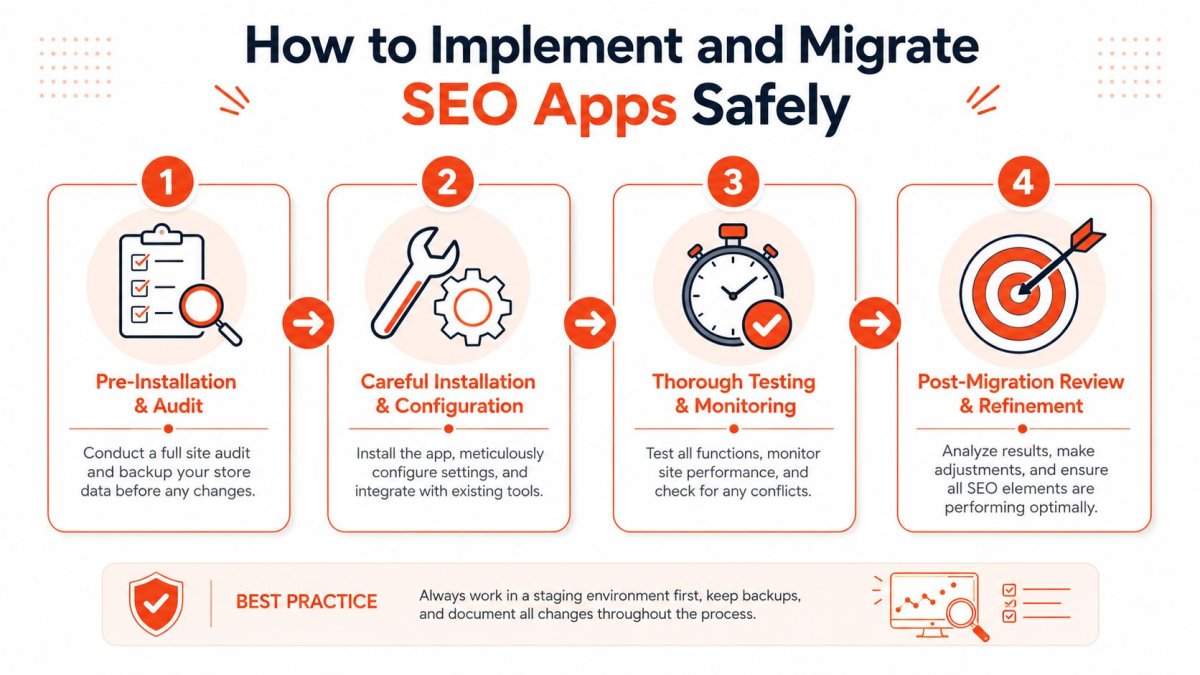
The problems usually show up after the app is live: duplicate schema, redirect confusion, overwritten metadata, or theme remnants from an old tool. Most of these issues are avoidable if you treat app changes like infrastructure changes instead of casual experiments.
Before you install anything
Start with an audit of what already exists in the store.
Check for current schema output, active redirects, image settings, title templates, robots directives, and any app-injected features still running from older tools. If you skip this step, you can end up stacking automation on top of automation.
A practical technical checklist helps. This guide on technical SEO for ecommerce is a useful reference if you want a more structured review before making app changes.
Use this pre-installation checklist:
- Map existing SEO responsibilities: Know whether metadata, blogs, images, and redirects are handled by different people.
- Document current outputs: Save examples of product titles, meta descriptions, schema presence, and redirect patterns.
- Review overlapping app functions: If two tools touch the same SEO element, decide which one owns it.
- Back up critical settings: Especially redirects, templates, and any manual SEO edits worth preserving.
A safer migration sequence
If you're replacing one SEO app with another, don't uninstall first and hope for the best. Migrate in sequence.
- Inventory what the old app controls. Identify schema injection, redirects, metadata templates, image settings, and any audit or indexing tools.
- Replicate the must-keep settings in the new app. Handle redirects and structural features before removing the old app.
- Test on key page types. Check products, collections, blog posts, and standard pages for duplicate markup or missing elements.
- Remove the old app carefully. Then re-test the same page types.
- Monitor crawl-related issues and page presentation. Watch for broken results, strange snippets, or missing structured data.
When migrations go wrong, it's rarely because the new app is bad. It's because the store kept pieces of the old one running.
Two issues deserve special attention:
- Schema duplication: If both the theme and the app output product schema, search engines can receive mixed signals.
- Redirect loss: If an old app handled redirect management and you remove it without exporting or rebuilding rules, old URLs can break.
The best migration is boring. No ranking shock. No weird snippets. No emergency cleanup three days later.
Frequently Asked Questions About Shopify SEO Apps
Most of the confusion around Shopify SEO apps doesn't come from features. It comes from overlap. Store owners want to know how many apps to use, what a reasonable spend looks like, and how to avoid slowing down the store while trying to improve it.
Can you use more than one SEO app
Yes, but only when their jobs are clearly separated.
A common example is pairing an image-focused tool with a broader SEO suite. That can work well because one app specializes and the other handles wider maintenance or content support.
What usually fails is stacking multiple apps that all manage metadata, schema, sitemaps, or redirects. Then you're not improving SEO. You're creating conflicting instructions.
How do you know if an app is slowing your store down
Look for symptoms after installation, not just promises before it.
Watch for slower page rendering, visual instability, delayed interaction, or storefront elements loading differently than before. If a tool injects unnecessary storefront code, the cost shows up in user experience before it shows up in rankings.
Apps that avoid storefront JavaScript are often cleaner from a performance standpoint because they don't add as much front-end overhead. That doesn't make every no-code app automatically better, but it's a smart thing to evaluate.
What kind of budget makes sense
Budget should follow store complexity, not ego.
A small store can do a lot with a lower-cost app if the main goal is maintenance and basic automation. A larger brand with ongoing content production, technical oversight, and multi-market demands usually needs more depth.
Think in tiers rather than exact spend:
- Entry stage: Basic cleanup, metadata, schema, and issue detection
- Growth stage: More automation, content support, and stronger reporting
- Operational stage: Deeper intelligence, scalable workflows, and cleaner management across teams or stores
What usually goes wrong after installation
The most common failures are simple:
- Nobody owns the app: It gets installed, configured once, and forgotten.
- Automation goes unchecked: AI-generated fields publish with weak wording or awkward phrasing.
- Old app remnants stay active: Especially around schema or redirects.
- The app stack grows randomly: One new tool gets added every few months until the store becomes harder to manage.
The best SEO apps for Shopify don't just offer automation. They create fewer decisions, fewer repetitive tasks, and fewer chances for the store to drift out of shape.
If you want one system that combines Shopify-focused technical SEO, AI content creation, indexing tools, rank tracking, and store-level workflow efficiency, take a look at wRanks. It's built specifically for Shopify merchants who want to centralize SEO work instead of piecing it together across multiple apps.

About Sarah Mitchell
Senior SEO strategist with 8+ years in e-commerce search optimization. Sarah helps Shopify merchants turn organic traffic into revenue through data-driven content strategies.