
Draft Order
Quick Definition
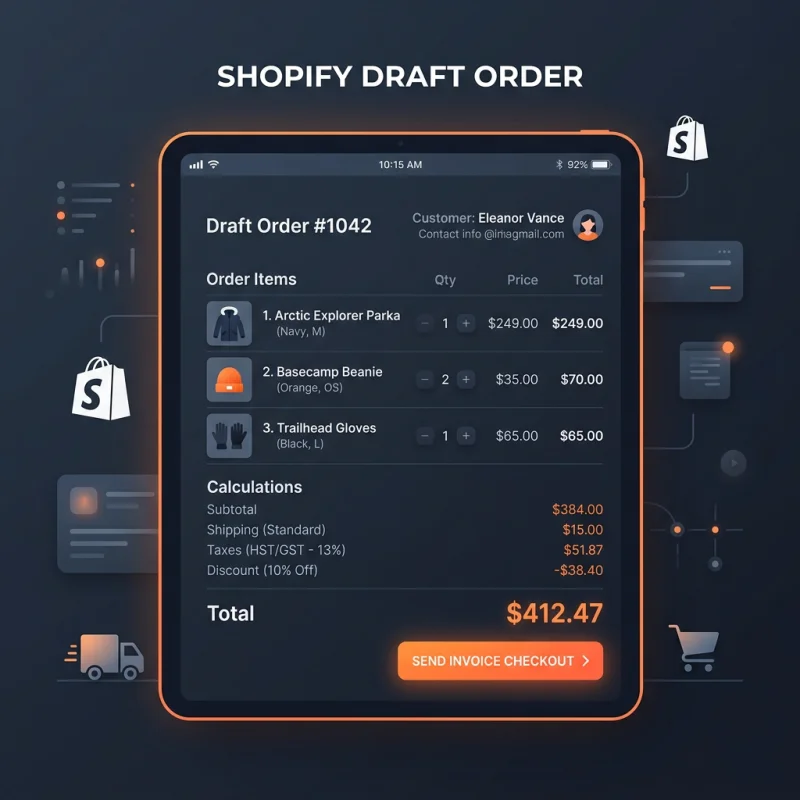
A Draft Order is a manually created order in the Shopify Admin that allows merchants to sell products, issue invoices, and collect payments directly from clients.
Table of Contents
- Understanding Draft Orders in Shopify
- Creating and Managing Draft Orders in Shopify
- Strategic Business Benefits of Draft Orders
- Optimizing Draft Orders for E-Commerce Success
- Conclusion
- Frequently Asked Questions
- How do I create a draft order in Shopify?
- Can I customize draft orders before sending invoices?
- How do draft orders impact my store's analytics?
- Are there any apps that enhance draft order management?
Understanding Draft Orders in Shopify
Draft Orders in Shopify serve as a powerful tool for merchants to manually create, customize, and manage orders outside the standard checkout process. Unlike regular orders that are initiated by customers through the storefront, draft orders are created directly within the Shopify admin panel. This feature is particularly valuable for scenarios such as wholesale transactions, custom product bundles, or situations where a merchant needs to invoice a customer before the payment is collected. Draft orders enable merchants to add products, apply discounts, include custom notes, and send invoices to customers, all while maintaining full control over the sales process.
From a practical standpoint, draft orders facilitate personalized customer service, streamline bulk sales, and support complex sales workflows. They also allow merchants to record offline transactions, such as phone orders or in-person sales, ensuring that all revenue streams are consolidated within the Shopify system. According to Shopify's own data, merchants utilizing draft orders report increased flexibility in handling diverse sales channels and customer requests, which directly contributes to higher conversion rates and improved customer satisfaction.
Creating and Managing Draft Orders in Shopify
To leverage the full potential of draft orders, merchants need to understand how to create, customize, and finalize them within Shopify. The process begins in the Shopify admin dashboard, accessible via Shopify's official help documentation.
- Access Draft Orders: Navigate to Orders in the Shopify admin, then click on Drafts.
- Create a New Draft Order: Click the Create order button. This opens a new draft order form.
- Add Products: Use the search bar to find products, add them to the order, and specify quantities. You can also add custom items or notes.
- Apply Discounts and Adjustments: Shopify allows discounts at the line item or order level, which can be applied manually.
- Customer Details: Assign the order to an existing customer or create a new customer profile.
- Review and Send Invoice: Once the draft order is complete, review the details. You can then send an invoice to the customer via email or mark the order as paid if payment has already been collected.
Managing draft orders also involves editing, duplicating, or canceling them as needed. Shopify's interface provides intuitive options for these actions, ensuring seamless workflow management. For merchants integrating with third-party apps, additional functionalities such as automated draft order creation or advanced customization are available, enhancing operational efficiency.
Strategic Business Benefits of Draft Orders
Implementing draft orders within your Shopify store offers several strategic advantages that can significantly impact your sales and customer relationships. Firstly, they enable personalized sales experiences, especially for B2B clients or high-value customers who prefer invoicing over immediate checkout. This flexibility can lead to increased order sizes and higher customer retention.
Moreover, draft orders facilitate offline sales recording, ensuring that all transactions are captured within Shopify's ecosystem, which simplifies accounting and reporting. They also support complex sales workflows, such as custom product bundles, special pricing, or exclusive offers, which are difficult to manage through standard checkout processes.
From an optimization perspective, merchants can use draft orders to pre-approve discounts, test different pricing strategies, or prepare bulk orders for quick processing. This proactive approach reduces checkout friction and accelerates the sales cycle. Additionally, draft orders can be integrated with marketing automation tools to send targeted follow-ups, increasing conversion rates.
Real-world examples include wholesale suppliers creating draft orders for bulk buyers, or service providers invoicing clients for custom packages. According to industry studies, businesses leveraging draft orders see an average increase of 15-20% in sales efficiency, primarily due to the enhanced control and flexibility they offer.
Optimizing Draft Orders for E-Commerce Success
To maximize the benefits of draft orders, consider implementing the following strategies:
- Automate Draft Order Creation: Use apps or Shopify's API to generate draft orders automatically based on customer interactions or external data sources.
- Personalize Customer Interactions: Send customized invoices with personalized notes, branding, and payment instructions to foster trust and professionalism.
- Integrate with Payment Gateways: Ensure your payment setup supports invoice payments for draft orders, providing multiple payment options for customers.
- Track and Analyze: Use Shopify analytics to monitor draft order conversions and identify bottlenecks in your sales funnel.
- Leverage Apps: Explore Shopify App Store solutions that enhance draft order management, such as bulk creation, automation, or integration with CRM systems.
By adopting these tactics, merchants can streamline their sales processes, improve customer satisfaction, and ultimately boost revenue. Remember that clear communication and seamless workflows are key to converting draft orders into finalized sales efficiently.
Conclusion
Draft orders are an essential component of a flexible and customer-centric e-commerce strategy within Shopify. They empower merchants to handle complex sales scenarios, personalize customer interactions, and optimize operational workflows. Whether you are a wholesale supplier, a service provider, or a retailer with custom needs, mastering draft order management can significantly enhance your store's efficiency and profitability. For further guidance, visit Shopify's official documentation and explore third-party apps to extend functionality.
Frequently Asked Questions
How do I create a draft order in Shopify?
To create a draft order, go to your Shopify admin panel, click on Orders, then select Drafts. Click on Create order, add products or custom items, apply discounts if needed, select or create a customer, and then review the details. You can choose to send an invoice or mark the order as paid. This process allows you to manually generate orders outside the standard checkout flow, ideal for B2B or offline sales.
Can I customize draft orders before sending invoices?
Yes, Shopify allows extensive customization of draft orders. You can add custom notes, adjust quantities, apply discounts, and include personalized messages. Before sending an invoice, review all details to ensure accuracy. Customization helps in providing a tailored experience for your customers, especially for high-value or special requests, enhancing professionalism and trust.
How do draft orders impact my store's analytics?
Draft orders are recorded within Shopify's order management system, allowing you to track sales that originate outside the standard checkout process. They contribute to your overall sales data, enabling comprehensive reporting. By analyzing draft order data, you can identify sales trends, customer preferences, and potential areas for process improvement, ultimately informing your marketing and sales strategies.
Are there any apps that enhance draft order management?
Yes, the Shopify App Store offers various apps designed to improve draft order workflows. These include automation tools for bulk creation, integration with CRM systems, and advanced customization options. Apps like Order Printer Pro or Bulk Draft Orders can save time and increase efficiency, especially for merchants handling high volumes of offline or wholesale orders.

About Sarah Mitchell
Senior SEO strategist with 8+ years in e-commerce search optimization. Sarah helps Shopify merchants turn organic traffic into revenue through data-driven content strategies.