
Domain
Quick Definition
A Domain is the web address (URL) where your Shopify store is accessible online, consisting of a primary domain, subdomains, and redirect paths.
Table of Contents
- Understanding the Concept of a Domain in E-Commerce
- Shopify Configuration and Implementation of Domains
- The Strategic Business Value of a Domain in E-Commerce
- Optimization Tips and Real-World Examples
- Additional Resources and References
- Frequently Asked Questions
- How do I choose the best domain name for my Shopify store?
- What are the steps to connect an external domain to Shopify?
- How can I improve my domain's SEO performance?
Understanding the Concept of a Domain in E-Commerce
A domain is the core web address that users type into their browsers to access your online store. In the context of e-commerce, especially on platforms like Shopify, a domain is more than just a URL; it is a critical component of your brand identity, user experience, and search engine visibility. A domain typically consists of a primary name (e.g., myshopifystore.com), possibly accompanied by subdomains (e.g., blog.myshopifystore.com), and redirect paths that guide visitors to specific pages or sections within your site.
From a technical perspective, a domain is linked to an IP address via the Domain Name System (DNS), translating human-readable addresses into machine-readable IPs. This system ensures that when customers enter your domain, they are directed to your Shopify store's hosting servers. Domains are registered through domain registrars such as GoDaddy, Namecheap, or Google Domains, and they are essential for establishing your online presence, building credibility, and improving discoverability.
In e-commerce, a well-chosen domain can significantly impact branding, SEO, and customer trust. For instance, a domain that clearly reflects your niche or product line (e.g., organicbeauty.com) can enhance brand recognition and improve search engine rankings. Moreover, having a custom domain (as opposed to a free Shopify subdomain like yourstore.myshopify.com) lends professionalism and credibility to your store, which can influence purchasing decisions.
Shopify Configuration and Implementation of Domains
Setting up and managing your domain within Shopify involves several key steps that ensure your store is accessible, branded, and optimized for search engines. Here is a detailed walkthrough:
- Purchasing a Domain: You can buy a domain directly through Shopify or use an external registrar. To buy within Shopify, navigate to Shopify's domain setup guide. If purchasing externally, ensure the domain registrar supports DNS management for Shopify integration.
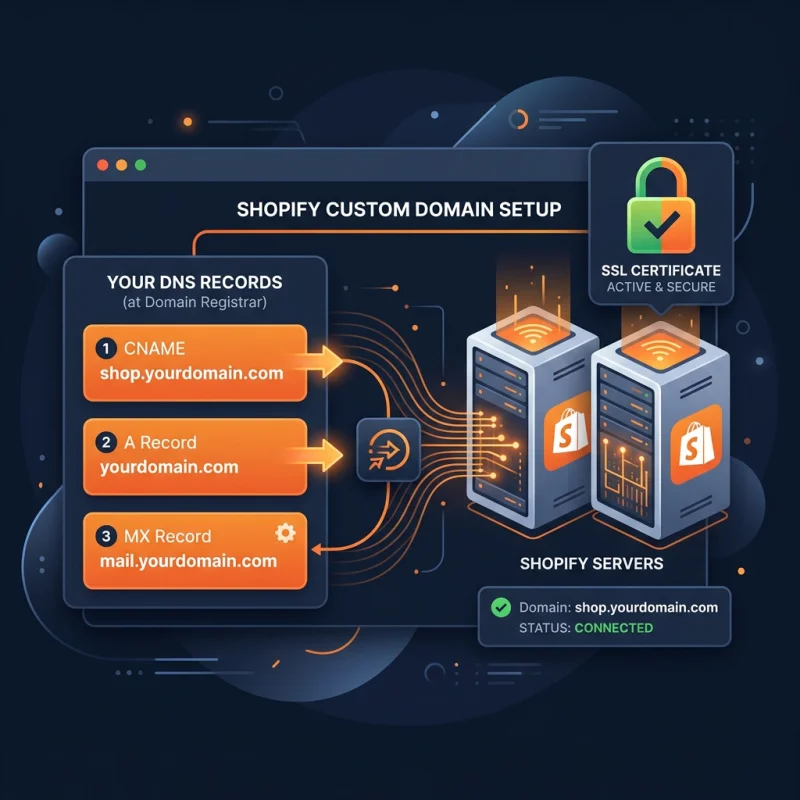
- Connecting Your Domain to Shopify: Once you have a domain, go to Online Store > Domains in your Shopify admin panel. Click Add existing domain and enter your domain name. Shopify provides specific DNS records (A record and CNAME) that you need to update at your registrar to point your domain to Shopify's servers.
- Configuring DNS Settings: Access your domain registrar's DNS management panel. Set the A record to Shopify's IP address (e.g., 23.227.38.65) and the CNAME record for www to shops.myshopify.com. Shopify's help documentation offers detailed instructions for popular registrars.
- Verifying Domain Connection: After DNS propagation (which can take up to 48 hours), return to Shopify's Domains page to verify the connection. Shopify will confirm when your domain is correctly linked.
- Setting the Primary Domain: In Shopify, you can select your primary domain under Online Store > Domains. This domain will be used for all storefront URLs and SEO signals. Consider choosing a clean, memorable domain that aligns with your brand.
- SSL Certificates and Security: Shopify automatically provides SSL certificates for your custom domains, ensuring secure HTTPS connections. Confirm that SSL is active to protect customer data and improve SEO rankings.
Additional considerations include redirecting your old URLs to your new domain to preserve SEO equity and setting up email forwarding if needed. Shopify's platform simplifies many of these steps, but understanding DNS management and domain configuration is crucial for a seamless transition and optimal store performance.
The Strategic Business Value of a Domain in E-Commerce
A domain is a foundational element of your online business strategy. It influences branding, customer perception, and search engine rankings. Here are key aspects of its strategic importance:
- Brand Identity and Trust: A memorable, relevant domain reinforces your brand image and builds customer trust. For example, Amazon.com is globally recognized and trusted, which directly impacts conversion rates.
- Search Engine Optimization (SEO): Domains that include relevant keywords can improve visibility in search results. While exact match domains are less influential than they once were, a keyword-rich domain can still provide an SEO boost.
- Customer Accessibility and Recall: Short, simple domains are easier to remember and type, reducing bounce rates and increasing repeat visits.
- Competitive Advantage: Owning a premium domain can prevent competitors from acquiring it and can be leveraged for marketing campaigns or brand expansion.
Effective domain strategy involves selecting a name that aligns with your niche, is easy to spell, and is available across social media platforms. Regularly monitoring domain health and renewing registration before expiry are essential practices to maintain your online presence.
Optimization Tips and Real-World Examples
To maximize the benefits of your domain, consider the following tips:
- Use a Custom Domain: Always opt for a custom domain instead of Shopify's default subdomain for professionalism and SEO benefits.
- Implement Redirects: Use 301 redirects from old URLs to your new domain to preserve SEO rankings and avoid broken links.
- Secure Your Domain: Enable SSL certificates and HTTPS to protect customer data and boost SEO rankings.
- Maintain Consistency: Ensure your domain matches your branding, including social media handles, to create a cohesive online identity.
- Monitor Domain Performance: Use tools like Google Search Console to track how your domain performs in search results and identify optimization opportunities.
For example, BarkBox leverages a memorable domain that aligns with its playful brand, contributing to its viral marketing success. Similarly, Glossier uses a clean, brand-centric domain that enhances customer trust and recognition.
Additional Resources and References
- Shopify Help: Domains
- Google Developers: Structured Data for SEO
- Schema.org: Organization Markup
- Web.dev: Hosting and Deployment
Frequently Asked Questions
How do I choose the best domain name for my Shopify store?
Choosing the best domain name involves selecting a memorable, brand-relevant, and keyword-appropriate address. Keep it short, easy to spell, and avoid hyphens or numbers that can cause confusion. Conduct a trademark search to ensure your chosen name does not infringe on existing brands. Use domain name generators or tools like NameMesh to explore available options. Once selected, verify domain availability and consider purchasing variations to protect your brand. A strong domain enhances brand recognition, improves SEO, and makes it easier for customers to find and remember your store.
What are the steps to connect an external domain to Shopify?
Connecting an external domain involves updating DNS records at your domain registrar. First, log into your registrar's account and locate DNS management settings. Set the A record to Shopify's IP address (e.g., 23.227.38.65) and the CNAME record for www to shops.myshopify.com. Save the changes and return to Shopify's admin panel under Online Store > Domains. Click Add existing domain, enter your domain, and verify the connection. Shopify will confirm once the DNS changes have propagated, which can take up to 48 hours. Proper DNS configuration ensures your store is accessible via your custom domain and benefits from Shopify's SSL security.
How can I improve my domain's SEO performance?
Improving your domain's SEO performance involves several strategies: use a relevant and keyword-rich domain name, ensure fast website loading times, and implement SSL certificates for security. Create high-quality, keyword-optimized content and obtain backlinks from reputable sources. Use descriptive meta tags and schema markup to enhance search listings. Maintain a clean URL structure and redirect old URLs to preserve link equity. Regularly monitor your domain's performance with tools like Google Search Console and adjust your SEO strategies accordingly. A well-optimized domain not only attracts organic traffic but also enhances your store's credibility and conversion rates.

About David Chen
Technical SEO engineer focused on structured data, indexing optimization, and Core Web Vitals. David turns complex technical requirements into actionable Shopify solutions.