
Discount Function
Quick Definition
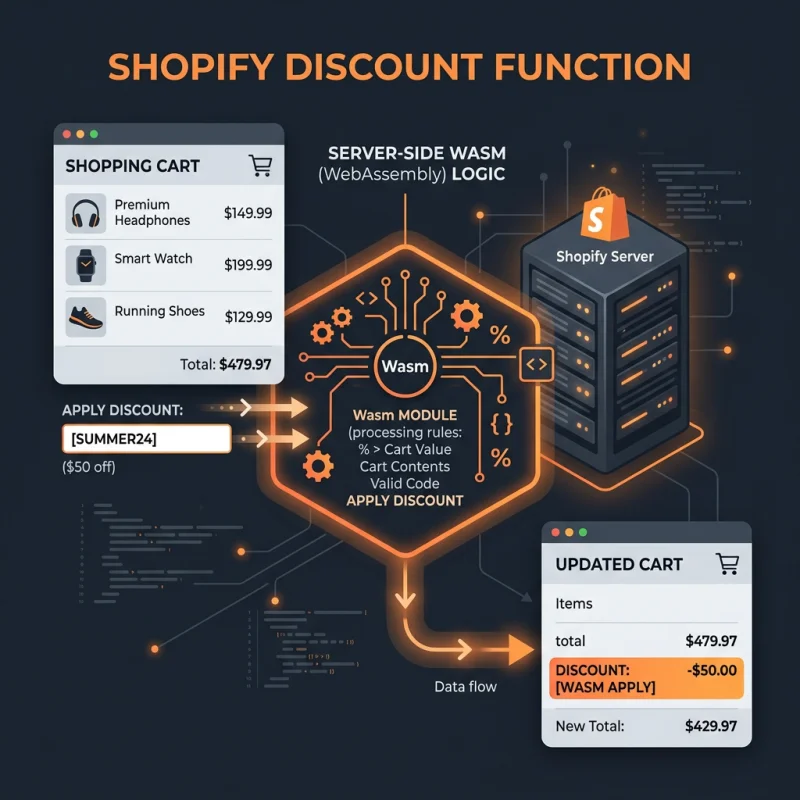
A Discount Function is a server-side customization built with Shopify Functions that allows developers to run bespoke discount logic directly in Shopify's checkout engine.
Table of Contents
- Deep Conceptual Overview of Discount Function
- Implementing Discount Functions in Shopify: Step-by-Step Guide
- Navigating Shopify Settings for Discount Function Deployment
- Configuring Discount Logic and Conditions
- Strategic Business Value and Optimization Tips
- Real-World Examples and Case Studies
- FAQ
- How do I set up a Discount Function in Shopify?
- Can I customize discount logic for specific customer segments?
- What are the benefits of using Discount Functions over standard discounts?
- Are there any limitations or considerations when using Discount Functions?
Deep Conceptual Overview of Discount Function
The Discount Function in Shopify represents a powerful tool that enables developers and merchants to implement highly customized discount logic directly within the checkout process. Unlike standard discount codes or automatic discounts, which are limited to predefined rules, Discount Functions are server-side customizations built with Shopify Functions, allowing for dynamic, context-aware discounts tailored to specific customer behaviors, order attributes, or promotional campaigns.
At its core, a Discount Function is a piece of code that executes within Shopify's checkout engine, providing the ability to modify prices, apply conditional discounts, or even create complex promotional rules that adapt in real-time. This capability is especially valuable for large-scale merchants or brands seeking to deliver personalized shopping experiences, optimize revenue, and streamline promotional workflows without relying solely on Shopify's default discount features.
Implementing Discount Functions requires familiarity with Shopify's development environment, including Shopify CLI, and knowledge of programming languages such as JavaScript or Liquid. These functions are deployed via Shopify's admin API, enabling seamless integration into existing store workflows. They are particularly useful for scenarios like tiered discounts, customer-specific offers, or time-sensitive promotions that demand granular control beyond standard discount options.
From an e-commerce perspective, Discount Functions significantly enhance flexibility and enable merchants to craft unique promotional strategies that can lead to increased conversion rates, higher average order values, and improved customer loyalty. As Shopify continues to evolve its checkout customization capabilities, mastering Discount Functions becomes essential for merchants aiming to stay competitive and innovative in their discounting approaches.
Implementing Discount Functions in Shopify: Step-by-Step Guide
Navigating Shopify Settings for Discount Function Deployment
To leverage Discount Functions, merchants must first ensure their store is on a Shopify plan that supports checkout customizations, such as Shopify Plus. Once confirmed, the process begins with setting up a development environment using the Shopify CLI. This tool facilitates creating, testing, and deploying custom functions efficiently.
Next, access the Shopify admin dashboard and navigate to Apps. From there, select Develop apps for your store or create a new private app if necessary. Within the app, enable API access for Shopify Functions, which allows you to upload and manage custom discount logic.
Within your development environment, create a new Shopify Function project. Shopify provides starter templates that simplify the process. These templates are written in JavaScript or Liquid and are designed to interact with checkout data, such as cart contents, customer tags, or order history.
Once your function code is ready, test it locally using Shopify CLI commands. Testing ensures that the discount logic performs correctly under various scenarios, such as different cart sizes or customer segments. After thorough testing, deploy the function via the admin API, linking it to specific checkout workflows or promotional campaigns.
Configuring Discount Logic and Conditions
In your Shopify Function code, define the specific discount rules you want to implement. For example, you might create a tiered discount that offers 10% off for orders over $100, or a customer-specific discount for VIP clients. Use conditional statements within your code to specify these rules, ensuring they are flexible and scalable.
For instance, a typical discount function might check the total cart value and apply a percentage discount if certain conditions are met:
// Example pseudo-code
if (cart.total_price > 10000) { // price in cents
  applyDiscount(percentage: 10);
}
Adjust the logic to include other parameters such as customer tags, product categories, or order origin. This level of customization allows for highly targeted promotions that can significantly improve conversion rates.
Strategic Business Value and Optimization Tips
Implementing Discount Functions offers strategic advantages that extend beyond simple price reductions. They enable personalized marketing, improve customer engagement, and facilitate complex promotional campaigns that can adapt to market trends or inventory levels. Here are some key benefits and tips for maximizing their value:
- Personalization: Use customer data to deliver tailored discounts, increasing loyalty and repeat purchases.
- Dynamic Promotions: Adjust discounts based on real-time inventory, seasonal trends, or competitor pricing.
- Automation: Reduce manual intervention by automating complex discount rules, saving time and reducing errors.
- Data-Driven Optimization: Analyze discount performance metrics to refine your strategies continually.
For example, a fashion retailer might create a Discount Function that offers exclusive discounts to VIP customers during flash sales, or a tech store might implement a bundle discount based on customer purchase history. These tailored approaches can lead to higher average order values and better customer satisfaction.
To optimize your Discount Functions, consider integrating them with your analytics tools, such as Google Analytics or Shopify's native reports. Regularly review performance data to identify which discount strategies yield the best ROI. Additionally, test different discount tiers and conditions to find the most effective combinations.
Incorporate best practices such as clear communication of discounts, avoiding over-discounting that can erode margins, and ensuring compliance with legal standards. For instance, Shopify's official discount documentation provides valuable insights into creating effective promotional campaigns.
Real-World Examples and Case Studies
Many successful brands leverage Shopify's Discount Functions to deliver innovative promotions. For example, a luxury skincare brand might use a Discount Function to offer personalized discounts based on customer loyalty tiers, resulting in increased retention. Similarly, a sporting goods retailer could implement a time-sensitive discount that activates during peak shopping hours, boosting sales during specific periods.
Another case involves a subscription box service that uses Discount Functions to provide discounts for first-time buyers, then dynamically adjusts offers for repeat customers based on their purchase history. These strategies demonstrate how flexible, custom discount logic can be a game-changer in competitive markets.
By integrating these advanced discounting techniques, merchants can differentiate their brand, foster customer loyalty, and achieve higher revenue targets. The key is to continuously test, analyze, and refine your Discount Functions to align with your evolving business goals.
FAQ
How do I set up a Discount Function in Shopify?
Setting up a Discount Function in Shopify involves enabling checkout customizations on Shopify Plus, creating a development environment with Shopify CLI, and deploying custom code via Shopify's admin API. You start by creating a Shopify app with API access, then develop your discount logic using Shopify Functions templates. Testing thoroughly before deploying ensures your discounts work correctly across various scenarios. Shopify's official documentation provides detailed step-by-step instructions to guide you through this process.
Can I customize discount logic for specific customer segments?
Yes, Discount Functions allow for highly targeted discounts based on customer data such as tags, purchase history, or loyalty status. By incorporating customer-specific conditions into your code, you can create personalized promotions that resonate with individual shoppers. This customization enhances customer experience and increases the likelihood of repeat business. Properly managing customer data and testing your logic ensures accurate and effective segmentation.
What are the benefits of using Discount Functions over standard discounts?
Discount Functions offer greater flexibility and control compared to standard discounts. They enable complex, dynamic, and personalized discount rules that can adapt to real-time data. This allows for more sophisticated promotional strategies, such as tiered discounts, customer-specific offers, or conditional promotions based on cart contents. Additionally, they reduce manual intervention, streamline promotional management, and can lead to higher conversion rates and revenue growth.
Are there any limitations or considerations when using Discount Functions?
While powerful, Discount Functions require Shopify Plus, which involves higher costs and technical expertise. Developing and maintaining custom code also demands ongoing effort and testing to prevent errors. Additionally, overuse of discounts can erode profit margins, so strategic planning is essential. It is important to stay compliant with legal standards and ensure that discounts are clearly communicated to customers. Regular performance analysis helps optimize their impact.

About David Chen
Technical SEO engineer focused on structured data, indexing optimization, and Core Web Vitals. David turns complex technical requirements into actionable Shopify solutions.