
Collection
Quick Definition
A Shopify Collection is a group of products organized into categories to help customers navigate a store and find items more efficiently.
Table of Contents
- Understanding Shopify Collections: A Deep Dive
- Configuring Shopify Collections: Step-by-Step Guide
- Accessing Collection Settings
- Choosing the Collection Type
- Setting Up a Manual Collection
- Configuring an Automated Collection
- Optimizing Collection Visibility
- Advanced Customization and SEO
- The Strategic Power of Shopify Collections
- Targeted Marketing and Promotions
- Personalized Shopping Experiences
- Inventory Management and Sales Optimization
- SEO and Organic Traffic Growth
- Real-World Examples and Best Practices
- Additional Resources
- Frequently Asked Questions
- How do I set up a collection in Shopify?
- Can I customize the appearance of my collections?
- How do collections impact SEO?
- What are some best practices for managing collections?
Understanding Shopify Collections: A Deep Dive
In the realm of e-commerce, especially within Shopify, a Collection serves as a fundamental organizational tool that groups products into categories, making it easier for customers to browse, find, and purchase items. Think of collections as digital aisles or sections within a physical store - each designed to streamline the shopping experience and highlight specific product groups based on themes, seasons, or customer interests.
From a technical perspective, Shopify Collections are dynamic or manual groupings of products that can be customized extensively. They play a crucial role in store navigation, SEO, marketing campaigns, and inventory management. According to Shopify's own data, stores that effectively utilize collections see increased conversion rates and improved customer satisfaction, as shoppers can quickly locate relevant products without sifting through unrelated items.
Collections are not just about organization; they are strategic assets that influence user experience and sales performance. Properly curated collections can target specific customer segments, promote new arrivals, or clear out seasonal stock. They also serve as a backbone for marketing initiatives like email campaigns, social media promotions, and paid advertising, making them indispensable for a thriving online store.
Configuring Shopify Collections: Step-by-Step Guide
Accessing Collection Settings
- Log in to your Shopify admin panel.
- Navigate to Products in the sidebar menu.
- Select Collections.
- Click on Create collection.
Choosing the Collection Type
Shopify offers two main types of collections:
- Manual Collections: You add products individually, giving you full control over which items appear.
- Automated Collections: Products are automatically included based on conditions like product tags, prices, or vendor.
Setting Up a Manual Collection
- Enter a compelling Title and Description.
- Upload a representative Image for visual appeal.
- Click Save.
- To add products, go to the collection page and click Add products.
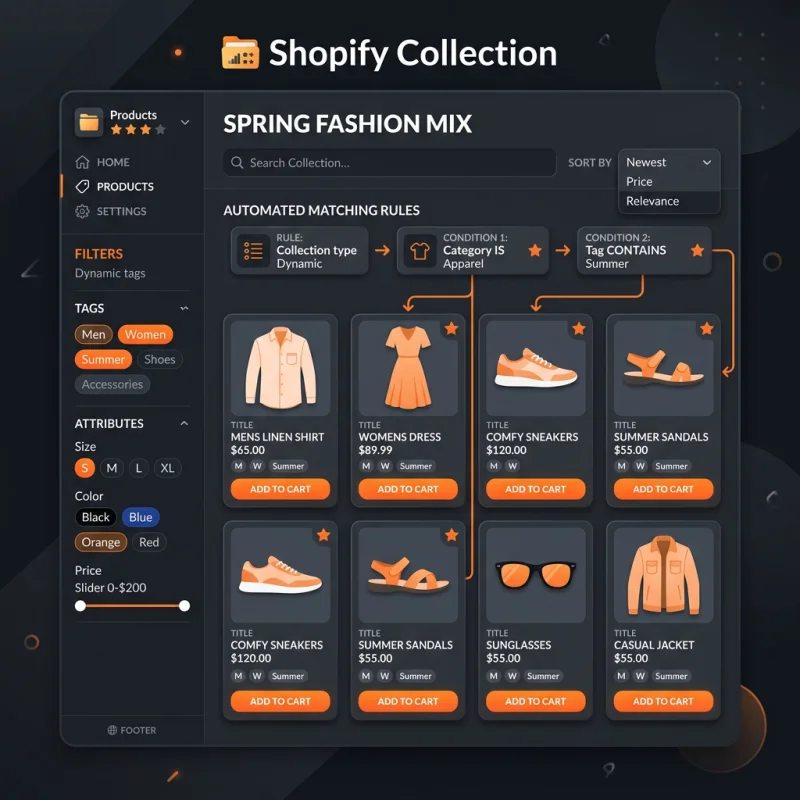
Configuring an Automated Collection
- Define specific Conditions such as product tags, vendor, price range, or inventory status.
- Choose whether products must meet all conditions or any condition to be included.
- Save your settings, and Shopify will automatically populate the collection.
Optimizing Collection Visibility
Once your collections are set up, ensure they are accessible from your store's navigation menus:
- Go to Online Store > Navigation.
- Select the menu where you want the collection to appear.
- Click Add menu item, name it appropriately, and link it to your collection.
- Save changes and verify on your storefront.
- Example 1: A fashion retailer creates seasonal collections like "Spring 2024 Collection" to showcase new arrivals, encouraging customers to explore the latest trends.
- Example 2: An electronics store groups products by brand or function, such as "Wireless Headphones" or "Smart Home Devices," simplifying the shopping process.
Advanced Customization and SEO
Enhance your collections for SEO by editing the collection description and adding relevant keywords. Use descriptive titles and alt text for collection images. Shopify also allows you to customize the URL handle for each collection, which can improve search engine rankings. For technical SEO best practices, consult Shopify's SEO guide for collections.
The Strategic Power of Shopify Collections
Beyond mere organization, collections are powerful tools for driving sales and enhancing customer engagement. Here's how:
Targeted Marketing and Promotions
By creating themed collections - such as summer essentials, holiday gifts, or bestsellers - you can tailor marketing campaigns to specific audiences. Collections can be featured prominently on your homepage or in email newsletters, increasing visibility and conversions.
Personalized Shopping Experiences
Using automated collections based on customer behavior or preferences (like past purchases or browsing history) enables personalized experiences. Shopify apps and integrations can facilitate dynamic collections that adapt to individual shoppers, boosting loyalty and repeat business.
Inventory Management and Sales Optimization
Collections help in managing stock levels by grouping slow-moving items for clearance or highlighting high-margin products. Seasonal collections can be scheduled to launch at optimal times, aligning inventory with market demand.
SEO and Organic Traffic Growth
Well-structured collections improve your store's internal linking and keyword relevance, which are critical for SEO. Each collection page can rank independently in search engines, capturing organic traffic for specific product niches. For example, a collection titled "Eco-Friendly Yoga Mats" can target long-tail keywords, attracting highly relevant visitors.
Real-World Examples and Best Practices
To maximize collection effectiveness, regularly review analytics to identify high-performing collections and optimize underperforming ones. Use tools like Google Analytics and Shopify's native reports to track visitor behavior and conversion metrics.
Additional Resources
Frequently Asked Questions
How do I set up a collection in Shopify?
To set up a collection, log into your Shopify admin, navigate to Products > Collections, and click Create collection. Choose between manual or automated, then fill in details like title, description, and images. For manual collections, add products individually; for automated, set conditions based on tags, vendor, or other criteria. Save your collection and add it to your store navigation for visibility. Proper setup ensures a seamless shopping experience and improves SEO.
Can I customize the appearance of my collections?
Yes, Shopify themes allow extensive customization of collection pages. You can modify layouts, add banners, change fonts, and include custom images through the theme editor or by editing theme code. Additionally, apps from the Shopify App Store can enhance collection presentation with features like filters, sorting options, and dynamic layouts. Customization helps align collections with your brand identity and improves user engagement.
How do collections impact SEO?
Collections improve SEO by creating keyword-rich, relevant pages that search engines can index. Properly optimized collection titles, descriptions, and images enhance visibility in search results. Internal linking from your homepage and other pages boosts overall site authority. Additionally, structured data markup can help search engines understand your collections better, leading to rich snippets and higher click-through rates. Regularly updating collection content and maintaining clean URLs are best practices for SEO success.
What are some best practices for managing collections?
Effective collection management involves regularly reviewing product groupings, updating descriptions with relevant keywords, and ensuring navigation links are current. Use analytics to identify popular collections and optimize or expand them. Keep collection images high quality and relevant. Also, consider seasonal or promotional collections to boost sales during specific periods. Automating product inclusion based on conditions saves time and ensures collections stay current without manual intervention.

About Priya Sharma
Content marketing expert and Shopify ecosystem authority. Priya has helped 200+ stores grow organic traffic through strategic blog content and keyword targeting.