
Theme App Extension
Quick Definition
A Theme App Extension is a framework that allows apps to inject content and scripts into Online Store 2.0 themes using App Blocks and App Embeds.
Table of Contents
- Understanding Theme App Extensions in Shopify
- Configuring and Implementing Theme App Extensions in Shopify
- Strategic Business Value and Optimization of Theme App Extensions
- Conclusion
- Frequently Asked Questions
- How do I set up a Theme App Extension in Shopify?
- Can I customize Theme App Extensions after deployment?
- What are the benefits of using Theme App Extensions over traditional app integrations?
- Are Theme App Extensions compatible with all Shopify themes?
Understanding Theme App Extensions in Shopify
Theme App Extensions are a pivotal component of Shopify's Online Store 2.0 architecture, enabling developers and merchants to enhance and customize storefronts seamlessly. Essentially, a Theme App Extension is a specialized framework that allows third-party apps to inject content, scripts, and functionalities directly into Shopify themes through predefined extension points such as App Blocks and App Embeds. This modular approach promotes a more flexible, scalable, and maintainable storefront design, aligning with modern e-commerce needs.
Unlike traditional app integrations that often require manual code edits or theme modifications, Theme App Extensions operate within a controlled environment, reducing the risk of conflicts or theme breakage. They leverage Shopify's extension points system, allowing apps to add features like custom sections, banners, product recommendations, or interactive elements without altering core theme files. This architecture not only streamlines the development process but also empowers merchants to customize their storefronts more intuitively.
From a technical perspective, Theme App Extensions are built using Shopify's extension point API and are packaged as part of the Shopify CLI development workflow. They are designed to be compatible with Shopify's Online Store 2.0 themes, which support JSON templates and flexible section-based layouts, making them ideal for creating dynamic, personalized shopping experiences.
Configuring and Implementing Theme App Extensions in Shopify
Implementing Theme App Extensions involves several key steps, from development to deployment within your Shopify admin panel. Here's a detailed walkthrough:
- Prerequisites: Ensure you have a Shopify Partner account, access to the Shopify CLI, and a development store set up for testing.
- Development Environment Setup: Install Shopify CLI and initialize your theme project. Use commands like
shopify extension createto generate a new Theme App Extension scaffold. - Designing Extension Content: Define your extension's content using Liquid, JSON, and JavaScript. Use Shopify's extension point APIs to specify where your app's content will appear.
- Testing Locally: Use Shopify CLI commands such as
shopify extension serveto preview your extension in a local environment or on a development store. - Packaging and Deployment: Once tested, package your extension and publish it via the Shopify Partners Dashboard. Assign it to your app and specify the extension points it will utilize.
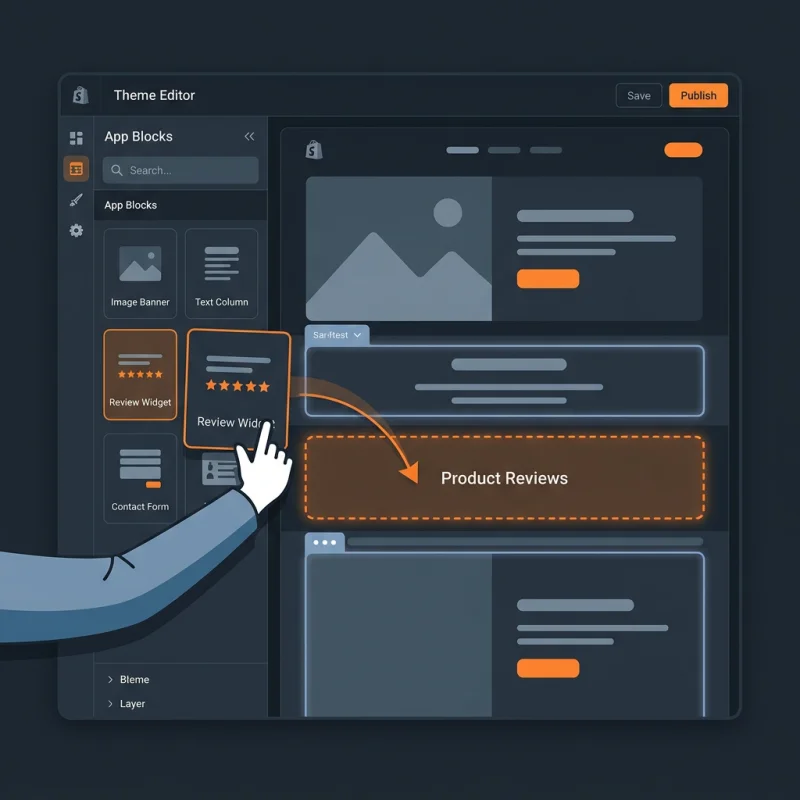
- Adding Extensions to Themes: In the Shopify admin, navigate to Online Store > Themes > Customize. Use the theme editor to add your app blocks or embed code snippets into theme sections.
- Managing Extensions: Post-deployment, monitor extension performance, update content, and manage permissions through the Shopify admin and Partners Dashboard.
Throughout this process, developers should adhere to Shopify's extension point guidelines to ensure compatibility and optimal performance. Proper testing, version control, and documentation are essential for maintaining a robust extension ecosystem.
Strategic Business Value and Optimization of Theme App Extensions
Theme App Extensions significantly enhance the flexibility and scalability of Shopify storefronts, offering tangible strategic benefits for e-commerce businesses. By enabling modular customization, merchants can rapidly adapt their storefronts to changing market trends, seasonal campaigns, or personalized customer experiences without extensive code modifications.
One of the primary advantages is improved user experience (UX). Custom app blocks can be used to display personalized product recommendations, dynamic banners, or interactive elements that increase engagement and conversion rates. For example, a fashion retailer might deploy a Theme App Extension to showcase trending styles based on customer browsing history, leveraging Shopify's schema.org markup for better SEO.
From an operational perspective, Theme App Extensions streamline development workflows. Developers can create reusable components that are easy to update and deploy across multiple themes or stores, reducing time-to-market and maintenance costs. This modularity also aligns with Shopify's web.dev best practices for performance optimization, ensuring fast load times and responsive design.
Real-world examples include:
- Adding custom promotional banners that update automatically based on inventory levels.
- Embedding customer reviews or social proof widgets that are easy to manage and update.
- Implementing advanced filtering or product sorting options within collection pages.
To maximize the value of Theme App Extensions, merchants should focus on strategic placement, performance optimization, and seamless integration with their overall marketing and sales funnels. Regularly reviewing analytics and user feedback can help refine extensions for better engagement and ROI.
For further insights, Shopify's developer documentation offers extensive guidance on extension development and best practices: shopify.dev.
Conclusion
Theme App Extensions are transforming how Shopify merchants customize and enhance their online stores. By leveraging this powerful framework, developers and merchants can create dynamic, personalized, and scalable storefronts that meet modern e-commerce demands. As Shopify continues to evolve, mastering Theme App Extensions will be essential for staying competitive and delivering exceptional shopping experiences.
Frequently Asked Questions
How do I set up a Theme App Extension in Shopify?
Setting up a Theme App Extension involves creating an extension scaffold using Shopify CLI, designing your extension content with Liquid and JavaScript, testing locally or on a development store, and then deploying it through the Shopify Partners Dashboard. After deployment, you can add your extension to themes via the Shopify admin's theme editor. This process allows for seamless integration without altering core theme files, ensuring maintainability and compatibility with Online Store 2.0 themes.
Can I customize Theme App Extensions after deployment?
Yes, you can update and customize Theme App Extensions after deployment. Shopify provides tools within the Partners Dashboard and CLI to modify extension content, update scripts, or change extension points. Regular updates help improve functionality, fix bugs, and adapt to changing business needs. It's recommended to test updates thoroughly before deploying to live stores to prevent disruptions.
What are the benefits of using Theme App Extensions over traditional app integrations?
Theme App Extensions offer a modular, scalable, and less invasive way to customize storefronts compared to traditional app integrations. They reduce the risk of theme conflicts, simplify updates, and enable merchants to add features directly into theme sections without manual code edits. This approach aligns with Shopify's Online Store 2.0 architecture, providing a more flexible and future-proof customization method.
Are Theme App Extensions compatible with all Shopify themes?
Theme App Extensions are designed primarily for Shopify's Online Store 2.0 themes, which support JSON templates and flexible sections. They are compatible with most modern themes built on this architecture. However, themes based on older architecture may require additional modifications or may not support certain extension features. Always verify compatibility during development and testing phases.

About David Chen
Technical SEO engineer focused on structured data, indexing optimization, and Core Web Vitals. David turns complex technical requirements into actionable Shopify solutions.