
Online Store 2.0
Quick Definition
Online Store 2.0 (OS 2.0) is Shopify's modern theme architecture that supports sections everywhere, app blocks, and improved performance.
Table of Contents
- Understanding Online Store 2.0
- Implementing Online Store 2.0 in Shopify
- Strategic Business Value of Online Store 2.0
- Additional Resources and References
- Frequently Asked Questions
- How do I identify if my Shopify theme is Online Store 2.0 compatible?
- What are the key benefits of switching to Online Store 2.0?
- Can I migrate my existing Shopify store to Online Store 2.0?
Understanding Online Store 2.0
Online Store 2.0 (OS 2.0) represents a significant evolution in Shopify's platform architecture, designed to empower merchants with greater flexibility, enhanced performance, and a more customizable shopping experience. Introduced in 2021, OS 2.0 shifts from the traditional theme architecture to a modular, component-based system that allows store owners and developers to build highly personalized storefronts without extensive coding. This architecture supports sections everywhere, enabling dynamic content placement on product pages, collection pages, and even the homepage, fostering a more engaging and tailored shopping journey.
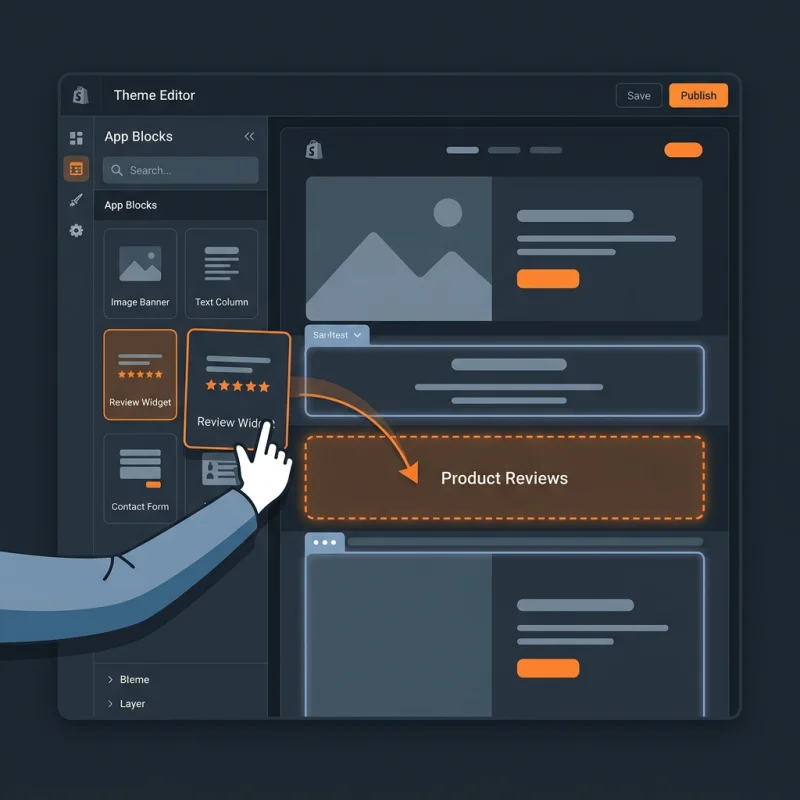
At its core, OS 2.0 leverages a new theme architecture built on JSON templates, which simplifies theme customization and upgrades. It introduces app blocks, allowing third-party apps to seamlessly integrate into themes as modular components, reducing conflicts and improving maintainability. Additionally, OS 2.0 enhances site speed, accessibility, and SEO performance, aligning with modern web standards and user expectations. This platform update is not just a technical upgrade but a strategic tool that enables merchants to innovate rapidly and deliver unique customer experiences, ultimately driving higher conversion rates and customer loyalty.
Implementing Online Store 2.0 in Shopify
Transitioning to Online Store 2.0 involves a series of strategic steps within the Shopify admin dashboard. The process begins with selecting a compatible theme, as only OS 2.0 themes support the new architecture. To verify this, navigate to Online Store > Themes and check the theme details or visit the Shopify Theme Store for OS 2.0 options.
Once a suitable theme is installed, customize it via Online Store > Themes > Customize. Here, you will notice the new sections everywhere feature, allowing you to add, remove, and rearrange content blocks on product pages, collection pages, and homepage sections. This flexibility is a core benefit of OS 2.0, enabling non-developers to craft unique layouts without editing code.
For advanced customization, developers can modify theme files using Shopify's Liquid templating language, now complemented by JSON templates. Access these via Online Store > Themes > Actions > Edit code. Here, you can create custom sections, add app blocks, and optimize your storefront for performance and SEO. Shopify's documentation provides detailed guidance on creating and managing these components (help.shopify.com).
To leverage app blocks, install compatible apps from the Shopify App Store that support OS 2.0. These apps can add functionalities such as reviews, product upsells, or custom content blocks directly into your theme, enhancing the user experience without code conflicts.
Strategic Business Value of Online Store 2.0
Adopting Online Store 2.0 offers substantial strategic advantages for e-commerce businesses. First, it significantly improves site performance, which is critical as Google's algorithms prioritize fast-loading websites. Faster sites lead to better SEO rankings and higher conversion rates; according to web.dev, a one-second delay in load time can reduce conversions by up to 7%.
Secondly, OS 2.0 enhances flexibility in design and content management. Merchants can create highly personalized storefronts tailored to their brand and customer preferences, fostering a more engaging shopping experience. This customization capability reduces reliance on developers for routine updates, lowering operational costs and speeding up deployment of new features or campaigns.
Moreover, the modular architecture facilitates faster site updates and integrations. App blocks enable seamless addition of new functionalities, making it easier to adapt to market trends or customer feedback. This agility is vital in a competitive landscape where rapid innovation can differentiate a brand.
Real-world examples include brands that have redesigned their product pages with interactive sections, dynamic content, and personalized recommendations, resulting in increased average order value and customer retention. Additionally, OS 2.0's improved SEO capabilities, such as better structured data and faster load times, contribute to higher organic traffic, reducing dependence on paid advertising.
In conclusion, Online Store 2.0 is not merely a technical upgrade but a strategic enabler for growth, efficiency, and customer engagement. By leveraging its features, merchants can build more adaptable, faster, and more compelling online stores that meet the demands of modern consumers.
Additional Resources and References
Frequently Asked Questions
How do I identify if my Shopify theme is Online Store 2.0 compatible?
To determine if your Shopify theme supports Online Store 2.0, navigate to Online Store > Themes in your Shopify admin. Look for themes labeled as "Online Store 2.0" or check the theme's details for mentions of JSON templates and sections everywhere support. You can also visit the Shopify Theme Store and filter themes by compatibility. Upgrading to an OS 2.0 theme is recommended for full access to the new architecture, which allows for greater customization and app integration.
What are the key benefits of switching to Online Store 2.0?
Switching to Online Store 2.0 provides numerous benefits, including improved site speed, enhanced customization options, and better SEO performance. It allows merchants to create dynamic, personalized storefronts with sections everywhere, reducing reliance on developers for routine updates. Additionally, OS 2.0 facilitates easier app integration through app blocks, enabling rapid deployment of new features. Overall, it leads to a more flexible, faster, and engaging shopping experience, which can increase conversions and customer satisfaction.
Can I migrate my existing Shopify store to Online Store 2.0?
Yes, migrating to Online Store 2.0 is possible but requires careful planning. You should select an OS 2.0-compatible theme and back up your current theme and customizations. The migration process involves installing the new theme, transferring custom code, and reconfiguring sections and app integrations. Shopify provides detailed guides and support to assist with this transition. It's advisable to test the new setup thoroughly before going live to ensure all functionalities work correctly and your store maintains its branding and user experience.

About David Chen
Technical SEO engineer focused on structured data, indexing optimization, and Core Web Vitals. David turns complex technical requirements into actionable Shopify solutions.