
App Embed
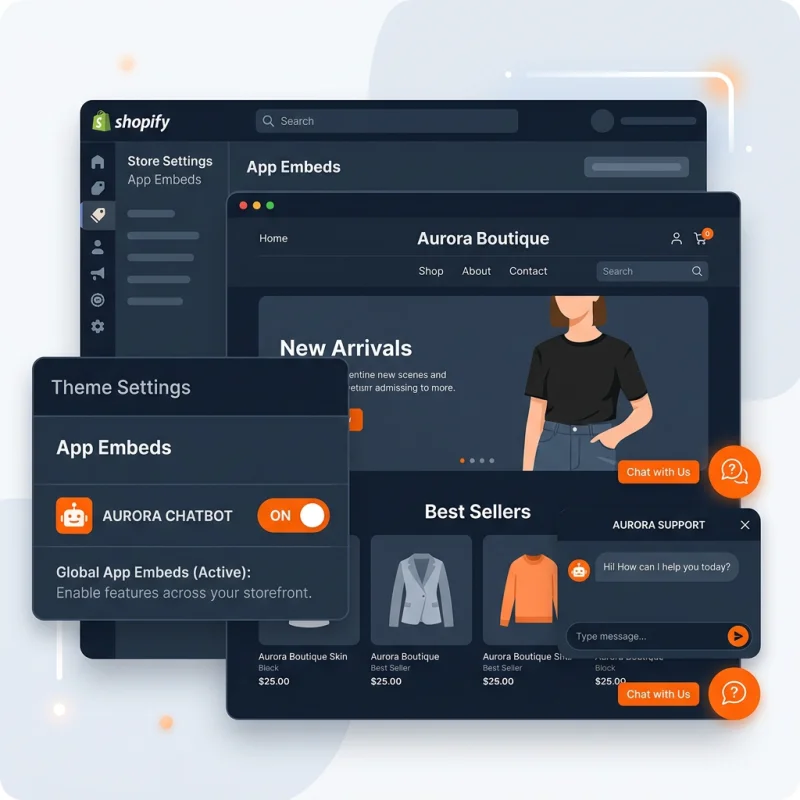
Quick Definition
An App Embed is a global component provided by a Shopify app that runs site-wide or on specific templates without requiring visual placement inside a theme section.
Table of Contents
- Understanding App Embed in Shopify
- Implementing App Embed in Shopify: Step-by-Step Guide
- Accessing the Shopify Admin Panel
- Installing or Developing an App with Embed Capabilities
- Configuring Embeds within Shopify Themes
- Testing and Validation
- Strategic Business Value of App Embeds
- Optimization Tips and Best Practices
- Real-World Examples and Case Studies
- FAQs about App Embed in Shopify
- How do I set up an App Embed in Shopify?
- Can I customize App Embeds to target specific pages?
- Are App Embeds SEO-friendly?
- What security considerations should I keep in mind?
Understanding App Embed in Shopify
An App Embed in Shopify is a powerful feature that allows developers and store owners to integrate app functionalities directly into a store's theme without altering the visual layout or requiring manual placement within theme sections. Unlike traditional app integrations that often involve inserting code snippets or widgets into specific theme files, an App Embed acts as a global component that loads site-wide or on designated templates seamlessly. This approach simplifies the process of extending store capabilities, ensuring consistency and reducing development overhead.
At its core, an App Embed is designed to enhance the flexibility of Shopify stores by enabling apps to inject scripts, styles, or interactive elements dynamically. This is particularly beneficial for functionalities like live chat, personalized recommendations, or analytics tracking, which need to operate across multiple pages without cluttering the theme code. By leveraging App Embeds, developers can create more modular, maintainable, and scalable integrations that adapt effortlessly to theme updates or customizations.
From a technical perspective, App Embeds utilize Shopify's ScriptTag API and theme extension points to embed scripts at specific points in the store's lifecycle. They are typically packaged as part of a Shopify app and registered during app installation, allowing the store to automatically load the embed without manual intervention. This mechanism aligns with Shopify's move toward a more flexible, app-centric architecture, empowering merchants to customize their storefronts with minimal technical effort.
Implementing App Embed in Shopify: Step-by-Step Guide
Accessing the Shopify Admin Panel
Begin by logging into your Shopify admin dashboard. Navigate to Apps in the left sidebar. If you already have an app that supports App Embeds, select it; otherwise, you will need to develop or install an app that offers this functionality. Shopify's App Store hosts numerous apps designed for embedding scripts and components, such as Shopify App Store.
Installing or Developing an App with Embed Capabilities
If you are developing your own app, ensure it supports App Embeds by utilizing Shopify's Embed API. During app setup, define the embed components within your app's configuration, specifying whether they should load globally or on specific templates. For existing apps, follow the installation instructions provided by the app developer to enable embed functionalities.
Configuring Embeds within Shopify Themes
Once the app is installed, go to Online Store > Themes. Click Customize on your active theme. In the theme editor, access the Theme Settings or Code Editor depending on the app's instructions. Many apps automatically inject their scripts via theme extension points, such as theme.liquid or specific template files.
For manual configuration, locate the theme's layout files, typically theme.liquid, and insert the embed code snippets provided by the app. These snippets often include script tags or data attributes that enable the app's functionality. Some apps offer a dedicated section within the theme editor where you can toggle embed activation or specify page targeting.
Testing and Validation
After configuration, preview your store to ensure the embed loads correctly. Use browser developer tools to verify that scripts are executing without errors. Check for any conflicts with existing scripts or styles. It's also advisable to test across different devices and browsers to confirm responsiveness and performance.
Strategic Business Value of App Embeds
Implementing App Embeds unlocks significant strategic advantages for e-commerce businesses. They enable seamless integration of advanced functionalities without the need for extensive theme modifications, reducing development time and costs. This modular approach allows store owners to rapidly deploy new features, such as personalized product recommendations, live chat support, or loyalty program widgets, directly enhancing customer experience.
Moreover, App Embeds facilitate data collection and analytics by embedding tracking scripts across the entire site or specific pages. This comprehensive data collection supports better decision-making, targeted marketing, and personalized shopping experiences, which are proven to increase conversion rates. According to Shopify's own data, stores that leverage personalized and interactive features see an average increase of 10-15% in sales.
From an SEO perspective, App Embeds can be optimized to ensure fast load times and minimal impact on page performance. Properly implemented, they contribute to a more engaging user experience, which search engines favor. Additionally, by using structured data and schema markup within embedded components, merchants can enhance their visibility in search results.
Optimization Tips and Best Practices
- Lazy Loading: Implement lazy loading for scripts to improve page load speed.
- Minimize Conflicts: Use unique class and ID selectors within embedded scripts to prevent conflicts with existing theme code.
- Responsive Design: Ensure embedded components are mobile-friendly and adapt to various screen sizes.
- Performance Monitoring: Regularly audit embed scripts using tools like Google Lighthouse to maintain optimal performance.
- Security: Only use trusted apps and verify that embedded scripts follow security best practices to prevent vulnerabilities.
Real-World Examples and Case Studies
Many successful Shopify stores utilize App Embeds to enhance their storefronts. For instance, a fashion retailer might embed a live chat widget across all pages to improve customer support. An electronics store could embed a product comparison tool that dynamically loads on product pages, aiding customers in making informed decisions. These implementations have been shown to increase engagement and reduce bounce rates.
Another example is a store that uses embedded review widgets to display user-generated content, boosting social proof and conversions. These embedded components are often managed centrally via apps, allowing for easy updates and consistent branding across the site.
FAQs about App Embed in Shopify
How do I set up an App Embed in Shopify?
Setting up an App Embed involves installing a compatible app from the Shopify App Store or developing your own using Shopify's Embed API. Once installed, configure the embed settings within the app's interface, then integrate the embed code into your theme through the theme editor or code files. Testing across devices ensures proper functionality. Many apps provide step-by-step guides to streamline this process, making it accessible even for non-developers.
Can I customize App Embeds to target specific pages?
Yes, most App Embeds can be configured to load on specific pages or templates. This is achieved by setting display rules within the app's configuration or by editing theme files to conditionally load embed scripts based on URL patterns or template types. For example, you might want a review widget only on product pages or a chat widget on the checkout page. Proper targeting enhances user experience and performance.
Are App Embeds SEO-friendly?
When implemented correctly, App Embeds can be SEO-friendly by ensuring they do not hinder page load times and are structured to support accessibility. Embeds that load asynchronously and follow best practices for script management help maintain good SEO performance. Additionally, embedding structured data within your components can improve search engine understanding and enhance your visibility in rich snippets.
What security considerations should I keep in mind?
Only install apps from trusted sources and verify that embedded scripts follow security best practices, such as avoiding inline scripts and ensuring HTTPS delivery. Regularly update your apps and theme files to patch vulnerabilities. Use Content Security Policy (CSP) headers to restrict unauthorized script execution. These measures help protect your store and customer data from potential threats.

About David Chen
Technical SEO engineer focused on structured data, indexing optimization, and Core Web Vitals. David turns complex technical requirements into actionable Shopify solutions.