
Embedded App
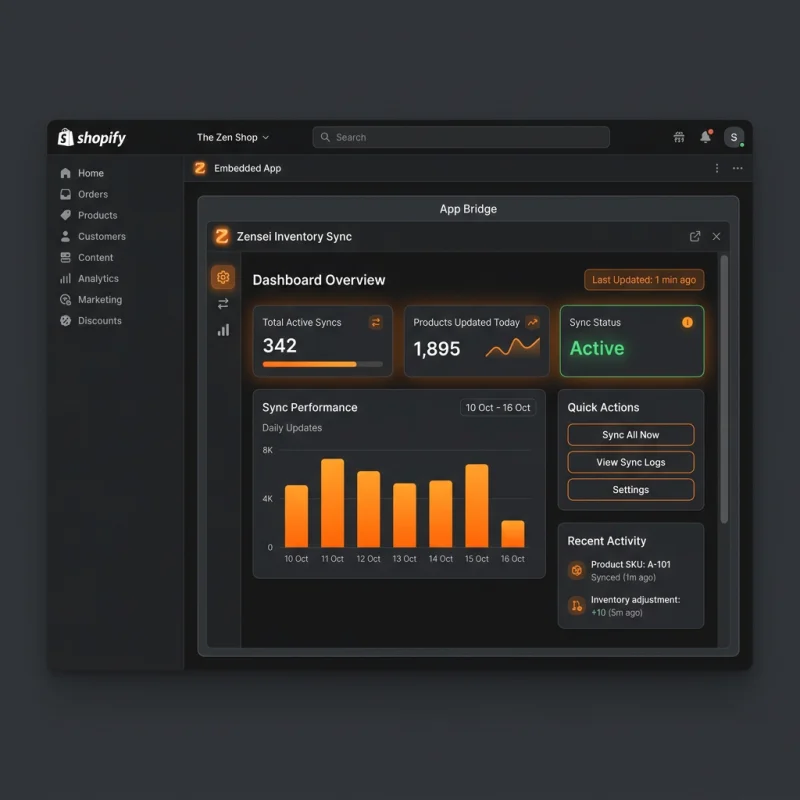
Quick Definition
An Embedded App is a Shopify application that runs directly inside the Shopify Admin panel as an iframe, leveraging App Bridge to match Shopify's look and feel.
Table of Contents
- Understanding Embedded Apps in Shopify
- Configuring and Implementing Embedded Apps in Shopify
- Strategic Business Value and Optimization of Embedded Apps
- Frequently Asked Questions
- How do I set up an embedded app in Shopify?
- What are the main benefits of using embedded apps in Shopify?
- Can I customize the appearance of my embedded app to match Shopify's look and feel?
Understanding Embedded Apps in Shopify
An Embedded App in Shopify refers to an application that operates directly within the Shopify Admin interface, providing merchants with enhanced functionality without leaving their store management environment. Unlike standalone apps that open in separate browser tabs, embedded apps are integrated seamlessly into the Shopify admin panel through iframes, creating a cohesive user experience. This integration is achieved using Shopify's App Bridge, a JavaScript SDK that facilitates communication between the embedded app and Shopify's core platform.
Embedded apps are designed to look and feel like native parts of Shopify, leveraging the platform's design language and navigation. This tight integration allows developers to create powerful tools - such as inventory management, order processing, or marketing dashboards - that merchants can access effortlessly. As of recent data, over 80% of Shopify apps listed in the Shopify App Store are embedded, reflecting their importance in modern e-commerce ecosystems.
From a technical perspective, embedded apps utilize iframes to embed external web applications within the Shopify admin. This approach ensures security, isolation, and consistency across different apps and Shopify themes. Additionally, Shopify provides APIs and SDKs to facilitate authentication, data exchange, and UI customization, making embedded app development both robust and scalable.
Configuring and Implementing Embedded Apps in Shopify
Implementing an embedded app in Shopify involves several key steps, starting from app registration to embedding within the admin interface. Here is a detailed walkthrough:
- Register Your App in Shopify Partners Dashboard: Begin by creating a new app in your Shopify Partners account. During registration, specify the app type as embedded and provide essential details like app name, URL, and redirect URLs.
- Configure App Settings: In the app setup, enable the Embedded App toggle. Set the app's URL, which is the web application that will run inside the iframe. Shopify requires HTTPS for security reasons, so ensure your server supports SSL.
- Implement Shopify App Bridge: Integrate the Shopify App Bridge SDK into your app. This SDK manages the communication between your app and Shopify, handling tasks such as navigation, modal dialogs, and notifications.
- Handle Authentication: Use OAuth 2.0 to authenticate merchants securely. Shopify provides OAuth endpoints and tokens that your app must handle to access store data securely.
- Embed the App in Shopify Admin: Once configured, Shopify automatically embeds your app within the admin panel. Merchants can access it via the Apps section or through custom links in the admin sidebar.
- Design for Seamless User Experience: Match Shopify's UI/UX standards by utilizing Shopify Polaris design system. This ensures your embedded app feels native and intuitive.
- Test and Deploy: Test your embedded app thoroughly across different devices and Shopify themes. Use Shopify's testing tools to simulate merchant environments before going live.
In terms of navigation, embedded apps are accessible via the Shopify admin menu, and developers can add custom links or buttons using the Shopify App Bridge. The app's URL is loaded within an iframe, which is sandboxed for security. Shopify also provides mechanisms to resize iframes dynamically, ensuring optimal display across devices.
Strategic Business Value and Optimization of Embedded Apps
Embedded apps are a cornerstone of modern Shopify store management, offering numerous strategic advantages:
- Enhanced User Experience: By integrating directly into the Shopify admin, embedded apps eliminate the need for merchants to switch between multiple tabs or platforms, streamlining workflows and reducing friction.
- Increased Engagement and Adoption: Seamless integration encourages merchants to utilize more features, boosting app adoption rates and, consequently, revenue for developers.
- Brand Consistency: Using Shopify's Polaris design system within embedded apps ensures visual consistency, reinforcing brand trust and professionalism.
- Data Security and Compliance: Embedding apps within Shopify's secure environment ensures compliance with data privacy standards, which is critical for handling sensitive customer and order data.
Optimization tips for embedded apps include leveraging Shopify's Embedded App SDK for dynamic resizing, implementing OAuth for secure data access, and adhering to Shopify's Polaris design guidelines for UI consistency. Real-world examples include inventory management tools like Stocky, marketing dashboards such as Kit, and order processing apps like Oberlo.
Furthermore, analytics and KPIs can be integrated into embedded apps to monitor merchant engagement, feature usage, and overall performance. This data informs iterative improvements, ensuring the app remains valuable and competitive in the Shopify ecosystem.
For developers, understanding the strategic importance of embedded apps means focusing on seamless integration, security, and user-centric design. As Shopify continues to evolve, embedded apps will remain vital for creating scalable, efficient, and engaging e-commerce solutions.
Frequently Asked Questions
How do I set up an embedded app in Shopify?
Setting up an embedded app involves registering your app in the Shopify Partners Dashboard, configuring the app as embedded, integrating Shopify App Bridge SDK, and implementing OAuth for authentication. Once configured, Shopify embeds your app within the admin panel, accessible via the Apps section or custom links. Ensure your app uses HTTPS, follows Shopify Polaris design standards, and is tested thoroughly across devices. Shopify provides comprehensive documentation and tools to streamline this process, making it accessible even for developers new to Shopify app development.
What are the main benefits of using embedded apps in Shopify?
Embedded apps enhance the merchant experience by providing seamless, integrated functionalities within the Shopify admin. They reduce context switching, improve workflow efficiency, and foster higher app adoption. Additionally, embedded apps benefit from Shopify's security infrastructure, ensuring data privacy and compliance. They also allow developers to create more engaging and intuitive interfaces, leveraging Shopify's Polaris design system, which increases user satisfaction and retention. Overall, embedded apps are essential for building scalable, user-friendly Shopify solutions that align with modern e-commerce needs.
Can I customize the appearance of my embedded app to match Shopify's look and feel?
Yes, Shopify provides the Polaris design system, a comprehensive UI framework that helps developers create consistent and visually appealing embedded apps. By adhering to Polaris guidelines, your app will seamlessly blend into the Shopify admin interface, providing a native-like experience. Additionally, the Shopify App Bridge SDK offers tools for customizing navigation, modals, and notifications, further enhancing the integration. Custom styling should be minimal and aligned with Polaris to maintain visual harmony. This approach not only improves user trust but also ensures compliance with Shopify's design standards, leading to higher engagement and satisfaction.

About David Chen
Technical SEO engineer focused on structured data, indexing optimization, and Core Web Vitals. David turns complex technical requirements into actionable Shopify solutions.