
Email Marketing (Shopify Email)
Quick Definition
Email Marketing is a digital marketing strategy of sending targeted promotional emails to store subscribers, managed natively via Shopify Email.
Table of Contents
- Understanding Email Marketing with Shopify Email
- Configuring Shopify Email: Step-by-Step Guide
- Accessing Shopify Email
- Setting Up Your Email Campaigns
- Building Your Email List
- Designing and Personalizing Emails
- Scheduling and Automating Campaigns
- Strategic Business Value of Shopify Email Marketing
- Optimization Tips for Better Results
- Real-World Examples and Case Studies
- Additional Resources and References
- Frequently Asked Questions
- How do I set up Shopify Email for my store?
- Can I automate email campaigns with Shopify Email?
- What are best practices for designing effective Shopify Email campaigns?
Understanding Email Marketing with Shopify Email
Email marketing remains one of the most effective channels for e-commerce businesses to engage customers, nurture leads, and drive sales. Shopify Email, Shopify's native email marketing solution, enables store owners to create, send, and analyze targeted email campaigns directly from their Shopify dashboard. This integration simplifies the process, eliminating the need for third-party tools, and provides seamless synchronization with customer data, order history, and store analytics.
At its core, email marketing involves sending personalized messages to a targeted list of subscribers to promote products, announce sales, or build brand loyalty. According to recent studies, email marketing boasts an average ROI of $42 for every dollar spent, making it a cornerstone of digital marketing strategies. Shopify Email leverages this power by offering customizable templates, automation workflows, and detailed performance metrics, empowering merchants to optimize their campaigns effectively.
Configuring Shopify Email: Step-by-Step Guide
Accessing Shopify Email
- Log into your Shopify admin panel.
- Navigate to Marketing from the left sidebar.
- Click on Shopify Email. If it's not installed, follow the prompts to add it from the Shopify App Store.
Setting Up Your Email Campaigns
Once Shopify Email is installed, you can start creating campaigns by clicking Create Campaign. You'll be prompted to choose a template or start from scratch. Shopify offers a variety of professionally designed templates optimized for conversions.
Building Your Email List
Effective email marketing hinges on a quality subscriber list. Shopify integrates with your store's customer accounts, allowing you to segment your audience based on purchase behavior, location, or engagement level. You can also embed sign-up forms on your website or pop-ups to grow your list organically.
Designing and Personalizing Emails
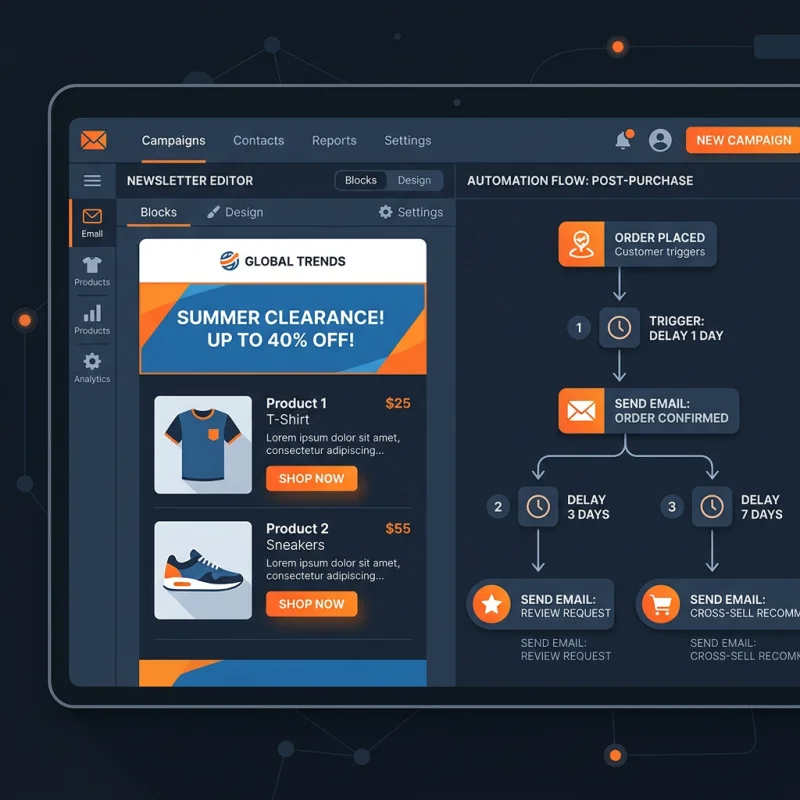
Use Shopify Email's drag-and-drop editor to customize your templates. Personalization tokens like {{ customer.first_name }} can be inserted to make messages more engaging. Incorporate compelling visuals, clear calls-to-action, and relevant content to maximize open and click-through rates.
Scheduling and Automating Campaigns
Automation features allow you to send targeted emails based on triggers such as cart abandonment, order confirmation, or customer birthdays. Schedule your campaigns for optimal times based on your audience's behavior, which can be analyzed through Shopify's analytics dashboard.
Strategic Business Value of Shopify Email Marketing
Implementing a robust email marketing strategy with Shopify Email can significantly impact your store's growth. Personalized emails foster customer loyalty, increase repeat purchases, and improve lifetime value. For example, abandoned cart recovery emails have been shown to recover up to 15-20% of lost sales, translating into substantial revenue gains.
Furthermore, email marketing allows for precise segmentation, enabling targeted promotions that resonate with specific customer groups. This targeted approach results in higher engagement rates compared to generic advertising. Shopify's integration ensures that your email campaigns are data-driven, leveraging purchase history and browsing behavior to tailor messages effectively.
Optimization Tips for Better Results
- Segment your audience: Use Shopify's customer data to create segments based on behavior, location, or purchase history.
- A/B testing: Experiment with subject lines, content, and send times to identify what resonates best.
- Mobile optimization: Ensure your emails are mobile-friendly, as over 60% of emails are opened on mobile devices.
- Clear calls-to-action: Use prominent buttons and concise copy to guide recipients toward desired actions.
- Monitor analytics: Regularly review open rates, click-through rates, and conversions to refine your strategy.
Real-World Examples and Case Studies
Many successful Shopify stores leverage email marketing for exponential growth. For instance, a fashion retailer increased repeat sales by 25% after implementing personalized product recommendations in their email campaigns. Another example is a home goods store that used automated cart abandonment emails, recovering over $10,000 in lost revenue monthly.
By analyzing Shopify's built-in analytics and integrating with tools like Google Analytics, merchants can gain insights into customer behavior, campaign performance, and revenue attribution, enabling continuous improvement.
Additional Resources and References
Frequently Asked Questions
How do I set up Shopify Email for my store?
To set up Shopify Email, log into your Shopify admin panel, navigate to the Marketing section, and select Shopify Email. If it's not installed, you can add it from the Shopify App Store. Once installed, you can create your first campaign by choosing a template, customizing it, and selecting your target audience. Shopify provides step-by-step guidance to help you design effective emails and automate your campaigns. Integrating Shopify Email with your store's customer data ensures personalized messaging, which boosts engagement and conversions.
Can I automate email campaigns with Shopify Email?
Yes, Shopify Email supports automation workflows that enable you to send targeted emails based on customer actions or triggers. Common automations include abandoned cart recovery, order confirmations, welcome series, and birthday emails. Setting up automation involves selecting a trigger, designing the email content, and scheduling the timing. Automation helps maintain consistent communication, nurture leads, and recover potentially lost sales, making it a vital component of a successful email marketing strategy.
What are best practices for designing effective Shopify Email campaigns?
Effective Shopify Email campaigns should be visually appealing, personalized, and mobile-friendly. Use high-quality images, clear headlines, and concise copy. Incorporate personalization tokens like the customer's first name to increase engagement. Ensure your call-to-action buttons are prominent and compelling. Segment your audience to send relevant content, and test different elements through A/B testing to optimize performance. Regularly analyze campaign metrics such as open rates and click-through rates to refine your approach. Following these best practices can significantly improve your email marketing ROI.
}
About Priya Sharma
Content marketing expert and Shopify ecosystem authority. Priya has helped 200+ stores grow organic traffic through strategic blog content and keyword targeting.