How to Duplicate a Product in Shopify Without SEO Damage
Duplicate product management in Shopify ensures SEO signals stay strong by using drafts, unique metadata, and clear search intent before publishing.

When you duplicate a product during a busy afternoon, you may change the colour and stock details, save the new item, and move on. Later, you notice both live product URLs carry nearly the same title, description, images, and buying intent, so your store is presenting two pages to the same shoppers.
Most Shopify merchants don't have a copying problem. They have a control problem. A duplicate product is useful when the new page has a clear job, but it can create SEO confusion when a quick administrative shortcut becomes a second competing URL. The safe process starts with the right source, keeps the copy in Draft, rebuilds its commercial and SEO identity, and checks meta tags, structured data, and canonical signals before publication. Once the page is ready, wRanks can help you review alt text, keyword targets, and performance through Google Search Console. The companion guide to Shopify product title SEO fits the same workflow.
Why an Uncontrolled Product Copy Can Split Shopify SEO Signals
You may duplicate a product to save editing time, then publish the copy before deciding what makes its URL different. That shortcut can leave your Shopify store with two pages aimed at the same search, similar metadata, and no clear reason for Google to prefer one listing.
The issue isn't duplication itself. The risk starts when an administrative copy becomes a second public page with conflicting titles, descriptions, structured data, image alt text, or canonical signals. A clear search purpose turns a copy into a useful product page rather than a competing URL.

The difference between a working copy and a competing product URL
A working copy stays in Draft while you change its product identity, content, images, and SEO fields. A competing product URL goes live while those signals still closely match the original, leaving search engines to interpret two similar pages.
What duplicate product means
A duplicate product is an additional product record with matching or nearly matching information. Thrive Metrics describes a duplicate as a product appearing more than once in the same location with matching information.
“A duplicate is a product that appears more than once in the same location, with matching information,” according to Thrive Metrics.
For your store, that definition describes the record, not an automatic SEO penalty. Google can understand similar products, but your pages still need distinct reasons to appear for shoppers.
A duplicate product example
A duplicate product example is a second “Alpine Fleece Hoodie” page created for a new colour but left with the original title, description, images, and product schema. The URL may change while the page signals do not.
Weak version: “Alpine Fleece Hoodie | Northstar Apparel” for both the navy and charcoal products.
Strong version: “Charcoal Alpine Fleece Hoodie | Northstar Apparel,” with charcoal-specific images, copy, alt text, inventory details, and structured data.
The 390-search opportunity is lost when copies target the same intent
The keyword “duplicate product” receives 390 monthly searches in the supplied demand data, showing that merchants actively need a safe process. A Shopify Community thread about the issue has reached 1.0k views, which signals real uncertainty among Shopify users.
When your copies target the same intent, relevance can split between URLs. You may also create mismatched product schema or canonical signals, making it harder to identify the page that deserves visibility. The guide to how to add product schema in Shopify fits this checking workflow.
Another word for “duplicate”
The noun is duplication. In Shopify SEO, duplication means creating another product record whose search signals may repeat the original unless you give the new page a separate purpose.
The Draft-first rule for protecting the original listing
Duplicate for editing, but don't publish until one URL has a clear search purpose. That rule protects the original listing while giving you time to rebuild the copy's commercial and SEO identity.
Practical rule: Keep every duplicated Shopify product in Draft until its URL, title, description, structured data, images, alt text, and canonical purpose are clearly different or intentionally consolidated.
Choose the Copy Type Before You Click Duplicate
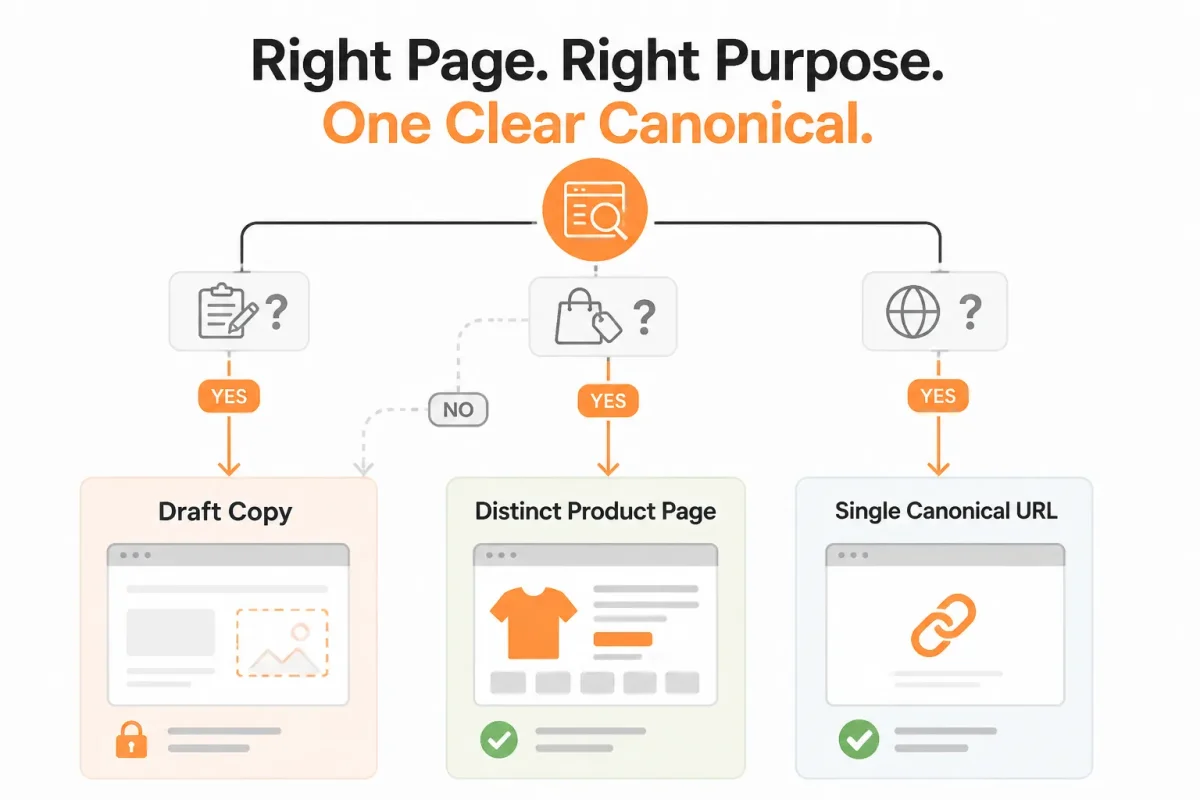
Decide whether the new Shopify product is a working draft or a genuinely separate offer. That choice determines whether you edit merchandising details, add a variant, or create another indexable URL.
Inherited product information can save time, but it cannot decide search intent for you. Use related images and specifications as starting material, then give the copy a clear reason to exist before publishing it.
Use a draft copy for controlled product edits
Use a draft copy when you need to revise a title, price, SKU, feature note, or launch configuration while preserving the original listing. Keep the copy unpublished while you check its keyword target, URL handle, media, alt text, meta tags, and structured data.
Weak example: “Blue Cotton Hoodie - Copy” with the original description and the same product images.
Strong example: “Men’s Navy Organic Cotton Hoodie” with revised feature notes, a new SKU, relevant images, and a search purpose focused on navy organic cotton hoodies.
Inherited media and product information are useful only when they still describe the revised offer. For guidance on reviewing image dimensions and presentation, this companion guide to Shopify product image size fits the same product-editing workflow.
Use a separate published page only for a distinct search intent
Publish a separate product only when your customer would search for, compare, or buy it as a different offer. A three-piece travel bundle, a professional-size refill, or a gift set may justify its own title, keyword target, images, product details, and URL.
Weak example: “Ceramic Travel Mug - Black” and “Ceramic Travel Mug - Blue” as two pages targeting the same query.
Strong example: “Ceramic Travel Mug Gift Set” as a separate page targeting gift bundles, with its own contents, photography, pricing, and buying information.
| situation | better move |
|---|---|
| The same offer needs a revised title, price, or feature note before launch | Duplicate into Draft, edit the copy, and keep it unpublished until its search purpose is reviewed |
| The product differs only by size, colour, or another selectable option | Use a variant or edit the existing product instead of creating another competing URL |
| The product is a genuinely distinct bundle, use case, or customer offer | Create a separate product with its own title, keyword target, media review, and URL purpose |
| The copy would inherit the same information and target the same query | Do not publish a second page. Improve the original or consolidate the merchandising plan |
Use one canonical product route when the offer is not genuinely different
Use an edit when the offer remains the same, and use a variant when shoppers are choosing options within one product family. A duplicate product is not justified merely because a new colour or size deserves a different internal SKU.
If both pages would retain the same information and target the same query, keep one canonical product route. Terminology does not decide your URL strategy.
Another word for “duplicate product”
Another word for “duplicate product” is a product copy, cloned listing, or replicated product record. These terms describe how you created the item, not whether your Shopify store needs a second indexable page.
Prepare the Source Product and SEO Fields Before Duplication
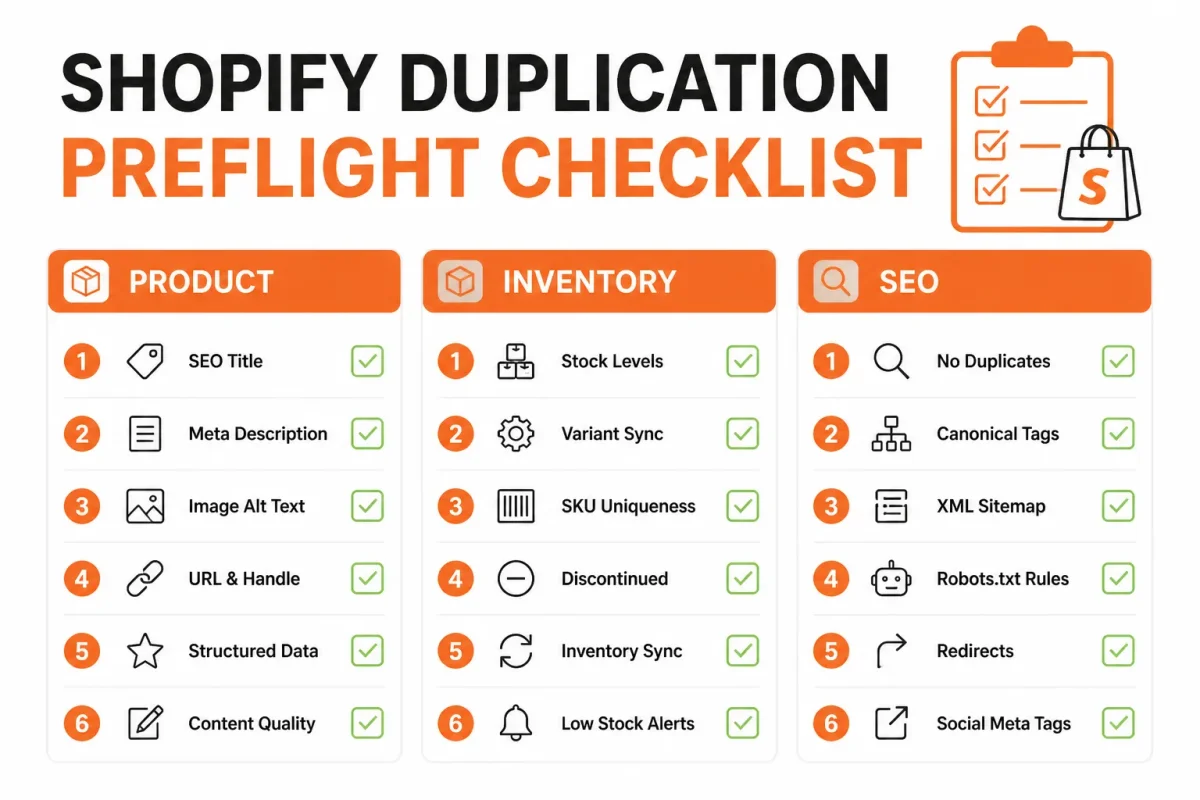
You can create the wrong copy when the source product already has unclear URLs, weak metadata, or incomplete inventory details. A quick preflight gives you a record of what exists before Shopify creates another product record.
Check the proposed copy’s search intent, offer, audience, and fulfilment conditions first. If you document the intended canonical outcome before editing, you’re less likely to leave conflicting URLs or SEO signals behind.
Record the original URL and product identity
- Source URL: Copy the current product URL and confirm it is the listing you intend to duplicate.
- Product title: Record the live title exactly, including product type, material, size, or other identifying details.
- SKU: Note the source SKU so you can assign a distinct SKU to the new offer.
- Images: List the current images and check whether each image will remain relevant to the proposed copy.
- Inventory state: Record whether the source is in stock, backordered, discontinued, or connected to a fulfilment location.
- Target keyword: Write down the query the source page currently targets and identify the copy’s different search intent, if one exists.
Decide whether the copy remains a draft
Keep the new product as a draft while you compare its offer, audience, images, inventory, and SEO fields with the source. A draft gives you a safe workspace for revision without immediately creating another public route for search engines.
- Publication status: Confirm that the source is live and the new product will remain unpublished until its fields are reviewed.
- Canonical outcome: Document whether the source, the copy, or one consolidated product should represent the primary search result.
List every field that must change before publication
- SEO fields: Record the existing meta title, meta description, URL handle, and any canonical setting before editing.
- wRanks checks: Review meta tag quality, structured data output, image alt text, keyword tracking, and Google Search Console data for the source URL.
- Product copy: Mark every sentence, specification, image, and benefit that must reflect the new offer.
Weak: “Blue Hoodie.” Strong: “Navy Organic Cotton Zip Hoodie | Northline Apparel.” The stronger title gives you a distinct product identity without inventing a different keyword target.
Once this inventory is complete, you’ll know whether duplication supports a separate offer or only repeats an existing page.
Duplicate the Shopify Product, Then Rebuild Its Search Identity
You now have the source URL, product details, and search fields recorded. Open Shopify only when you can keep the new listing unpublished until its customer purpose and SEO identity are genuinely different.
A copied product is not finished when Shopify creates the record. You need a distinct offer, clean technical signals, and a clear reason for the new page to exist.
How to duplicate products in Shopify
To duplicate products in Shopify, open Products, select the source item, choose Duplicate, and create the new record from the correct listing. This control starts the workflow, not ends it. Studio Designer’s help documentation describes a similar process using the three dots menu followed by “Duplicate.”
Done looks like: You have confirmed the source product, URL, SKU, images, and inventory before editing anything. If you copied the wrong listing, stop and delete the draft rather than repairing a damaged stock record.
Keep the new listing in Draft while changes are made
Keep the copied product in Draft while you change its identity. This keeps an unfinished page from becoming a live search competitor and gives you time to review every field.
Done looks like: You can open the preview and edit the page without customers or search engines treating it as a finished offer. If the copy is already live, unpublish it before continuing.
Separate the product details, media, SKU, and inventory
Change the title, price, SKU, feature notes, images, variants, inventory quantities, and shipping details wherever the new offer differs. A concrete change might look like this:
Weak: “Everyday Cotton Hoodie,” $48, SKU ECH-BLK-M, with the original lifestyle images and “cotton hoodie” focus.
Strong: “Heavyweight Cotton Hoodie for Winter Layering,” $68, SKU HCH-NAV-M, with fleece-close-up images, winter layering notes, and “heavyweight cotton hoodie” as the search focus.
Done looks like: Your new page describes the product customers will actually receive. If the copied page retains the original details, it remains an unchanged search competitor, not a finished product.
Rework metadata, structured data, alt text, and canonical signals
Review the meta title, meta description, structured data, image alt text, internal links, and canonical signals against the new product. wRanks can review these fields and Search Console data, but your theme or custom apps may still require a manual canonical check.
- Meta identity: Your title and description match the new product and search intent.
- Media identity: Your images and alt text describe the new garment, colour, and use.
- Technical identity: Your structured data and canonical point to the intended product URL.
Publish only after the new page has a distinct search purpose
Publish only when your offer, URL, metadata, and keyword focus serve a clear customer need that the source page does not. If you cannot explain the difference in one sentence, keep the product in Draft.
| priority | what to check | why |
|---|---|---|
| 1. Source control | Correct product, source URL, SKU, images, and inventory are recorded | Prevents edits being made to the wrong listing or stock record |
| 2. Draft identity | Copy remains Draft while title, price, feature notes, and search intent change | Keeps an unfinished page from becoming a live competitor |
| 3. SEO identity | Meta fields, structured data, image alt text, and canonical signals are reviewed | Reduces conflicting relevance and duplicated technical signals |
| 4. Publish decision | Offer and URL have a clear, distinct customer and keyword purpose | A copied page that remains unchanged should not be published |
Scale Shopify Product Duplication Without SEO Conflicts
Repeated duplication jobs can save hours across a large Shopify catalogue, but speed can also publish dozens of near-identical pages. You need a workflow that separates mechanical edits from search decisions.
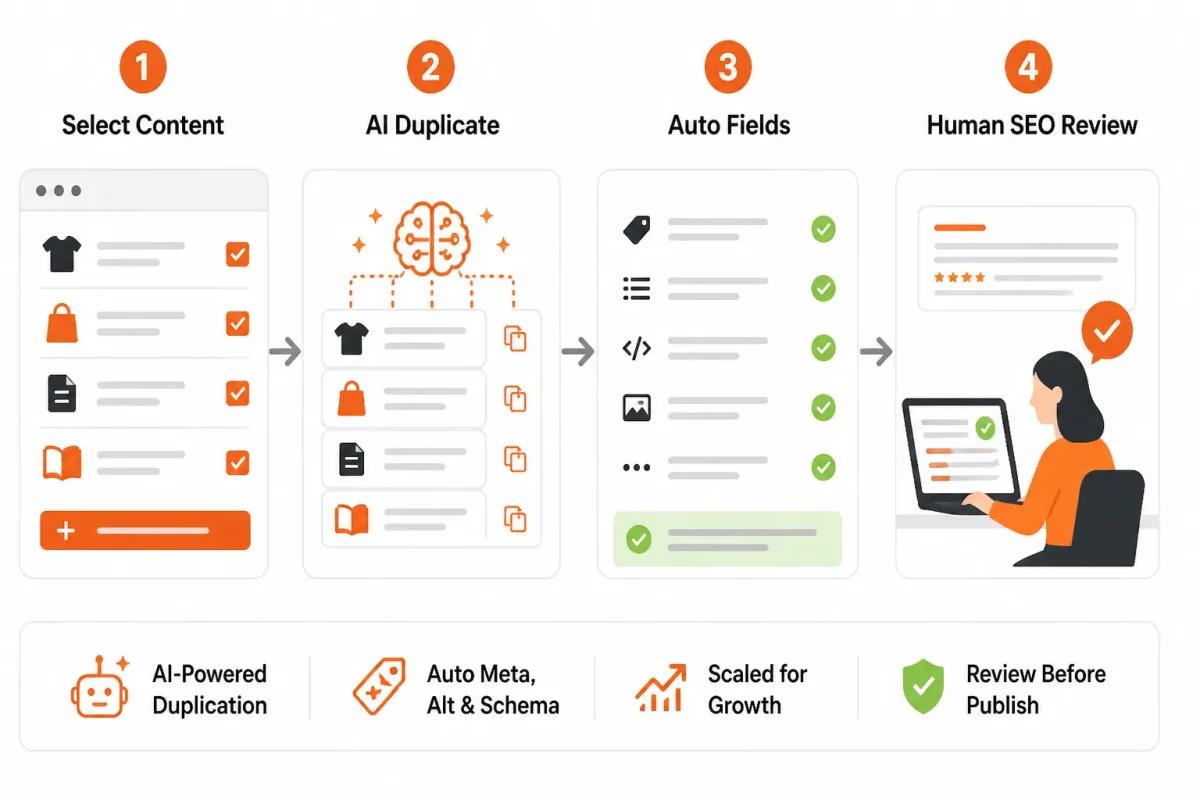
Automation should create controlled drafts, not decide which products deserve visibility. Each copy still needs a distinct offer, URL purpose, keyword target, and canonical choice before publication.
Batch the Mechanical Fields, Not the SEO Judgment
Start with approved source products, then use templates for repeatable fields such as variant details, structured data inputs, and image alt text. Create every copy as Draft, assign an owner, validate the SKU, and record the intended URL before anyone publishes.
Weak template: “Blue Backpack | Brand Name” with the same meta description and alt text applied to every colour.
Strong template: “Navy Commuter Backpack for 15-Inch Laptops” with a matching description, unique product attributes, and alt text describing the navy finish.
A duplicate product app or bulk process reduces repetitive clicks, but it cannot decide whether a new colour, bundle, or regional offer merits its own search result. Gelato’s October 30, 2025 documentation similarly describes duplication as a store selection, product lookup, and menu action, not as an SEO approval process.
What works
- Draft-only automation: Keep batch-created products unpublished until an assigned reviewer checks them.
- Review limits: Set a maximum batch size, such as 20 copies, so errors remain contained.
- SKU validation: Compare each new SKU against inventory records before search fields are edited.
- Recorded decisions: Log the intended URL, keyword target, and canonical choice for every publishable copy.
What fails
- Blind publishing: A bulk workflow can release many competing URLs before anyone checks intent.
- Shared metadata: Identical titles and descriptions make distinct products harder to interpret.
- Template-only review: A standard pattern cannot catch an unsuitable bundle or weak customer purpose.
- Unverified automation: A duplicate product app may copy stale prices, images, or inventory settings.
Create a Naming and Keyword Rule for Repeated Copies
Define how each copy earns a separate name. For example, a “TrailLite 28L Backpack” can target commuting, while “TrailLite 28L Backpack for Airline Travel” targets a different buying need. Your rule should prevent minor colour changes from creating unnecessary search competitors.
Weak naming rule: Add the colour to every copied title, regardless of search intent.
Strong naming rule: Publish a separate URL only when the product has a distinct use, offer, or query, then assign that purpose to one canonical page.
Use wRanks and Search Console to Review Scaled Changes
wRanks can monitor keyword movement, meta tags, structured data, image alt text, and Google Search Console signals after a batch goes live. Its AI-powered SEO checks help you spot patterns across Shopify stores, but monitoring does not replace pre-publication judgment.
After publishing, inspect a sample and the full change log. Check indexing, canonical signals, clicks, impressions, and unexpected keyword overlap before approving the next batch.
Fix the Failure Patterns That Make Duplicate Pages Compete
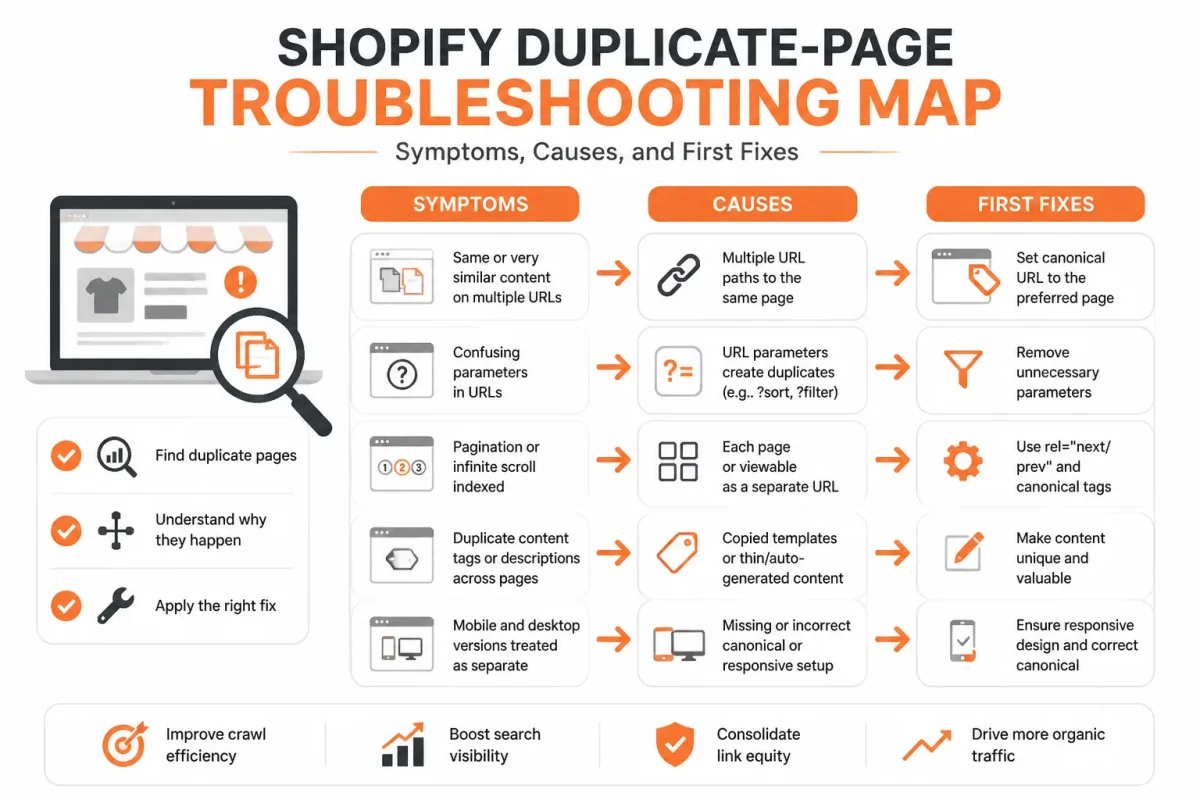
You can correct a duplicate product quickly when you diagnose the visible symptom first. A new price or SKU alone doesn't give your copy a distinct SEO purpose, especially when your title, description, images, and target keyword remain unchanged.
Use the table to isolate the first reversible action. Then inspect the page as both a shopper and a search engine before leaving the copy published.
Two products appear to target the same keyword
You may see two Shopify URLs competing for the same phrase because the copied page has no separate customer need. Choose one primary URL, or give the second product a genuinely different use, feature set, or buying question.
Weak: “Blue Cotton Hoodie | Northstar Apparel” targets the same “cotton hoodie” query as the source. Strong: “Lightweight Blue Cotton Hoodie for Summer Travel | Northstar Apparel” gives the copy a clearer use and search purpose.
| symptom | likely cause | first fix |
|---|---|---|
| Title and description are unchanged | The copy was published with inherited content and no new search intent | Return it to Draft and rewrite the title, description, feature notes, and target keyword |
| Canonical signal points to the wrong page or is reused without review | The copied template retained an unsuitable canonical decision | Inspect both URLs and set the canonical strategy according to the intended primary page |
| Structured data is duplicated or describes the wrong offer | Product fields, price, availability, or identifiers were not revalidated | Review the rendered product data and correct the copy’s offer details before publishing |
| Images have missing or identical alt text | Media was inherited without an accessibility and SEO review | Add accurate, product-specific alt text and replace images that no longer represent the offer |
| Both pages target the same keyword | The copy has no distinct customer problem or search purpose | Choose one primary URL or assign the copy a genuinely different intent |
| Copy is live before review | Automation or a rushed workflow skipped Draft status | Unpublish or hide the copy, complete the checklist, then validate metadata and canonical signals |
The copied page inherits the wrong canonical or metadata
Inspect the rendered source, meta tags, structured data, and Google Search Console data when the canonical points elsewhere unexpectedly. Rewrite the copy’s title, description, price, feature notes, and SKU only after deciding whether it deserves its own URL.
The new listing has duplicate images or weak alt text
You need product-specific images and alt text when the colour, size, materials, or bundle changes. wRanks can help you identify metadata, structured data, alt text, and keyword inconsistencies across your catalogue, though you still need to verify the customer-facing offer manually.
The copy is published before its content and inventory are verified
Return the page to Draft when inventory, price, SKU, images, or availability remain uncertain. Confirm the offer, review the canonical decision, and test the structured data before publishing again. A rushed live copy can create conflicting URLs before you notice the error.
Language and Buying Questions About Shopify Product Dupes and Copies
Another word for “duplicate”
Another word for “duplicate” is copy, although you should choose the term that matches your product relationship. Cambridge Dictionary defines a duplicate as an exact copy of something else. If your Shopify listing represents the same item, treat it as a duplicate SEO problem. If you sell a meaningfully different offer, you need distinct content and search intent.
Five synonym words for “duplicate”
Five useful synonyms are copy, replica, twin, counterpart, and reproduction. You can use these words in ordinary product discussions, but they don't decide whether Shopify needs another indexable page. Merriam-Webster describes “duplicate” as a double or counterpart that exactly corresponds to another thing. Your differentiation, customer intent, inventory, and canonical setup matter more than the label.
The slang word for “duplicate”
The common slang word is dupe. You usually see it in ecommerce when a product resembles another item, often at a lower price, rather than when it is an exact technical copy. If your Shopify product is a dupe, you still need original descriptions, accurate claims, and a separate buying reason. Slang doesn't create a valid SEO purpose.
Another word for “duplicate” or “replica”
Another word is counterpart, while “copy,” “twin,” and “reproduction” also fit in different contexts. You should use “replica” when the item closely recreates another product, not automatically when two Shopify listings share a template. A synonym cannot justify a second page. Your offer must have distinct value, search intent, and controlled canonical signals.
Five good synonyms for “duplicate”
Five good synonyms are copy, duplicate, replica, counterpart, and twin. You may use them to describe how two products relate, but their meanings are not identical. “Duplicate” suggests an exact match, while “counterpart” can describe a corresponding item. For your Shopify SEO, decide whether shoppers need separate pages based on the products, not the vocabulary.
Whether Dupe.com is free
Dupe.com presents an AI dupe-finding service with sign-up and product discovery features, but the supplied research doesn't establish that it is fully free. You should check its current terms before creating an account or relying on its features. Its name also doesn't change your Shopify decision: a similar product still needs clear differentiation and an appropriate canonical strategy.
Start With One Shopify Product Before Duplicating the Rest
A controlled test gives you evidence before your catalogue carries the same mistake dozens of times. You can protect your live Shopify store by treating one product copy as a search and merchandising test, not as a quick save-and-publish task.
Your first successful duplicate should have a distinct offer, clear search purpose, and consistent technical signals. Use that page to prove the process before repeating it across collections or product lines.
The six-step safe duplication sequence
- Choose and record: Select one source product and capture its URL, title, SKU, images, inventory, and current SEO fields.
- Create a Draft: Duplicate the product in Shopify, then keep the new version unpublished while you edit it.
- Change the product identity: Update the title, price, feature notes, SKU, images, inventory, and offer details wherever the new product differs.
- Assign search intent: Give the copy a distinct reason to appear in search, then review its meta tags, structured data, image alt text, and canonical signals.
- Publish with purpose: Publish only when the offer and URL are meaningfully distinct for shoppers and search engines.
- Monitor the test: Track keyword movement and Google Search Console signals in wRanks, then correct issues before duplicating another product.
Start with one page and one distinct search intent
Before you call the test successful, check the page as both a shopper and a search engine. A saved copy is not proof of quality. You need a coherent product, a unique URL, and metadata that supports the page's actual offer.
- Product check: The title, price, SKU, images, inventory, and feature details describe the new offer.
- Search check: The page targets a distinct query or buying purpose instead of repeating the source page.
- Technical check: The canonical, meta tags, structured data, and alt text match the intended product.
- Monitoring check: You have recorded the starting position and can review changes in wRanks and Google Search Console.
Start with one existing Shopify product page and its current SEO audit, not a bulk duplication job. Scale the catalogue only after one controlled page proves that the process protects clarity.
If you want a faster way to audit and improve duplicated Shopify pages, wRanks articles cover AI-powered SEO, meta tags, structured data, image alt text, keyword tracking, and Google Search Console insights for Shopify store owners managing product visibility across search engines and AI platforms.

Senior SEO strategist with 8+ years in e-commerce search optimization. Sarah helps Shopify merchants turn organic traffic into revenue through data-driven content strategies.


