Shopify Product Title SEO: Step-by-Step Guide
You open your Shopify analytics and find a familiar frustration: your product names make perfect sense to your team, yet shoppers search for different words. A branded name hides the product type, key details sit at the end, and similar variants blur together in results. Shopify product title SEO starts with fixing that structure, not adding more keywords.
Most Shopify stores don't have a keyword problem. They have a product-title structure problem. A useful title makes each product clear to shoppers and search systems without turning it into repetitive copy.
This guide separates the customer-facing product title from the SEO page title, supporting description, and fields that reinforce product meaning. It also shows how wRanks can review titles, meta tags, structured data, image alt text, keyword tracking, and Google Search Console insights. Start with one product, test a repeatable title pattern, and scale it only after the structure works.
Why the product title affects relevance and clicks
You may know a product by its brand name, internal SKU, or collection label. Your shopper may search for “women’s waterproof hiking jacket” instead. When your Shopify title hides that product type, search systems and shoppers have less context to use.
Your title has two jobs: explain what the page offers and help the right shopper choose it. Search position matters, but accurate relevance and readable wording still shape whether your listing earns attention.
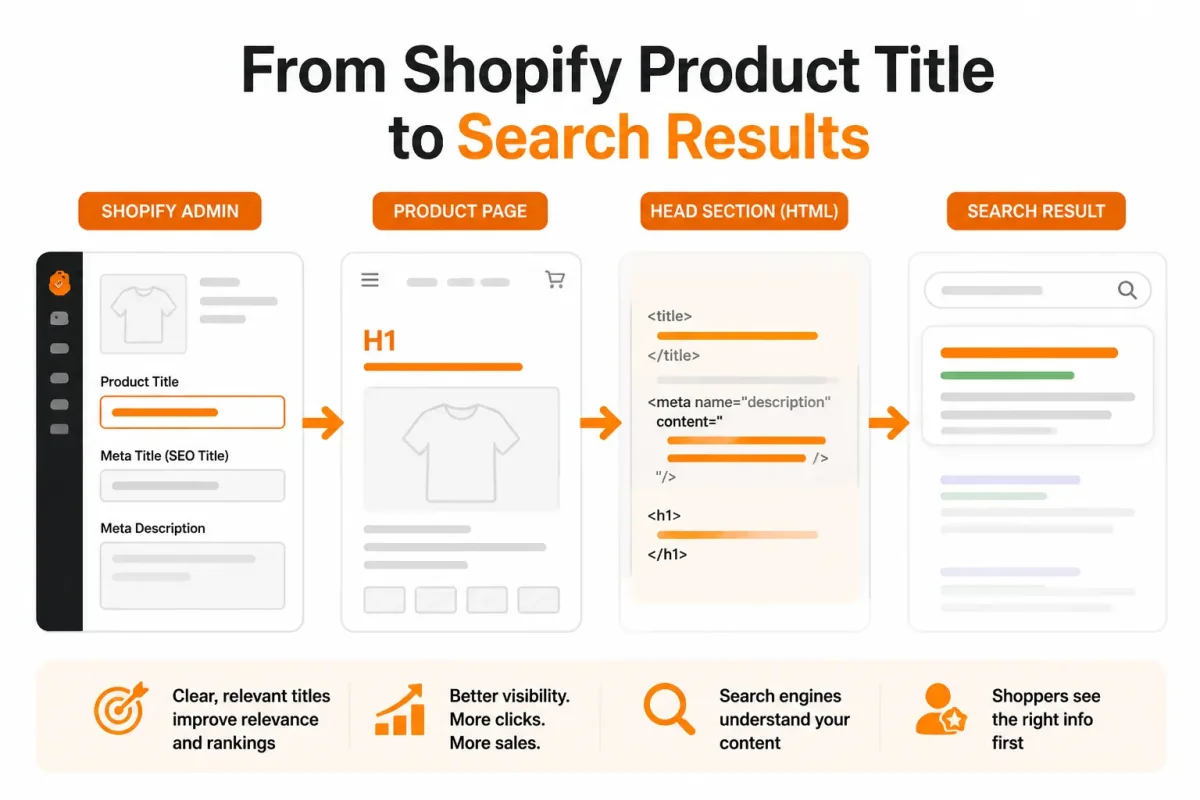
What a good SEO title must accomplish
A good SEO title identifies the page clearly and earns a qualified click. Include the primary term your audience uses, then add a useful detail such as material, fit, size, or intended use. Shopify recommends including the primary keyword in the title, according to Shopify's guidance on SEO title tags.
Search visibility does not make vague copy effective. Advanced Web Ranking found that first-position US desktop organic results received a 30.13% click-through rate in May 2026, according to Advanced Web Ranking's Google organic click-through rate data. Your title still needs to match the page, set accurate expectations, and give shoppers a reason to select it.
What makes an SEO title effective
A good SEO title names the product or page and makes the likely click worthwhile. You can make it specific without stuffing repeated keywords into every phrase. Shopify says title tags generally need to stay around 60 characters to appear fully in search results, according to Shopify's title tag guidance.
What makes a title SEO-friendly
An SEO-friendly title is clear to you, your shopper, and search systems. It gives the product type early, uses natural language, and avoids unsupported claims. Your product title often becomes the on-page H1, while Shopify's SEO page title controls the search-result wording. They can support the same topic, but they're separate fields and need not be identical.
What makes a title catchy
A catchy title uses memorable wording while still telling shoppers what the product is. “Ready for Rain” may sound appealing, but “Women's Waterproof Hiking Jacket” gives stronger relevance. Shopify describes title writing as a balance between relevant keywords and clickable copy, according to Shopify's title tag guidance.
“Writing title tags requires a gentle balance of including relevant keywords and crafting something clickable for the SERP,” said Paul Shapiro, head of technical SEO and SEO product management at Shopify.
The practical rule for choosing the first words
Put the product type first, then the strongest useful differentiator. Your shopper should understand the offer before reaching the brand name or promotional phrase.
Practical rule: Lead with the product type, then the strongest useful differentiator.
Prepare the product facts before writing a title
A strong title starts before you open Shopify. Gather the words your customers use, the facts that reduce hesitation, and one clear reason to choose your product.
Your product page must answer more than one search query. Reboot Online found that the average ecommerce brand ranks for 1,783 organic keywords, according to Reboot Online's 2026 ecommerce SEO analysis. Gather the full product context first, then choose what belongs in the title.
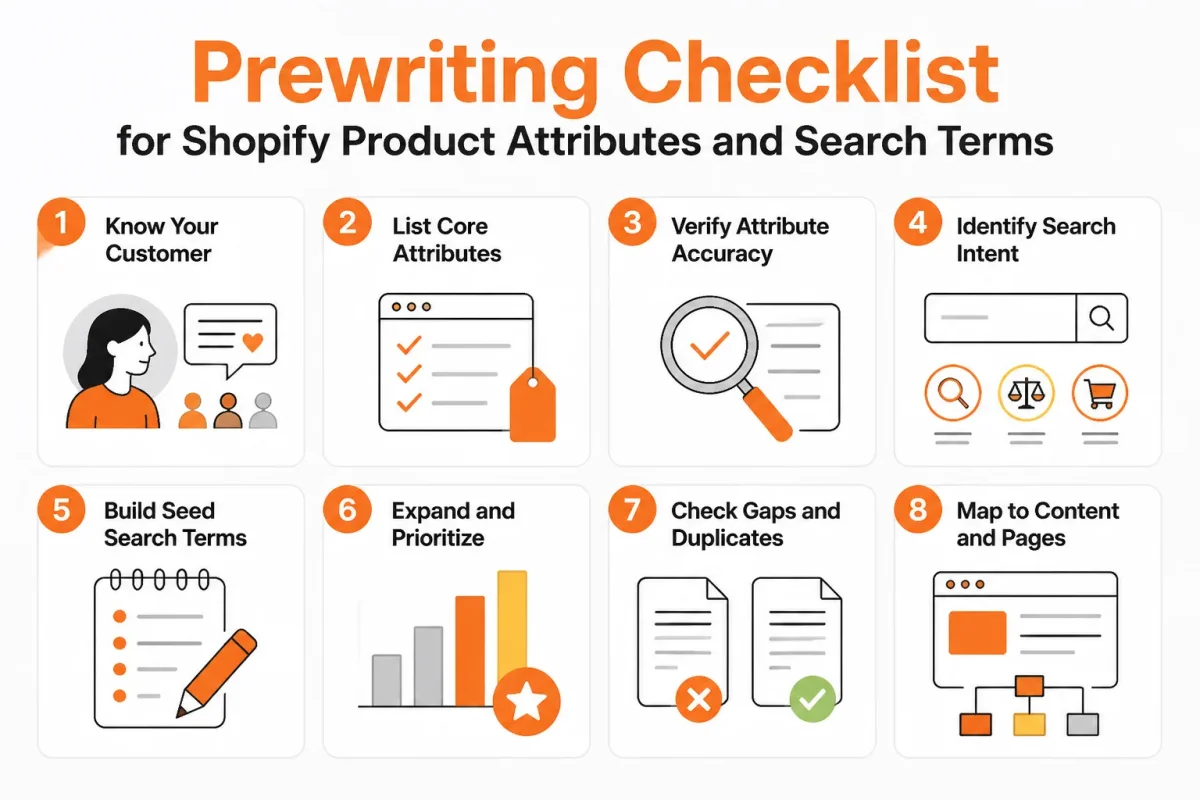
Collect the attributes shoppers actually search
Start with the facts that help shoppers identify, compare, and use the product. Your product description can expand on these details instead of forcing every fact into one crowded title.
- Product type: Record the plain-language category, such as “women's waterproof hiking jacket.”
- Audience wording: Use the terms your customers use, not an internal SKU or collection label.
- Material or format: Note facts such as merino wool, stainless steel, digital download, or hardcover.
- Size or quantity: Capture dimensions, capacity, pack count, or weight where shoppers compare them.
- Compatibility: List the device, model, platform, or age range your product supports.
- Use case: Describe the job the product helps your customer complete.
- Brand: Keep the brand available, but don't let it hide the product type.
- One differentiator: Choose one useful distinction that safely fits without repetition.
Complete information also supports confidence after the click. Baymard Institute found that 52% of desktop ecommerce sites had mediocre or worse product-page UX, according to Baymard's 2026 product page UX benchmark.
Choose the primary phrase and one modifier
Choose one phrase that names the product and one modifier that narrows the intent. Reboot Online estimates that the average ecommerce brand receives 9,625 organic visits per month, according to Reboot Online's 2026 ecommerce SEO analysis. Your broader product facts help you serve related searches rather than repeating one phrase everywhere.
Write an effective Shopify product description
An effective Shopify product description expands on the title, answers buying questions, and explains the material, fit, compatibility, use, and care details your customer needs. Baymard reports that 62% of mobile ecommerce sites have mediocre or worse product-page UX, according to Baymard's 2026 product page UX benchmark. Your description should remove uncertainty, not copy the title several times.
Separate product-title copy from SEO-field copy
Keep the visible product title descriptive and readable. Use Shopify's separate SEO page title for a tighter search snippet when the visible title already needs brand, size, or customer-facing detail.
Weak visible title: “Alpine Pro 3000.”
Waterproof Women's Hiking Jacket, Alpine Pro: This version names the product first and adds the brand without stuffing.
Shopify supports SEO across product, collection, page, and blog fields. wRanks can help organize meta tags, structured data, image alt text, and keyword tracking, while its AI-powered SEO workflow still leaves you responsible for checking product accuracy. The guide to SEO automation for Shopify stores fits this preparation workflow.
- Visible title: Use the clearest customer-facing product name.
- SEO page title: Use a tighter search-focused version when needed.
- Product description: Add the facts and answers the title cannot carry.
- Final check: Remove repeated keywords, unsupported claims, and details that belong in another field.
Write the customer-facing product title in four actions
You have the product facts in front of you. Now turn them into a title that a shopper understands before opening the page. Your first words should identify what you sell, not what your team calls it.
Work from meaning to detail. Keep the attribute that changes search intent or purchase eligibility, then move secondary details into variants, bullets, or description copy.
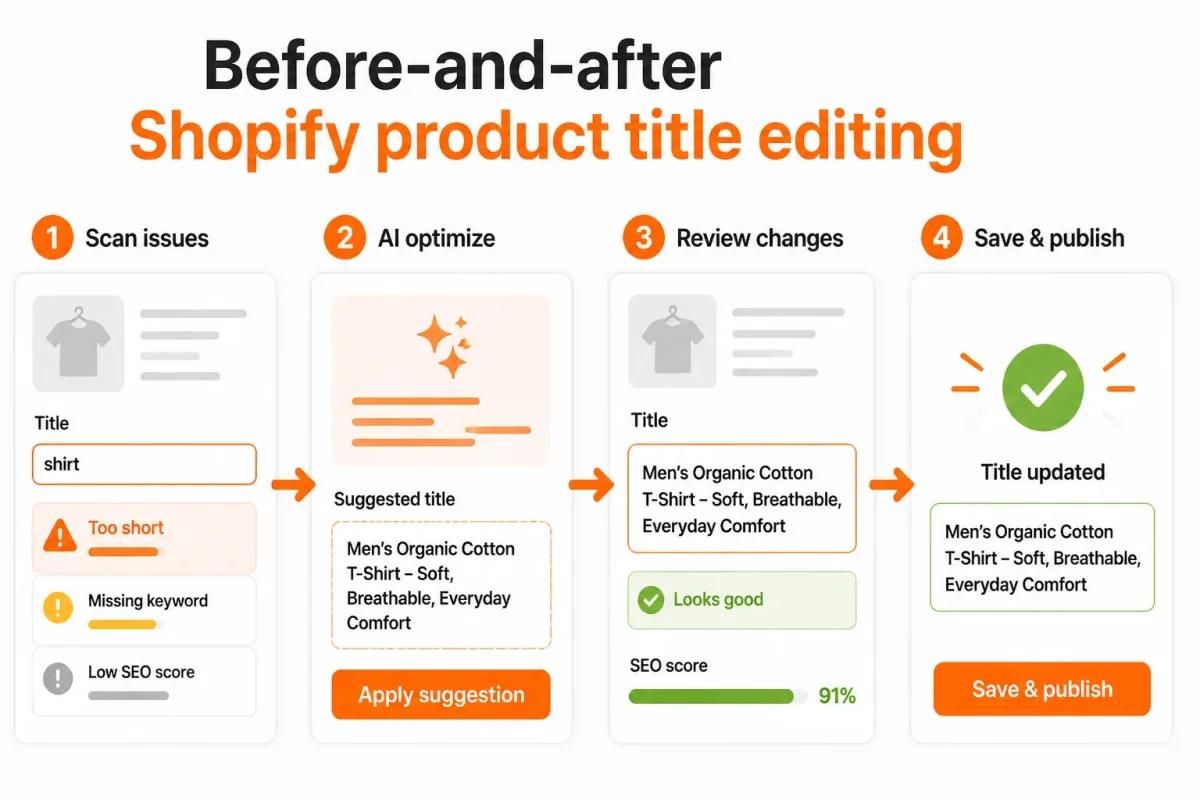
1. Lead with the product type
Put the item shoppers search for before your brand name or internal model. If you lead with a private label, you make your customer guess.
Before: “SummitShell Alpine 2.0.”
After: Women’s Waterproof Hiking Jacket | SummitShell Alpine 2.0
You're done when someone unfamiliar with your catalog can name the product immediately. If the title still sounds like a campaign name, the product type is too late.
2. Add the strongest differentiator
Choose one detail that changes the search or buying decision. Material, compatibility, format, or intended use usually earns priority over a minor color detail.
Before: “Ceramic Travel Mug | Northline.”
After: 16 oz Stainless Steel Travel Mug | Northline
You're done when the title explains why this product fits a specific need. If you're listing every feature, keep the detail that affects eligibility and move the rest to your bullets or description.
3. Use the brand and variant details selectively
Add your brand when recognition, trust, or branded search intent helps the shopper. Include color, size, or compatibility only when that detail changes which product the shopper can buy.
Before: “Blue, Large, Compatible With iPhone 15, 16, and 17 Case | Orbit.”
After: iPhone 15 Protective Case | Orbit
You're done when the title identifies the purchasable product without listing every variant. If a shopper sees a catalog export instead of a product name, shift variant details into Shopify’s option fields.
4. Read the title as a shopper, not a keyword list
Remove repeated terms, vague superlatives, and filler such as “best,” “premium,” or “must-have.” Your title should sound like a useful answer, not a search-term pile.
Before: “Best Premium Women’s Waterproof Waterproof Hiking Jacket Jacket.”
After: Women’s Waterproof Hiking Jacket | SummitShell
You're done when the title sounds natural aloud and still carries the main search meaning. If you stumble while reading it, shorten it before publishing.
- Product type: You can identify the item from the opening words.
- Primary differentiator: You can explain why this version matters.
- Selective detail: You have kept only purchase-relevant attributes.
- Natural wording: You have removed repetition and promotional filler.
Apply the title across Shopify without duplicating signals
Your new title only helps when each Shopify field supports the same product meaning. For the SummitShell jacket, you want one clear product identity across the page, search snippet, images, and structured data, without copying the same phrase into every field.
Shopify’s product title generally supplies the visible H1 on the product page, so you must treat that field as both customer-facing copy and an SEO signal, according to Shopify Community’s explanation of product titles and H1 tags.
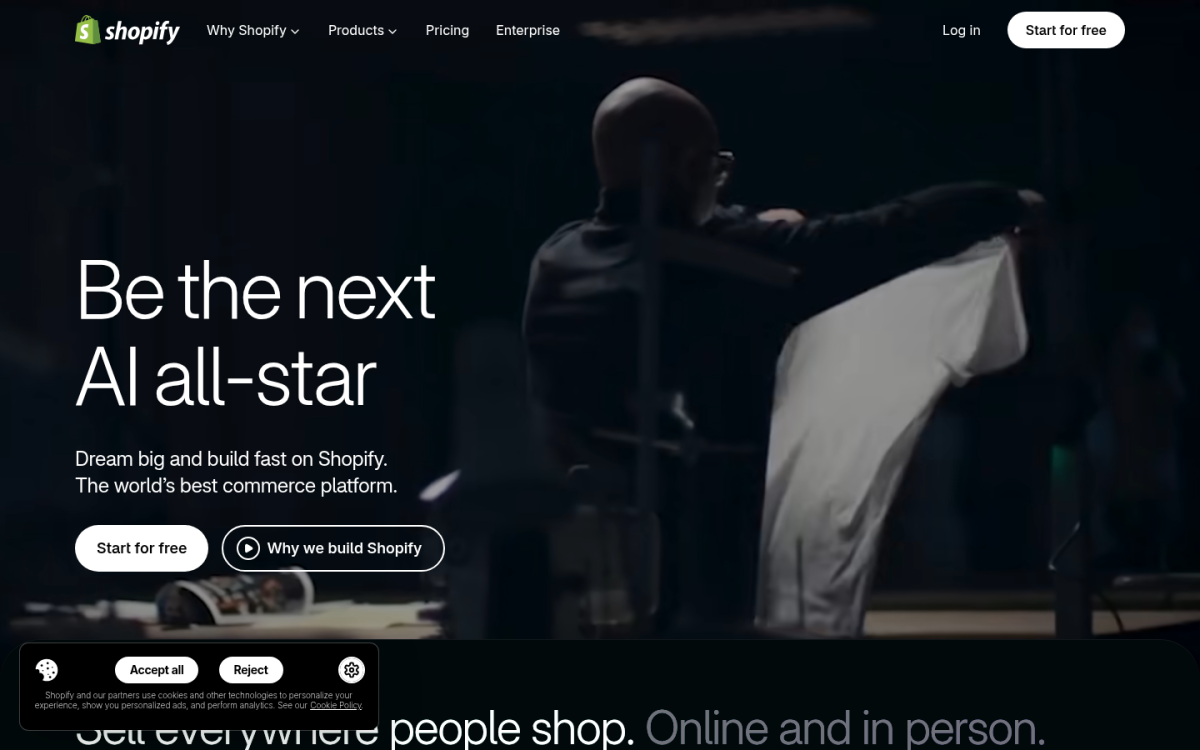
Map the product title to Shopify’s SEO fields
Open your Shopify admin, select Products, choose the product, and open the search engine listing editor near the bottom of the page. Keep the visible title and SEO page title aligned, but let the SEO title use a tighter variation for searchers.
- Set the H1: Use “Women’s Waterproof Hiking Jacket | SummitShell” as the product title. It identifies the product before the brand.
- Set the SEO title: Use “Women’s Waterproof Hiking Jacket | SummitShell” or a shorter variation such as “Waterproof Hiking Jacket for Women | SummitShell.” Preserve the product type first if Google truncates the result.
- Set the meta description: Write a useful reason to choose the jacket, such as “Stay dry on changing-weather hikes with SummitShell’s waterproof women’s jacket, built for lightweight layering and trail comfort.”
Before: “SummitShell Alpine Pro Jacket | Official Store.” After: “Women’s Waterproof Hiking Jacket | SummitShell.” The stronger version leads with the words your shopper is likely to understand.
Write the supporting description and image alt text
Your product description should expand the title rather than repeat it. Explain the jacket’s waterproof fabric, adjustable hood, fit, temperature range, care instructions, and intended trail use. For the main image, use alt text such as “SummitShell women’s waterproof hiking jacket in forest green,” not a string of repeated keywords.
Structured data should describe the same product with its name, brand, image, offer, availability, and review details where applicable. Your page title, description, alt text, and structured data then reinforce one product without sounding copied.
| situation | better move |
|---|---|
| The visible product title is the page H1 and starts with a model name | Lead with the product type and useful differentiator, then add the brand or model if recognition matters |
| The SEO page title is truncated in Google results | Keep the primary product term and strongest differentiator near the beginning and remove secondary wording |
| A merchant is searching Shopify for a meta-keywords field | Use meaningful page copy, the SEO title, meta description, alt text, structured data, and performance tracking instead |
| The product description repeats the exact title several times | Expand with material, fit, compatibility, use, care, and buying details in natural language |
Skip meta keywords in Shopify
You shouldn't search Shopify for a modern meta-keywords field. Instead, put your effort into useful page copy, metadata, image alt text, structured data, and performance tracking in wRanks. Its keyword tracking and Google Search Console integration help you compare the signals with the queries bringing visitors to your store, although automated recommendations still need a human review for accuracy.
Scale Shopify product titles across variants, catalogs, and AI search surfaces
Large catalogs create a difficult trade-off. Templates keep product titles consistent, but overly rigid templates hide compatibility, audience, format, or use-case details that shoppers need. Google said people shop across its services more than 1 billion times per day, according to Google's 2026 update on Shopping.
Your product information must stay consistent without becoming identical. Google also reported that its Shopping Graph contains more than 60 billion product listings, according to Google's 2026 Shopping Graph announcement. Clear facts help both traditional search and AI platforms interpret your catalog.
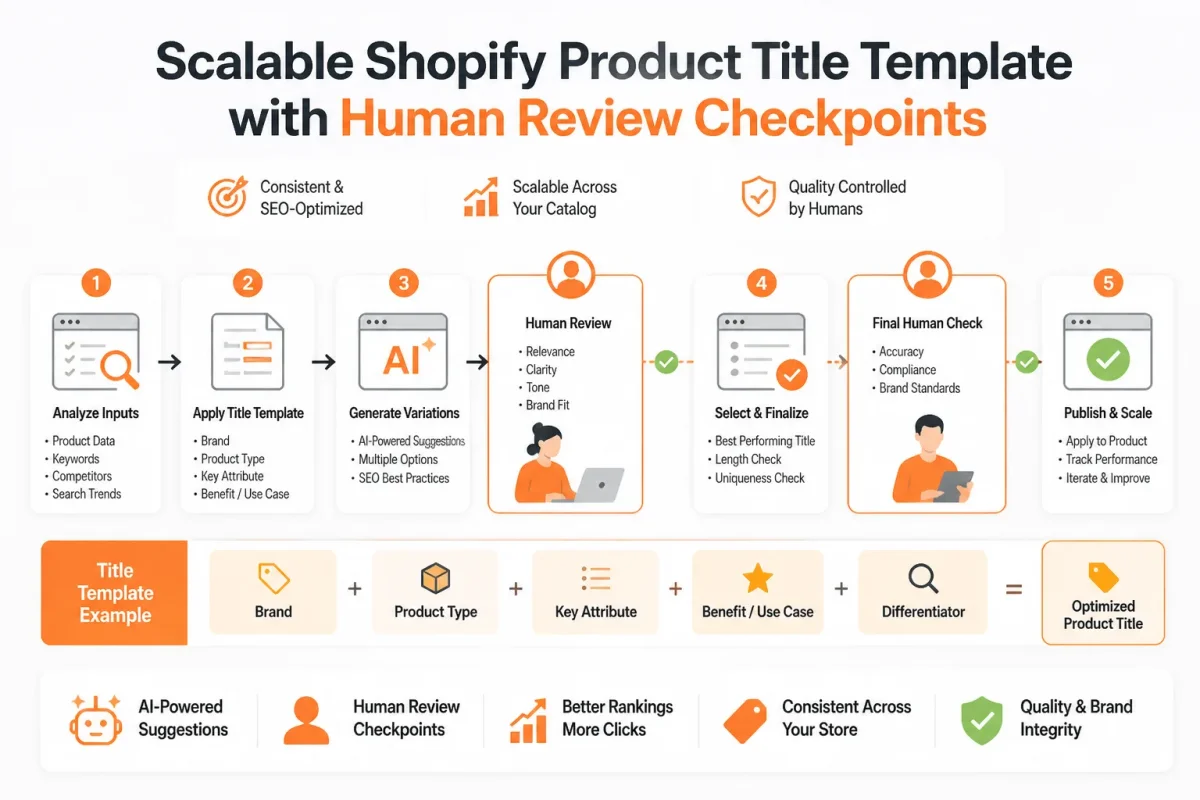
Create a title pattern without making every product identical
Use a repeatable order for your Shopify store, then reserve space for the detail that separates each product. You might use brand, product type, audience, material, and defining feature, but you shouldn't force every field into every title.
Weak example: “SummitShell Alpine.” You give shoppers a brand-like name, but not the product category or buying reason.
Strong example: “SummitShell Women's Waterproof Hiking Jacket.” You preserve the recognizable name while adding the terms that explain the product.
Handle variants and technical compatibility claims
Keep shared product facts in the main title and place meaningful differences in variant names when Shopify supports them. For technical products, verify compatibility, measurements, device models, and claims before publishing.
Weak example: “VoltEdge Charger.” You leave phone compatibility unclear.
Strong example: “VoltEdge USB-C Laptop Charger for Dell XPS 13.” You make the intended device visible, but you still need a human to confirm that specification.
Why clear product information still matters
SEO can feel outdated because tactics and search layouts change, but you still need clear product information. Keyword tracking should support accurate wording, not replace useful titles with repetitive phrases.
Why AI doesn't replace SEO
SEO isn't dead with AI because you still need structured facts that search engines and AI platforms can interpret. Your product type, audience, specifications, and use case remain essential discovery signals.
Use automation with an accuracy review
wRanks can propose title and supporting-copy drafts through AI-generated content, monitor target terms through keyword tracking, and surface impressions and queries through Google Search Console integration. Approve every draft, especially compatibility, claims, measurements, and variant accuracy.
What works
- Consistent templates: You give your catalog a predictable structure.
- Specific exceptions: You preserve intent for technical and near-duplicate products.
- Human approval: You catch inaccurate AI-generated details before publication.
What fails
- Identical titles: You erase the differences that help shoppers choose.
- Brand-only naming: You hide the category behind an internal product name.
- Unreviewed automation: You risk publishing incorrect compatibility or variant claims.
Diagnose broken Shopify product titles with symptom, cause, and first fix
A broken title usually leaves a visible clue in your catalog. You may see a branded phrase with no product category, a warehouse code shoppers cannot understand, or a long line that reads like a parts list.
You don't need to rebuild every page at once. Find the symptom, make one small change, and review whether the title becomes clearer for both shoppers and search systems.
Brand-first titles that hide product intent
When your title opens with a brand or collection name, move the product type closer to the beginning. You can keep the brand when it helps recognition, but your shopper should identify the item first.
Weak: “Summit Home Alpine Collection Ceramic Mug.”
Strong: “Ceramic Mug, Summit Home Alpine Collection.”
Keyword repetition that reduces readability
Repeated keywords usually show that you're forcing relevance instead of describing the product naturally. Keep one primary term, then add a useful material, use case, or differentiator.
Weak: “Blue Shirt, Blue Casual Shirt, Blue Cotton Shirt.”
Strong: “Blue Cotton Casual Shirt.”
Titles that hide the product type or use internal SKU language
If you can't quickly tell what the item is, replace the creative name or internal code with shopper language. Your SKU belongs in its proper Shopify product field, not at the centre of customer-facing copy.
| symptom | likely cause | first fix |
|---|---|---|
| The title starts with a brand or collection name | Brand recognition was prioritized before the product category | Move the product type and strongest differentiator to the beginning; retain the brand only if it helps recognition |
| The same keyword appears multiple times | The merchant is trying to force relevance through repetition | Keep one natural primary term and use distinct attributes or use-case language |
| The product type is difficult to find | A creative name or model number hides what the item is | State the plain-language product type near the start of the title |
| The title uses an internal SKU or warehouse code | Catalog or operations language was copied into customer-facing copy | Replace the code with shopper language and keep the SKU in its proper product field |
| The title does not match the page content | The title was changed without updating product details or variants | Reconcile the title with the description, selected variant, images, and structured data |
| The title becomes unreadable after every attribute is added | Color, size, material, compatibility, and marketing claims were all forced into one line | Keep the product type plus one high-value differentiator and move secondary details into supporting fields |
Search titles that don't match the product page
A title-page mismatch can confuse you, your shoppers, and search engines. Check the description, selected variant, images, and structured data before publishing the revised title.
- Check variants: Remove a color, size, or compatibility claim that the available options do not support.
- Check supporting fields: Move secondary attributes into the description, variant names, and structured data instead of cramming them into one line.
- Review the pattern: wRanks can help you compare title patterns, tracked queries, metadata, and supporting fields, but you still need human review for accuracy and readability.
Start with one obvious failure, not every possible keyword. That small, testable correction helps you recover clarity without undoing earlier catalog decisions.
Answer the remaining Shopify SEO questions directly
Why SEO still matters in 2026
SEO isn't outdated because search still helps you discover products, compare options, and reach stores you haven't seen before. What has changed is the work involved. Your Shopify store now needs clear titles, useful descriptions, accurate attributes, accessible pages, and trustworthy product information. A keyword-stuffed title won't carry your page when shoppers and search systems need specific answers.
How AI changes SEO without replacing it
SEO isn't dead with AI because AI-generated results still depend on reliable product information across the web. Your title, description, structured data, reviews, and policies help search systems understand what you sell. AI may change how shoppers find your products, but it doesn't remove the need for accurate pages. wRanks can help you monitor titles, metadata, tracked queries, and Google Search Console performance while you review the final copy.
Whether SEO is still worth it in 2026
Yes, SEO can still be worth your investment in 2026, but no single title guarantees rankings or sales. Your results depend on search relevance, competition, product quality, technical access, pricing, trust, and the checkout experience. Use SEO to make your Shopify store easier to find and understand, then measure qualified visits and sales rather than chasing visibility alone.
What a meta description is for a website
A meta description is a concise summary of your page that search engines may use in the search snippet, helping you influence the click decision. It isn't your SEO page title, H1, or a meta-keywords field. Write an accurate summary that supports the product's intent and complements its title. You can review related Shopify terminology in this Shopify glossary of SEO and store terms.
Make Shopify product title SEO repeatable
A clear meta description supports the click, but your next decision is operational: which product page will prove the new pattern? You don't need to rewrite your entire catalog to learn what works. Start with one page that already earns impressions but uses an unclear or brand-first title.
Your goal isn't a keyword insertion. Shopify product title SEO works best as a repeatable information architecture decision, where each field helps a shopper and a search system identify the same product.
1. Select one high-opportunity product
- Choose the test page: Pick one important product with impressions, but a title that leads with a brand name, internal code, or vague phrase. Record its current queries, impressions, clicks, and page behaviour before making changes.
- Record the buying language: Write down the shopper-facing product type and strongest differentiator. For example, capture “women’s waterproof hiking jacket” and “packable 3-layer shell” rather than only “SummitShell.” This gives you a useful comparison point.
2. Rewrite and align its supporting fields
- Rewrite the visible title: Put the product type first, then add the clearest differentiator and brand where it helps recognition.
Weak example: SummitShell Alpine 47.
Women’s Waterproof Hiking Jacket, Packable 3-Layer Shell | SummitShell
- Align the supporting fields: Match the SEO page title and meta description to the same product meaning without copying the visible title word for word. Check the product description, image alt text, and structured data for accurate size, material, gender, availability, and brand details.
Weak example: “Shop SummitShell Alpine 47. Free shipping available.”
Stay dry on changing trails with a women’s packable 3-layer waterproof hiking jacket, available in sizes XS-XL.
3. Check, measure, and template the result
- Verify the page: Review the rendered product page, image alt text, variant details, and structured data. Make sure compatibility or sizing information remains accurate after the title change.
- Measure the page: Monitor queries, impressions, clicks, and page behaviour through wRanks and Google Search Console. Compare the revised page with its original performance before changing another product.
- Template carefully: Once the pattern is clear, apply it to a related collection or product group. Check each variant manually. A useful template should preserve shopper clarity, not flatten every product into identical wording.
If you want a faster way to do this, wRanks helps Shopify stores optimize products, generate meta tags and image alt text, and connect keyword tracking with Google Search Console across search engines and AI platforms through wRanks' Shopify SEO resources.

About Priya Sharma
Content marketing expert and Shopify ecosystem authority. Priya has helped 200+ stores grow organic traffic through strategic blog content and keyword targeting.