SEO Automation for Shopify Stores: A Practical Workflow
You open a product page between customer messages and spot three different title formats. The hero image has no alt text, the collection description is still two seasons out of date, and yesterday’s blog post contains links to discontinued products. SEO automation can help detect and handle that repetitive work, but the catalog still needs human oversight. The catalog once felt manageable. Now every manual fix creates another task.
Most Shopify merchants don’t have an SEO knowledge problem. They have a workflow problem. Automation means using AI to handle repetitive SEO work that might otherwise go to a virtual assistant or junior SEO specialist, according to Marketer Milk’s guide to SEO automation tools. It doesn’t replace merchandising judgment.
This guide sets out a repeatable wRanks workflow: audit records, prioritize batches, generate updates for meta tags, alt text, structured data, and content, check quality, and publish selectively. Automation handles production and detection. Human review remains essential for search intent, product claims, brand voice, and release decisions.
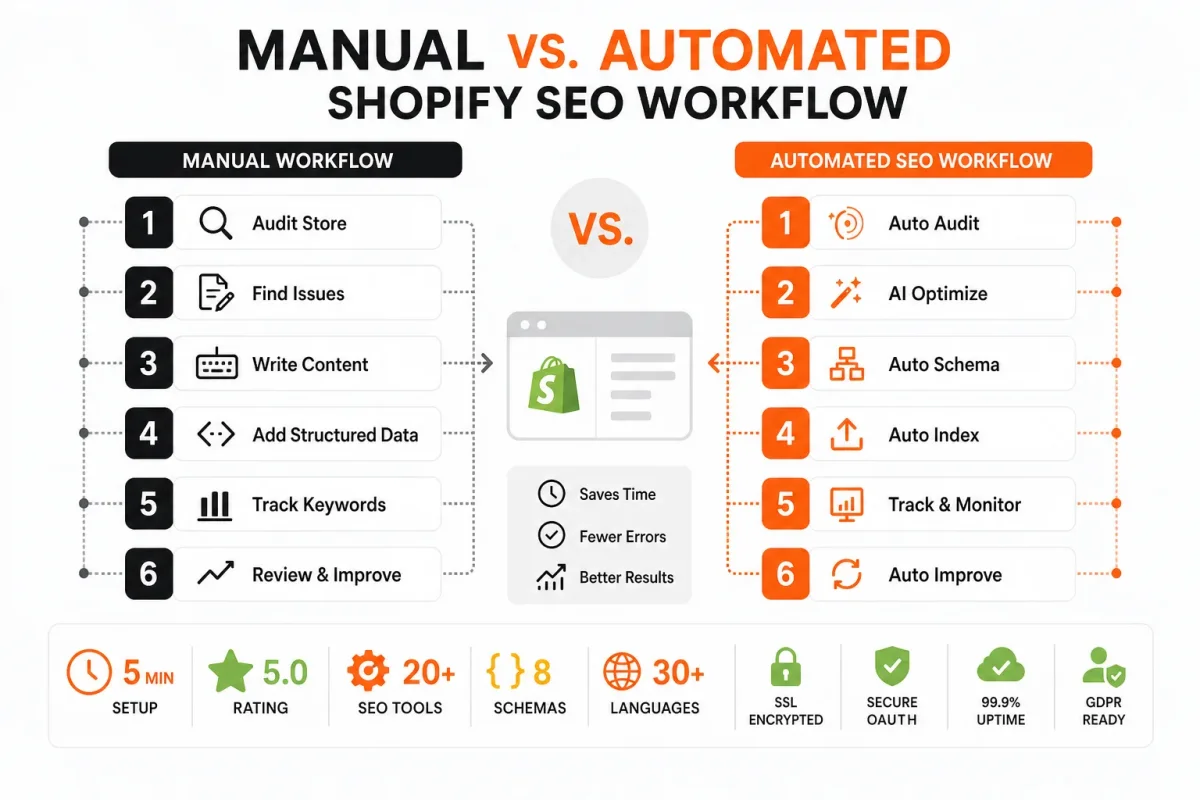
Why Manual Catalog SEO Stops Paying Back
Every Shopify product can need a title, meta description, image alt text, structured data, and useful page copy. Editing those fields one page at a time turns simple improvements into repeated research, writing, checking, and publishing work. The cost is not only labor. It is the missed merchandising and campaign work that the same team could have completed.
Manual updates also create drift. One product may use a clear benefit-led title while another uses an internal SKU phrase. Collection pages can describe last season’s range, and schema fields can remain incomplete long after product details change.
The repetitive work that quietly consumes an e-commerce team
SEO remains worth pursuing in 2026 when organic discovery brings qualified shoppers to useful pages over time, rather than depending entirely on paid clicks. The practical burden is deciding whether each target query fits the page, then repeating the same production steps across dozens or thousands of records.
For example, “Buy Red Cotton T-Shirt Online | Store” says little. Strong example: “Women’s Organic Cotton T-Shirts | Soft Everyday Tees” gives shoppers and search systems clearer context without inventing a product claim.
The competitor-reported eight-hour-to-three-hour workflow improvement
Marketer Milk reported that one manually written SEO workflow fell from about 8 hours to a maximum of 3 hours, covering keyword research, outlining, writing, CMS formatting, and publishing. That observation is a productivity example, not a guaranteed result for every Shopify store or wRanks workflow, according to Marketer Milk’s report on SEO automation tools.
“The workflow fell from about 8 hours to a maximum of 3 hours while everything was still written manually,” according to Marketer Milk’s report on SEO automation tools.
The rule for automating execution without automating judgment
wRanks can produce drafts, apply repeatable formatting, generate alt text, support meta tag and structured data updates, and surface issues across Shopify pages. Its limitation is useful to state plainly: it cannot decide whether a query matches search intent, whether language sounds like the brand, whether a claim is supportable, or whether an update should go live.
Practical rule: Let automation produce, format, and monitor repetitive SEO work, while marketers approve intent, language, claims, and publishing decisions.
Saved time only creates value when review quality stays high. Faster production without judgment simply spreads weak SEO across more pages.
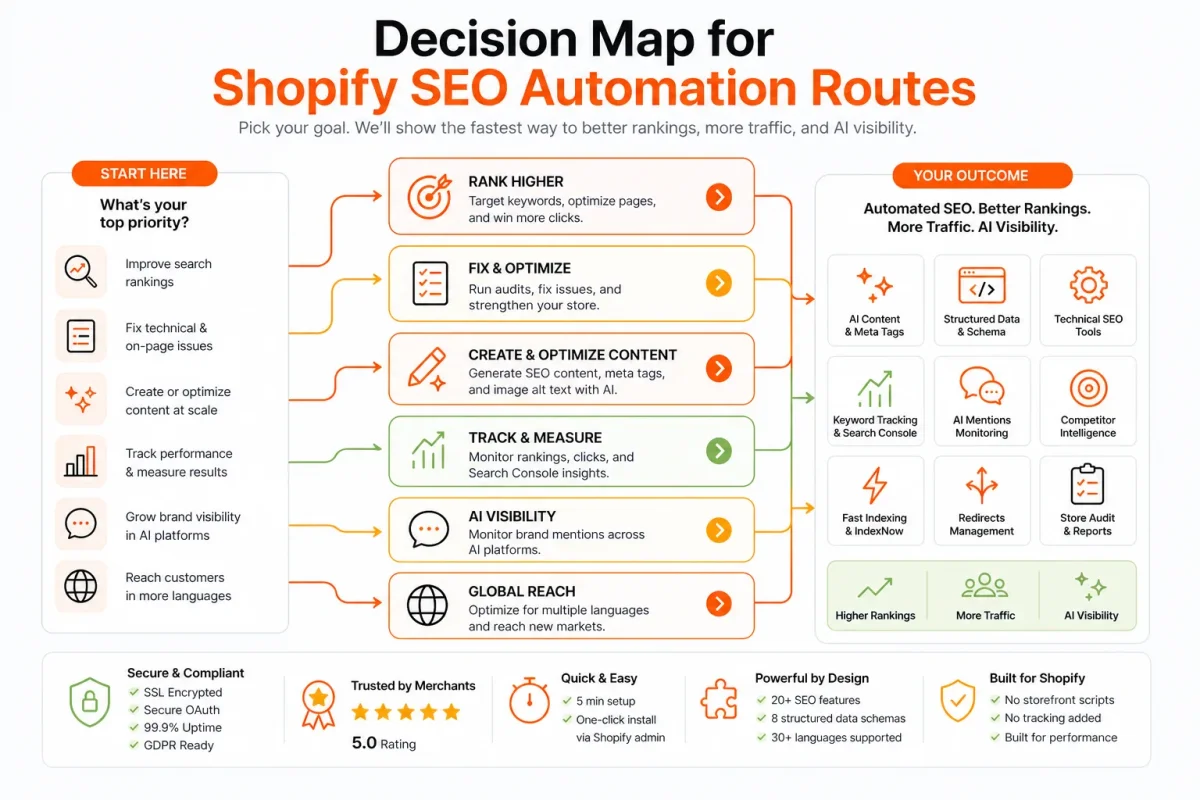
Choose the Automation Route That Fits Your Shopify Store
A Shopify merchant with a small catalog can manage SEO in a spreadsheet. A retailer with thousands of products needs a different operating model, especially when metadata, image alt text, structured data, and content require regular updates.
The right route depends on catalog size, developer access, review requirements, and whether the team is optimizing for Google alone or also for AI platforms. Automation works best when it fits the team’s daily workflow, not when it simply adds another dashboard.
Manual spreadsheets for small, tightly controlled catalogs
Manual spreadsheets suit small catalogs with occasional updates and a clear approval process. They offer strong review control, but consistency depends on someone checking every row and publishing every approved change.
Separate tools for teams with specialist owners
Separate specialist tools fit teams where SEO, content, technical SEO, and analytics have different owners. Content optimization tools can save more than 15 hours per plan, according to Siteimprove’s summary of SEO automation research from its SEO automation analysis. The same source reports that content optimizers can save more than 8 hours per post by reviewing ranking content and suggesting topics and keywords.
This route can work well, but disconnected tools create handoffs. Search Console insights, keyword tracking, Shopify fields, schema, and AI-search-oriented content may remain split across several systems.
Custom workflows for stores with engineering resources
Custom API or script workflows suit retailers with developers, stable data models, and unusual catalog rules. They can connect Shopify, Google Search Console, internal product data, and publishing controls precisely, but the team must maintain authentication, error handling, field mappings, and review safeguards.
The wider market shows strong interest in this model. Gumloop reported raising $50 million in Series B funding, led by Benchmark, in its overview of SEO automation use cases from Gumloop. Funding does not make a custom workflow suitable for every Shopify team.
Integrated automation for catalogs that need one operating layer
An integrated Shopify SEO platform such as wRanks is the best fit when a store needs batch production, consistent review, and one workflow for products, collections, pages, and blogs. wRanks connects meta tag optimization, structured data, image alt text, keyword tracking, Google Search Console insights, and AI-generated content, though human approval remains necessary for intent, tone, and factual claims.
The best automated SEO tool for a Shopify store
The best automated SEO tool is the one that works inside the merchant’s operating environment, supports the required Shopify page types, creates quality gates, and gets used consistently. A specialist tool may excel at one task. An integrated platform is usually the better move when repeated catalog work crosses several SEO tasks.
How to compare five SEO tools
There is no universal list of five best SEO tools for every Shopify store. A useful stack should be selected by workflow coverage, including metadata, structured data, alt text, keyword tracking, Search Console analysis, content review, and AI-search visibility. This comparison of SaaS SEO services and SEO automation fits the same decision process.
| situation | better move |
|---|---|
| Small catalog with occasional updates and no recurring production bottleneck | Start with a manual spreadsheet and a documented review checklist |
| Large catalog with repeated metadata, alt text, and schema work | Use an integrated Shopify SEO platform such as wRanks for batch production and review |
| Marketing team without developers | Prefer a connected platform with Shopify and Search Console workflows over custom scripts |
| Retailer targeting Google and AI search platforms | Choose an integrated workflow that combines keyword tracking, content optimization, structured data, and human approval |
Prepare Your Shopify Catalog Before the First Automated SEO Update
Automation works best when the store has clean inputs, clear permissions, and a defined review point. Without those controls, a batch update can repeat missing keywords, weak metadata, or incorrect product details across many pages.
Treat the first pass as a controlled preflight, not a promise of instant rankings. The aim is to create a repeatable batch process that wRanks can support while the merchant retains approval over what gets published.
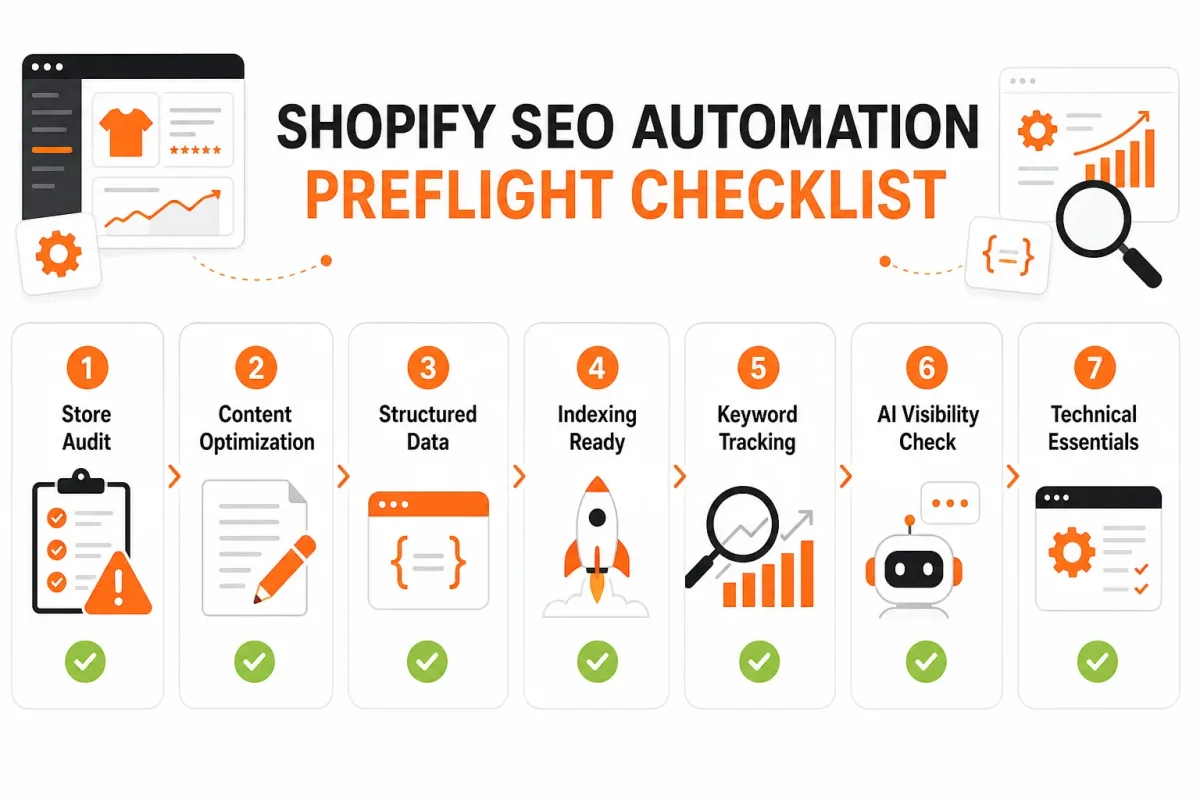
Gather the catalog fields and search data you will edit
- Shopify access: Confirm the team member or app connection can review and update products, collections, pages, blogs, and relevant SEO fields.
- Catalog exports: Export products and collections with handles, titles, descriptions, status, prices, and existing search metadata.
- Priority URLs: List the pages tied to high-margin products, important categories, commercial landing pages, and content with search potential.
- Keyword map: Assign a primary search term and useful supporting terms to each priority URL, avoiding one keyword across unrelated pages.
- Current metadata: Capture existing title tags and meta descriptions before changing them.
- Image fields: Inventory product and collection images with missing, duplicated, or vague alt text.
- Structured data: Inspect whether product, review, breadcrumb, and article schema is present, accurate, and free from avoidable conflicts.
Weak: “Blue Running Shoes | Store.” Stronger: “Men’s Blue Running Shoes for Daily Training | Northstar Run.” The second version identifies the product and its use without stuffing the title.
The wRanks store audit documentation fits this preparation workflow because it explains the checks needed before editing pages. wRanks can automate metadata, alt text, and structured data work, but it still needs accurate catalog information and human review.
Connect Google Search Console before changing pages
Connect the Shopify store to Google Search Console and record current queries, impressions, clicks, indexed URLs, and coverage issues for the priority pages. This baseline helps separate an actual improvement from a change that merely looks cleaner in the admin.
Select a priority batch instead of updating everything at once
Choose the page type that combines business value, search opportunity, and repeatable defects. Start with products when high-margin items lack metadata, collections when impressions produce weak clicks, pages when commercial destinations are incomplete, or blogs when useful queries have no refresh process. Begin with a representative batch of 10 to 25 URLs, then review before expanding.
Learning SEO as a beginner
The fundamentals are learnable, but reliable execution across a large Shopify catalog requires documented rules, dependable data, and review discipline. A small approved batch gives the team a safer way to refine those rules before wider automation.
Run the First wRanks Workflow Across Priority Shopify Pages
A first automated update should not begin with the entire Shopify catalog. It should begin with one page type, a controlled batch, and a clear approval path. That keeps wrong-store access, weak keywords, inaccurate claims, and bad schema from spreading.
wRanks provides the automation layer for this process, while the marketing manager remains responsible for priorities, accuracy, and publishing decisions. The workflow below turns a selected group of Shopify URLs into approved optimization records.
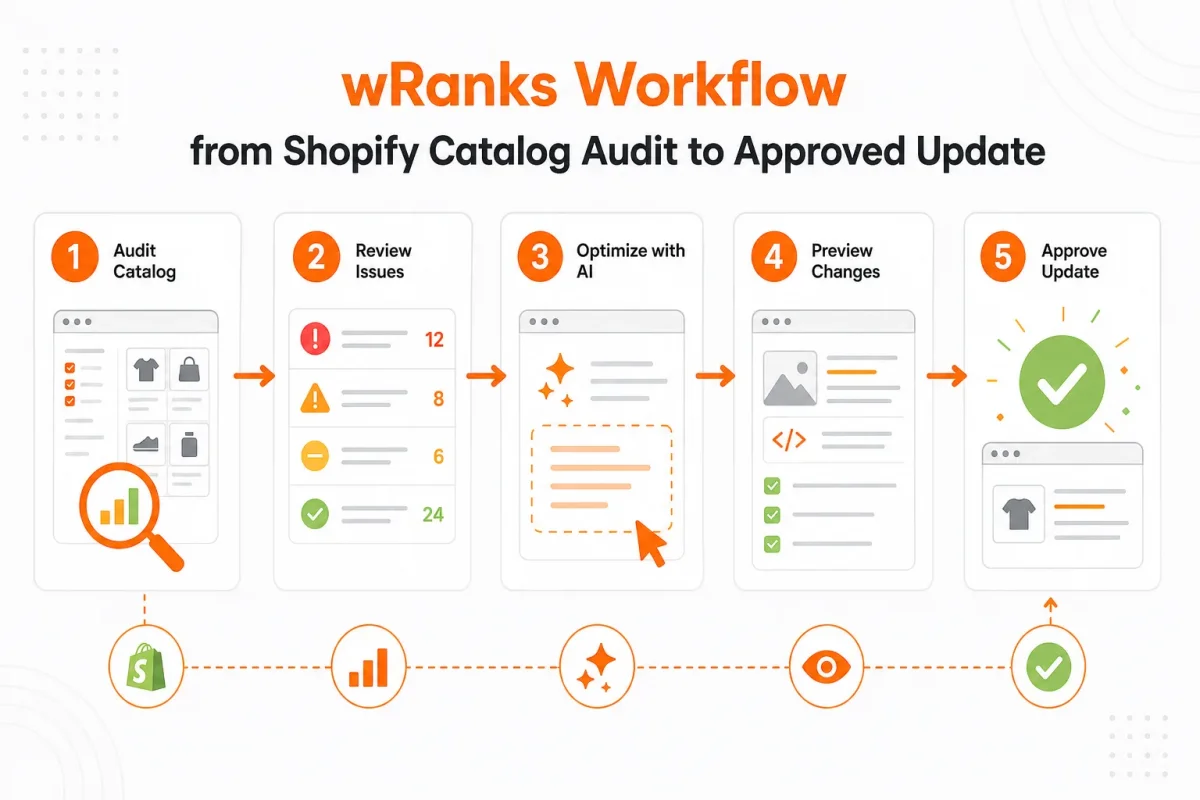
1. Connect the store and define the first URL batch
- Connect and verify: Link the intended Shopify store to wRanks, confirm the account name, and check that products, collections, pages, and blogs appear correctly. Done means the correct store and selected page types are visible. Stop for permission or wrong-store checks if anything does not match.
- Define the batch: Select one page type and assign an owner to every URL. Done means each record has a responsible reviewer and a reason for inclusion. If the batch is too broad to review carefully, reduce its scope before generating anything.
2. Prioritize pages with keyword and Search Console signals
- Set the target query: Use keyword data and Google Search Console impressions, clicks, and queries to give every page a target term and a written rationale. Keyword platforms can assess more than 50,000 related terms while examining search-volume trends and click-through rates, according to Siteimprove's SEO automation research. Done means the chosen query matches the page's product or collection intent, not merely its highest volume.
3. Generate metadata and image alt text with guardrails
- Generate and edit fields: Ask wRanks to revise the title tag, meta description, and image alt text using the page facts and target query. Alt text should describe what the image communicates, not repeat “Hydro Flask bottle” for every image. Done means each field is distinct, accurate, and within the store's review rules.
Weak version: “Blue running shoes | Fast shoes online.”
Strong version: “Women’s Blue Trail Running Shoes | Ridgeway Outdoor” with alt text reading “Blue women’s trail running shoes with lugged soles beside a rocky path.”
Using AI for repeatable SEO tasks
Yes, AI can handle repeatable SEO tasks such as metadata drafts, alt text, keyword grouping, and structured data checks, but it cannot own strategy or accountability. wRanks can automate those production steps for Shopify stores, although a human still needs to verify product facts, search intent, regulated claims, and brand voice.
4. Validate schema and review AI-generated content
- Check structured data: Validate product, offer, review, article, or collection schema against the page content. Automated schema creation can save more than 4 hours per page, according to Siteimprove's overview of SEO automation. Done means required values are present and no markup promises information the page does not show.
- Review generated copy: Check intent, accuracy, claims, tone, and duplication before approval. Remove unsupported delivery promises, invented specifications, and generic paragraphs that add no buying value. The wRanks Quick Start Guide fits this workflow because it covers the setup a reviewer needs before running the first update.
5. Publish the approved changes and record the baseline
- Approve the record: Compare the original and proposed fields, then mark the page approved only after metadata, alt text, schema, and content pass review.
- Publish and log: Release the approved changes through the connected Shopify workflow and record the date, URL, target query, changed fields, reviewer, and starting Search Console data. Done means every update is traceable and reversible. If a field fails validation, leave that page unpublished rather than releasing a partial record.
- Store check: The intended Shopify account and page type are visible.
- Priority check: Every URL has an owner, target query, and rationale.
- Content check: Metadata, alt text, schema, and AI-generated copy match the page.
- Publishing check: Approval, change details, and baseline data are recorded.
Scale SEO Automation for Shopify Stores Without Catalog-Wide Errors
A controlled pilot proves that automation can update Shopify pages safely. Scale introduces a different risk: one vague instruction can create the same wrong title, claim, or AI-generated paragraph across hundreds of records.
The answer is governance, not blind speed. Separate page rules, controlled batches, approval thresholds, and repeated Search Console checks let wRanks handle routine work while people retain strategic judgment.
Create separate automation rules for each Shopify page type
Products, collections, pages, and blogs serve different search intents. A product rule can use product name, material, size, and buying language. A collection rule needs category context and internal links. Pages often carry policy or brand information, while blogs need editorial structure and links to relevant products.
Weak rule: “Rewrite every page title with the target keyword and add helpful copy.”
Product rule: “Create a concise title using the product name and primary query. Keep material and size claims only when confirmed in Shopify. Do not invent benefits, certifications, or performance statements.”
Batch similar records together. wRanks can act as the automation layer, but its limitation is clear: AI-generated wording still needs human review when facts, positioning, or customer promises are involved.
Use approval gates for high-value and high-risk pages
Automatic handling suits missing alt text, empty meta descriptions, and consistent formatting. Mandatory review should cover best-selling products, strategic collections, regulated claims, seasonal campaigns, and pages with unclear keyword intent.
Research from Marketer Milk describes automation as supporting about 50% of content brief creation, with human insight completing the work, according to Marketer Milk's SEO automation research. That is collaboration, not replacement.
Weak gate: “Publish all generated updates after the batch finishes.”
High-risk gate: “Auto-approve missing fields. Send claims, strategic pages, ambiguous queries, and unusual wording to a named reviewer before publishing.”
Balance batch speed against content accuracy and brand control
Larger batches improve throughput, but they also multiply duplicated, inaccurate, or generic wording. Enterprise guidance places quality gates around accessibility, brand compliance, system integrations, and measurable throughput, according to Siteimprove's SEO automation guidance.
- What works: Small batches by page type, approval thresholds, keyword tracking, and recurring Google Search Console checks.
- What works: Alerts for unusual title patterns, repeated sentences, missing schema, and sudden visibility changes.
- What fails: One prompt applied to products, collections, pages, and blogs.
- What fails: Treating faster publishing as better SEO while removing human control from claims and brand decisions.
As the operation matures, link monitoring can also surface risks and opportunities. Siteimprove reports that tools such as Majestic and Moz may save 12+ hours per week through backlink monitoring, according to Siteimprove's SEO automation guidance.
Diagnose the Failures That Make Automated SEO Underperform
Automation can produce a large batch of changes without producing better Shopify pages. The failure usually appears in the catalog first: titles sound interchangeable, image descriptions repeat themselves, or structured data reflects missing store fields.
Ranking tools may flag these issues, but the alert is only useful when someone can identify the symptom and choose the first correction. Technical scanners such as Screaming Frog and Deepcrawl can save 15+ hours per week by mapping site structure and finding problems, according to Siteimprove's SEO automation guidance.
Generic titles and descriptions despite bulk generation
A batch can finish successfully while every product still reads like “Shop Our Best Products.” Check whether the prompt or template includes product attributes, search intent, and a controlled keyword input. wRanks can generate metadata at scale, but the source fields still determine whether each result sounds specific.
Alt text that describes the file instead of the product image
When alt text exactly repeats a product title, the workflow has substituted catalog copy for image context. A weak instruction might say: “Write alt text for the Alpine Trail Jacket.” Strong instruction: “Describe the navy Alpine Trail Jacket shown on a hiker beside a rocky trail, including the visible hood and waterproof shell.”
Structured data that fails validation or mismatches page content
Inspect the failing record before changing the markup. Missing product identifiers, incomplete offer data, or prices that differ from the page can make structured data invalid or misleading. Complete the Shopify source fields, review the validation output, and then publish only the corrected record.
Automated content that is accurate in form but weak in shopper intent
AI content can follow a word count and still miss the buyer’s decision. A useful review checks claims, duplication, tone, product usefulness, and alignment with the page’s search intent. Keyword tracking also needs an owner and a response, not just a position history.
| symptom | likely cause | first fix |
|---|---|---|
| Product pages have generic titles and meta descriptions | The template lacks product attributes, page intent, or a controlled keyword input | Add product-specific fields and review a small generated batch before scaling |
| Image alt text repeats the product title | Automation copied the title instead of describing the visible image | Regenerate with instructions to describe subject, context, and meaningful visual details |
| Structured data is invalid or incomplete | Required product, offer, or identifier fields are missing or mismatched | Inspect the failing record, complete source fields, and validate before publishing |
| Keyword tracking produces no action | Terms are monitored without page ownership, thresholds, or a response plan | Assign each priority term to a URL and define the next optimization decision |
| AI content was published without review | The workflow has no approval gate for claims, duplication, or brand language | Pause broad publishing, audit the affected batch, and require human approval |
- Start with the affected batch: Sample the pages named by the alert before changing the entire catalog.
- Assign ownership: Give each metadata, schema, or keyword issue to a person with a defined next action.
- Protect approval gates: Keep human review for claims, regulated products, and brand-sensitive copy.
Measure Whether the Shopify SEO Workflow Improved Search Visibility
A catalog update is not successful because new meta tags appear in Shopify. The useful test is whether the same product or collection batch earns stronger visibility, cleaner indexing, or more relevant clicks after publication.
Choose one controlled batch and compare its recorded baseline with the same signals later. This keeps the measurement tied to approved changes, rather than confusing seasonal demand or unrelated site updates with automation results.

Record the page, query, and baseline before publishing
Save the batch date, URLs, target queries, indexed status, impressions, clicks, click-through rate, average position, and the current metadata, schema, and content state. In Google Search Console, use the Performance report for query and page data, then use URL Inspection to check discovery and indexing signals.
For example:
Weak version: “Blue shoes for everyday wear.”
Strong version: “Women’s Navy Walking Shoes | HarborStep.” The matching collection schema, descriptive product copy, and image alt text should be recorded with the approved version.
- Baseline: Save the date, selected URLs, target queries, and every current metric.
- Page state: Record whether each URL is discovered, indexed, and eligible for the intended structured data.
- Change record: Tie the approved metadata, schema, alt text, and content updates to the batch history in wRanks.
Compare Search Console and keyword-tracking signals after the update
After enough search activity has accumulated, compare the same pages and queries in Google Search Console. A useful result may be more impressions for relevant searches, more clicks at similar visibility, a stronger average position, or corrected indexing. Revenue need not change immediately for the workflow to show progress.
Use wRanks keyword tracking to check movement across the approved batch. Automated monitoring can flag ranking drops or broken links within minutes, according to Siteimprove’s research on SEO automation. Tracking tools can also reduce manual monitoring time by 10+ hours per week, according to Siteimprove’s analysis of automated SEO monitoring. An alert is a signal, not proof that a particular edit caused the change.
Using ChatGPT to support SEO review
ChatGPT can help interpret exported data, suggest drafts, and create review checklists, but it cannot replace Search Console evidence or merchant approval. Use it to support the workflow, not to make the publishing decision.
Re-audit the batch when visibility does not improve
If nothing moves, return to the audit. Check query intent, indexing status, internal links, canonical signals, schema validity, and whether the new copy is genuinely different and useful. wRanks can help compare keyword movement, but the next edit should follow the diagnosed issue, not an automatic rewrite.
Answers to Common Shopify SEO Automation and AI Questions
AI’s role in the future of SEO
AI will automate repetitive SEO tasks, but it won't replace strategy or accountability. Shopify merchants still decide which products deserve attention, what expertise belongs in the copy, how pages support merchandising goals, and whether technical changes are safe to publish. Tools such as wRanks can handle repeatable execution, while the merchant remains responsible for judgment, review, and publishing.
Ways ChatGPT can support SEO work
ChatGPT can help with SEO by suggesting page copy, grouping search themes, explaining reports, and creating review checklists. It cannot confirm search intent, validate every technical signal, or prove that a change improved visibility. A Shopify merchant can use ChatGPT for assistance, then check evidence in Google Search Console and approve the final work through a controlled process.
How beginners can learn SEO
A beginner should learn SEO in this order: search intent, on-page fundamentals, technical accessibility, internal linking, measurement, and supervised practice. A small Shopify collection makes a useful training ground because its pages share a clear topic without exposing the entire catalog to mistakes. Practice should connect each edit to a reason, a review, and an observable search outcome.
Current names for AI-assisted SEO
There is no single official replacement for SEO. Common labels include AI-assisted SEO, generative search optimization, and answer-engine optimization. The terms describe different emphases, from using AI during execution to improving visibility in generated answers. wRanks can automate repeatable SEO work, but no platform removes the merchant's responsibility for accuracy, usefulness, or search performance.
Start With One Shopify Collection and Make the Workflow Repeatable
The next useful move is smaller than a catalog-wide launch. Choose one collection that already matters to sales, then make every decision visible before anything reaches customers or search engines.
A repeatable workflow is not a promise of instant traffic. It is a controlled way to learn what improves a Shopify store, with human approval between automated recommendations and publication.
1. Select one commercially important collection
Choose a collection with clear products, consistent demand, and enough existing search activity to provide a useful baseline. Connect Google Search Console before making changes, so the collection's queries, impressions, clicks, and indexed status can be compared later.
2. Audit and approve a small optimization batch
Run the collection audit in wRanks across its meta tags, image alt text, structured data, and supporting content. wRanks can surface repeated gaps and suggest updates, but a person still needs to check product claims, search intent, tone, and accuracy.
- Collection scope: One commercially important collection is selected, with its URL and business purpose recorded.
- Search connection: Google Search Console is connected, and the collection's current search signals are available.
- Metadata review: The title and meta description match the collection's products and customer intent.
- Image review: Alt text describes useful image content without stuffing keywords.
- Schema review: Structured data reflects the page and its visible information.
- Content review: Supporting copy answers real customer needs and matches the collection's products.
- Approval boundary: Every proposed change in the first batch has a human reviewer and a recorded decision.
3. Publish, measure, and duplicate the process
- Select the page: Start with one priority Shopify collection, not the whole catalog.
- Connect the data: Link Google Search Console before the audit.
- Audit the page: Review metadata, alt text, structured data, and supporting content in wRanks.
- Choose the batch: Select a small group of useful, related updates.
- Approve each change: Check every recommendation for accuracy and customer value.
- Publish the batch: Release only the approved updates.
- Record the baseline: Save the date and starting search signals, then review keyword tracking and Search Console data on a recurring schedule.
Today, start the wRanks audit for one collection page. That approved batch becomes the template for product, collection, page, and blog work across the store. Controlled repetition beats catalog-wide guesswork.
If you want a faster way to turn one approved collection workflow into repeatable catalog work, wRanks audits and helps optimize Shopify products, collections, pages, and blogs with meta tags, structured data, alt text, keyword tracking, and Search Console insights for merchants seeking consistent review. Explore wRanks SEO resources for Shopify stores.

About James Rodriguez
AI & GEO specialist helping brands maximize visibility across AI platforms like ChatGPT, Gemini, and Claude. James pioneers generative engine optimization techniques for e-commerce.