
Storefront API
Quick Definition
The Shopify Storefront API is a public-facing API that allows developers to query product data, manage shopping carts, and process checkouts in headless applications.
Table of Contents
- Understanding the Storefront API: A Deep Dive into Shopify's Headless Commerce Tool
- Configuring and Implementing the Storefront API in Shopify
- The Strategic Business Value of the Storefront API
- Frequently Asked Questions (FAQs)
- What is the primary purpose of the Shopify Storefront API?
- How do I generate API credentials for the Storefront API?
- Can the Storefront API be used with any Shopify plan?
Understanding the Storefront API: A Deep Dive into Shopify's Headless Commerce Tool
The Shopify Storefront API is a powerful, flexible interface that enables developers to build custom storefronts and headless commerce experiences. Unlike traditional Shopify themes that rely on Liquid templates, the Storefront API allows for a decoupled architecture, giving brands and developers the freedom to craft unique, highly optimized shopping experiences across various platforms and devices.
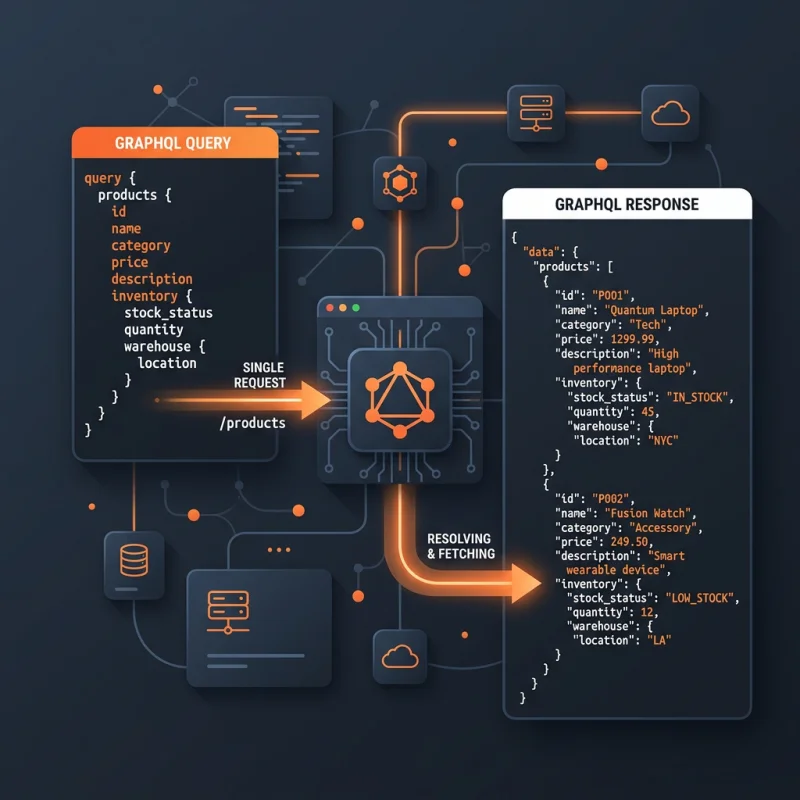
At its core, the Storefront API is a GraphQL-based interface that exposes essential e-commerce functionalities such as querying product data, managing shopping carts, and processing checkouts. This API is designed to be publicly accessible, ensuring that developers can integrate Shopify's commerce engine seamlessly into custom applications, mobile apps, or even IoT devices. Its flexibility supports modern development paradigms, including Progressive Web Apps (PWAs), single-page applications (SPAs), and custom frontend frameworks like React, Vue, or Angular.
In a rapidly evolving digital commerce landscape, the Storefront API serves as a critical enabler for brands seeking to differentiate their online presence. It supports advanced features such as personalized shopping experiences, real-time inventory updates, and multi-channel selling. As Shopify continues to innovate with tools like Hydrogen - a React-based framework for building custom storefronts - the Storefront API remains at the heart of headless commerce strategies, providing a robust foundation for scalable, high-performance storefronts.
Configuring and Implementing the Storefront API in Shopify
Implementing the Storefront API within a Shopify store involves several key steps, from setup to deployment. Here's a detailed walkthrough to help developers and store owners leverage this API effectively:
- Accessing API Credentials: First, navigate to your Shopify admin panel. Under Apps and integrations, create a private app or use an existing one. Generate the API credentials, specifically the Storefront API access token, which is essential for authenticating requests.
- Configuring API Permissions: Ensure that the private app has the necessary permissions enabled, particularly for reading products, collections, and checkout data. This step is crucial for enabling seamless data flow between your storefront and Shopify backend.
- Setting Up Your Development Environment: Choose your preferred development stack - whether it's a React app, Vue.js, or plain JavaScript. Install relevant GraphQL clients such as Apollo Client or urql to facilitate API interactions.
- Making GraphQL Requests: Use the Storefront API endpoint, typically in the format
https://{your-shop}.myshopify.com/api/2023-10/graphql.json. Authenticate requests with the Storefront API access token. Construct GraphQL queries to fetch product data, create carts, or initiate checkouts. - Implementing Core Features: Develop features such as product listing pages, product detail views, shopping cart management, and checkout flows. Shopify's documentation provides extensive GraphQL schemas and sample queries to accelerate development.
- Testing and Optimization: Test your storefront across devices and browsers. Use Shopify's developer tools and GraphQL explorers to debug and optimize queries for performance.
- Deployment and Monitoring: Deploy your custom storefront to your preferred hosting environment. Monitor API usage and performance metrics via Shopify's admin dashboard or third-party analytics tools to ensure a smooth shopping experience.
For detailed technical documentation, visit Shopify's official Storefront API docs. This resource provides comprehensive schemas, sample queries, and best practices to help you maximize the API's potential.
The Strategic Business Value of the Storefront API
The Storefront API unlocks significant strategic advantages for e-commerce brands. By decoupling the storefront from Shopify's traditional theme system, businesses gain unparalleled flexibility to craft unique, engaging shopping experiences that align with their brand identity. This flexibility facilitates:
- Enhanced User Experience: Custom interfaces tailored to target audiences, optimized for speed and responsiveness.
- Multi-Channel Selling: Seamless integration across websites, mobile apps, social media platforms, and IoT devices.
- Personalization and Data-Driven Marketing: Real-time access to customer data enables personalized recommendations and targeted campaigns.
- Faster Innovation Cycles: Rapid deployment of new features without waiting for Shopify theme updates or Liquid code changes.
Real-world examples include brands like Allbirds and Gymshark, which leverage headless architectures to deliver immersive shopping experiences, resulting in increased conversion rates and customer engagement. According to Shopify's data, stores utilizing headless commerce report up to 30% faster page loads and 20% higher conversion rates, underscoring the API's impact on business performance.
Pro Tip: Use Shopify's Hydrogen framework to streamline development of custom storefronts with built-in support for the Storefront API, React components, and optimized performance.
Furthermore, integrating SEO best practices with your custom storefront - such as structured data, fast loading times, and mobile optimization - can significantly improve organic visibility. For example, implementing schema.org markup helps search engines understand your product data better, enhancing rich snippets in search results. For more insights, visit Google's Structured Data documentation.
Frequently Asked Questions (FAQs)
What is the primary purpose of the Shopify Storefront API?
The primary purpose of the Shopify Storefront API is to enable developers to build custom, headless storefronts that interact with Shopify's e-commerce engine. It allows for querying product data, managing shopping carts, and processing checkouts through a flexible GraphQL interface. This API empowers brands to create unique shopping experiences beyond traditional themes, supporting multi-channel selling and personalized customer journeys. It is especially valuable for businesses seeking to improve site performance, user engagement, and conversion rates by customizing their storefronts to meet specific branding and functional requirements.
How do I generate API credentials for the Storefront API?
To generate API credentials, log into your Shopify admin panel and navigate to Apps. Create a new private app or select an existing one, then assign the necessary permissions, such as read access to products, collections, and checkout data. Once configured, Shopify provides an API access token, which is used to authenticate your GraphQL requests. Keep this token secure, as it grants access to sensitive store data. Shopify's official documentation offers step-by-step instructions for creating and managing private apps, ensuring a secure setup process.
Can the Storefront API be used with any Shopify plan?
The Storefront API is available for all Shopify plans that support online stores, including Basic Shopify, Shopify, and Advanced Shopify. However, access to certain advanced features or higher API rate limits may vary depending on your plan. Shopify also offers the Hydrogen framework, which is optimized for headless commerce and works seamlessly with the Storefront API. For detailed information about plan-specific capabilities and limitations, refer to Shopify's API documentation.

About David Chen
Technical SEO engineer focused on structured data, indexing optimization, and Core Web Vitals. David turns complex technical requirements into actionable Shopify solutions.