
GraphQL API
Quick Definition
The Shopify GraphQL API is a powerful query API that allows apps and custom storefronts to request only the exact data they need, improving performance.
Table of Contents
- Understanding GraphQL API in E-Commerce
- Core Concepts of GraphQL
- Implementing Shopify's GraphQL API: Step-by-Step Guide
- Advanced Implementation Tips
- Strategic Business Value of Shopify's GraphQL API
- References and Resources
- Frequently Asked Questions
- How do I set up Shopify's GraphQL API for my store?
- What are the main advantages of using GraphQL over REST in Shopify?
- Can I use GraphQL API with Shopify's Hydrogen framework?
- Is Shopify's GraphQL API suitable for large-scale stores?
Understanding GraphQL API in E-Commerce
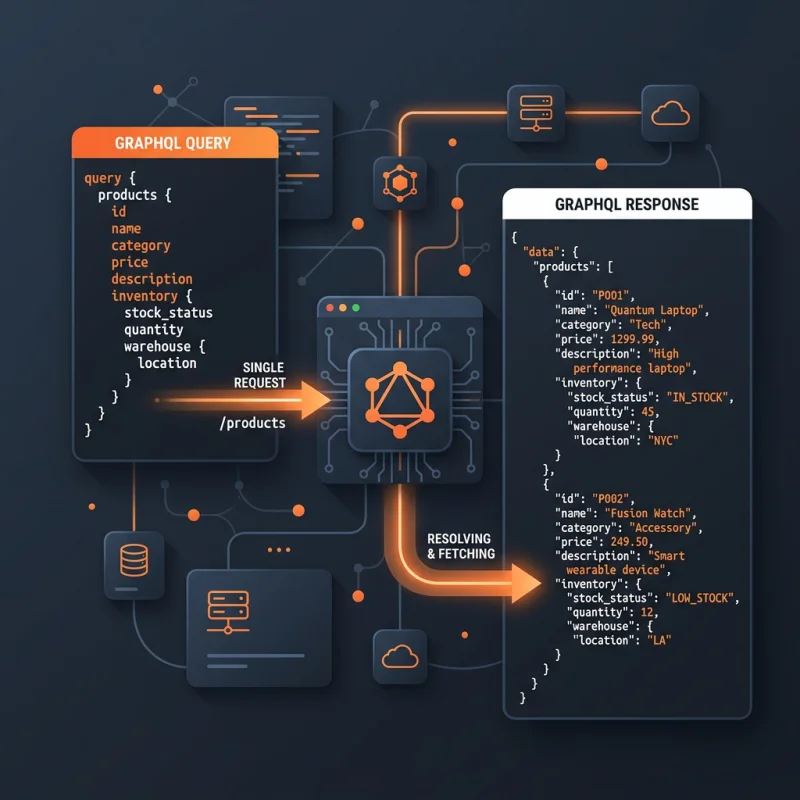
GraphQL API is a modern query language for APIs, developed by Facebook in 2012 and released publicly in 2015. Unlike traditional REST APIs, which expose multiple endpoints and often return excessive data, GraphQL allows clients to specify exactly what data they need in a single request. This flexibility results in more efficient data retrieval, reduced bandwidth consumption, and faster load times - crucial factors for e-commerce platforms aiming to optimize user experience and performance.
In the context of Shopify, the GraphQL API serves as a powerful interface for developers to interact with store data, including products, collections, customers, orders, and more. It enables custom storefronts, integrations, and apps to operate seamlessly, providing granular control over data queries and mutations. This API is especially valuable for high-traffic stores where performance and data precision directly impact conversion rates and customer satisfaction.
Core Concepts of GraphQL
- Schema: Defines the types of data available and the relationships between them.
- Queries: Requests for data, specifying exactly which fields are needed.
- Mutations: Operations that modify data, such as creating or updating products.
- Resolvers: Functions that resolve the data for each field in a query.
By leveraging these core concepts, developers can craft precise, efficient, and flexible data interactions tailored to their e-commerce needs.
Implementing Shopify's GraphQL API: Step-by-Step Guide
Getting started with Shopify's GraphQL API involves a series of configuration steps within your Shopify admin and development environment. Here's a detailed walkthrough:
- Create a Private App or Custom App: Navigate to Shopify's app setup section. For private apps, go to Apps > Manage private apps > Create a new private app. For custom storefronts, consider creating a custom app with API access permissions.
- Configure API Permissions: Ensure your app has the necessary permissions, such as read_products, write_orders, or read_customers, depending on your needs.
- Generate API Credentials: Obtain the API key and password (for private apps) or access tokens (for custom apps). These credentials authenticate your requests.
- Set Up Your Development Environment: Use tools like Postman or GraphQL clients such as Insomnia. Install Shopify's SDKs if needed, or set up a server environment with libraries like Apollo Client or graphql-request.
- Construct Your First Query: Use the Shopify GraphQL Explorer (Shopify GraphQL API documentation) to test queries. For example, to fetch product data:
query {
  products(first: 5) {
    edges {
      node {
        id
        title
        descriptionHtml
        images(first: 1) {
          edges {
            node {
              src
            }
          }
        }
      }
    }
  }
}
Once tested, integrate these queries into your storefront or app codebase, ensuring proper authentication headers are included.
Advanced Implementation Tips
- Use Pagination: Shopify's API supports cursor-based pagination, essential for handling large datasets efficiently.
- Implement Caching: Cache frequent queries to reduce API calls and improve response times.
- Monitor API Usage: Shopify enforces rate limits; track your API calls to avoid throttling.
- Leverage Webhooks: Combine GraphQL with webhooks for real-time data updates, such as order status changes.
Strategic Business Value of Shopify's GraphQL API
Adopting GraphQL API within your Shopify store architecture offers significant strategic advantages. Its ability to fetch only the necessary data reduces load times, which directly correlates with higher conversion rates. For instance, a study by Google Web.dev highlights that a delay of just one second in page load time can decrease conversions by up to 7%. GraphQL's efficiency enables faster storefronts, especially critical for mobile users where bandwidth and speed are paramount.
Furthermore, GraphQL facilitates a flexible, scalable architecture that adapts to evolving business needs. Custom storefronts built with frameworks like Shopify Hydrogen leverage GraphQL to deliver personalized shopping experiences, integrating seamlessly with third-party services and internal systems. This flexibility supports omnichannel strategies, allowing brands to unify their online and offline data seamlessly.
Optimization tips include designing minimal queries, leveraging server-side caching, and monitoring API usage to stay within Shopify's rate limits. Real-world examples include brands like Gymshark and Allbirds, which utilize GraphQL for dynamic product filtering and real-time inventory updates, enhancing customer engagement and operational efficiency.
References and Resources
Frequently Asked Questions
How do I set up Shopify's GraphQL API for my store?
To set up Shopify's GraphQL API, you need to create a private or custom app within your Shopify admin, assign the necessary permissions, and generate API credentials. Use these credentials to authenticate your requests. Then, utilize tools like Postman or GraphQL clients to test queries and integrate them into your storefront or app code. Shopify's documentation provides detailed steps and best practices for secure setup and efficient data retrieval.
What are the main advantages of using GraphQL over REST in Shopify?
GraphQL offers precise data fetching, reducing over-fetching and under-fetching common in REST APIs. It allows clients to request exactly what they need in a single request, improving load times and reducing bandwidth. Additionally, GraphQL's flexible schema supports complex queries and mutations, enabling more dynamic and personalized storefront experiences. This results in better performance, scalability, and developer productivity.
Can I use GraphQL API with Shopify's Hydrogen framework?
Yes, Shopify's Hydrogen framework is built specifically to leverage GraphQL API for building custom storefronts. Hydrogen provides pre-built components and hooks optimized for GraphQL queries, making it easier for developers to create fast, dynamic, and personalized e-commerce experiences. It seamlessly integrates with Shopify's GraphQL API, allowing for real-time data updates and enhanced storefront customization.
Is Shopify's GraphQL API suitable for large-scale stores?
Absolutely. Shopify's GraphQL API is designed to handle large datasets efficiently through features like cursor-based pagination and query batching. It enables high-performance data retrieval, essential for large-scale stores with extensive product catalogs and high traffic volumes. Proper implementation of caching, rate limit management, and optimized queries further enhance its suitability for enterprise-level e-commerce operations.

About David Chen
Technical SEO engineer focused on structured data, indexing optimization, and Core Web Vitals. David turns complex technical requirements into actionable Shopify solutions.