
Hydrogen
Quick Definition
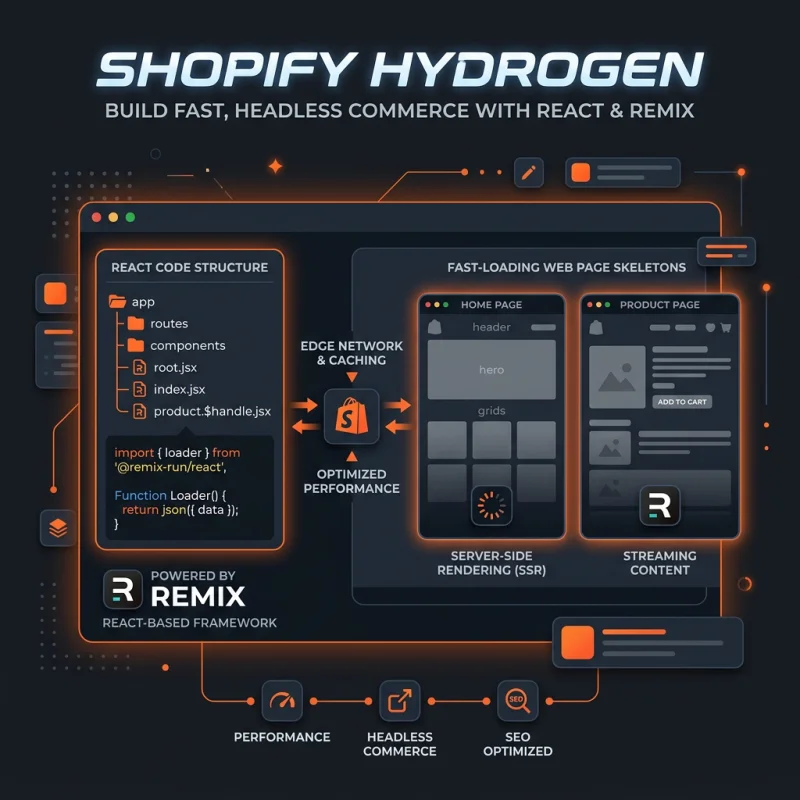
Shopify Hydrogen is a React-based development framework built on Remix that provides components and utilities to build custom, headless storefronts.
Table of Contents
- Understanding Hydrogen: A Deep Conceptual Overview
- Implementing Hydrogen in Shopify: Practical Configuration and Setup
- Strategic Business Value and Optimization Tips for Hydrogen
- References and Further Reading
- Frequently Asked Questions
- How do I set up Shopify Hydrogen for my store?
- What are the main benefits of using Hydrogen for Shopify storefronts?
- Can Hydrogen be used for large-scale e-commerce websites?
Understanding Hydrogen: A Deep Conceptual Overview
Shopify Hydrogen is an innovative development framework designed specifically for creating custom, headless storefronts on the Shopify platform. Built on React and Remix, Hydrogen empowers developers to craft highly personalized shopping experiences that are fast, flexible, and scalable. Unlike traditional Shopify themes, which rely heavily on Shopify's templating system, Hydrogen leverages modern JavaScript technologies to decouple the frontend from the backend, enabling a true headless commerce architecture.
At its core, Hydrogen provides a suite of pre-built components, utilities, and hooks that streamline the development process. These include product galleries, cart management, checkout flows, and more, all optimized for performance and SEO. The framework also integrates seamlessly with Shopify's GraphQL API, allowing real-time data fetching and dynamic content rendering. This setup ensures that storefronts built with Hydrogen are not only visually compelling but also highly responsive and optimized for conversions.
Hydrogen's architecture supports server-side rendering (SSR) and static site generation (SSG), which are critical for achieving fast load times and excellent SEO rankings. Its modular design encourages component reuse and customization, making it suitable for both small boutique stores and large-scale enterprise solutions. As e-commerce continues to evolve toward more personalized and immersive experiences, Hydrogen stands out as a powerful tool for developers aiming to push the boundaries of what's possible with Shopify.
Implementing Hydrogen in Shopify: Practical Configuration and Setup
Getting started with Hydrogen involves several key steps within your Shopify admin and local development environment. First, ensure you have a Shopify store with a suitable plan that supports custom storefronts. Then, access the Shopify Partners dashboard to create a new development store or connect to an existing one. From there, you can initialize a Hydrogen project using the command line interface (CLI).
- Install the Hydrogen CLI: Run
npm create @shopify/hydrogenin your terminal to scaffold a new project. This command sets up a React-based environment pre-configured with Hydrogen components and dependencies. - Configure your store connection: In your project directory, update the
shopify.config.jsfile with your store's domain and API credentials. You can generate API credentials from your Shopify admin under Apps > Manage private apps. - Set up environment variables: Store sensitive data such as API keys in a .env file to keep them secure and accessible during development.
- Customize your storefront: Use Hydrogen's component library to build your pages. For example, replace default product templates with Hydrogen components like
ProductProvider,CartLine, andImage. - Implement routing and navigation: Hydrogen supports file-based routing similar to Next.js. Define your routes in the
src/routesdirectory, creating pages for collections, products, cart, and checkout. - Deploy your storefront: Use platforms like Vercel, Netlify, or Shopify's own Hydrogen hosting to deploy your site. Hydrogen's SSR capabilities ensure your storefront loads quickly and is SEO-friendly.
Throughout this process, it's essential to test your storefront locally using the Hydrogen dev server, which provides hot-reloading and real-time data updates. Regularly consult Shopify's official documentation on Hydrogen setup and best practices for detailed guidance.
Strategic Business Value and Optimization Tips for Hydrogen
Adopting Hydrogen for your Shopify store can significantly enhance your e-commerce strategy by enabling a highly customized, fast, and SEO-optimized storefront. Here are some key benefits and tips to maximize its potential:
- Enhanced User Experience: Hydrogen allows you to design unique, immersive shopping interfaces that align perfectly with your brand identity, increasing customer engagement and conversion rates.
- Performance Optimization: With server-side rendering and static site generation, Hydrogen ensures rapid load times, which are critical for reducing bounce rates and improving SEO rankings. Regularly audit your site using tools like Google PageSpeed Insights.
- Flexibility and Scalability: The component-based architecture enables easy customization and scaling as your product catalog grows or your marketing strategies evolve.
- Seamless Shopify Integration: Hydrogen's deep integration with Shopify's GraphQL API simplifies data management, order processing, and inventory synchronization, reducing operational complexity.
- Real-World Examples: Major brands like Allbirds and Gymshark have adopted headless architectures with Hydrogen to deliver personalized shopping experiences that boost customer loyalty and sales.
To optimize your Hydrogen storefront, focus on implementing best practices such as lazy loading images, optimizing API calls, and leveraging CDN caching. Additionally, consider integrating third-party tools like Google Analytics, Shopify's built-in analytics, and marketing automation platforms to gather actionable insights and refine your customer journey.
Investing in a headless approach with Hydrogen positions your brand at the forefront of e-commerce innovation, enabling rapid adaptation to market trends and consumer preferences. Regularly monitor performance metrics and user feedback to iterate and improve your storefront continually.
References and Further Reading
Frequently Asked Questions
How do I set up Shopify Hydrogen for my store?
Setting up Shopify Hydrogen involves creating a new project using the Hydrogen CLI, configuring your store credentials, and customizing your storefront components. Start by installing the CLI with npm create @shopify/hydrogen, then connect your Shopify store by updating the shopify.config.js file with your store's domain and API credentials. After setting environment variables, you can develop locally using the Hydrogen dev server, which supports hot-reloading. Once satisfied, deploy your site on a hosting platform like Vercel or Netlify. Shopify provides detailed guides on their official documentation.
What are the main benefits of using Hydrogen for Shopify storefronts?
Hydrogen offers several advantages, including the ability to create highly customized and immersive shopping experiences, improved site performance through server-side rendering and static generation, and seamless integration with Shopify's backend via GraphQL API. This approach enhances SEO, reduces page load times, and provides flexibility to tailor the storefront to specific branding and functional needs. Additionally, Hydrogen's component-based architecture simplifies maintenance and scalability, making it suitable for both small and enterprise-level stores.
Can Hydrogen be used for large-scale e-commerce websites?
Yes, Hydrogen is designed to support large-scale e-commerce operations. Its architecture supports server-side rendering and static site generation, which are critical for handling high traffic volumes efficiently. The modular component system allows developers to optimize and scale individual parts of the storefront without affecting the entire site. Many large brands leverage Hydrogen to deliver fast, personalized shopping experiences while maintaining robust backend integrations, making it a viable choice for enterprise-level stores seeking flexibility and performance.
.
About James Rodriguez
AI & GEO specialist helping brands maximize visibility across AI platforms like ChatGPT, Gemini, and Claude. James pioneers generative engine optimization techniques for e-commerce.