Shopify Titles and Meta Descriptions: A Practical Guide
Shopify title and meta description best practices help you craft clear, clickable search listings tailored for products, collections, and pages.
You edit a Shopify product, save the title, and wait for Google to catch up. When the listing appears, the keyword is there, but the wording feels clipped, vague, or oddly focused. Your product may match the search, yet the result gives shoppers little reason to choose your page. A clear Shopify title and meta description can change that.
Most Shopify merchants don't have a keyword problem. They have a search-result message problem. A title and description must quickly explain what your page offers, who it suits, and why the click makes sense. Shopify Help Center identifies title tags and meta descriptions as important because shoppers see them in search results.
The real task is creating, adding, and checking page-specific copy across products, collections, pages, and blogs. That workflow also connects with structured data, image alt text, keyword tracking, and Google Search Console insights through wRanks, so you can scale relevance without forcing one phrase into every field.
The 60-Character Title and 160-Character Description Rule Has a Business Cost
Your Shopify page can appear for the right search and still lose the click. If your title doesn't show whether the page sells a product, serves a collection, or answers a customer need, shoppers have to guess. A vague description gives you no clear way to persuade a qualified shopper to choose your result.
Treat these character targets as practical display guidelines, not rigid laws. Search engines may shorten your titles or rewrite your descriptions, but clear, focused copy gives you a better starting point.
Titles identify the page before shoppers read anything else
You can use up to 70 characters in a Shopify page title, but Shopify recommends staying at or below 60 characters because longer titles may be shortened in search results, according to the Shopify Help Center. That trade-off matters when your product name, key feature, or brand name gets cut before a shopper understands your offer.
Weak example: Summer Sale | Great Deals on All Natural Organic Cotton Women’s Lightweight Crew Neck T-Shirts
Organic Cotton Crew Neck T-Shirt | Northstar puts the product and brand first.
“Shopify recommends entering a page title that is 60 characters or fewer because most search engines shorten longer titles.” Shopify Help Center
Descriptions influence the click without directly guaranteeing rankings
Meta descriptions still matter for your Shopify store, but they don't directly improve rankings. Shopify explains that your descriptions can influence whether a searcher clicks when Google uses them as the snippet. Make your description clarify the offer, match the searcher's intent, and give the reader a specific reason to visit.
Weak example: Shop our products online. Great quality and fast shipping.
Shop women’s organic cotton crew neck shirts in six colors. Free shipping on orders over $50. gives you a clearer reason to earn the click.
The practical character targets for Shopify search listings
Shopify recommends about 160 characters for a meta description and natural keyword use rather than keyword lists, according to the Shopify Help Center. Treat 60 characters for titles and 160 characters for descriptions as working targets, then check how your listing reads on mobile and desktop.
| Clear listing | Truncated or vague listing |
|---|---|
| Organic Cotton Crew Neck T-Shirt | Northstar Women’s organic cotton shirt in six colors. Free shipping on orders over $50. |
Summer Sale | Great Deals on All Natural Organic Cotton Women’s Lightweight Crew Neck T... Shop our products online. Great quality and fast shipping. |
Practical rule: Keep your titles near 60 characters and descriptions near 160, but prioritize a clear promise over filling every available character.
Choose the Right Shopify Metadata Pattern for Each Page Type
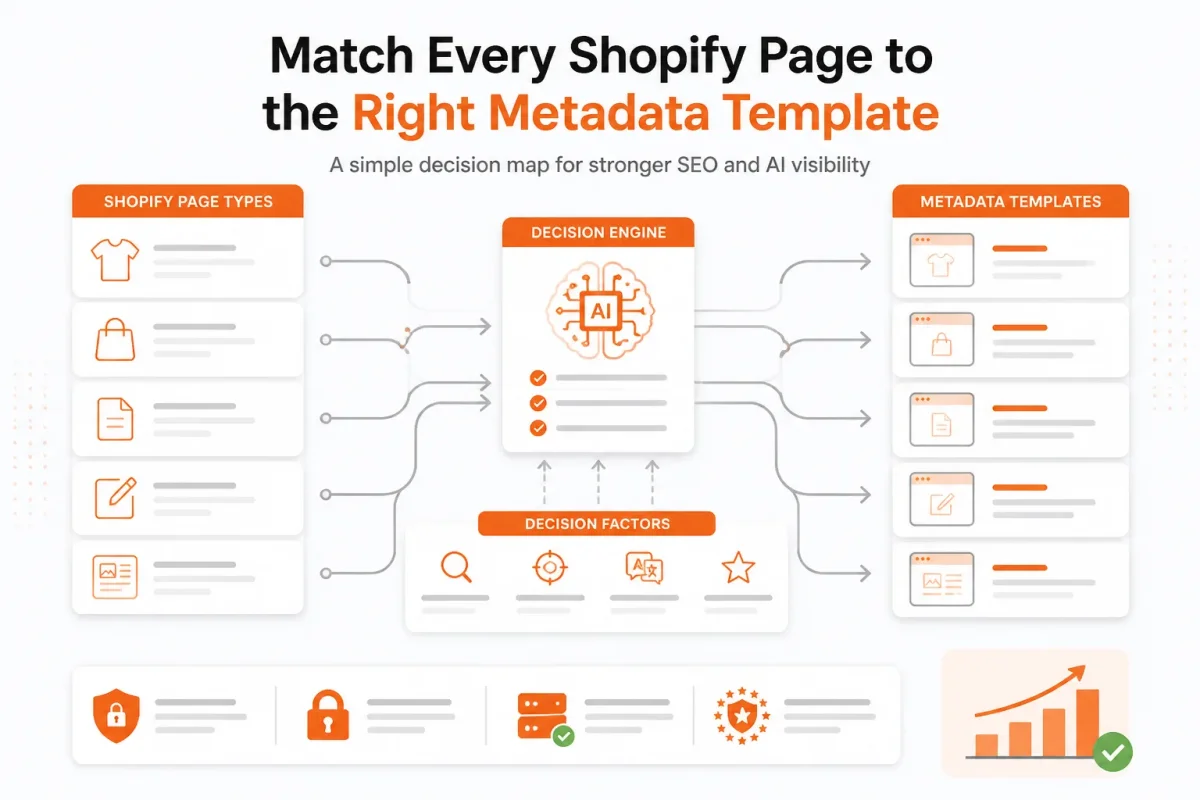
A product needs a different Shopify title and meta description pattern from a collection, homepage, or blog post. A product sells one item, while a collection helps shoppers compare several related options.
Shopify recommends putting important target keywords near the beginning of each unique, descriptive page title, according to the Shopify Help Center. Each page should signal its own purpose rather than repeat one store-wide formula.
Product pages need the item and buying differentiator
For a product, include the product name, defining attribute, customer benefit, and brand. A starting title pattern is [Product name] | [Key attribute or benefit] | [Brand]. A description pattern is Shop [product] with [specific benefit]. [Proof point or offer].
Weak example: “Organic Cotton T-Shirt | Northstar.”
Organic Cotton Crew Neck T-Shirt | Northstar: “Shop breathable organic cotton in six colors, with free shipping on orders over $50.”
A product-title workflow can help you refine this pattern before applying it across your catalog. The Shopify Product Title SEO guide covers product-focused title decisions that fit this workflow.
Collections need category intent and a reason to browse
For a collection, focus on the category and shopper outcome rather than one repeated product phrase. Use [Category] for [Shopper need] | [Brand], followed by selection, range, or comparison details in the description.
Weak example: “Women’s Shirts | Northstar.”
Women’s Organic Cotton Shirts for Everyday Comfort | Northstar: “Browse breathable tees, tanks, and button-downs in versatile colors and sizes.”
| situation | better move |
|---|---|
| Product page targeting a specific item | Use the product name plus a defining attribute, customer benefit, and brand. Don't substitute a broad category phrase. |
| Collection page covering multiple related products | Use the category and shopper outcome, then explain the range or selection in the description. |
| Homepage representing the entire store | Lead with the primary store category and differentiator rather than a single product name. |
| Standard page such as shipping, returns, or sizing | Describe the customer task and expected information instead of forcing a commercial product keyword. |
| Blog post answering a search question | Use the topic or question with the reader’s promised outcome and keep the wording editorial. |
Pages, blogs, and the homepage need different promises
Your homepage should lead with the store category and differentiator. A shipping page should promise delivery information, while a blog post should pair the reader’s question with a useful outcome. Shopify recommends a unique meta description in plain, direct language for every page. Each description should match the page's search intent.
Meta tag examples for Shopify pages
You can add a description tag such as this in a page’s HTML: <meta name="description" content="Shop breathable organic cotton shirts in six colors, with free shipping on orders over $50."> Shopify’s editor manages this field for most store pages, so you usually enter the wording rather than edit code.
The most important meta tags
Your title tag and meta description deserve first attention because they shape the search listing. Alt text, page content, and structured data also support discoverability, and wRanks can help you optimize those elements at scale. Unusual products still need human review.
Use one-off editorial copy for a homepage, policy page, or blog post. Use product and collection templates for a large catalog, then edit important pages manually.
Prepare the Keyword, Offer, and Shopify Editor Before You Write
You get better metadata when you decide what the page promises before opening Shopify’s editor. Start with the searcher, the offer, and the page type, not with a character counter.
A homepage needs store-level messaging, while a product or collection needs wording tied to a specific shopping intent.
Collect the facts the snippet must communicate
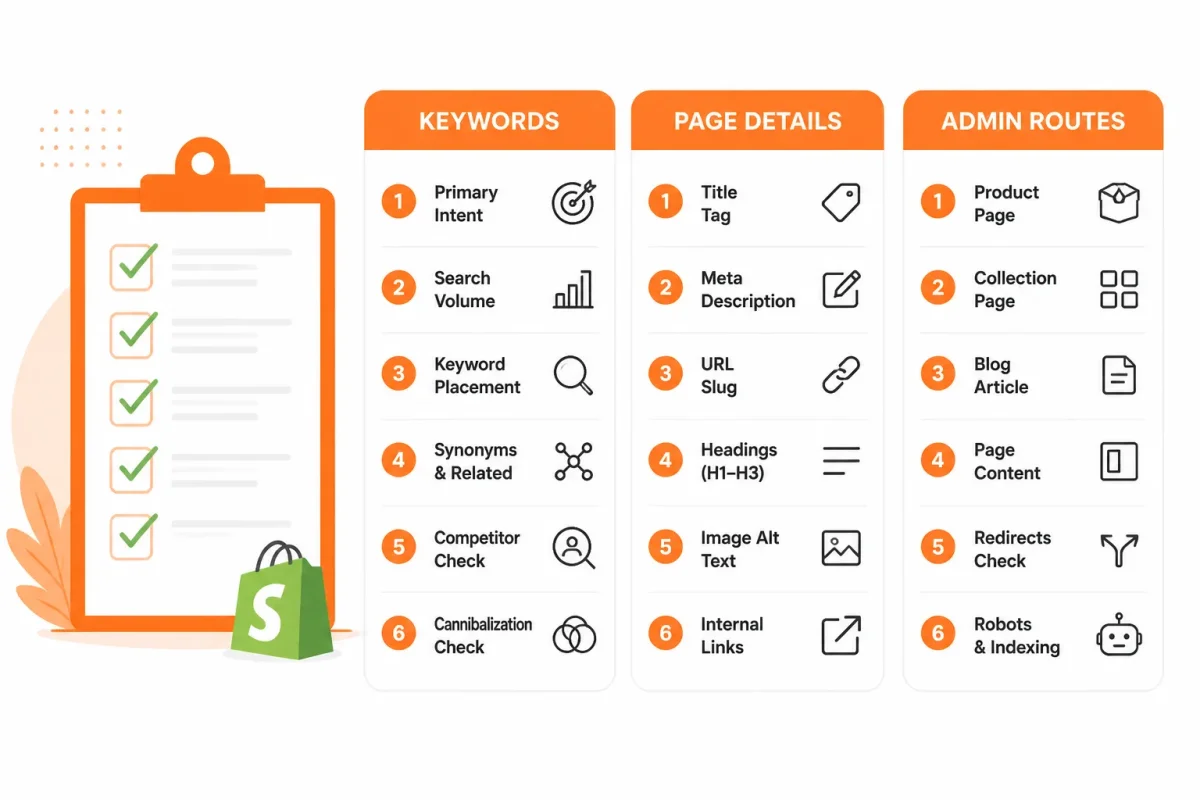
Before you write, collect one primary search phrase, the actual offer, one differentiator, a useful call to action, your brand name, and the correct Shopify page type. Shopify identifies four main places for natural keyword use: page titles, meta descriptions, ALT tags, and body content.
- Primary phrase: Choose the search wording that best matches what your page sells or explains.
- Actual offer: Record the product, collection, service, guide, price point, or benefit the page delivers.
- Differentiator: Add a specific proof point, such as “organic cotton,” “ships from Texas,” or “30-day returns.”
- Call to action: Give your reader a useful next step, such as “Shop insulated bottles” or “Compare sizes.”
- Brand name: Keep your store name available for consistent title formatting.
- Page type: Mark the page as a product, collection, regular page, blog post, or homepage.
Weak: “Blue Water Bottle | RiverPeak.”
Strong: “Insulated Stainless Steel Water Bottle | RiverPeak.”
Adding a meta title and meta description
To add a Shopify title and meta description, open the relevant product, collection, page, or blog post in Shopify admin. Find the search engine listing preview, choose “Edit website SEO,” and enter both fields. Preview the wording before saving.
Adding homepage metadata in Shopify
To add homepage metadata, open Online Store > Preferences, find the homepage search-engine listing area, and edit the title and description there. Your homepage copy should describe the store’s main category and strongest reason to buy, not one individual product.
Weak: “RiverPeak Online Store.”
Strong: “Insulated Water Bottles and Travel Drinkware | RiverPeak.”
Meta keywords in Shopify
Shopify does not require a hidden meta-keyword list for modern search optimization. Place useful language in titles, descriptions, body copy, structured data, and image ALT text instead. A few high-value pages suit manual editing. A larger catalog suits wRanks for repeatable meta tag checks, though unusual products still need your review.
Match the task to the correct Shopify admin screen
Use the product, collection, page, or blog editor for individual content, and use Online Store preferences for the homepage. If several pages share the same structure, an AI-powered SEO workflow in wRanks can help you apply patterns and review gaps without treating every page as identical.
Decide whether one page or a store-wide pattern is needed
Choose manual editing when you’re refining a homepage, a top-selling product, or an important campaign page. Choose a repeatable workflow when your Shopify store has many products, collections, or posts that need consistent titles, descriptions, structured data, and ALT text.
Write and Add a Shopify Title and Meta Description Step by Step
Your primary phrase, offer, and landing page must agree before you save anything. The copy should sound natural, set a clear expectation, and give the right shopper a reason to visit.
Use the workflow below on one product, collection, page, or blog post first. You’ll see what finished copy looks like, where errors appear, and how to check the correct Shopify editor.
1. Open the page’s Search engine listing preview
Open the specific product, collection, page, or blog post in Shopify, then find Search engine listing preview and choose the edit option. Edit the page that searchers will land on, not a similar product or a store-wide setting.
2. Build the title around the page’s primary phrase
Choose one primary phrase and place it naturally near the front of your Shopify title. Shopify advises using keywords in readable phrases because random keyword placement can discourage customers and may be ignored by search engines.
Before: Hiking Socks | Northstar
Merino Wool Hiking Socks | Warm, Durable Fit | Northstar
The stronger version identifies the product, its useful benefit, and the brand. Your title should match what the page actually sells.
Meta title and meta description example
A useful example is the title “Merino Wool Hiking Socks | Warm, Durable Fit | Northstar” paired with “Stay warm and dry on the trail with moisture-controlling merino wool socks. Enjoy durable comfort and fast U.S. shipping. Shop Northstar today.”
3. Turn the description into a truthful click reason
Write a benefit-led description that explains what you offer, why it helps, and what the shopper can do next. Google may show a meta description in roughly 150 to 160 characters, according to Shopify’s guidance. Keep the most persuasive detail near the beginning and review the available space in the preview.
Your description must reflect the landing page. Don't claim free shipping, medical benefits, or next-day delivery unless the page supports those claims.
What to write in a meta description
Write the product’s clearest customer benefit, one specific reason to choose it, and a fitting action. For the Northstar socks, you might mention warmth, moisture control, durability, shipping terms, and “Shop today” without repeating the phrase unnaturally.
- Primary phrase: Use one natural phrase that matches the page.
- Benefit: State a concrete outcome shoppers care about.
- Proof: Include a supported feature, material, or service detail.
- Action: End with an appropriate next step.
4. Preview, save, and verify the live page
Read the mobile and desktop preview, then save the Shopify page. The copy is ready when the title is specific, the description is readable, and both match the visible product or offer.
Watch for duplicated copy across unrelated pages, truncation before the benefit appears, unsupported claims, and wording disconnected from the landing page. After publishing, you can use wRanks to review meta tags across Shopify stores, though automated checks still need human review.
Scale Shopify Metadata Across Products, Collections, Pages, and Blogs
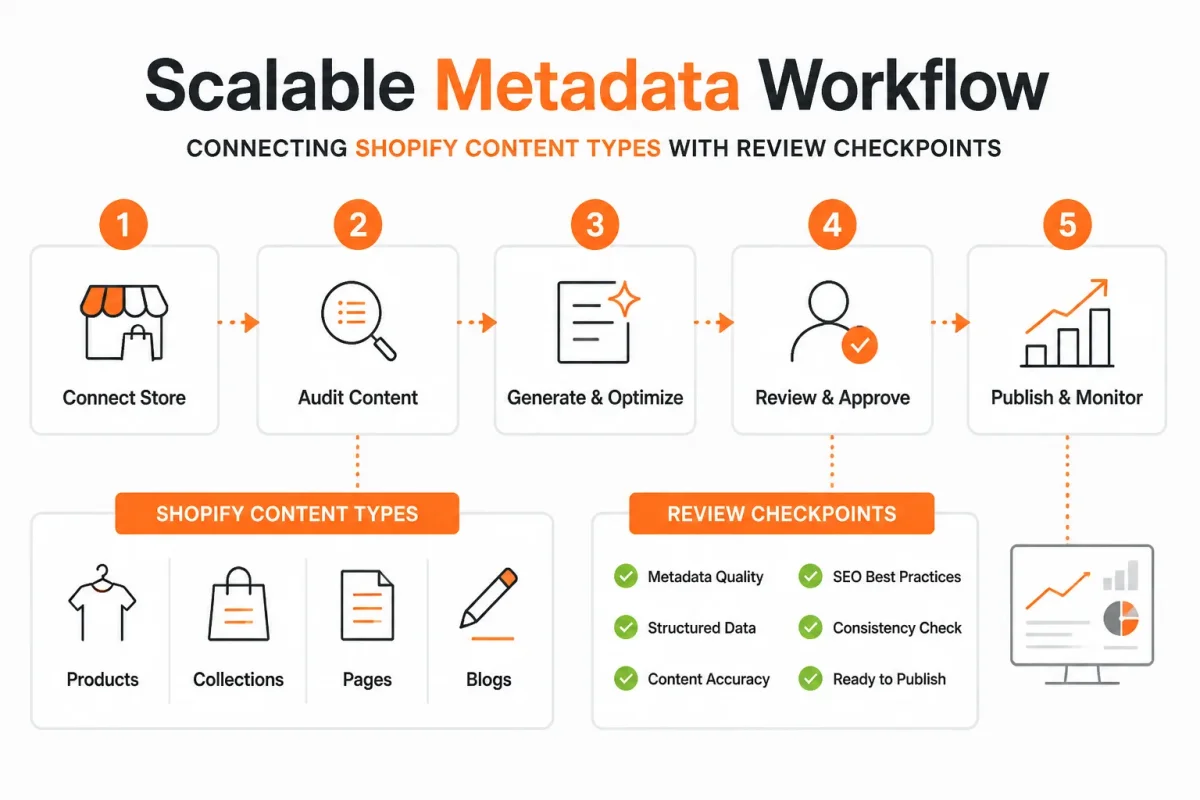
Manual editing works for a few pages, but your Shopify store may have hundreds of products and collections. Reusable rules can create useful drafts without flattening every page into the same sentence.
A template gives you speed. Human review keeps each Shopify title and meta description accurate, relevant, and consistent with the page visitors reach.
Create variables for repeatable product and collection templates
For products, combine the product name, one verified attribute, and one customer benefit. For collections, combine the collection name, category, and shopper outcome. Your source data must reflect current inventory, pricing, materials, and available variants.
Weak product draft: “Stainless Steel Water Bottle | Best Bottles Online”
Insulated Steel Bottle: “Insulated Steel Bottle, 32 oz | Keeps Drinks Cold for 24 Hours”
Use a similar rule for collections: “Running Shoes | Shop Our Collection” becomes “Women’s Trail Running Shoes | Find Grip for Rocky Routes.” The pattern gives you consistent drafts while preserving the page’s specific offer.
Use different rules for evergreen pages and blog posts
Shipping, returns, and about pages need a clear purpose plus a service promise. A blog post needs its topic plus the reader outcome, not a product pitch. Shopify says Google usually builds snippets from page content, but may use your meta description when it offers a better summary.
- Inputs: Provide page type, keyword, facts, offer, and approved claims.
- Draft: Apply the relevant product, collection, page, or blog template.
- Review: Check intent, accuracy, length, voice, and landing-page alignment.
- Publish: Save the approved metadata and inspect the live result.
- Feedback: Compare keyword movement and Search Console insights before revising.
This guide to SEO automation for Shopify stores fits the same workflow when you want governance beyond one page.
Review AI drafts for accuracy, intent, and brand voice
AI-generated metadata gives you speed, coverage, and useful variation. It can also invent benefits, repeat vague wording, miss search intent, or make unsupported claims. wRanks helps you generate and review meta tags across Shopify while checking structured data, image alt text, keyword tracking, and Google Search Console insights. Automation cannot verify every product fact or replace your approval.
What works
- Verified variables: Draw attributes and benefits from accurate Shopify data.
- Page-specific review: Confirm that each draft matches the visible content.
- Central checks: Review metadata, structured data, and performance together.
What fails
- Blanket automation: Publish identical claims across unrelated pages.
- Invented benefits: Let AI describe features the product does not have.
- No feedback loop: Generate drafts without comparing Search Console results.
Fix the Shopify Metadata Mistakes That Waste Search Clicks
You can follow a sound Shopify title and meta description template and still lose clicks through small errors. A clipped title, recycled description, unsupported promise, or stale Google snippet can make your page look less relevant than it is.
Shopify describes a meta description as a short page summary that appears in search results and as an HTML element in the page head. Meta descriptions help explain the page, but useful content, accurate offers, and structured data still matter.
Common Shopify meta tag mistakes
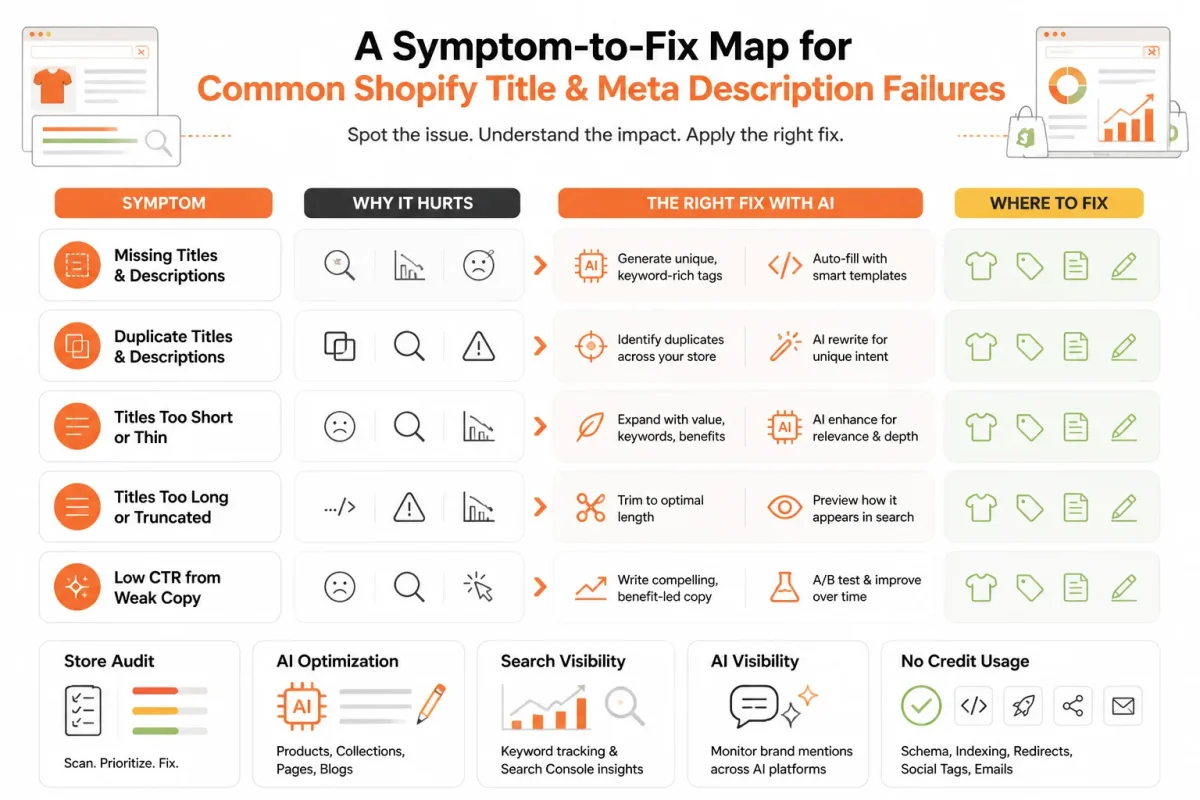
Common mistakes include truncating the key phrase, duplicating descriptions, stuffing keywords, inventing benefits, and ignoring page intent. Treating meta keywords as a substitute for titles, descriptions, useful page content, or structured data is another mistake. Google may also rewrite your snippet from visible page content when that text better matches the search.
| symptom | likely cause | first fix |
|---|---|---|
| Title is cut off in the search result | The title exceeds Shopify's practical visible target or puts the key meaning too late | Move the main phrase and page purpose forward, then revise toward 60 characters or fewer. |
| Several pages show the same description | A copied description or generic template lacks page-specific variables | Add the product, collection, or article-specific benefit and create a unique description. |
| Copy reads like a list of repeated keywords | Keywords were inserted without natural sentence structure | Rewrite for a person first, keeping only the phrase variations that accurately fit the page. |
| The snippet promises something the page does not provide | Unsupported claims or an outdated offer were used in the metadata | Verify the claim against the live page, product, price, availability, and shipping details. |
| Google still shows the old title or description | Google has not recrawled the page or selected different page content for the snippet | Confirm the saved source, request or wait for recrawling, and improve the page content that Google may use. |
When every product has the same title pattern
You lose relevance when every product inherits “Shop Premium Products | Store Name” without a meaningful product variable. Check that your template includes the product name, defining attribute, and page purpose instead of repeating one broad keyword.
When the description reads like a keyword list
You need a sentence a shopper can understand, not a string of search terms.
Weak: “Women’s running shoes, running sneakers, athletic shoes, buy running shoes online.”
Strong: “Shop lightweight women’s running shoes with cushioned support for daily miles and weekend training.”
When Google shows different text than Shopify
You may have accurate metadata while Google selects visible page copy that better answers the search. Align your title, description, product details, and structured data, then review the live source. wRanks can audit those signals and monitor changes, but your approval still matters.
When a saved edit still looks unchanged
First confirm the saved title and description in Shopify's live source, then allow time for recrawling. For a new workflow, this guide to Shopify Search Console verification fits the same checking process.
Four Answers to the Metadata Questions Shopify Guides Leave Open
You may understand how to edit Shopify metadata and still have basic terminology or billing questions. These answers separate search presentation from Shopify charges, so you know what each setting controls.
Shopify's charge on a $20 sale
The amount Shopify takes from a $20 sale depends on your Shopify plan, payment method, location, and applicable transaction or payment-processing fees. Your store subscription is separate from the sale itself. Check your Shopify admin and current plan terms for the exact charge rather than applying a universal percentage. SEO metadata does not change Shopify’s billing.
An example of something that is meta
Metadata is information that describes other information, such as a page title describing your webpage. For example, “Organic Cotton Bath Towel” can describe a product page without being the product itself. You may see that title in search results, browser tabs, or Shopify settings. Metadata provides context, while your page content provides the full customer experience.
An example of a meta tag
A meta tag is an HTML instruction in your page’s head section, not ordinary body copy that you or your shoppers read. A weak example is <meta name="description" content="Shop towels."> A stronger example is <meta name="description" content="Shop soft organic cotton bath towels with quick-dry fabric and free U.S. shipping."> The tag suggests search-result text.
The purpose of a website meta description
A meta description is a short summary of your webpage that you provide to search engines and often see below the result title. It can explain what your product, collection, or article offers and give searchers a reason to visit. Write it for the actual page rather than repeating keywords. Search engines may still choose different visible text when another passage better matches the query.
Start With One High-Value Shopify Page and Turn the Result Into a Template
You don't need to rewrite your entire catalog to improve Shopify metadata. Start with one page where a clearer search listing could attract a better-fit visitor, then use what you learn to guide the next page.
Open that page's Search engine listing preview first. This keeps the work focused, lets you inspect the result before publishing, and gives you a verified pattern instead of a rushed store-wide rewrite.
Choose the page with the clearest search opportunity
- Select one page: Choose a high-value product, collection, homepage, or blog post with a clear search purpose.
- Define the promise: Write down the query, customer benefit, differentiator, and suitable call to action.
Draft and check the metadata
Draft a title near 60 characters and a description near 160 characters. The wording should match the page, sound natural, and give the searcher a reason to continue.
Weak example: “Blue Running Shoes | Store Name.”
Strong example: “Men’s Blue Running Shoes for Daily Training | Northstar.”
Weak example: “Shop our products online. Fast shipping available.”
Strong example: “Shop lightweight men’s blue running shoes with cushioned support for daily miles. Free U.S. shipping on orders over $75.”
- Query: Your primary phrase reflects what a real customer searches.
- Promise: Your listing explains the page’s specific value.
- Fit: Your title and description match the page visitors will reach.
- Review: Your copy avoids awkward repetition, unsupported claims, and clipped wording.
Reuse the proven pattern carefully
- Save the page: Enter the title and description in the correct Shopify page editor, then save your changes.
- Inspect the result: Check the preview and, when available, the live search listing. Record which structure worked for your page type.
- Create the template: Turn that structure into variables for product name, benefit, differentiator, and call to action. Add review rules before applying it elsewhere.
Check the page’s Search engine listing preview
Open the preview before touching another page. wRanks can help turn your validated pattern into a scalable workflow while connecting metadata checks with structured data, image alt text, keyword tracking, and Google Search Console data. One accurate listing gives you a better template than a rushed catalog rewrite.
For a faster workflow, wRanks helps Shopify merchants create and check metadata, structured data, and image alt text while connecting keyword tracking with Google Search Console data. Explore wRanks guidance for Shopify SEO workflows before improving one page today.

AI & GEO specialist helping brands maximize visibility across AI platforms like ChatGPT, Gemini, and Claude. James pioneers generative engine optimization techniques for e-commerce.


