What Is a Meta Title? Shopify Examples and Tools
What is a meta title and how to craft effective Shopify titles that boost SEO. Discover examples, tools, and best practices for meta titles and
What a meta title does
You’ve finished a Shopify product page, collection, or blog post, then preview Google and find a vague title, a cut-off phrase, or wording unrelated to the search. The page is ready, but the snippet isn’t. So, what is a meta title, and how do you make it work for the page?
In plain terms, a meta title is the HTML element that labels your webpage and describes its content to search engines, according to Florida International University. You may also see it in your browser tab and Google’s results. It differs from your visible H1 and meta description. “Product Page” is weak; Organic Cotton Bath Towels | Harbor Home is specific. “Shop Towels” is weak for a collection; Quick-Dry Bath Towels | Harbor Home matches intent.
What this Shopify guide covers
This guide covers practical examples for products, collections, and blogs, along with title-to-description decisions, pre-publication checks, and the tool workflow behind each choice. The guide to Shopify titles and meta descriptions fits the same workflow.
How These Meta Title Tools Were Selected
A definition isn't enough. You also need to know whether a tool helps you write the HTML title element for a Shopify product, collection, or blog page, then check how that title works beside the meta description.
This roundup uses the same method for every pick. The tools are judged against real Shopify tasks, not vague promises about better SEO or generic writing assistance.
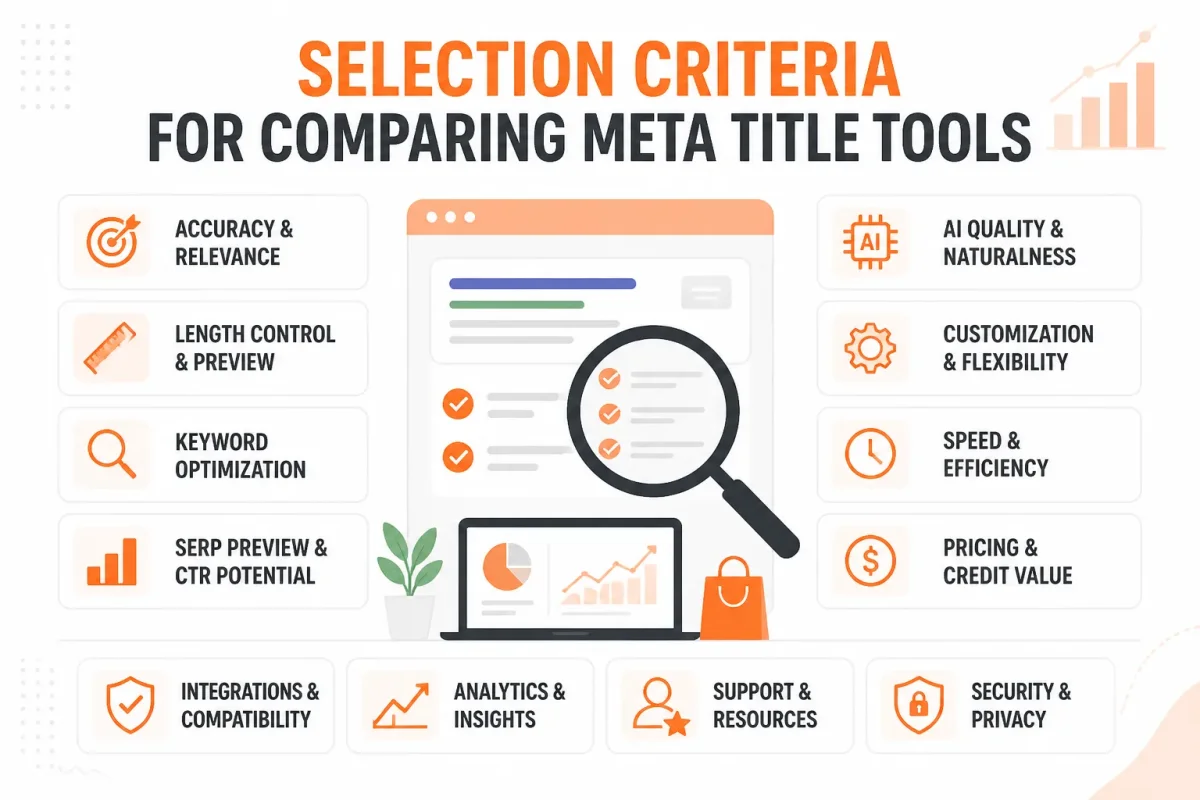
The five criteria applied to every pick
Assess each option with the same five-part checklist. The strongest choice helps you draft, inspect, or measure the result without separating the title from the search snippet around it.
- Identifies the page: You can tell whether the wording describes a specific product, collection, or blog post.
- Leads with the topic: You can place the primary search topic naturally, without awkward keyword repetition.
- Stays concise: You can spot wording that risks truncation in Google results before publishing it.
- Works with the description: You can review the title and meta description together as one search snippet.
- Fits Shopify workflows: You can use the tool while editing products, collections, pages, or blogs in your store.
A meta title is technically the HTML title element, not a generic meta tag. Florida International University describes a practical target of 50–60 characters and no more than 600 pixels, according to its March 2024 guidance. Google may truncate titles beyond 60 characters or beyond 600 pixels, so treat length as a display-risk guideline, not a guarantee. Search engines may still rewrite a snippet.
Practical rule: Keep your Shopify title focused, specific, and short enough to reduce display risk, then review it beside your meta description.
What a useful title example must show
You need to see the title doing real work, not just read advice about keyword placement. A useful example shows the page topic, the store context, and the description working together.
Weak example: Bamboo Towels | Harbor Home
Strong example: Organic Bamboo Bath Towels | Harbor Home
The stronger version gives you a clearer product topic and a more useful starting point for the description, such as “Shop soft organic bamboo bath towels with quick-dry weave and free shipping over $50.” Moz reports that 90 percent of title tags under 60 characters display correctly on search results pages. That figure is a Moz benchmark, not a Google rule.
What the roundup rules out
You won't find definition-only pages or generic writing tools that produce a polished phrase without showing its relationship to the description. Those options leave you guessing whether the wording fits the search result or your Shopify editing process.
The final picks serve different jobs: drafting a title, editing metadata across Shopify pages, or measuring what searchers see. The Shopify product title SEO guide fits the same workflow when you need to connect page titles with product-page optimization.
wRanks
Which tool helps you create a meta title across an entire Shopify store, not just explain the term? wRanks gives you one AI-powered SEO workflow for products, collections, pages, and blogs. You can start with the page type and its search intent.
Draft a concise title, pair it with a useful meta description, review the search snippet, and connect that work with structured data, image alt text, keyword tracking, Google Search Console, and AI-generated content. That broader workflow fills a gap left by definition-only resources and single-purpose tools.
A meta title example
A meta title example is “Women’s Linen Shirts | Harbor & Pine” for a Shopify collection targeting linen shirts. It tells you what the page offers without repeating the keyword unnaturally.
Weak version: “Linen Shirts Women Linen Shirt Collection Buy Linen Shirts.”
Strong version: “Women’s Linen Shirts | Harbor & Pine”
A good meta title is descriptive, concise, unique, and easy to understand, according to Florida International University’s guidance on effective meta titles. The university's guidance sets out the underlying standard.
A meta tag example
Yes. A meta title is the HTML title element, while a meta description is a separate tag that previews the page’s value in search results. The description supports the title. It doesn't replace it.
Weak version: “Shop now. Great products at great prices.”
Strong version: “Shop women’s linen shirts made for warm weather, with breathable fabrics, relaxed fits, and nationwide shipping.”
For a Shopify product, wRanks might help you connect the page’s title and description with related metadata work:
- Product: “Merino Wool Travel Hoodie | Northline Apparel”
- Collection: “Women’s Hiking Jackets | Northline Apparel”
- Page: “About Northline Apparel | Outdoor Clothing Made in Colorado”
- Blog: “How to Wash a Merino Wool Sweater | Northline Journal”
How to create a meta title
Select your Shopify page, identify its search intent, draft a specific phrase, and review how the title works with the description. wRanks applies that process across products, collections, pages, and blogs rather than limiting you to one content type.
Weak version: “Organic Coffee | Coffee Beans | Buy Coffee Online.”
Strong version: “Single-Origin Organic Coffee Beans | Cedar Roasters”
Then check whether the wording reflects the page, supports the target keyword, and differs from nearby titles. Its keyword tracking and Google Search Console integration help connect the edit with later search visibility checks. The guide to SEO automation for Shopify stores fits the same workflow when you want to connect drafting, implementation, and review.
Best use case: building consistent Shopify titles and descriptions
Use wRanks to build consistent Shopify titles and descriptions across many page types. AI-powered optimization can provide the first draft, but review the wording before publishing instead of copying one formula across your store.
Weak version: “Blue Candle Candle Gift Home Decor.”
Strong version: “Blue Cedar Soy Candle, 8 oz | Hearthside Home”
What works
- Page-type coverage: You can optimize products, collections, pages, and blogs in one Shopify-focused platform.
- Connected metadata: You can work on meta tags alongside structured data and image alt text.
- Search follow-up: You can use keyword tracking and Google Search Console integration to review the work after publication.
What fails
- AI without review: You still need to check every draft for accuracy, brand voice, and search intent.
- One phrase everywhere: You won't get useful titles by forcing the same template onto a product, collection, and blog.
- Ranking assumptions: A well-written title supports discoverability, but wRanks cannot guarantee rankings or replace wider SEO work.
Best for product-page title examples
wRanks suits you when product titles need clear attributes rather than keyword stuffing. Highlight the product type, useful differentiator, and brand while keeping the result readable.
Best for collection and blog metadata
It also suits collections and blogs, which need different metadata strategies. A collection title can describe a buying category, while a blog title can promise an answer or practical guide.
Best for connecting metadata with wider SEO work
wRanks is strongest when you want metadata connected with structured data, image alt text, keyword tracking, Search Console insights, and AI-generated content. Its limitation is real: you still need human judgment for claims, intent, and final wording.
Use it if you want one Shopify-oriented workflow for creating, implementing, and reviewing titles and descriptions across multiple page types.
Shopify
When you’re already working on your Shopify store, you’ll find the meta title inside the search engine listing settings for a product, collection, page, or blog post. Shopify provides the first-party context that standalone title tools often miss.
Compare the SEO title with the visible H1 and meta description beside the content they describe. That makes Shopify the clearest place to understand what a meta title and meta description do together, even though broader optimization and measurement may require another tool.
Best use case: editing metadata beside store content
Shopify suits you when you want to edit metadata while checking the actual product, collection, or blog content. A product title can target the item and buying intent, while a collection title can describe the category and audience.
Your meta title in Shopify
Your meta title is the SEO title for the entire page, not necessarily the large heading shoppers see on that page. Florida International University explains that the meta title and H1 should be different because the title represents the full page while the H1 summarizes its textual section.
Weak product SEO title: Blue Ceramic Mug | Store
Stoneware Coffee Mug, 12 oz | Dishwasher Safe
Writing the meta description
Write a concise preview that states the page’s benefit, differentiator, or next step accurately. For the mug, mention its size, care instructions, and intended use rather than repeat the product name.
Weak meta description: Shop our ceramic mug collection online.
Enjoy everyday coffee in a 12 oz stoneware mug with a comfortable handle and dishwasher-safe finish.
The relationship between a meta title and description
There isn’t a separate “meta description title” in Shopify. You’re choosing two related fields: the SEO title names the page, while the meta description explains why the searcher may find it useful.
Meta titles and meta descriptions together
Your meta title identifies the whole page in search results, and your meta description gives a short, useful preview. A collection title can name the category and audience, while a blog title can reflect the question or topic you answer.
What works
- Direct editing: You can update metadata beside the store content it represents.
- Page awareness: You can tailor titles for products, collections, pages, and blogs.
- Clear relationships: You can keep the SEO title and H1 related without making them identical.
What fails
- Limited measurement: You won’t get the broader keyword tracking and Search Console analysis found in dedicated SEO platforms.
- Repetition: You may create weak metadata if you copy the product title into every field.
- Missing strategy: Shopify edits the fields, but it doesn’t replace human judgment about intent and wording.
Use Shopify if you want to understand and edit metadata in its store context. For wider AI-powered SEO work across your Shopify stores, complementary tools such as wRanks can connect titles with structured data, image alt text, and performance insights.
Google Search Console
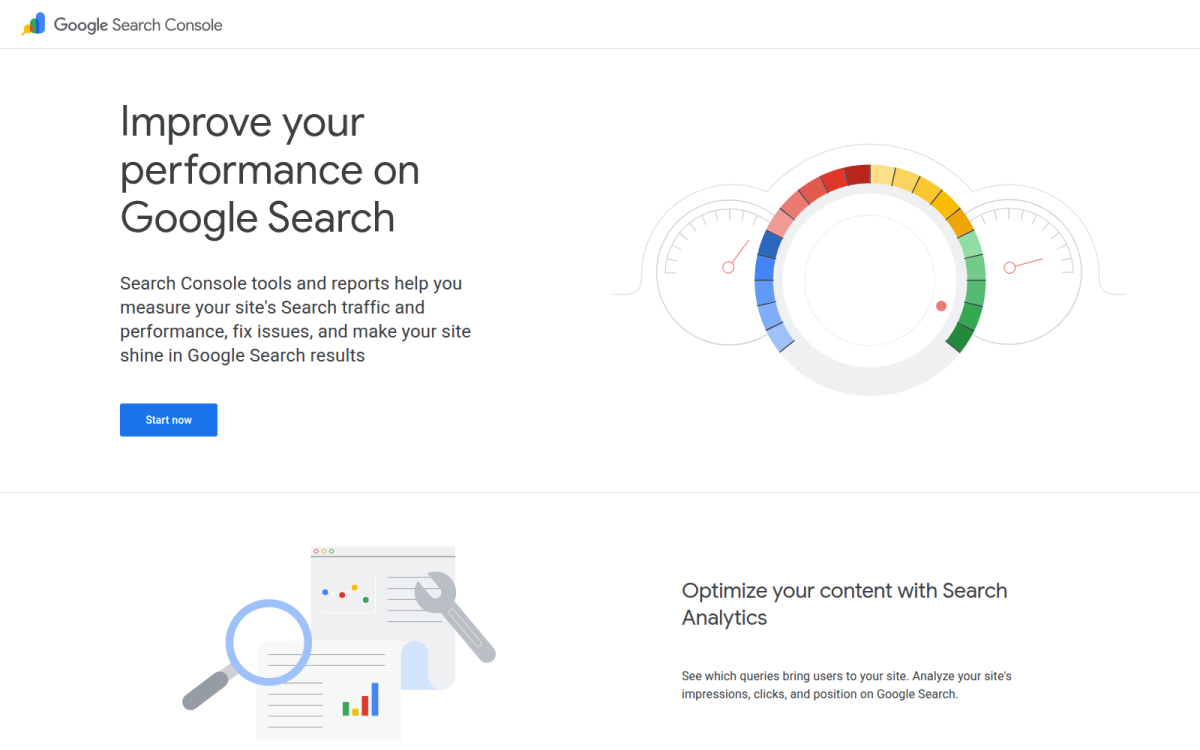
After you publish a meta title, you need to know whether searchers see it and respond to it. Google Search Console gives you that measurement layer, so you can compare queries, impressions, clicks, click-through rate, and the pages receiving attention.
You still edit the title in Shopify or an AI-powered SEO platform. Search Console shows what happens afterward, helping you judge the title beside the page URL and description rather than as an isolated string.
Screenshot view: a Search Console performance report pairs a page URL with its queries, impressions, clicks, and click-through rate. You use that context to inspect the title and description shown for the page.
Best use case: checking metadata against search visibility
Google Search Console suits you when a title is already published and you want evidence about its search performance. Find pages with relevant impressions but weak clicks, then compare the search intent with the wording shown in the result.
Your review loop stays practical: publish the page, allow data to accumulate, identify an underperforming query, revise the title or description, and monitor the next period. Search Console validates metadata. It doesn't draft or edit it for you.
Weak example: “Products | Harbor & Pine” gives you little reason to choose the page for a search about linen bedding.
Shop linen bedding: “Washed Linen Bedding in Soft Coastal Colors | Harbor & Pine” gives you a clearer match for that search intent.
How long a meta title should be
There is no fixed title length that guarantees strong rankings or a complete display. Write a concise title that puts the page topic and useful differentiator first, then use Search Console to see whether the result earns relevant clicks.
What a meta description is
A meta description is HTML text that summarizes a page for search engines and searchers. Use it to explain the offer, answer a likely need, or set an accurate expectation before someone visits your Shopify store.
Whether meta descriptions still matter
Yes, a useful meta description still matters because Google may display it as the result summary. Google may also rewrite it or use page text for a particular query, so treat it as helpful supporting copy, not a guaranteed display.
What works
- Page context: You compare the title with its URL and description instead of judging characters alone.
- Search evidence: You connect impressions, clicks, and click-through rate with the queries bringing visitors.
- Revision loop: You can change weak metadata and monitor whether the result attracts more relevant visits.
What fails
- No drafting tools: You won't create or edit Shopify metadata directly inside Search Console.
- Delayed insight: You need published pages and accumulated data before comparisons become useful.
- Uncertain display: You can't force Google to show your supplied title or description exactly.
Best for investigating the title shown for a page
Search Console helps you inspect the page result associated with specific queries, while your title element tells search engines the page's subject. You can then test whether the wording matches what searchers appear to want.
Best for comparing title and description performance
Compare pages that receive similar impressions but different clicks, then review whether the title and description make each result equally relevant. This helps you separate weak messaging from weak search demand.
Best for merchants using Search Console insights
Search Console fits you if your Shopify store already has Google Search Console connected and you regularly review page and query performance. It complements Shopify editing and tools such as wRanks, but it doesn't replace an AI optimization workflow for metadata, structured data, or content.
The trade-off is clear: Search Console measures visibility after publication, but it offers limited help when you need to generate better titles across many Shopify products, collections, pages, or blogs.
Use it if you want to validate how your published title and description perform in real search results, not simply check whether the title looks acceptable before publication.
The Three Tools Compared on One Shopify Metadata Workflow
You may use the same Shopify page while asking three different questions: where to edit the title, how to improve the wider page, and whether searchers respond after publication. Those jobs overlap, but you won't get the same answer from every tool.
A consistent comparison helps you choose the right workflow instead of treating every title checker as interchangeable. Match writing, implementation, and measurement to the tool built for each task.
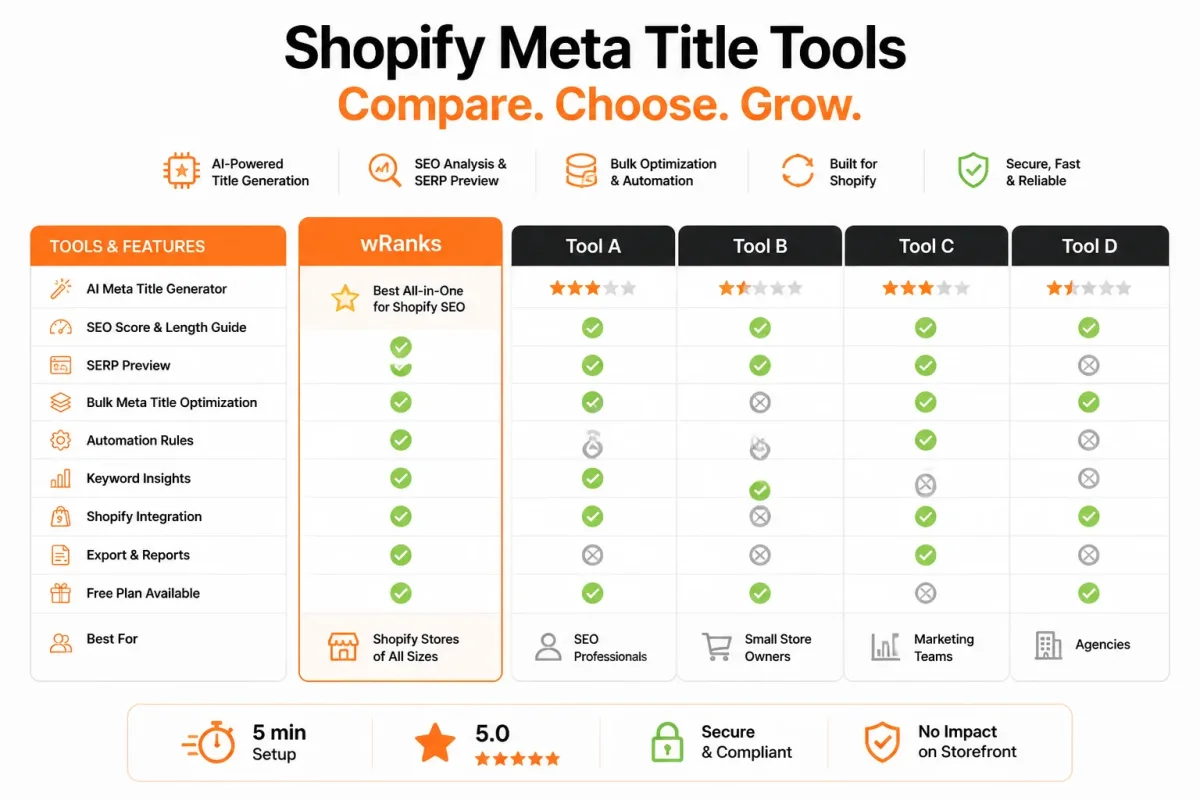
Tool-by-tool comparison
| tool | best for | strength | limitation | price band |
|---|---|---|---|---|
| wRanks | AI-assisted Shopify optimization across products, collections, pages, and blogs | Combines meta tags, structured data, image alt text, keyword tracking, Search Console integration, and AI-generated content | Broader optimization platform rather than only a native store editing screen | Not specified in supplied research |
| Shopify | Editing metadata in the store management workflow | Closest context for managing product, collection, page, and blog content | Not primarily a cross-site measurement or dedicated AI SEO workflow | Not specified in supplied research |
| Google Search Console | Evaluating search visibility after publication | Connects pages and queries with search performance data | Does not replace metadata drafting or Shopify content editing | Free |
The table gives you a practical split. wRanks is the broadest fit when you want AI-assisted Shopify optimization beyond meta titles, including structured data, image alt text, keyword tracking, Search Console integration, and AI-generated content. Shopify is the closest fit when you already have the product, collection, page, or blog open and need to edit its search listing settings.
What the limitations change
Google Search Console serves a different stage of your workflow. Use it to evaluate visibility after publication, not to draft metadata across a catalog. Shopify lets you make the edit, while wRanks helps you assess and improve more of the page around that edit.
A definition of a meta title or a recommended character range won't tell you whether you need a writing tool, a store editing screen, or a measurement platform. Choose based on the job in front of you.
For one quick change, Shopify may be enough. For repeated optimization across your Shopify store, wRanks gives you the most complete starting point, although its wider scope is less focused than a native editing screen. After publication, use Google Search Console to check whether your titles attract impressions and clicks.
Choose the Shopify SEO Tool by the Metadata Job You Need Done
You don't need the same tool for every meta title task. Your choice depends on whether you are creating metadata across many pages, editing one Shopify page, or evaluating search visibility after publication.
Use the tool that matches your immediate job, not a universal ranking. You can also combine the three tools as your workflow moves from drafting to implementation and then measurement.
| situation | better move |
|---|---|
| You need metadata for many Shopify products, collections, pages, or blogs | Start with wRanks for AI-assisted optimization and related SEO tasks |
| You are editing one product, collection, page, or blog inside the store | Use Shopify to implement and verify the page-level metadata |
| A published page receives impressions but fewer clicks than expected | Use Google Search Console to inspect queries and prioritize a title or description revision |
| You want an end-to-end workflow from drafting to measurement | Draft in wRanks, implement in Shopify, and monitor in Google Search Console |
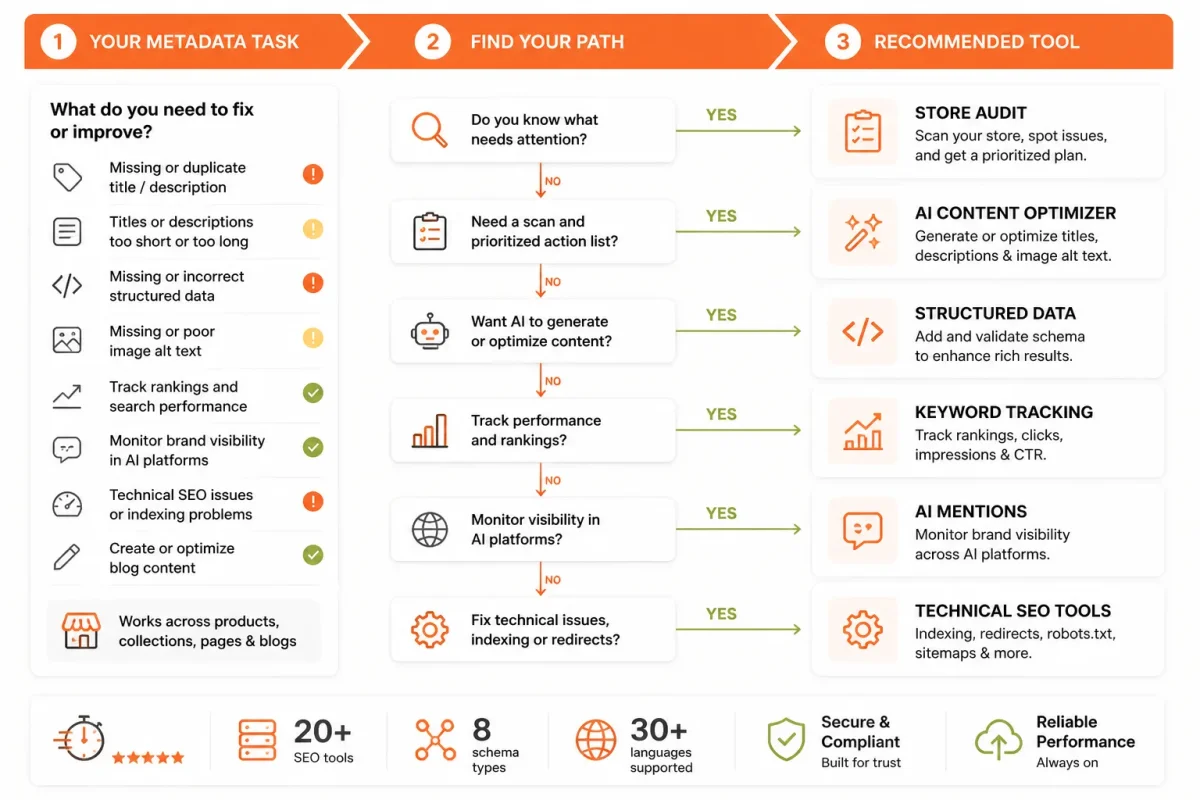
When you are creating metadata for many Shopify pages
If you need titles for dozens of products, collections, pages, or blogs, start with wRanks. Its AI-powered SEO workflow helps you optimize products and related elements together, although its broader scope may feel less direct than editing one title in Shopify.
- Choose wRanks: Use it when you want repeatable drafts, keyword guidance, structured data, image alt text, and other SEO tasks in one workflow.
- Keep titles specific: A weak title such as “Blue Hoodie | Store” gives you little room to match search intent. A stronger version is Organic Cotton Blue Hoodie | Women’s Pullover.
When you are editing one product, collection, or blog
When you are already inside one Shopify page, Shopify is the practical choice. Compare the meta title with your page heading and content, then check whether the description accurately supports the same search intent.
Weak description: “Shop our latest products online.” Better description: “Shop women’s organic cotton hoodies in soft fleece and classic colors, with free U.S. shipping on orders over $75.”
Keep the title focused on the page topic. Treat the meta description as connected supporting copy, not as a second title.
When you are checking what searchers actually see
After publication, use Google Search Console when you need evidence from real queries, impressions, clicks, and pages. Identify a page that appears often but earns few clicks, then revise its title or description and monitor the result.
- Creating: Start in wRanks when you need scalable drafts.
- Implementing: Use Shopify when you need to publish or verify one page.
- Evaluating: Use Google Search Console when you need to decide what deserves revision.
The right tool depends on whether you are creating, implementing, or evaluating metadata. That sequence keeps your Shopify SEO work focused instead of forcing one tool to handle every job.
FAQ
What a meta title example looks like
A meta title example might be Reusable Stainless Steel Water Bottles | Northstar Home. It names the product category, adds a useful distinction, and identifies the store. A title such as Water Bottles | Northstar Home is less helpful because it gives searchers little detail before they decide whether to open the page.
What your meta title is
Your meta title is the HTML title assigned to a page. Search engines may show it as the main clickable headline in a result, and browsers often use it in the tab. In Shopify, you'll usually edit it through the search engine listing settings for a product, collection, page, or blog post.
An example of a meta tag
A meta description is one common example of a meta tag. For a water bottle collection, it might read: Shop insulated stainless steel bottles that keep drinks cold for your commute, gym bag, or everyday errands. The description supports the title by explaining the page's value, although Google may choose different text for the result.
How to create a meta title
Choose the page's main topic and the searcher's likely intent, then write a concise title that describes what the page offers. Put the clearest wording first, add a meaningful product or category detail, and include your store name when space allows. Read the full title aloud before saving it in Shopify.
How long a meta title should be
There isn't a single character limit that guarantees a title will display in full. Aim for a concise title, commonly around 50 to 60 characters, and put the most useful words near the beginning. Check the result preview, then review Google Search Console after publication to see how the page appears for real queries.
Start With One Shopify Page and Improve Its Search Snippet
You don't need to rebuild your Shopify store to improve a search result. Start with one page where the title, description, page content, and searcher expectation point in the same direction.
Inspect the result carefully. A meta title isn't finished because it contains a keyword. It's finished when the complete snippet gives the right reason to visit the page.
The five-step metadata sequence
- Choose one page: Select one product, collection, or blog page tied to your current organic traffic or revenue goal.
- Identify the intent: Decide what the searcher wants, then write a specific title that names the page topic naturally.
- Write the description: Explain the page's value, product benefit, category scope, or answer in a separate meta description.
- Review the display: Check clarity, relevance, and possible truncation in your Shopify editing workflow. Don't judge the draft by its keyword alone.
- Use search data: After publication, review impressions, clicks, queries, and the page's wording before deciding whether another revision is justified.
A weak draft might read: Water Bottles | Northstar Home. The description might say, Shop water bottles online from our store. You give searchers little context and no strong reason to choose the page.
Reusable Stainless Steel Water Bottles | Northstar Home gives the product category and a useful distinction. Shop insulated stainless steel bottles that keep drinks cold for your commute, gym bag, or everyday errands. Now your title, description, and collection content set a clearer expectation.
The first page to optimize
Choose the Shopify page closest to your current goal, not the page that feels easiest. If you want more product sales, start with a product page that already attracts relevant impressions. If you need category visibility, choose a collection with clear demand and thin metadata. For informational traffic, select a blog post that answers one defined query.
- Page selected: One product, collection, or blog page supports your current organic traffic or revenue goal.
- Intent identified: The title reflects what the searcher expects to find.
- Snippet aligned: The description explains the page's value without repeating the title.
- Display checked: You have reviewed the wording inside the Shopify editing workflow.
- Revision planned: You know which search data will guide the next decision.
That first page keeps the risk low and the lesson clear. Your aim isn't a keyword stuffed into metadata. It's agreement between the query, snippet, page, and next click.
If you want a faster way to do this, wRanks uses AI-powered SEO workflows to draft and refine meta tags across products, collections, pages, and blogs for Shopify stores, with structured data, alt text, keyword tracking, and Search Console insights. Explore Shopify SEO guidance and tools.

Content marketing expert and Shopify ecosystem authority. Priya has helped 200+ stores grow organic traffic through strategic blog content and keyword targeting.


