What Is a Canonical URL? Shopify SEO Explained
Understand what is a canonical URL and how it helps Shopify stores consolidate SEO signals by choosing one preferred URL for similar content.
If you're asking what is a canonical URL, it's the preferred web address for a page when multiple addresses show substantially the same content. You may find the same Shopify item under several addresses: the direct product URL, a collection path, a variant parameter, or a campaign URL with tracking tags. Every page can load correctly while you still wonder which address Google should treat as the real one.
Most Shopify merchants don't have a broken-page problem. They have a preference problem. Your store can expose several URLs for identical or very similar content without any page being technically broken.
Google Search Central describes canonicalization as a way to identify the main version of similar pages. Your Shopify theme commonly communicates that preference through a canonical signal.
This guide explains what that signal means, how Shopify applies it to products and collections, and when you should validate or override it. You'll also see how canonical URLs differ from redirects and duplicate pages, so you can consolidate search signals without deleting useful alternate addresses.
The Search Visibility Cost of Choosing the Wrong Page
Several Shopify addresses can show the same product or collection while splitting your search signals. A collection path, filtered URL, tracking parameter, or variant URL may attract its own crawls, links, impressions, and clicks. Your store may look correct to shoppers, yet Google can receive mixed signals about which address deserves visibility.
Canonicalization helps you state one preferred address. It doesn't guarantee that Google will choose it. The useful outcome is simple: your Shopify store keeps one indexable URL as the standard, then you check whether Google agrees.
Canonical links in SEO
Canonical links in SEO are signals that tell search engines which URL represents the main version of similar pages. For your Shopify store, that usually means pointing product, collection, or blog variations toward the address you want indexed and ranked.
“A canonical URL can consolidate link equity, social shares, and SEO authority from duplicate pages into the primary page,” according to Google Search Central.
What canonicalize means
To canonicalize means to choose one preferred URL from several substantially similar addresses. It doesn't delete the other URLs, redirect every shopper, or create a penalty for duplicate paths. Google describes canonicalization as a preference, so you must validate the result rather than treat the signal as a command.
The meaning of “canonical” in simple terms
“Canonical” means standard or preferred. If your product appears at a direct URL and a collection path, the canonical address is the one you want search engines to treat as the main page.
How duplicate product and collection URLs fragment SEO signals
When filtered collections, campaign parameters, variant URLs, and duplicate product paths compete, crawling attention and ranking signals can spread across addresses. Google Search Central also explains that canonicalization helps search engines spend less time on redundant pages and focus on your main content.
Weak version: A campaign URL such as /products/linen-shirt?utm_source=email is treated as a separate preferred page.
Preferred version: The campaign URL remains usable for tracking, while /products/linen-shirt stays the selected, indexable product address.
Other words for canonical
Yes. In plain language, canonical means preferred, standard, or main. The goal is one main address for each product or collection, not several URLs competing in your reports.
The practical rule for a preferred Shopify URL
Keep one preferred, indexable URL for each important Shopify page, then use Google Search Console to check the URL Google selected. Your wider reporting workflow can also benefit from this guide to search impression share for Shopify SEO, since divided URLs can make visibility trends harder to interpret.
Practical rule: Choose one preferred, indexable Shopify URL for each product or collection, then validate Google’s selected canonical in Search Console.
Canonical, Redirected, and Duplicate URLs Are Different Cases
You may see several Shopify addresses load similar content, but those addresses do different jobs. Your product URL can be preferred, redirected, listed in a sitemap, linked internally, or treated as a duplicate without any one label replacing the others.
Google Search Central defines a canonical URL as the preferred web address for similar pages. Separate that preference from the technical controls around it, because each signal affects your Shopify SEO workflow differently. For broader guidance, see this Shopify SEO guide.
The preferred page versus an alternate accessible page
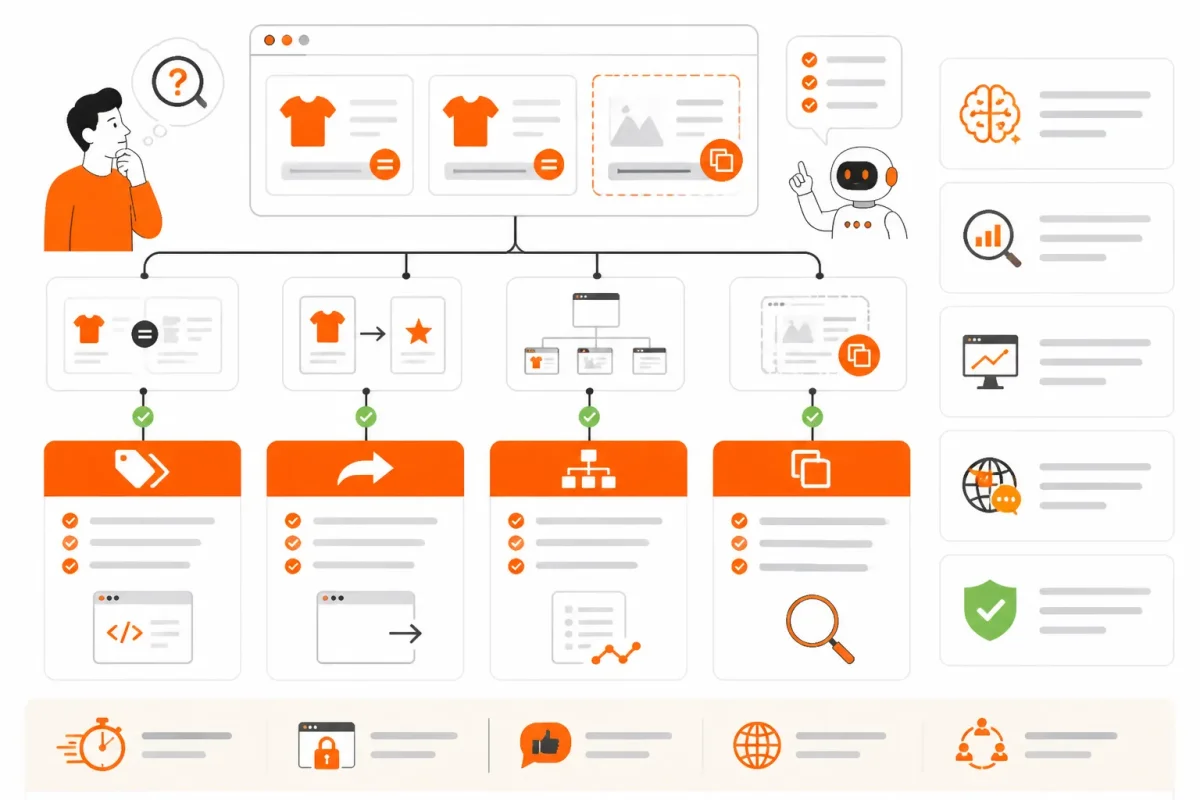
A canonical URL is the standard page you want search engines to associate with your content. If your product is available at /products/blue-cotton-shirt and through a collection path, you can select the direct product URL as the canonical while the alternate address remains accessible.
A redirect is different. Your old product handle, such as /products/blue-shirt, can permanently send visitors to the new handle. The visitor changes address, while a canonical tells search engines which accessible version is preferred. A sitemap entry recommends a URL for discovery, and an internal collection link helps people and crawlers find it. Neither one is a canonical declaration.
Google Search Central says the canonical URL identifies the single preferred address when duplicate or similar content exists across URLs. It is the address of choice for the specified page.
| situation | better move | why |
|---|---|---|
| The same product is reachable at a direct product path and through a collection path | Select the preferred product URL as canonical | The canonical identifies the standard page when the content is substantially the same |
| An old product handle permanently moves to a new handle | Use a redirect for the move and keep the destination canonical | A redirect changes the requested address, while a canonical declares the preferred version |
| A product URL appears in the XML sitemap | Keep the preferred URL in the sitemap and validate the page signal | A sitemap inclusion is a discovery preference, not the same mechanism as a canonical link |
| A filtered collection creates a near-duplicate URL | Assess whether the filtered page deserves independent search visibility before selecting a canonical | A duplicate or near-duplicate page may need consolidation, while a genuinely distinct landing page may deserve its own URL |
Product, variant, collection, and parameter URL patterns
Your preferred product handle usually represents the main product page. A variant address may identify a selected color or size, while a collection URL groups products and a filtered URL adds a sorting, filtering, or parameter variation. These patterns describe page addresses, not automatic canonical rules.
Weak example: Treat every variant parameter and filtered collection URL as a separate primary page.
Strong example: Check whether /products/blue-cotton-shirt, its selected-variant address, and a filtered collection show substantially the same content before choosing which page should represent your search intent.
The meaning of a canonical ID
A canonical ID is not a required Shopify field that every page must possess. In everyday SEO language, it usually means the identifier or URL selected as the standard representation among similar alternatives.
Your Shopify product still has its own product and variant identifiers. Those IDs help Shopify manage inventory and catalog data, but they aren't automatically the canonical URL for search engines.
A canonical example
A canonical example is a preferred product address such as https://store.example/products/blue-cotton-shirt when another accessible address displays substantially the same product. The example is canonical because you selected it as the main version, not because Shopify uses a special URL format.
An example of a canonical form
A canonical form is the clean, standard representation you use among alternatives. For your store, /products/blue-cotton-shirt may be the canonical form, while a collection route, variant parameter, or campaign-tagged address is an alternate form that needs review.
Strong example: Keep the direct product URL as the preferred representation, include that URL in your sitemap, link to it from relevant collections, and inspect the rendered rel="canonical" signal on the Shopify page. That shifts the focus from URL labels to the actual signal search engines read.
How a Canonical URL Works on a Shopify Store
You can reach one Shopify product through several URLs, but search engines still need a preferred address. Consider the product Blue Cotton Shirt at https://example.com/products/blue-cotton-shirt. You may also reach it through a collection path, a variant parameter, or a campaign link.
Your store's canonical signal tells search engines which address best represents that product. The signal needs checking, not blind trust, especially after template, app, market, or collection changes.

A product URL, collection URL, variant URL, and campaign URL side by side
You can treat the direct product URL as the preferred address, while these alternatives need comparison:
- Direct product: /products/blue-cotton-shirt
- Collection path: /collections/shirts/products/blue-cotton-shirt
- Variant URL: /products/blue-cotton-shirt?variant=123456789
- Campaign URL: /products/blue-cotton-shirt?utm_source=email
When these pages show substantially the same product, your rendered HTML can point each version toward the direct product URL.
What the rel canonical element tells search engines
A canonical URL is declared by placing a link element with the rel="canonical" attribute inside your page's HTML head, according to Google Search Central. The element identifies the preferred URL for your page.
Before: The campaign page has no clear canonical destination, leaving you to infer which product address matters.
After: The rendered head contains a link element with rel="canonical" pointing to https://example.com/products/blue-cotton-shirt.
How to check whether a URL is canonical
You can check a URL by opening the page, viewing its source or rendered HTML, and searching for rel="canonical" inside the head. Then confirm that the destination matches the product content, loads successfully, and remains eligible for indexing.
In Google Search Console, enter the URL in URL Inspection and review the selected canonical and Google-selected canonical details. You can also copy the page address from your browser's address bar, then inspect that exact version rather than an assumed product URL.
| situation | better move |
|---|---|
| Direct product URL, collection path, and campaign URL show substantially the same product | Inspect the rendered head and use the preferred product URL as the canonical destination |
| A variant parameter changes only the selected option or purchase configuration | Validate whether the variant needs separate search visibility; otherwise consolidate to the appropriate product URL |
| The canonical destination redirects, returns an error, or is blocked from indexing | Correct the destination before relying on the canonical signal |
| An alternate landing page has substantially different content and a deliberate SEO purpose | Keep it as its own indexable page with a self-consistent canonical rather than forcing it to the product |
How to get a URL link
You can get a URL link by loading the intended page, selecting the browser address bar, and copying the full address. Use that copied link in URL Inspection, then compare it with the canonical destination shown in the page head.
When to validate or override Shopify’s canonical signal
You should validate Shopify's default signal when markets, apps, product handles, templates, or collection logic create unexpected addresses. Override it only when an alternate page is intentionally distinct and is the correct indexable representative.
Don't force every variant or landing page to the parent product. Check the evidence first, then apply changes at scale through your Shopify SEO workflow or tools such as wRanks, which can help inspect related metadata and structured data while its broader automation still requires review.
Canonical Mistakes That Look Correct in Shopify
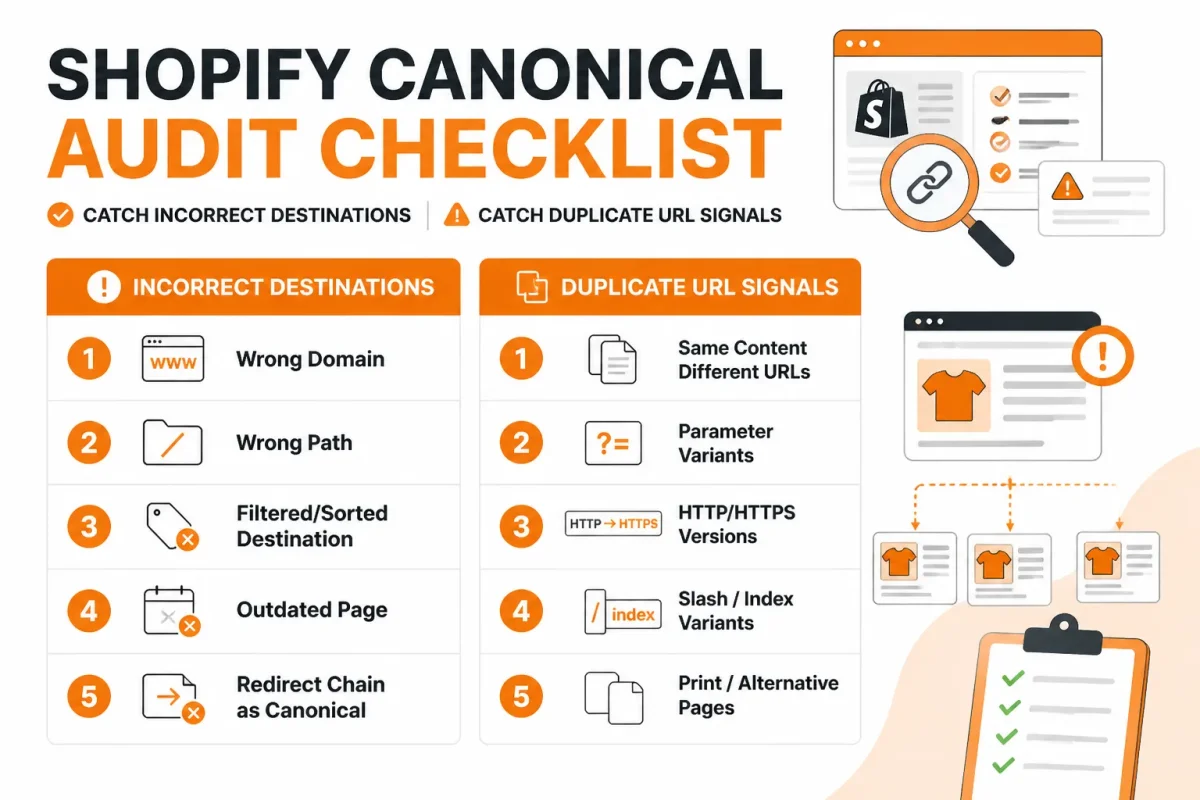
Your Shopify theme preview may show the right product while the live HTML sends a different canonical signal. You can also see duplicate addresses from tracking parameters, filters, protocol changes, or hostname variations. Google Search Central says these differences can create duplicate content, including HTTP and HTTPS versions and www and non-www hosts. Its canonicalization documentation explains these duplicate URL sources.
A canonical only helps when your chosen destination truly represents the alternatives. Google says signal pooling can combine duplicate-page signals on the primary URL instead of splitting them across pages, but you still need to check the destination before changing your Shopify theme or app settings. Use this checklist on one high-value page first.
Canonicalizing every variant without checking search intent
- Symptom: Every size or color variant points to an unrelated parent product, even when the variant has distinct search demand or content. Weak example:
/products/running-shoes?variant=blue-10canonicals to/products/shoes. Strong fix: Keep the canonical on the specific product URL when the page represents the same searchable product, and review variant intent before consolidating it.
Pointing to a blocked, redirected, or non-equivalent destination
- Symptom: A product canonical points to a noindex page, a redirected URL, or a different editorial landing page. Weak example:
/products/linen-shirtcanonicals to a blocked seasonal guide. Strong fix: Choose one live, indexable URL with matching intent, then test its status, robots directives, and rendered HTML.
Ignoring collection filters, hostnames, and protocol mismatches
- Symptom: Filtered collection URLs, campaign parameters, HTTP pages, and www versions produce inconsistent canonicals. Weak example:
http://www.example.com/collections/sale?color=bluepoints to an HTTP URL while the store resolves to HTTPS. Strong fix: Standardize the preferred HTTPS hostname and verify that filtered or editorial collections aren't being collapsed when their content and intent differ.
Assuming an SEO app’s output matches the live page
- Symptom: Your app dashboard shows the intended canonical, but the published theme outputs another value or duplicate structured data. Strong fix: Inspect the live HTML and Google Search Console before trusting the setting. wRanks can surface page-level SEO and structured-data inconsistencies across Shopify products, collections, pages, and blogs, but it doesn't replace those checks.
FAQ
What does canonicalize mean
To canonicalize a URL means to identify the preferred address for a page when several URLs show the same or nearly identical content. For a Shopify product, that usually means choosing one clean HTTPS product URL and placing it in the page's canonical link element. The signal helps search engines understand which version should represent the product in search results.
How can I get a URL link
Open the published Shopify product page in your browser and copy the address from the address bar. Use the live HTTPS URL, not a theme preview link or an admin URL. If you need the canonical URL specifically, view the page source and find the link element with rel="canonical", then copy its href value.
What is a canonical ID
“Canonical ID” isn't a standard HTML SEO term. People may use it to mean the identifier for the preferred page, product, or record in a system. In Shopify SEO, the useful value is usually the canonical URL, while a product ID is an internal reference. Don't treat a product ID as a replacement for the canonical link element.
What are canonical links in SEO
A canonical link is an HTML signal that names the preferred URL for a page. It appears in the document head as a link with rel="canonical". When product pages are available through collection paths, tracking URLs, or other routes, the canonical link can point search engines to the clean product address. It is a hint, not a command.
How can I check if a URL is canonical
Open the live page, view its source, and search for rel="canonical". Check whether the href value matches the preferred URL, including the hostname, HTTPS scheme, and handle. Then inspect that destination in Google Search Console and confirm it loads successfully, remains indexable, and represents the same product and search intent.
Start With One Live Shopify Product URL
A reliable canonical review starts with the page you want customers to find, not with a blanket theme override. You can test one product, trace its alternate addresses, and see whether Shopify, your theme, and Google are sending the same signal.
That small baseline gives you evidence before a wider change. If the live HTML disagrees with your intended URL, you can ask the theme or app owner to investigate the template instead of guessing.
Choose the preferred page
Pick the product URL that represents the page customers and search engines should use. You should usually begin with the direct product address, then record every alternate route that may reach the same item.
- Select the destination: Write down the preferred HTTPS product URL, including the correct hostname and clean handle.
- List the alternatives: Record collection-path URLs, variant URLs, campaign URLs with tracking parameters, and any other address that loads the product.
Inspect and compare its URL signals
Open the live product page, view its source, and find the canonical link element. Compare that value with the destination's indexability, visible content, internal links, and structured data. A theme preview isn't enough.
- Check the live canonical: Confirm that the published HTML names the preferred product URL, not a preview address or an unrelated collection route.
- Compare the destination: Verify that the canonical page returns successfully, is indexable, and contains the product content you want Google to understand.
- Canonical match: The live HTML points to the chosen product URL.
- Indexability match: The destination isn't blocked by a noindex directive, password gate, or unsuitable redirect.
- Content match: The destination represents the same product and search intent as the alternate URL.
- Owner review: A theme or SEO app owner investigates when the setting and published HTML disagree.
Start with one high-value product page
Use the product that matters most to your store, then monitor its Google Search Console signals before changing canonical logic at scale.
- Record the baseline: Open that single live product page and save the canonical URL shown in its HTML. Compare it with Google's observed signals before deciding whether an override is justified.
wRanks can support ongoing reviews of your pages, metadata, structured data, and keyword tracking, but it doesn't replace Google Search Console or live technical validation. Test, monitor, and scale only when the evidence stays consistent.
If you want a faster way to review Shopify SEO signals, the wRanks SEO blog covers practical guidance for store owners and marketing managers using AI-powered SEO, Search Console insights, metadata tools, and structured data checks.

AI & GEO specialist helping brands maximize visibility across AI platforms like ChatGPT, Gemini, and Claude. James pioneers generative engine optimization techniques for e-commerce.