
Flow (Shopify Flow)
Quick Definition
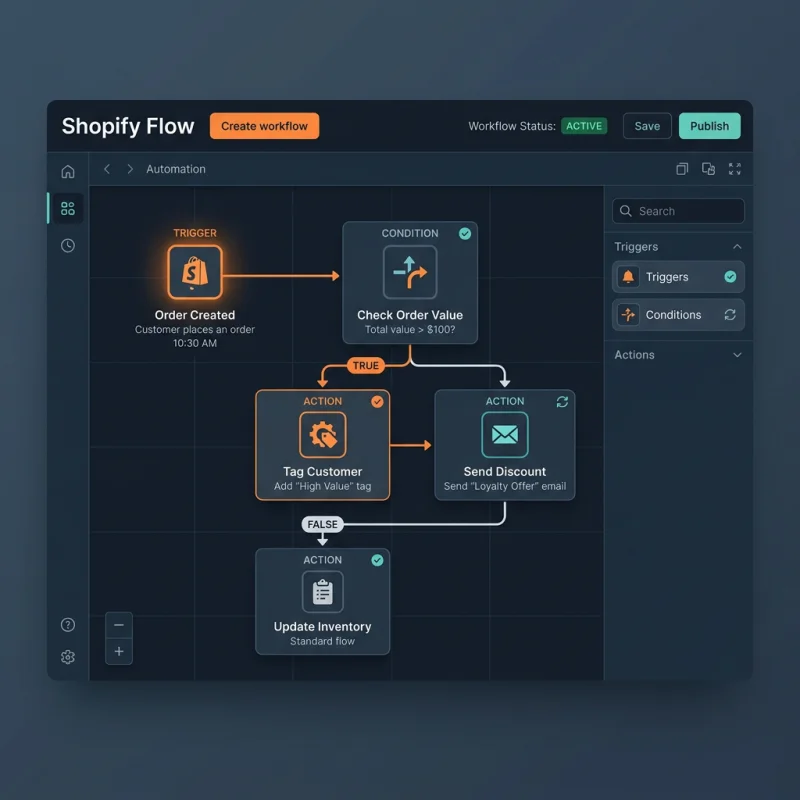
Shopify Flow is a visual, code-free automation tool that allows merchants to create custom workflows to manage store operations, inventory, and marketing tasks.
Table of Contents
- Understanding Flow (Shopify Flow)
- Configuring Shopify Flow: Step-by-Step Guide
- Accessing Shopify Flow
- Creating Your First Workflow
- Managing and Optimizing Workflows
- Strategic Business Value of Shopify Flow
- Real-World Examples and Optimization Tips
- References and Resources
- Frequently Asked Questions
- How do I set up Shopify Flow?
- Can Shopify Flow integrate with external apps and APIs?
- Is Shopify Flow suitable for small or medium-sized stores?
Understanding Flow (Shopify Flow)
Shopify Flow is a powerful, visual automation platform designed specifically for Shopify Plus merchants. It enables store owners and managers to create custom workflows without writing any code, thereby automating repetitive tasks and streamlining complex processes. These workflows can manage inventory updates, customer segmentation, order processing, marketing campaigns, and more, all within an intuitive drag-and-drop interface. Shopify Flow integrates seamlessly with other Shopify apps and APIs, allowing for a highly customizable automation ecosystem tailored to the unique needs of each business.
At its core, Shopify Flow acts as the brain behind operational efficiency, reducing manual effort and minimizing errors. It leverages event-driven triggers - such as new orders, customer sign-ups, or inventory changes - and responds with predefined actions, creating a responsive and dynamic store environment. This automation capability is especially vital for high-volume stores, where manual management becomes impractical and costly. By automating routine tasks, Shopify Flow empowers merchants to focus on strategic growth, customer experience, and innovation.
Configuring Shopify Flow: Step-by-Step Guide
Accessing Shopify Flow
To begin using Shopify Flow, ensure your store is on Shopify Plus, as the app is exclusive to this tier. Navigate to the Shopify Admin dashboard, then go to Apps. If Shopify Flow is not installed, visit the Shopify App Store and install it. Once installed, open Shopify Flow from the Apps menu. The interface presents a clean, visual workspace where you can create, edit, and manage workflows.
Creating Your First Workflow
- Click on Create Workflow.
- Select a trigger that initiates the workflow, such as Order Created, Customer Tagged, or Inventory Quantity Changed.
- Add conditions to refine when actions should occur, for example, Order total exceeds $100.
- Define actions, like sending an email, updating customer tags, or creating a task in a project management tool.
- Save and activate the workflow. Shopify Flow will now monitor for the specified trigger and execute actions automatically.
Managing and Optimizing Workflows
Regularly review your workflows to ensure they function as intended. Shopify Flow provides logs and activity feeds to monitor performance and troubleshoot issues. You can duplicate, modify, or deactivate workflows as your business evolves. Advanced users can integrate Shopify Flow with external APIs using webhooks, enabling complex automation scenarios such as syncing with CRM systems or marketing platforms.
Strategic Business Value of Shopify Flow
Implementing Shopify Flow offers tangible benefits that directly impact a store's bottom line. Automation reduces manual labor, freeing staff to focus on customer engagement and strategic initiatives. For example, automating abandoned cart follow-ups can recover lost revenue - studies show that automated emails have a 70% higher open rate than generic campaigns, significantly increasing conversions.
Moreover, Shopify Flow enhances operational accuracy by eliminating human error, especially in inventory management and order fulfillment. It also enables personalized customer experiences through targeted segmentation and timely communication, which can boost customer loyalty and lifetime value. For high-growth stores, Flow scales operations efficiently without proportional increases in staffing costs.
Real-World Examples and Optimization Tips
- Order Automation: Automatically tagging high-value customers or VIPs upon purchase, enabling targeted marketing campaigns.
- Inventory Management: Restocking alerts triggered when stock levels fall below a threshold, preventing stockouts.
- Customer Engagement: Sending personalized emails or discounts based on customer behavior or lifecycle stage.
To maximize the effectiveness of Shopify Flow, regularly analyze workflow performance metrics and adjust triggers or actions accordingly. Integrate Flow with analytics tools to gain insights into automation impact. Additionally, stay updated with Shopify's latest features and community best practices via the Shopify Community.
References and Resources
Frequently Asked Questions
How do I set up Shopify Flow?
Setting up Shopify Flow requires a Shopify Plus account. After installing the app from the Shopify App Store, access it via the Apps menu. From there, you can create new workflows by selecting triggers, adding conditions, and defining actions. The intuitive drag-and-drop interface makes it easy for non-developers to automate tasks. It's advisable to start with simple workflows and gradually implement more complex automations as you become familiar with the platform. Regularly monitor workflow logs to ensure proper functioning and refine your automations for optimal results.
Can Shopify Flow integrate with external apps and APIs?
Yes, Shopify Flow can connect with external applications and APIs through webhooks and custom actions. This allows merchants to extend automation beyond Shopify's native capabilities, integrating with CRM systems, email marketing platforms, or custom backend services. For advanced integrations, developers can utilize Shopify's API documentation and webhook endpoints to create seamless workflows that synchronize data and trigger external processes. This flexibility enables highly tailored automation strategies aligned with specific business needs.
Is Shopify Flow suitable for small or medium-sized stores?
Shopify Flow is primarily designed for Shopify Plus merchants, which are typically larger or high-volume stores. However, the principles of automation it offers can inspire smaller stores to adopt similar strategies through third-party apps or custom development. For small or medium-sized stores, automation can still deliver significant efficiency gains, especially in order management, customer segmentation, and marketing. While Shopify Flow itself may be limited to Plus plans, the concept of automation remains valuable across all store sizes, emphasizing the importance of streamlining operations for growth.

About David Chen
Technical SEO engineer focused on structured data, indexing optimization, and Core Web Vitals. David turns complex technical requirements into actionable Shopify solutions.