Why Product Pages Need FAQ Content
Why product pages need FAQ content that answers real buying doubts to reduce hesitation and improve purchase decisions on your SaaS product pages.
You have polished product photos, a strong title, and a clear Add to Cart button. Still, a shopper may leave after wondering whether the size will fit, the material will work, or the order will arrive before Friday. Questions about compatibility, care, and returns create the same hesitation. Those doubts explain why product pages need FAQ content that answers specific buying concerns.
Most product pages don't have a traffic problem. They have an unanswered-decision problem. A product FAQ isn't a second support centre. It earns space when it answers a product-specific doubt that could stop the purchase.
Useful questions come from customer evidence, not copied filler. Clear answers can expand search coverage without keyword stuffing, while structured data may help search engines interpret visible content without acting as a shortcut. A practical Shopify workflow starts with one high-traffic product, then compares customer behaviour with Google Search Console queries while wRanks helps you review related keywords and on-page SEO.
Why Product Pages Need FAQ Content
Your product page earns an FAQ when one unanswered doubt could stop a shopper from choosing. If your title, images, variants, shipping details, and description already settle the issue, another question adds clutter instead of value.
For your Shopify store, the useful test is simple: can one clear answer help a real shopper decide? It may reduce repetitive support requests and reveal wording worth tracking in Google Search Console, but it can't replace accurate product information or guarantee stronger rankings.
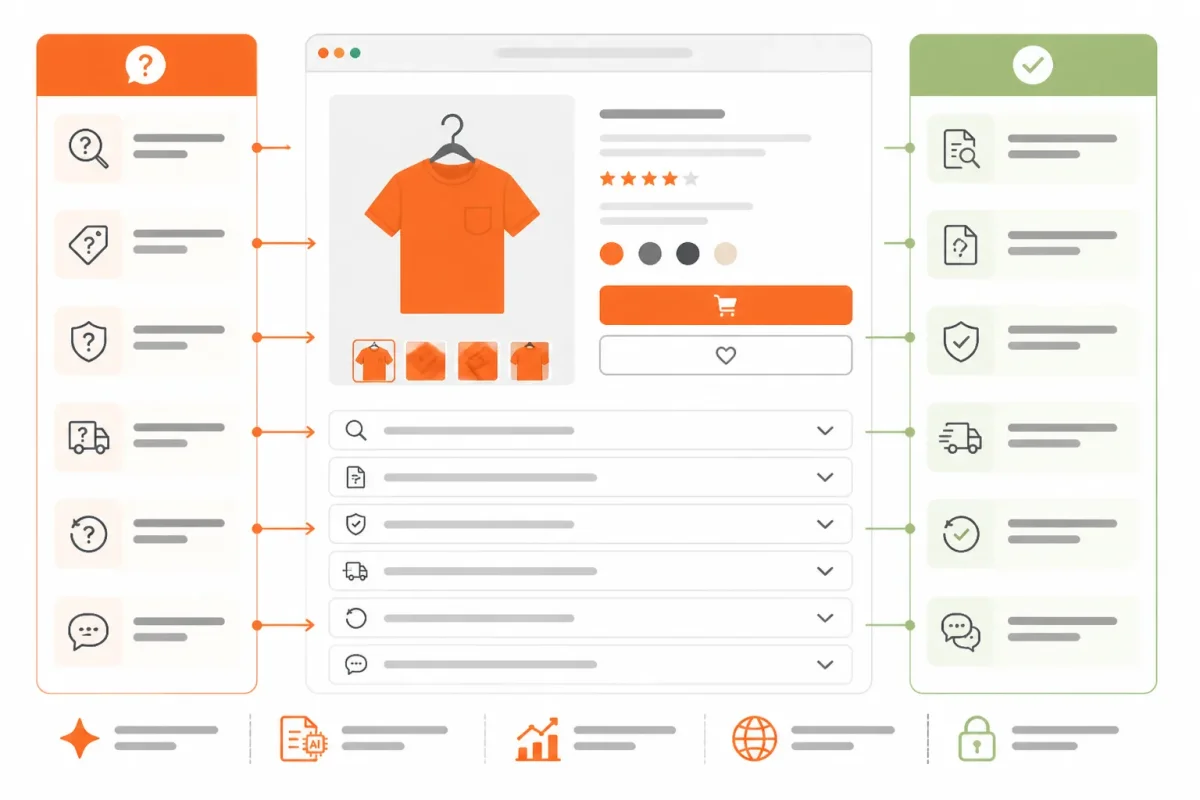
What an FAQ section on a website does
An FAQ section groups product-specific questions and answers so you can address buying objections on the page. For example, a ceramic travel mug might need an answer about whether its lid is leak-resistant, not a generic question about payment methods.
Weak: “Is this mug high quality?”
Leak-resistant lid: “The silicone-sealed lid helps prevent spills during car travel, but the mug is not fully leakproof when tipped upside down.”
“FAQ content can help visitors find answers quickly and may reduce routine questions reaching a support team,” according to competitor research.
Five website fundamentals an FAQ should support
Five useful website fundamentals are clear information, easy navigation, accessibility, trust signals, and a direct path to action. Treat an FAQ as support for those fundamentals, not as a substitute for them.
- Clear information: Explain the product, price, materials, and limitations plainly.
- Easy navigation: Help shoppers find sizing, shipping, returns, and related products.
- Accessibility: Use readable text, meaningful image alt text, and usable controls.
- Trust signals: Show accurate policies, reviews, contact details, and delivery expectations.
- Direct action: Make the variant choice and Add to Cart step obvious.
How FAQ content supports SEO
FAQ content can support SEO when your answers match genuine product questions and add useful detail. Search visibility still depends on relevance, quality, page experience, and accurate implementation, so structured data can't turn thin copy into a strong result.
One competitor claims FAQ structured data may increase the likelihood of enhanced search visibility, but you shouldn't treat that as a guaranteed outcome. Another cites a 27% voice-search figure from Think with Google. Verify that external claim before publication rather than building your strategy around it.
Why product pages needed FAQ content in 2021
Product pages needed FAQ content in 2021 for the same practical reason they need it now: shoppers lose confidence when they can't resolve a specific objection. Useful answers can also expose recurring questions for future guides, product changes, and support documentation.
Practical rule: Keep an FAQ on your product page only when it answers a real buying doubt that your existing copy, images, variants, or policies leave unresolved.
Use wRanks to review related keywords, meta tags, structured data, and Search Console insights, but make the merchant decision yourself. Keep the FAQ when it helps someone choose with greater confidence.
Turn Real Product Questions Into Useful On-Page Answers
Strong FAQ candidates appear in support tickets, product reviews, internal search queries, returns, chat transcripts, and variant-specific confusion. A question earns space on your product page when it recurs, concerns that product directly, and could change whether someone buys.
Research on FAQ content favours genuine customer questions over generic copy. Keep answers concise, use clear headings, and link to fuller information where needed. Place each answer beside the decision it supports, not in a detached block that forces shoppers to search for context.

How to create an FAQ section in Shopify
Add visible question-and-answer content to the product template or product description, then position it near the relevant buying detail. Put fit questions near the size selector, compatibility questions near technical specifications, and delivery questions near shipping information.
Weak example: “Is this jacket good for different body types? Yes, it has a comfortable fit.”
Made useful: “Will the Harbor Rain Jacket fit over a sweater? Choose your usual size for a base layer. Size up if you plan to wear a thick fleece underneath. The 32-inch back length reaches the upper thigh on most customers.”
wRanks can help you review related keywords, meta tags, and structured data. Any structured data must match visible content and current search-engine guidelines.
How to create an FAQ section in WordPress
Use clear question headings, answer each question immediately, and link to a fuller policy or support page when the explanation needs more detail. The same product-specific method works even when your store uses a different platform.
How to structure an FAQ page
Use a dedicated FAQ page for broader support needs, while keeping product-specific objections on the relevant product pages. This comparison can help you choose the right location.
| situation | better move | why |
|---|---|---|
| A Shopify product page receives repeated questions about fit, material, delivery, or compatibility. | Add concise, product-specific answers near the relevant buying information. | The answer supports the decision while the shopper is evaluating that product. |
| A WordPress product page needs answers to recurring product questions. | Use clear question headings, immediate answers, and links to fuller policy or support pages. | The research emphasises scannable structure, concise answers, and useful navigation. |
| Questions apply across many products or concern general support processes. | Organise them on a dedicated FAQ page and link to it from relevant product pages. | A dedicated FAQ page can serve broader support needs without crowding every product page. |
Product FAQ content examples
Test the method on a Shopify coffee grinder. A weak answer says, “Does it work with espresso? Yes, it is versatile.” A stronger answer: “Can the Atlas Burr Grinder make espresso-fine grounds? Yes, its 40-step adjustment reaches espresso settings, but a pressurised basket may produce more consistent results for beginners.”
That answer addresses equipment compatibility and expected performance without inventing a concern. Organise for the shopper, not for a preset question count or a keyword target.
Avoid FAQ Tactics That Weaken the Shopify Product Page
A product page gets weaker when you add questions nobody asks, repeat the description, or copy the same FAQ block across every item. You also create friction when shipping deadlines or compatibility details sit behind an accordion that shoppers must open to make a basic purchase decision.
Keep essential information easy to find. Use expandable content for supporting detail, not for facts that determine whether someone can buy with confidence. You need fewer specific answers, not a longer block of filler.
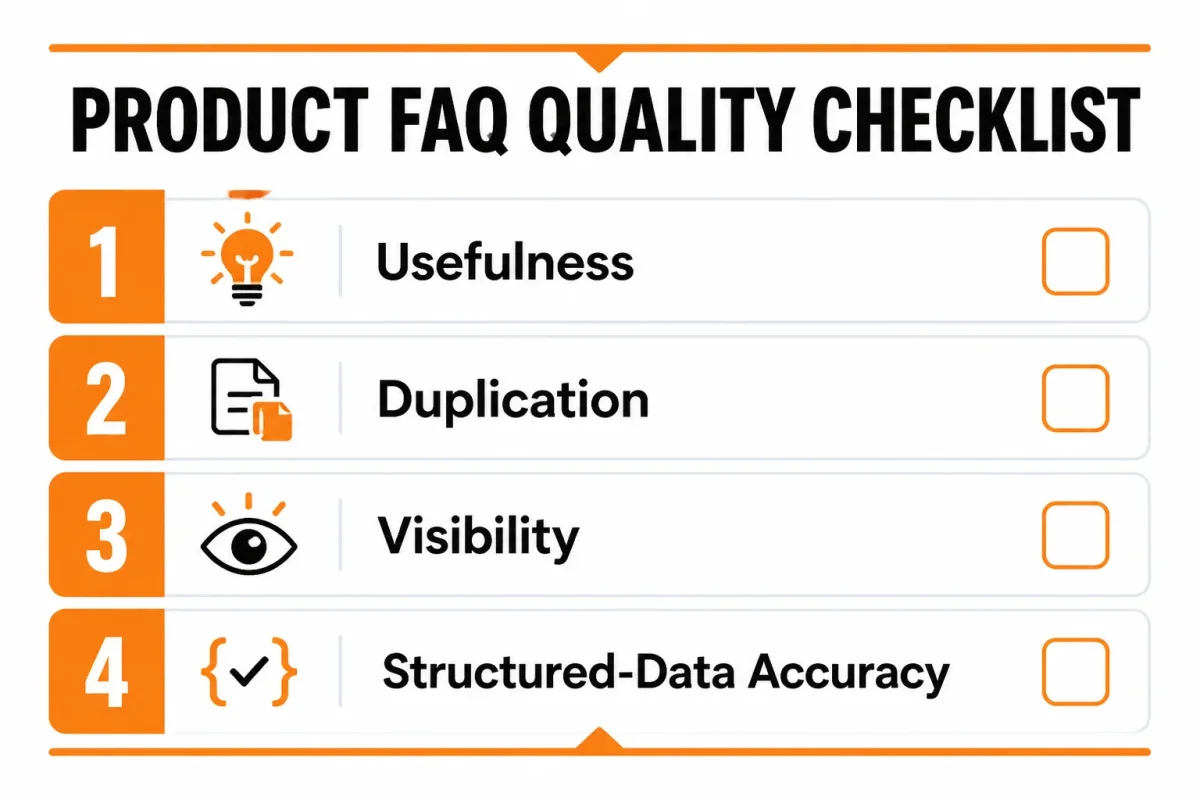
Common SEO mistakes to avoid
Check usefulness, duplication, visibility, and accuracy before publishing. Thin answers, repeated FAQs, hidden purchase details, and unsupported markup weaken the page even when the HTML is technically valid.
- Invented concerns: Remove questions that do not appear in support tickets, reviews, searches, returns, or customer conversations.
- Description repetition: Replace copied product claims with a decision-specific answer that explains fit, compatibility, use, or limitations.
- Identical FAQs: Write product-specific answers instead of placing the same shipping, material, and care block on every product.
- Hidden essentials: Keep delivery cutoffs, subscription terms, sizing limits, and compatibility warnings visible near the relevant buying information.
- Unsupported markup: Mark up only questions and answers that shoppers can actually see on the page.
Weak example: “Is the Atlas Burr Grinder high quality? Yes, it is made with premium materials.”
Strong example: “Can the Atlas Burr Grinder make espresso-fine grounds? Yes, its 40-step adjustment reaches espresso settings, but a pressurised basket may produce more consistent results for beginners.”
When FAQ schema remains relevant
FAQ schema may still be relevant when your questions and answers are visible, accurate, and eligible under current search-engine guidelines. It doesn't guarantee a rich result, so treat structured data as a clear description of page content, not a shortcut to more visibility.
Before publishing, use wRanks to review product-page SEO elements alongside meta tags, structured data, and other content signals. Its automation can speed up checks, but it can't confirm whether every FAQ reflects a real customer decision.
Choosing the number of FAQs for your website
Use as many FAQs as meaningful decision gaps require, not a preset target. Stop when a shopper can resolve the genuine doubts that your title, images, variants, description, and visible policies don't already answer.
A single product may need 2 useful answers. Another may need 6. If you're forcing a seventh question to reach a preferred count, you're probably adding filler.
Using Reddit discussions as FAQ research
Reddit discussions can help you find the language people use when they're uncertain, but don't treat every comment as proof of a store-wide concern. Use recurring, product-relevant questions as research leads, then verify them against your own support records, reviews, and search data.
Your final review should be simple.
- Real question: Confirm that each FAQ reflects a recurring or credible buying concern.
- Useful answer: Check that each response adds a specific fact, limitation, or choice aid.
- Visible content: Make sure shoppers can access the answer without relying on hidden or missing content.
- Product fit: Remove generic answers that belong to a store policy page or another product.
- Current details: Recheck prices, delivery windows, compatibility, materials, and policies after product changes.
- Accurate markup: Confirm that any structured data matches the visible copy and current search-engine requirements.
That review keeps your FAQ focused on the purchase decision. A short set of precise answers will serve your Shopify store better than a long, repetitive block written for an arbitrary question count.
Start with one Shopify product page and one unanswered buying decision
You don't need a storewide FAQ project to improve product-page usefulness. Start with one Shopify product page that attracts qualified visitors but still generates repeated pre-purchase questions. That page gives you a clear test, a defined audience, and behaviour you can measure.
Your first goal isn't more FAQ content. It's a better answer at the moment a shopper hesitates. Keep the experiment small, visible, and tied to an actual buying decision.
A low-risk Shopify FAQ action plan
- Choose the page: Select the Shopify product page with the most qualified organic traffic and repeated questions before purchase. Use support conversations, chat records, returns, and search data to confirm the pattern.
- Collect real questions: Gather the exact wording customers use about fit, compatibility, delivery, materials, or usage. Remove questions that your product title, images, variants, description, or shipping information already answers clearly.
- Write direct answers: Create concise responses specific to that product, not generic store copy. Weak: “This jacket is high quality and comfortable.” Strong: “The RidgeShell Jacket uses a 3-layer waterproof fabric and fits over a midweight sweater.”
- Place answers visibly: Put each answer near the decision it supports, such as sizing details beside the size selector or compatibility information near the specifications. Your shopper shouldn't need a separate policy page to resolve a product question.
- Validate structured data: If you add structured data, compare it with the rendered page and current search-engine requirements. Only mark up content you visibly provide. Accurate markup can support understanding, but it doesn't guarantee enhanced search results.
- Measure behaviour: Monitor organic queries, impressions, clicks, product-page engagement, support volume, and conversion behaviour where available. wRanks connects this content work with keyword tracking, Google Search Console insights, broader Shopify SEO workflows, and visibility in AI-search environments.
Improve one page first. Learn from real behaviour, then scale only the FAQ patterns that prove useful for your Shopify store.
If you want a faster way to connect product-page content with SEO data, wRanks provides AI-powered tools for Shopify stores, including meta tags, structured data, keyword tracking, and Google Search Console insights. The wRanks blog explains practical Shopify SEO workflows for search and AI platforms.

Senior SEO strategist with 8+ years in e-commerce search optimization. Sarah helps Shopify merchants turn organic traffic into revenue through data-driven content strategies.


