What Is FAQ Schema Markup? Shopify Guide
What is FAQ schema markup and how it helps Shopify stores improve search clarity and eligibility for rich results without guaranteed ranking boosts.
You add a useful FAQ accordion to a Shopify product, collection, or blog page. Later, you wonder whether search engines understand those answers, whether the code matches what shoppers see, and whether the work will improve visibility at all. When you ask what is FAQ schema markup, you’re really asking what the code means, when your page is eligible, and whether it deserves the effort. Conflicting advice makes the decision harder: one source calls FAQ schema essential, while another points out that Google has sharply limited FAQ rich results.
Most Shopify stores don't have a content problem, they have a meaning problem. The page says one thing to shoppers while its structured data says something else. This guide settles those points with a Shopify example, eligibility and quality checks, exact-URL validation, and a practical way to measure impressions and clicks without rebuilding your store.
Why FAQ schema matters even when Google does not promise a rich result
You can add FAQ markup to a Shopify product, collection, or blog page and see no expanded Google listing. That does not make the work pointless. It means you must separate clearer page meaning, eligibility for a search enhancement, and the possibility that search or AI systems interpret your content more accurately.
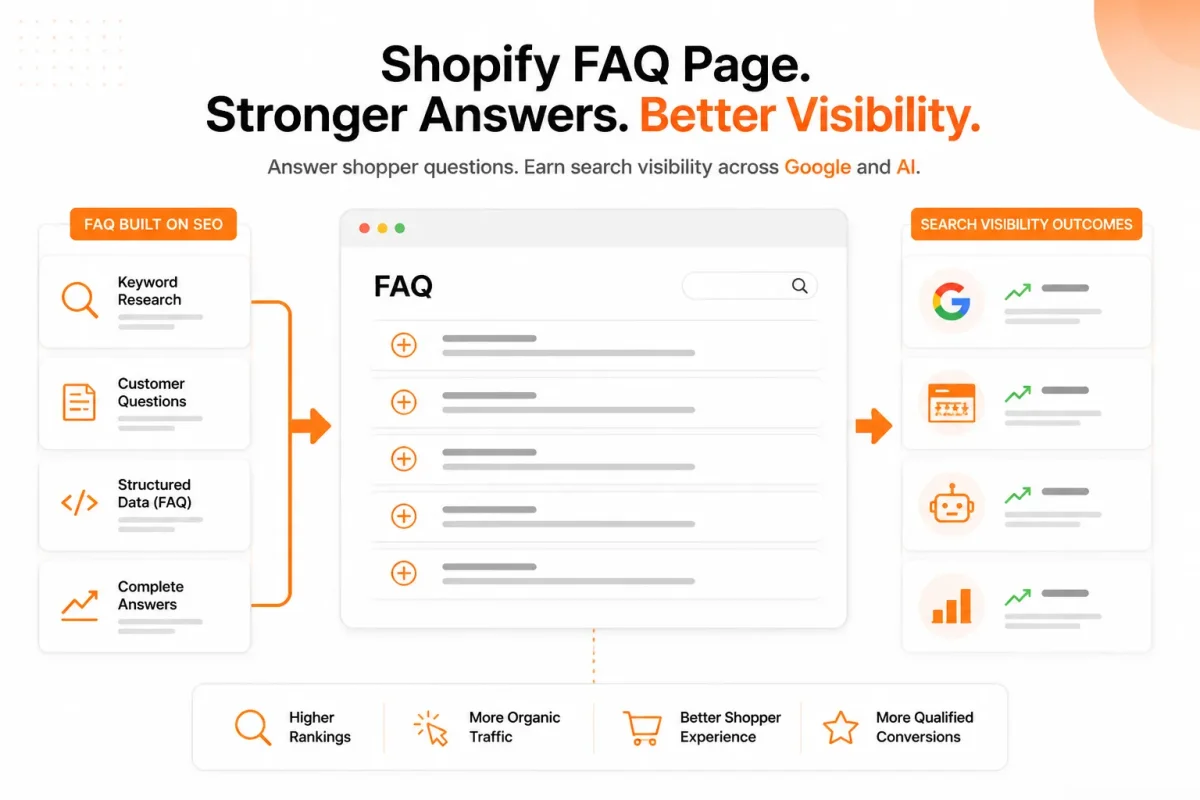
Google restricted FAQ rich results in August 2023, so valid markup is not a promise of extra visibility. Schema.org still reports FAQPage usage across 1M-10M domains in its August 2026 usage data, according to Schema.org's Google web-index aggregation. Adoption shows that the format remains relevant, not that every Shopify implementation earns traffic.
What a Shopify merchant risks by treating markup as a ranking shortcut
When you treat FAQ schema as a ranking shortcut, you can spend time marking up thin, repetitive, or hidden answers while shoppers still lack useful information. You also risk measuring a missing rich result as a technical failure, when Google may simply choose not to display that feature.
The business cost is confusion. Your team may keep editing code instead of improving answers about shipping, sizing, compatibility, returns, or product use. Valid structured data describes a page; it does not buy a search feature.
Is FAQ schema still relevant
Yes, FAQ schema remains relevant when you use it to describe useful answers that shoppers can see on the page. Clearer machine-readable meaning may help search systems and AI platforms interpret the relationship between a question and its answer, but no responsible platform can promise citations or rankings from markup alone.
“FAQPage is used by 1M-10M domains,” according to Schema.org's August 2026 usage data.
What changes when visible answers and structured data agree
Agreement gives your Shopify page one consistent meaning. If your visible answer says a 32 oz bottle fits a standard cup holder and the markup repeats that answer accurately, crawlers receive a precise description rather than a competing version.
Weak version: “Does it fit?” “Yes.”
Does the 32 oz TrailSip bottle fit a standard cup holder? “Yes. Its 3.1-inch base fits most standard vehicle cup holders.”
That clarity can support better page understanding and a better shopping experience, even when Google shows no FAQ enhancement. For the wider measurement context, this guide to organic search traffic for Shopify stores fits the same workflow.
Is FAQ good for SEO
FAQ schema can support SEO indirectly, but it is not a guaranteed ranking signal or traffic switch. You gain the most when useful visible answers come first, then precise structured data confirms them.
The practical rule for deciding whether an FAQ deserves markup
Practical rule: Publish a helpful visible answer first, then add FAQ schema only when it describes that exact answer.
The three layers behind FAQ schema markup
You may have clear questions and answers on your Shopify product, collection, page, or blog template, yet search tools still fail to interpret them correctly. The problem usually sits in a different layer than your visible FAQ.
You need to separate the shopper-facing content, the schema vocabulary, and the search platform’s eligibility decision. That model shows you which part needs fixing before you change your theme or JSON-LD.
What schema markup means in simple terms
Schema markup is code-based labeling that tells search engines what your page elements mean. You still need visible, useful answers first. The code describes those answers; it does not replace them.
- Layer one, human content: You publish complete answers about shipping, sizing, compatibility, returns, or product use on the Shopify page.
- Layer two, vocabulary: You identify the page as FAQPage, each item as Question, and each response as an acceptedAnswer.
- Layer three, platform decision: You meet the search platform’s quality and eligibility rules, but the platform still decides whether and how to display a result.
Weak example: “Does the TrailPack fit?” followed by “Yes.”
Strong example: “Does the TrailPack fit a 15-inch laptop?” followed by “Yes. The padded sleeve fits laptops up to 14.8 inches wide, including most 15-inch MacBook Air models.”
What FAQ schema means
FAQ schema means your recurring, publisher-provided questions and answers are identified as an FAQPage structure. It helps you express the relationship between each question and its answer, not claim a guaranteed expanded listing.
FAQPage fits a page where you provide the answers. QAPage fits a page focused on one question and its answers, often with customer contributions. Google’s documentation says QAPage markup is intended for pages focused on one question and its answers, according to Google Search Central official QAPage guidance.
FAQPage versus customer-submitted questions and answers
You should use FAQPage for a store-authored FAQ block, not a customer forum disguised as product support. If one customer asks whether a charger works with a specific device and other users answer, QAPage may describe that structure more accurately.
JSON-LD, FAQPage, Question, and Answer in the same model
JSON-LD is the usual format for expressing the vocabulary, not the meaning of FAQ schema itself. You can place the structured data in your page code while shoppers read the matching FAQ content in the page layout.
Weak configuration: JSON-LD labels a product description as an FAQPage, although no questions appear on the page.
Strong configuration: JSON-LD identifies the visible “How long does delivery take?” question and its complete acceptedAnswer using FAQPage relationships.
| symptom | likely cause | first fix |
|---|---|---|
| The FAQ is useful to shoppers but search tools cannot recognize it | The page lacks clear FAQPage, Question, and acceptedAnswer relationships | Map the visible questions and answers to valid JSON-LD |
| The JSON-LD is valid but the page is not eligible for the expected result | Search-platform eligibility or display rules are not satisfied | Review the current platform guidance instead of treating validation as a ranking guarantee |
| The markup describes a different page type | FAQPage was used for a single-question discussion or user-answer format | Evaluate whether QAPage or another schema type better matches the page |
wRanks can help you manage structured data across Shopify stores, but no tool can override a platform’s eligibility rules. You still need to inspect the exact page, visible answers, and current guidance.
How to recognize an FAQ ready for Shopify structured data
You should decide whether an FAQ belongs on the page before generating any markup. A useful entry answers a recurring concern about sizing, materials, shipping, returns, compatibility, or care. A slogan such as “Why choose the best candle online?” is promotional copy, not a genuine shopper question. Product-led brands such as Bawbags still need questions and answers tailored to the specific item or buying concern.
Your goal is editorial readiness first. If the question is relevant, the answer is accurate, and visitors can see the same information on the page, structured data has a sound foundation.
How to structure a FAQ with questions that reflect real product and store concerns
You can structure a FAQ by grouping specific questions around the product or page being viewed. Keep questions that help a buyer decide, then remove questions borrowed from another category or copied across unrelated products.
Weak: “Why is the Alpine Wool Throw the ultimate cozy blanket?”
Strong: “What size is the Alpine Wool Throw?” The answer states the measurements and explains which bed or seating area they suit.
| symptom | likely cause | first fix |
|---|---|---|
| The question promotes the product instead of answering a concern | Marketing copy was labeled as an FAQ | Rewrite it as a specific shopper question with a factual answer |
| The answer exists only in code or is inaccessible to visitors | Structured data does not reflect visible page content | Publish the same answer in the Shopify page’s visible FAQ block |
| Several unrelated product pages use the same questions | A template was expanded without checking page relevance | Keep only questions that genuinely apply to that product or collection |
| The answer is vague or incomplete | The FAQ was written for keywords rather than shoppers | Add the concrete condition, limitation, or next step a buyer needs |
Common FAQs with visible, complete, page-specific answers
You should publish each marked answer where human visitors can find it without relying on source code. An accordion is acceptable when its content is rendered and accessible, not when the answer exists only in a script or hidden field. This guide to adding a collapsible product description in Shopify fits the same workflow when your theme controls expandable content.
Weak: “Yes, this fits most homes.”
Strong: “The Cedar Desk measures 47 inches wide and fits standard home office spaces with at least 50 inches of clearance.”
A good FAQ page across product, collection, page, and blog templates
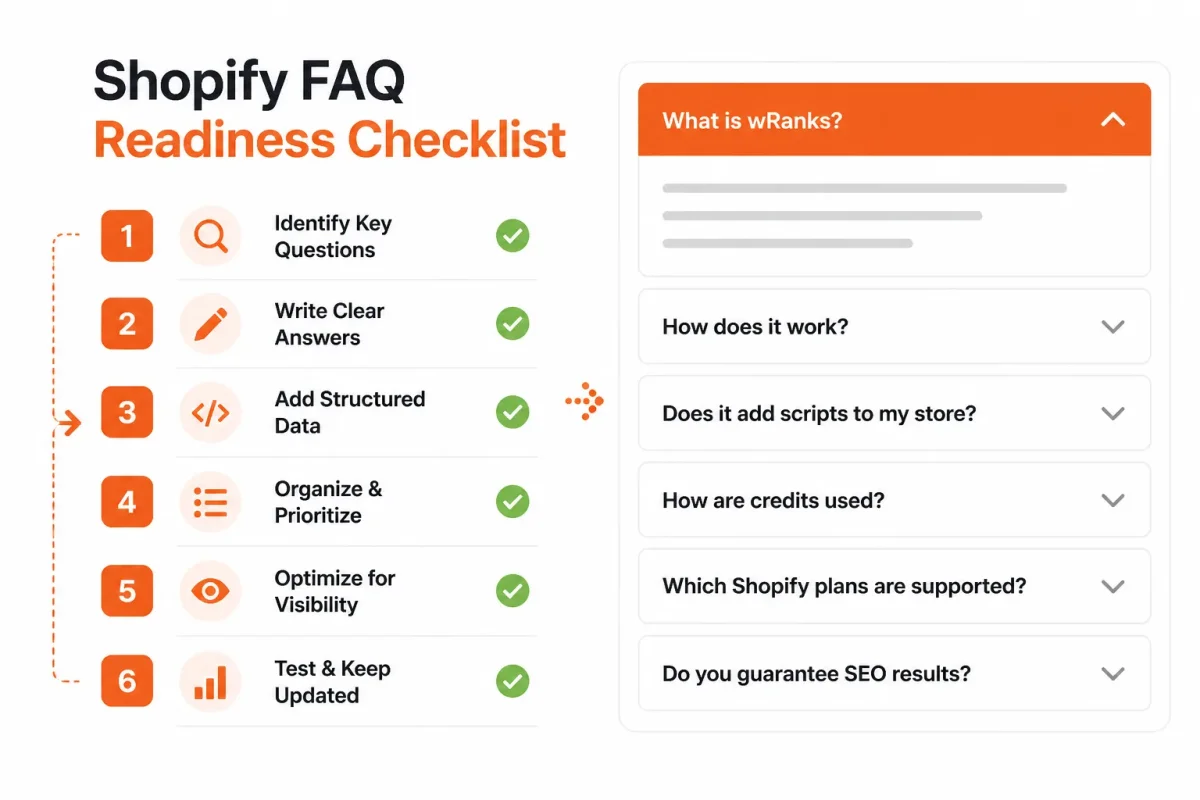
You can use this preflight checklist before marking any answer as FAQ content:
- Page relevance: Every question applies directly to the current product, collection, page, or blog topic.
- Factual accuracy: You have checked claims against current product, shipping, return, and care information.
- Visible placement: Visitors can read each answer on the rendered Shopify page.
- Answer completeness: Each response includes the condition, limitation, measurement, or next step a shopper needs.
- Duplication control: You have removed copied answers that do not fit the specific page.
- Review date: You have recorded when someone should verify the answer again.
When these checks fail, revise or remove the FAQ before adding markup. Editorial readiness comes before markup readiness.
A concrete FAQ schema example for a Shopify product page
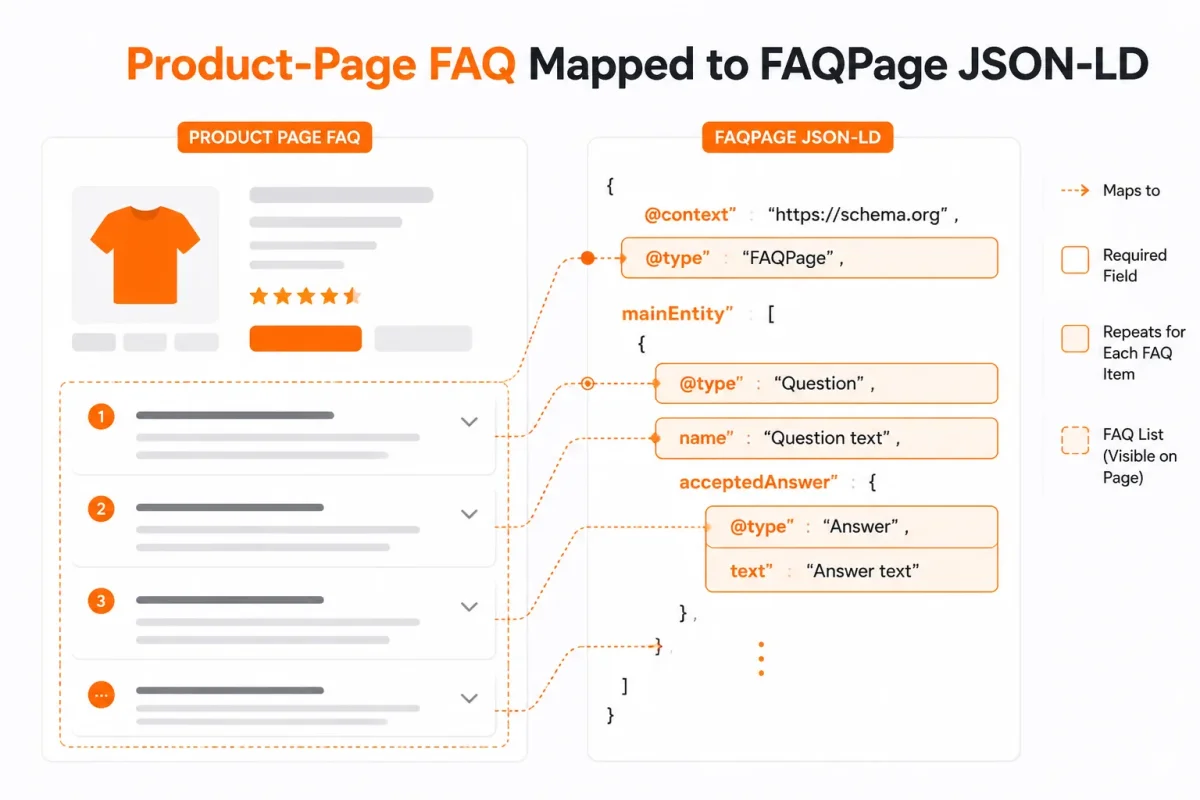
Your Shopify product page can show a useful sizing answer while its code describes that same answer for search engines and AI platforms. The key problem is alignment: your shoppers must see the FAQ, and your structured data must repeat it accurately.
Neil Patel describes FAQ schema as structured data that identifies questions and answers for search engines and AI platforms. He also explains that the markup sits in a page's HTML to clarify that FAQ content for search engines. Your visible copy remains the source of truth.
The visible FAQ shoppers should see first
For the Alder Waxed Jacket, your product page could display this FAQ:
Does this jacket fit true to size? The Alder Waxed Jacket runs small through the shoulders. Choose one size up if you prefer room for a sweater. See the size chart for chest measurements before ordering.
A weak answer gives shoppers too little direction. A strong answer gives you a specific fit instruction and a next step.
Weak version: This jacket runs small.
Strong version: The Alder Waxed Jacket runs small through the shoulders. Choose one size up for sweater layering, and compare your chest measurement with the size chart.
An FAQ schema example
Yes. You can pair that visible copy with JSON-LD that identifies the page as an FAQPage, names the Question, and supplies its acceptedAnswer.
{
"@context": "https://schema.org",
"@type": "FAQPage",
"mainEntity": {
"@type": "Question",
"name": "Does this jacket fit true to size?",
"acceptedAnswer": {
"@type": "Answer",
"text": "The Alder Waxed Jacket runs small through the shoulders. Choose one size up for sweater layering, and compare your chest measurement with the size chart."
}
}
}
Your JSON-LD should match the rendered FAQ, including the question wording and sizing guidance. If your team changes the product answer, update both versions together.
An FAQ schema markup example
This example shows how each code field maps to content your customer can read:
| situation | better move |
|---|---|
| The product page visibly asks whether the jacket fits true to size | Use the same question as the Question name and connect it to an acceptedAnswer |
| The visible answer says the jacket runs small | Use matching wording in acceptedAnswer.text and keep the answer concise and factual |
| A generator produces JSON-LD with a different answer | Edit or discard the generated output until it exactly reflects the published FAQ |
| The markup validates successfully | Treat validation as a technical check, not proof of a Google rich result |
A schema markup generator can speed up drafting, but you still need to check accuracy, relevance, escaped characters, and page visibility. Tools in wRanks can support structured data work for Shopify stores, although automated output still needs a human review.
What the example tells search engines and what it cannot guarantee
The markup communicates that your page contains a question, its accepted answer, and a defined FAQ structure. It does not guarantee that Google will display a rich result, increase rankings, or show the answer exactly as written.
Validate the final JSON-LD on the exact published Shopify URL, then inspect the rendered page. When sizing, shipping, or policy information changes, update your visible answer and JSON-LD together.
Where FAQ schema advice stops being reliable for Shopify stores
You can have valid FAQ markup on your Shopify page and still see no rich result, no AI citation, and no measurable ranking change. That gap matters when you are deciding whether to add questions across hundreds of products.
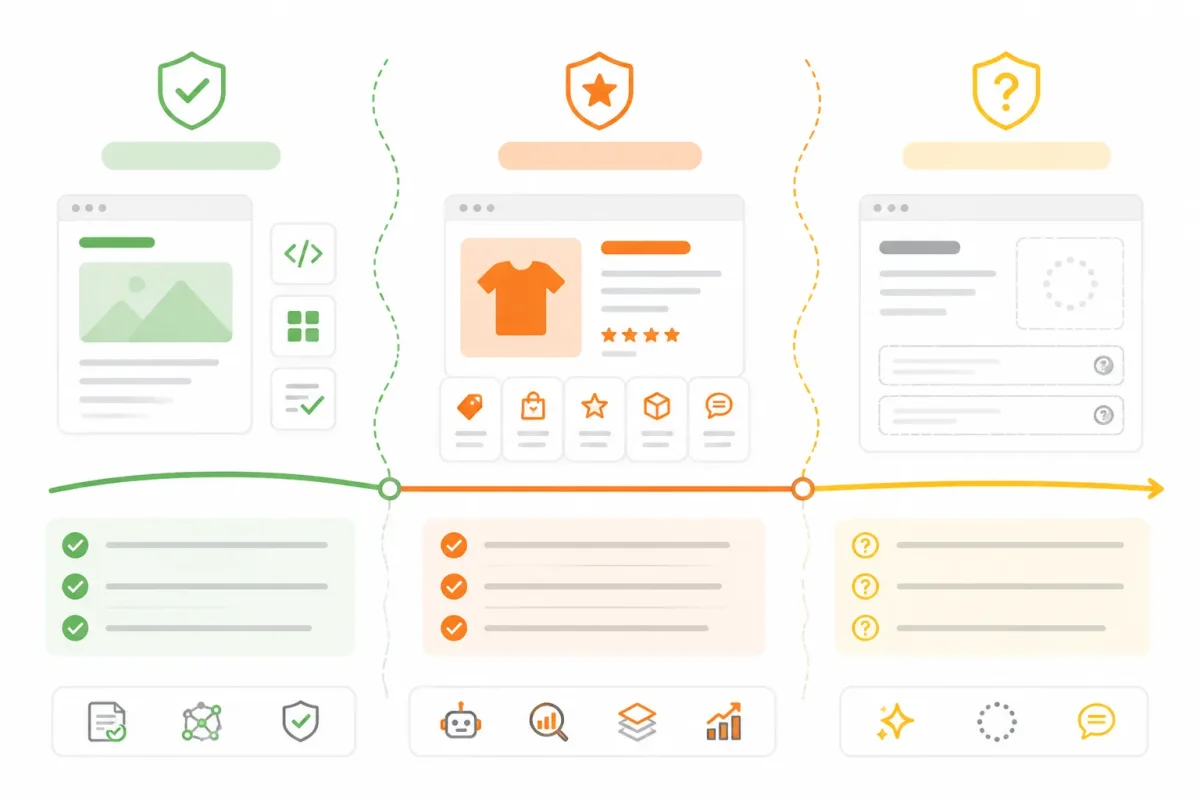
Technical validity, Google eligibility, and AI visibility are separate outcomes. Your best decision comes from treating FAQ schema as supporting evidence for page meaning, not as a promise of search exposure.
AI-readable content is not the same as an AI citation
FAQ schema may help automated systems process your page, but it cannot guarantee that your answer will appear in an AI response or receive a citation. Your visible wording, page authority, product relevance, and the system's selection process still matter.
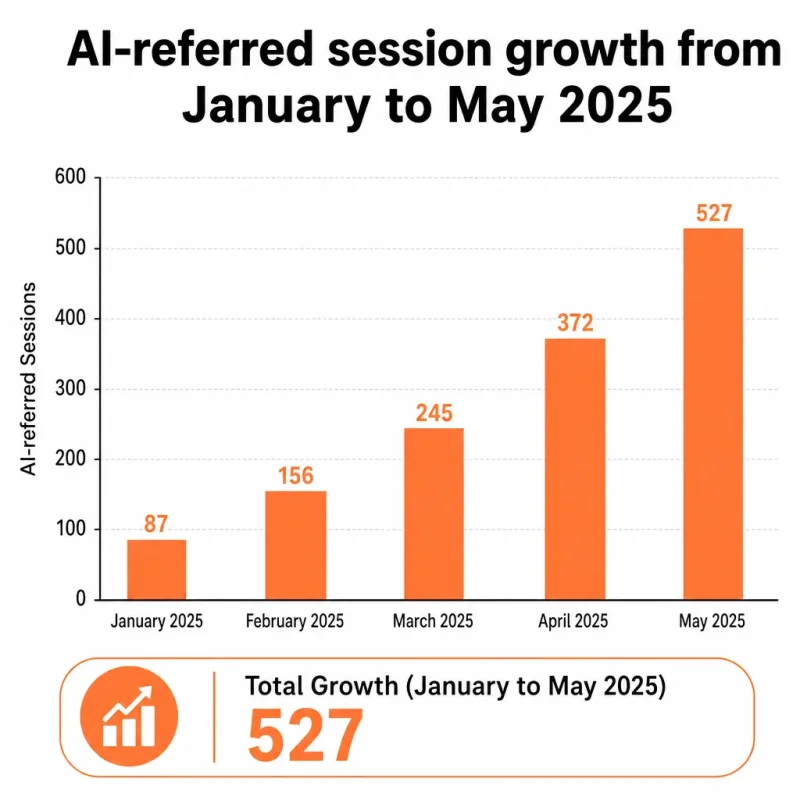
Search Engine Land reported that AI-referred sessions rose by 527% between January and May 2025, but that report does not show FAQ schema caused the increase. It does show why you may care about machine-readable content while measuring its effect separately.
What works
- Clear alignment: Your visible questions, answers, and JSON-LD describe the same page content.
- Useful coverage: You answer genuine concerns about materials, delivery, sizing, returns, or product use.
- Measured expansion: You add markup to more pages only after one page produces valid, accurate results.
What fails
- AI certainty: You treat structured data as a guarantee of citation, inclusion, or ranking.
- Broad duplication: You copy identical FAQs across products where the answers do not fit each item.
- Stale maintenance: You leave shipping, warranty, or pricing answers unchanged after policies shift.
Why Google eligibility changes the return on implementation effort
Google's restricted eligibility for FAQ rich results reduces the visible payoff for many Shopify stores. Your markup can remain valid and still produce no expanded listing, so broader coverage may improve machine readability without creating a matching increase in clicks.
That trade-off makes relevance more valuable than volume. If you are also reviewing product structured data, the guide to adding product schema in Shopify fits the same validation workflow.
How to evaluate community advice without treating it as documentation
For “what is FAQ schema markup Reddit,” the answer is that Reddit discussions offer anecdotal implementation experience, not a governing definition. You can use them to spot recurring problems, then verify each claim against Schema.org definitions and Google's validation guidance.
Expand only when one page has accurate visible content, valid markup, and measurable search evidence. Your scale rule should be simple: prove the page before multiplying the maintenance risk.
The seven FAQ schema mistakes that quietly invalidate the effort
You can publish accurate answers on a Shopify page and still send search engines the wrong signals. The usual causes are small: hidden text, mismatched wording, duplicated templates, or generated code that nobody checks.
You need to inspect both the shopper-facing FAQ and its structured data. A valid result only means the code is readable. It doesn't promise a rich result or an AI citation.
The visible-content mismatch
- Hidden answers: You should mark up answers shoppers can access in the page content, including expandable text that works for users. Remove schema for answers hidden from the storefront.
- Different wording: You should make the visible answer and the schema answer match. Replace a visible “Ships in 3 to 5 business days” with schema that says the same thing, not “Delivery is usually fast.”
The promotional-answer trap
- Sales copy disguised as FAQs: You shouldn't label “Why buy our premium cotton hoodie?” as an FAQ when the answer is advertising. Use a genuine customer question, such as “How should this hoodie be washed?”
- Before: “Why is Alpine Roast the best coffee?”
After: “How should Alpine Roast coffee be stored?” Keep the answer factual and useful rather than promotional.
Google's Search Central documentation says you shouldn't use QAPage markup for advertising purposes. The same principle helps you keep promotional copy out of FAQ structured data.
The duplicate-template problem
- Repeated FAQs: You should avoid copying the same five questions across unrelated products, collections, and blog URLs. Write page-specific answers, then remove entries that add no information.
- Template drift: You should check every page after changing a Shopify theme or SEO app. Delete duplicate JSON-LD blocks so one URL doesn't describe the same question twice.
The validation and platform-confusion errors
- Wrong page type: You should use FAQPage for a published question-and-answer set, not QAPage for advertising or a user forum where people submit answers.
- Broken relationships: You should connect each Question to an acceptedAnswer and Answer. Missing those relationships means the markup doesn't describe a complete FAQ.
- Blindly trusted generation: You should test generated code and inspect the exact Shopify URL after installation. WordPress uses the same principles, but its editor, plugin, theme, or custom code controls implementation, so don't copy WordPress instructions into Shopify without review.
How to tell whether FAQ schema helped your Shopify page
Your measurement starts with the exact published Shopify URL, not a general impression of better visibility. Check that your visible FAQ appears on the page, the JSON-LD describes those same questions and answers, and the URL remains indexed. That gives you an implementation record before search performance enters the picture.
Validation proves that search tools can read recognizable structured data. It cannot promise a rich result, higher rankings, more clicks, or an AI citation. You need both technical checks and page-level search evidence.
Validation signals versus search-performance signals
First, inspect the live URL and record whether the FAQ content is visible, whether the intended FAQPage data is present, and whether a validator recognizes the syntax and entities. If the validator reports errors, fix those before judging performance. If everything passes, you have a readable implementation, not a guaranteed search outcome.
wRanks can support this review through structured-data optimization, while its Shopify workflow keeps the product, collection, page, or blog URL tied to the implementation. A supplied market chart shows AI-referred sessions growing 527% from January to May 2025. That figure provides market context, not a benchmark your FAQ page must match.
The Search Console metrics to inspect by page and query
After Google has had time to crawl the published URL, use Google Search Console to compare impressions, clicks, click-through rate, and average position before and after the FAQ was added. Review the exact page, then inspect query wording. You may see more question-shaped searches, different product concerns, or no meaningful change.
Keyword tracking in wRanks can add another view of query movement, while its Google Search Console integration helps centralize page-level evidence. Record the date, URL, visible FAQ version, validation status, indexed status, and query changes. Compare like with like, because normal search volatility can confuse a short test.
When to revise the FAQ instead of adding more markup
If validation fails, fix the code. If validation passes but impressions and relevant queries remain flat, review the answer before adding more schema. Your FAQ may be too generic, poorly matched to the product, or absent from the shopper’s visible experience.
Keep: retain the FAQ when answers are accurate, visible, validated, and aligned with relevant query evidence. Revise: improve the wording or coverage when shoppers’ questions expose a clear content gap. Remove: delete the markup when the FAQ is thin, outdated, or unsupported by the page. That evidence trail tells you what happened without promising a universal traffic lift.
Start with one visible FAQ block on a Shopify page
A valid markup result won't fix an FAQ that shoppers can't find, trust, or use. You need one Shopify page where the questions reflect real buying concerns and the answers remain visible without relying on search features.
Start small. When you keep the visible copy, FAQPage JSON-LD, validation, and measurement tied to one URL, you create a clean test before changing an entire template.
Choose the page with the clearest shopper questions
Pick one product, collection, page, or blog URL that already benefits from an FAQ block. Use questions from customer messages, product reviews, support tickets, or your own sales conversations. You want genuine concerns, not keyword variations written only for search engines.
- Select one URL: Choose the Shopify page where an FAQ already helps a shopper decide.
- Collect real questions: Write down the questions customers ask about fit, materials, delivery, returns, compatibility, or use.
- Publish concise answers: Add clear answers to the visible page, using language your customers understand.
Weak: “Is this jacket good?”
Strong: “Does the RidgeShell Rain Jacket fit over a sweater? Yes. Choose your usual size for a light layer or size up for a heavier midlayer. Check the size chart for measurements.”
Match visible copy to structured data
Map only the questions and answers shoppers can see on that exact URL to FAQPage JSON-LD. If you edit the visible answer, update the structured data at the same time. Your markup should describe the page, not a preferred version of it.
- Keep the wording aligned: Make the JSON-LD answer materially match the visible answer.
- Remove unsupported entries: Exclude questions that belong to another product, template, or hidden section.
Validate, monitor, and scale only what remains accurate
Run the rendered page through a schema markup validator, then use Google’s relevant testing workflow to review eligibility signals. A validator confirms technical recognizability. Platform testing and Google Search Console provide separate evidence about eligibility, indexing, and search response.
- Validator check: Confirm the exact page contains readable FAQPage JSON-LD with no critical errors.
- Eligibility check: Review whether Google identifies the structured data for the rendered URL.
- Search Console check: Monitor that same URL for indexing, impressions, queries, and changes in search behavior.
- Template decision: Expand only when the page stays accurate, useful, and synchronized after edits.
FAQ schema is a communication layer, not a ranking guarantee. Your first test should be one page whose FAQ already improves buying confidence, because that page gives you the clearest evidence before a template rollout.
If you want a faster way to do this, wRanks organizes structured-data optimization, keyword tracking, and Google Search Console integration for Shopify stores, while your team keeps editorial control. Explore the wRanks blog for Shopify SEO guidance to support that workflow.

Technical SEO engineer focused on structured data, indexing optimization, and Core Web Vitals. David turns complex technical requirements into actionable Shopify solutions.


