What Is a Soft 404? Shopify SEO Explained
Discover what a soft 404 is and how it affects Shopify SEO by causing empty pages to waste search opportunities and how to fix them effectively.
You open a Shopify product URL during your morning check, and the browser loads it normally. Then you notice the discontinued product template is empty, the collection has no items, or a retired blog post simply says that nothing is available. Your store shows no obvious error, but Google Search Console reports a problem and organic traffic starts to fade. The page looks open to you, yet it gives shoppers and search engines little reason to stay.
That mismatch is the real issue. Your store says, “this page exists,” while the content says, “there’s nothing here.” A soft 404 can look live in a browser but appear empty, irrelevant, or unhelpful to search engines. Depending on what the URL used to offer, the right response may be restoring the page, redirecting it to an equivalent product or collection, or returning a truthful 404 or 410.
Why a Soft 404 Can Waste a Shopify Page's Search Opportunity
A Shopify product, collection, or blog URL can load in your browser and still fail as an organic landing page. Google may crawl the URL, interpret its rendered content as empty or irrelevant, and keep it out of the index. You may lose the page's search opportunity altogether.
The query "what is a soft 404" receives 140 monthly searches in the supplied keyword research, showing a real discovery need around this error. For your store, the commercial issue is clearer: a shopper follows an old link, reaches a page with no product or useful next step, and leaves instead of reaching a relevant collection.
The cost of telling Google an empty page is healthy
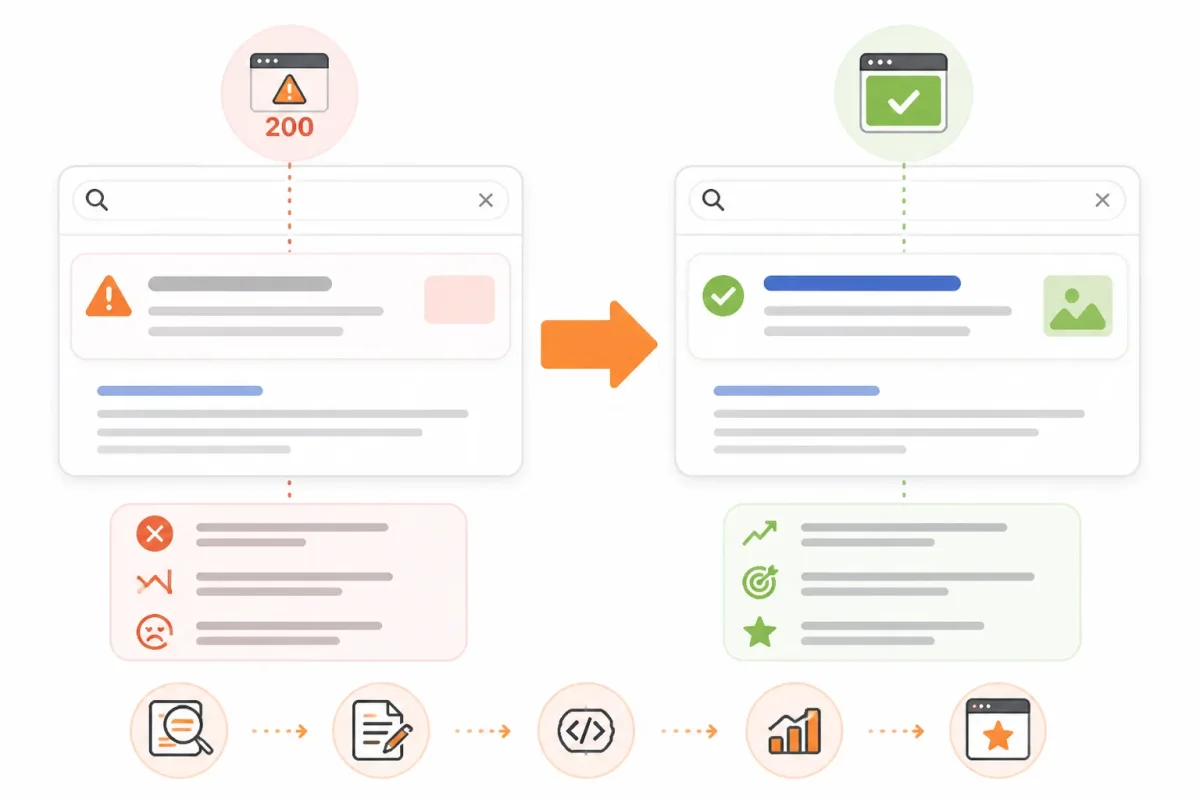
When your Shopify template returns a successful response but shows "product unavailable" without useful alternatives, Google has to reconcile conflicting signals. Crawl attention goes toward a URL that offers little value, while your strongest product or collection page misses a potential visitor. Shoppers may also reach a dead end through old bookmarks, search results, ads, or external links.
Yoast explains that a search result marked as a soft 404 will not appear in Google's index. The page isn't merely performing poorly. Google may decide it shouldn't be searchable at all.
"A page Google labels a soft 404 will not appear in its index," according to Yoast.
For example, a weak product URL might show this:
Before: "Vintage Leather Backpack - Out of stock." The page has no description, related products, or collection path.
A stronger destination gives both Google and shoppers a useful route:
After: "Vintage Leather Backpack has been retired. Browse the full leather backpack collection for current styles."
What changes when the URL sends the truthful signal
A truthful response helps Google stop treating an empty page as a valid destination. If the URL has no suitable replacement, a genuine 404 or 410 can remove it from search processing. If an equivalent product or collection exists, a relevant redirect can send the shopper there instead.
- URL: The old product, collection, or blog address remains identifiable.
- HTTP response: Your server communicates whether the destination exists.
- Rendered content: The page gives shoppers useful information or clearly confirms removal.
- Indexing: Google decides whether the URL deserves a searchable result.
- Opportunity: A useful destination can earn visits and sales. An empty one loses both.
wRanks can help you monitor affected Shopify pages and improve their meta tags and content after you choose the correct URL decision. It can't make an irrelevant destination useful without a genuine product, collection, or informational purpose.
The practical rule for deciding whether to preserve a URL
Preserve a URL when it still serves the search and shopping intent behind it. Don't preserve it merely because the browser loads a template. If you want to connect this repair work with broader acquisition reporting, the guide to what organic search traffic means for a Shopify store fits the same workflow.
Practical rule: Preserve a URL only when it leads to a useful, relevant destination. Otherwise, let it return a truthful not-found response.
The Three Page States Behind Every Soft 404 Diagnosis in Shopify SEO
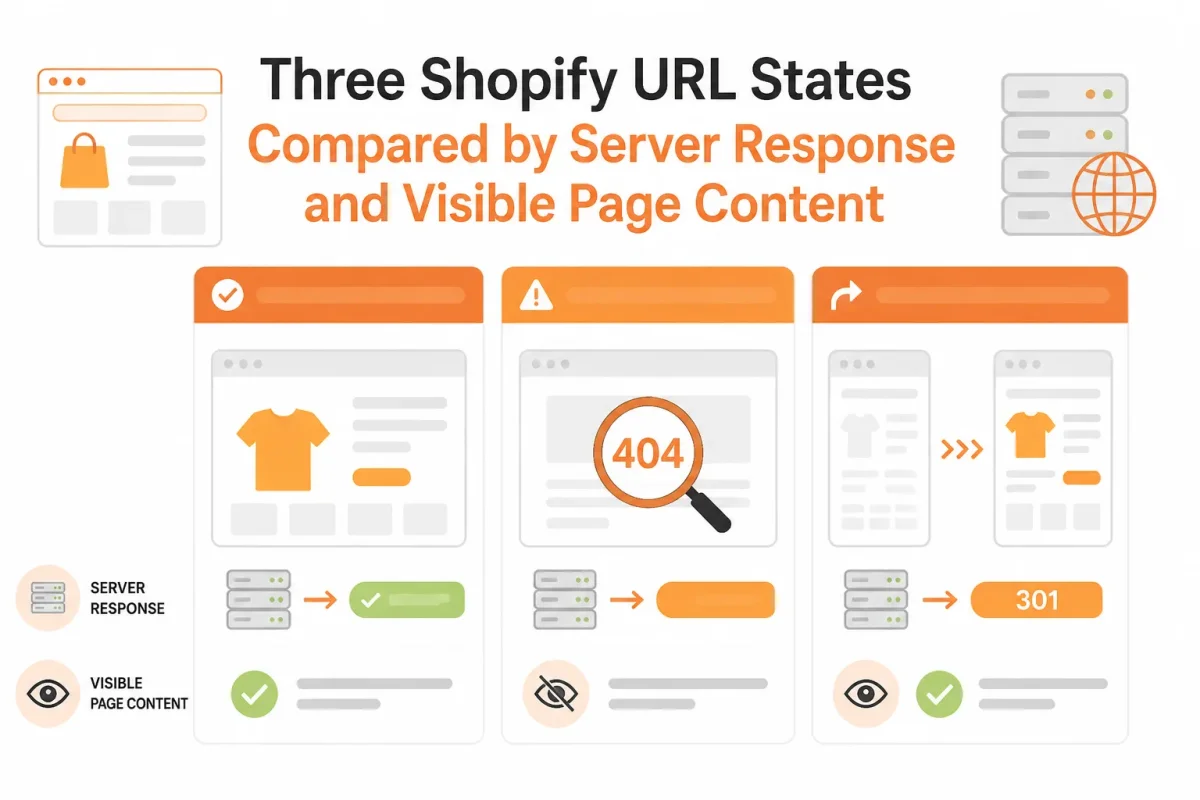
A deleted product, an empty collection, and a temporarily unavailable product may look similar in your browser, yet each deserves a different search response.
The useful distinction is between what your server returns and what the page appears to mean. Once you separate those states, you can protect relevant shopping intent without trying to recover URLs that have no useful destination.
What 404 Not Found Actually Means
404 Not Found means the requested resource cannot be found. You're seeing a genuine HTTP response, not proof of a ranking penalty. If you delete a Shopify product with no replacement, a real 404 accurately tells shoppers and search engines that the URL no longer represents an available resource.
A soft 404 is different. Yoast explains that it isn't a standard server status code, but a search-engine label for a page whose response and apparent purpose don't agree.
What a 404 Forbidden Error Means
"404 forbidden" combines two different HTTP ideas, so you're likely looking at a terminology mix-up. A 404 means the resource can't be found, while 403 Forbidden means the server understood the request but refused access.
Your deleted Shopify product may return 404. A private admin area or restricted file may return 403. Neither response alone tells you that your account caused a problem.
Whether a 404 Error Means You Were Blocked
No, a 404 error doesn't prove you were blocked. You may be visiting an old product URL, a mistyped handle, or a collection that no longer exists.
For a moved Shopify product, you may preserve the shopping intent with a relevant 301 redirect. For a deleted product without an equivalent, you may allow the URL to return a genuine 404 or 410. Yoast recommends a 404 or 410 when a page no longer exists.
Whether a 404 Error Is Your Fault
Usually, no. A 404 commonly reflects a deleted resource, a changed URL, or an outdated link, not a personal mistake or search-engine punishment.
Searches such as "404 Not Found movie" use the familiar internet phrase as a title or subject. That wording doesn't change the technical meaning of 404 for your Shopify store.
The 200-Status Page Google Interprets as Missing
A soft 404 often occurs when your Shopify URL returns a successful 200 status but shows almost nothing useful. An empty collection template, a discontinued product shell, or a polite "no results" message can create that mismatch.
- Deleted product: If no equivalent product exists, return a genuine 404 or 410 rather than leave an empty product template.
- Moved product: If the same product has a new URL, redirect visitors to the relevant replacement.
- Empty collection: If the collection has no current purpose, replace it with a useful destination or return a truthful not-found response.
The Valid Page That Must Not Be Mistaken for a Soft 404
A temporarily unavailable product can still be valid when you provide useful specifications, sizing, delivery context, related products, or a restock option. A collection can also remain valuable when its inventory is temporarily empty but its buying purpose is clear.
Your theme may hide substantial content below the fold, so inspect the rendered page before treating thin visible copy as a soft 404. The Shopify collapsible product description guide fits this workflow when useful product information exists but your theme presents it poorly.
| situation | better move | why |
|---|---|---|
| A deleted Shopify product has no equivalent replacement | Return a genuine 404 or 410 | The resource is gone, so the server and shopper experience should agree. |
| A product moved to a new URL but remains substantially the same | Use a relevant 301 redirect | The replacement preserves the original shopping intent. |
| A temporarily unavailable product still has useful details and buying context | Keep and improve the product page | Thin inventory messaging alone doesn't prove the page is nonexistent. |
| An empty collection has no current products and no useful purpose | Return a truthful not-found response or replace it with a relevant destination | An empty template shouldn't pretend to be a useful indexable collection. |
How to Confirm a Soft 404 Before Changing a Shopify URL
You may see a Shopify URL load normally while Google treats it as missing, empty, or unhelpful. Before you delete a product, edit a redirect, or change a collection handle, gather evidence from both the shopper view and the server response.
Your goal isn't to react to one Search Console notice. Build a repeatable record of what the shopper sees, what Google receives, and what Shopify says about the resource.
Open the Exact URL as a Shopper and as Google Sees It
Start with the reported URL in a private browser window. Record whether you see useful product details, an empty collection, a custom not-found message, a redirect, or an access-denied response. Then check the HTTP response with browser developer tools, a header checker, or a crawl. A page rendering normally doesn't prove that its response is correct.
Weak record: "The product page opens."
Strong record: "/products/blue-canvas-tote returns 200, shows no product details, and displays 'This item is unavailable.'"
- Shopper view: You have recorded the visible page state and its exact message.
- HTTP response: You have captured the status code, redirect path, and final URL.
- Page content: You have noted whether product, collection, or blog content remains useful.
Check Page Indexing and URL Inspection in Search Console
In Google Search Console, use the Page indexing report to find the affected URL and its classification. Search Console can show a submitted URL as a soft 404 even when your browser receives a successful response, according to Yoast's explanation of the Coverage report.
Next, use URL Inspection on the exact address. Compare Google's indexed interpretation with the live URL test, including indexing status, canonical information, and any detected issue shown in your account. You may be seeing a soft 404, a 403 restriction, a redirect, or a legitimate page that needs better content.
Match the URL to Its Shopify Product, Collection, or Blog State
In Shopify admin, check the resource's status, inventory, publication channels, collection rules, redirects, and theme behavior. Also confirm whether an app or theme condition hides content from visitors or search crawlers.
| symptom | likely cause | first fix |
|---|---|---|
| Search Console reports a soft 404 while the URL returns 200 | The rendered page resembles a missing or empty resource | Inspect the live page, response, and Shopify resource state together |
| The URL redirects before the page loads | A redirect rule or Shopify URL change | Confirm that the destination matches the original intent |
| The server returns 403 Forbidden | Access restriction, security layer, or permissions issue | Investigate access controls instead of treating it as a soft 404 |
| The page returns 200 and has useful product or collection content | A valid page may be underdeveloped rather than missing | Improve relevance and completeness, then request re-evaluation |
Before choosing a recovery path, keep the URL, response code, Search Console finding, screenshot, and Shopify resource state together. That evidence helps you fix the cause instead of changing a URL that still serves valuable content.
What a Soft 404 Is and How Shopify Creates the Mismatch
You can receive a successful response from Shopify while Google sees little or nothing worth indexing. The mismatch starts when your server says the URL exists, but the rendered page looks like a deleted product, empty collection, or unavailable resource.
Google describes a soft 404 as a page that returns 200 OK even though the requested resource doesn't exist, according to Google's documentation on soft 404 errors. Your Shopify theme, availability settings, and fallback templates can create that result without showing you a browser error.
The server response and the visible content tell different stories
A shopper requests your product URL. Shopify returns 200 OK, but the theme renders "Product unavailable," an empty layout, or a generic search result. Google evaluates the rendered content and may classify the URL as a soft 404, keeping it out of the index.
A custom not-found page can cause the same problem if it returns 200. A polite message isn't an accurate HTTP response.
What a Soft 404 Error Means
A soft 404 error is a valid server response attached to content that appears missing. For example, /products/cedar-desk-lamp may remain published after its product record is archived. The theme fallback preserves the URL response, while unavailable inventory, empty collection logic, missing Product structured data, a self-referencing canonical, and old internal links reinforce the wrong interpretation.
Worked example: a discontinued Shopify product URL
Before: "Cedar Desk Lamp is unavailable. Browse our home collection." The page returns 200, has no price or buying guidance, and links only to a broad collection. After: "Cedar Desk Lamp has been replaced by the Alder Desk Lamp. Compare sizes, finishes, and shipping details." The page now gives your URL a clear purpose.
How to Resolve a Soft 404
To resolve a soft 404, choose the response that matches the product's real status. Google guidance supports a 301 when a page has moved to a genuinely equivalent destination, according to Yoast's soft 404 guidance.
| situation | better move | why |
|---|---|---|
| Discontinued product has a genuinely equivalent successor | Create a relevant 301 redirect to the successor | The destination continues the original product intent. |
| Discontinued product can be sold again or still has valuable buying information | Restore and expand the product page | Useful content gives the 200 response a legitimate purpose. |
| Discontinued product has no replacement or meaningful residual purpose | Return 404 or 410 and remove discovery signals | A truthful unavailable response prevents a false existence signal. |
| Custom Shopify not-found template returns 200 | Configure the unavailable route to return the correct status | A polite message doesn't replace an accurate HTTP response. |
Your 301 isn't a universal deletion tool. Once you select an outcome, check meta tags, structured data, image alt text, and keyword performance in wRanks. Its AI-powered SEO checks can expose content gaps, but your Shopify configuration still controls the response code and redirect.
Where the Simple Soft 404 Rule Breaks Down at Scale
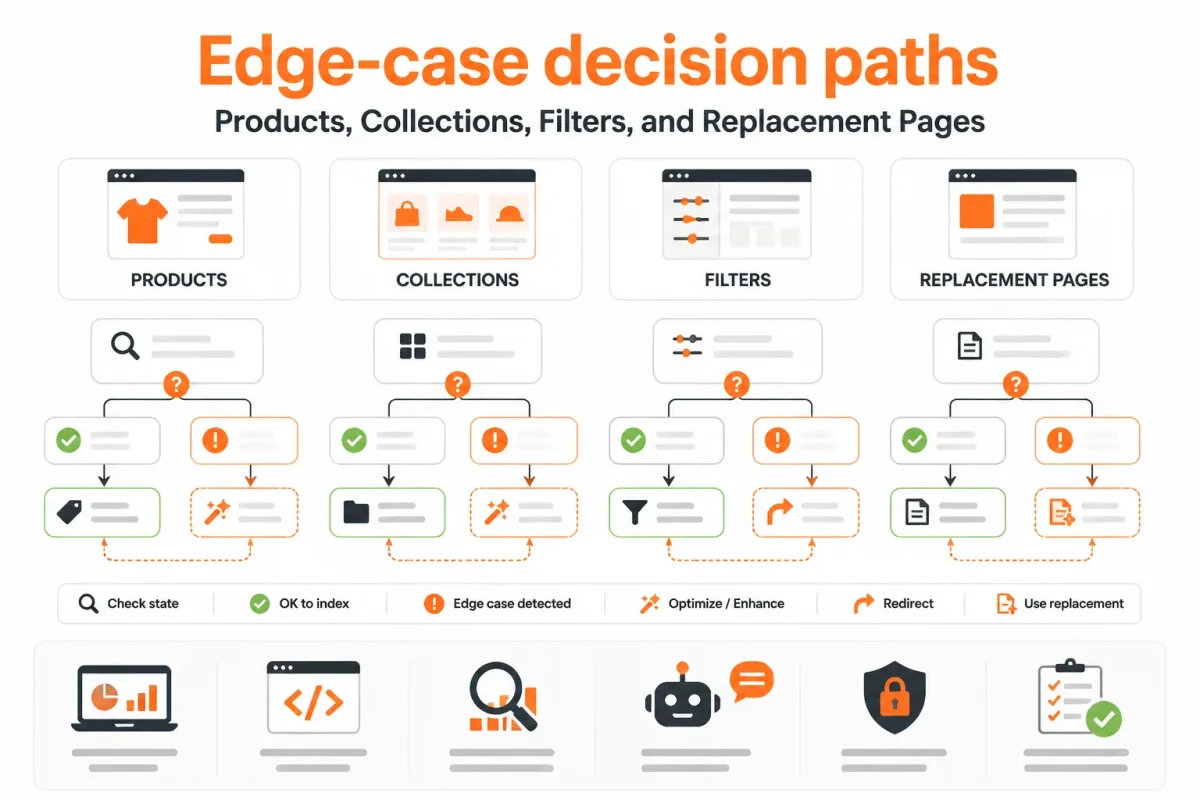
A single rule can't classify every Shopify URL in a large catalog. You may see a product that is temporarily unavailable, an automated collection with no current items, or a regional page serving a real audience. Each needs a different response.
At scale, judge intent, availability, and future value together. Clear purpose also helps Google and AI platforms interpret what your Shopify store offers, especially when structured data and visible page content agree. The same emphasis on clear purpose applies beyond ecommerce: Clinical Match Me presents clinical opportunities with concise role context rather than leaving candidates to infer relevance.
Temporarily Unavailable Is Not the Same as Permanently Deleted
You can keep an out-of-stock product live when its description, images, price context, and expected availability still help shoppers. A nearly empty template with no useful information is different. Restore the page only when you can give it genuine value.
Weak product state: "Classic Linen Shirt, unavailable" with no description, images, related products, or restock information.
Strong product state: "Classic Linen Shirt is temporarily out of stock. Join the waitlist for size Medium, or view the related Oxford Linen Shirt." The page retains its purpose.
Yoast explains that a page you want to keep accessible without placing in Google's index should use noindex, rather than relying on a misleading page state.
Empty Collections, Filters, and Parameter URLs Need Separate Judgment
An automated collection may become empty after a seasonal rule changes. You can restore useful buying guidance, related products, and a clear explanation, or remove the collection if it has no lasting purpose. Faceted URLs deserve tighter control, not mass redirects.
Weak canonical setup: Every URL such as /collections/shoes?color=blue&size=9 points to a broad homepage.
Strong canonical setup: The filter URL stays crawlable only when it has distinct demand and content. Otherwise, Shopify signals the primary shoe collection with a consistent canonical URL.
When a Redirect Protects Value and When It Creates a Mismatch
A redirect can preserve a useful journey when a retired product has a genuinely matching replacement. Backlinks alone don't justify sending visitors to a loosely related category. A regional page also needs an audience and content purpose before consolidation.
What works
- Restore: Keep useful availability, descriptions, and structured data visible.
- Redirect: Send visitors to a replacement matching the original intent.
- Noindex: Keep an accessible page out of Google's index when appropriate.
What fails
- Mass redirect: Sending every filter, region, or retired product to the homepage.
- Thin availability: Leaving an empty product template live with no shopper value.
- Backlink logic: Treating inbound links as proof that any destination fits.
For every chosen outcome, check your structured data, availability wording, canonical behavior, and descriptive content. wRanks can help audit those signals across Shopify products and collections, though your theme and URL rules still control the final page response.
Five Soft 404 Recovery Mistakes That Keep Shopify Pages Broken
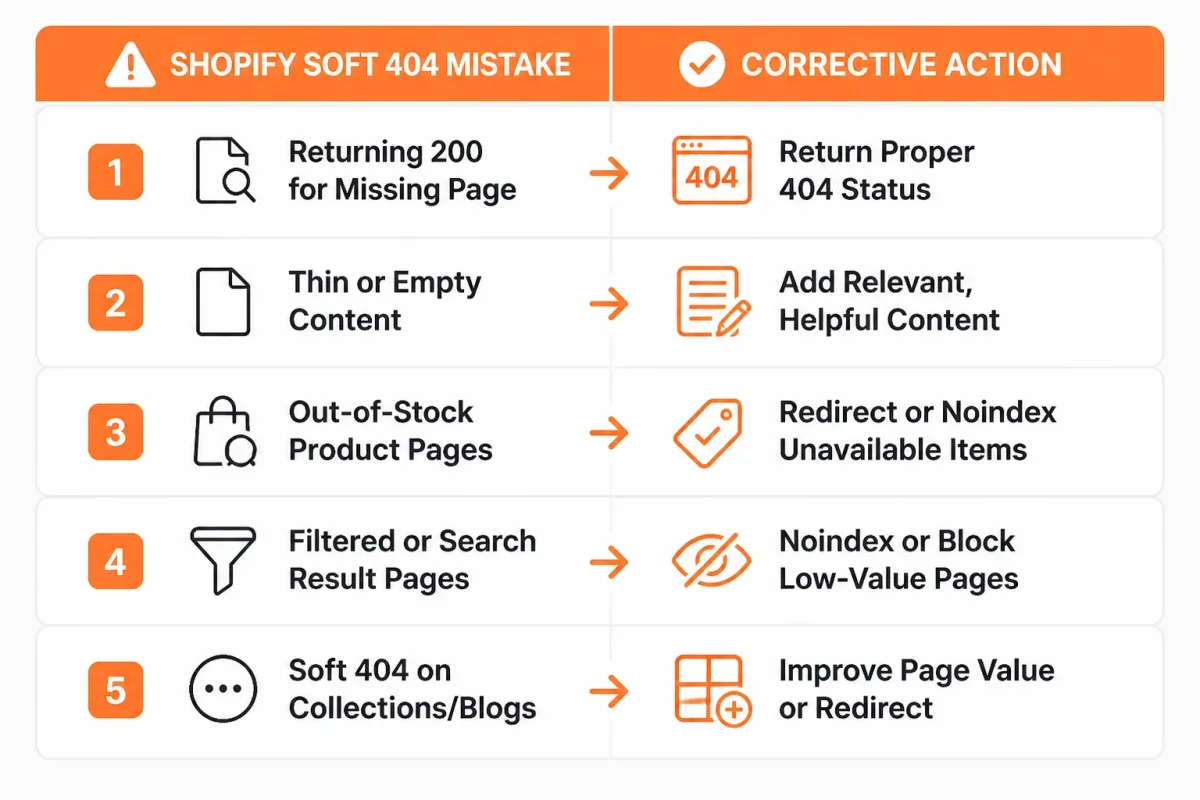
You can repair a Shopify URL and still leave Google with conflicting signals. A redirect may lose product intent, a custom not-found page may return the wrong status, or restored content may keep outdated schema and internal links.
Each fix must match the page's purpose. Your browser view is only one check, not proof that the recovery worked. The same evidence-led approach matters in professional documents; Accountancy Recruitment CV Tips That Get Noticed frames relevant experience clearly instead of relying on generic claims.
The Homepage Redirect That Destroys Search Intent
Redirecting every deleted product to your homepage sends shoppers somewhere unrelated and discards the original query behind the URL. A discontinued "Walnut Standing Desk" shouldn't silently become a generic storefront visit.
Weak example: /products/walnut-standing-desk redirects to /.
Strong example: Redirect the product to its closest replacement, or return a genuine 404 when no relevant alternative exists. Update the canonical and product links to match that decision.
The Custom 404 Template That Still Returns 200
A friendly Shopify message saying "This product is no longer available" doesn't fix a successful response if the page returns HTTP 200. Google can still classify the thin result as a soft 404, while your reports show a live URL.
Weak example: "Sorry, this item is unavailable," with status 200 and empty Product schema.
Strong example: Return a real 404 or 410, remove product schema, and offer only genuinely useful alternatives. A status check must confirm the response, not just the wording.
The Filler-Content Fix for an Empty Product or Collection
Padding an empty collection with generic copy creates length without shopper value. Yoast advises improving thin pages with solid, relevant content when thin content causes a soft 404.
Weak example: "Browse quality products from our trusted store" beneath an empty "Summer Linen" collection.
Strong example: Restore relevant items, explain availability, add useful buying details, and align the title, canonical, structured data, and images with the collection's actual purpose.
The Forgotten Links and Metadata That Recreate the Issue
Removing a URL from one menu isn't enough. Check collection navigation, XML sitemaps, promotional modules, canonical tags, structured data, image alt text, and internal links. Validate the rendered HTML and redirect chain, not only the browser view.
For a restored page, the guide to Shopify titles and meta descriptions fits this cleanup workflow.
- Retired URL: Remove it from internal links, sitemaps, and campaigns.
- Restored page: Repair its title, meta description, schema, media descriptions, and links.
- Technical response: Confirm status, canonical, rendered content, and redirects in Google Search Console and a crawler.
- Search signals: Use wRanks to optimize meta tags, structured data, alt text, and keyword tracking after the response is correct. It can't replace server or theme fixes.
- Final check: Request validation in Search Console only after every supporting signal points to the same page purpose.
Answers to the 404 Questions Left After the Diagnosis
You may still have broad 404 questions after checking a Shopify URL in Google Search Console. The distinction is simple: a normal 404 says the resource is missing, while a soft 404 says the page responds but appears empty or irrelevant to Google.
The Most Common Cause of a 404 Error
The most common cause is a deleted or moved page that still has an old URL. You may also see 404s from mistyped addresses, broken internal links, expired Shopify products, or removed blog posts. An empty collection or theme routing mistake may create a soft 404 instead because your server returns a page with little useful content.
How to Fix a 404 Error
Fix a 404 by restoring the resource, redirecting the URL to a genuinely relevant replacement, or leaving a 404 or 410 response when the page is permanently gone. For your Shopify store, restore a discontinued product if it will return, redirect a retired product to its closest successor, and remove broken internal links that send visitors nowhere.
Whether a 404 Error Is Permanent
A 404 error can be temporary or permanent, depending on why you received it. You may see one while a Shopify product is briefly unpublished, a URL is being changed, or a routing issue is being repaired. If the resource no longer exists, a 404 or 410 is appropriate. A 404 doesn't prove that Google blocked, punished, or flagged you.
What "Error 404 Hate Infected" Means
"Error 404 hate infected" is a misunderstanding, not a technical category. You may have encountered a strange search phrase, a misspelling, or an unrelated result, but HTTP 404 has no connection to infection or hatred. It simply indicates that the requested resource wasn't found. A soft 404 also describes page quality, not malware or personal fault.
Why Error 404 Is Famous
Error 404 became famous because you encounter it across the web whenever a requested resource can't be found. The short code is easy to remember, and custom error pages turned it into part of internet culture. For your Shopify store, a memorable design doesn't repair the issue. You still need to restore, redirect, or correctly retire the affected URL.
A Five-Step Shopify Soft 404 Recovery Plan
You can fix a soft 404 only when your Shopify page, server response, and shopper expectation agree. Changing a URL first often creates a second problem, especially when the original page still has useful search intent or internal links.
Use one affected URL as your test case. A narrow inspection gives you evidence before you edit a theme, product, collection, or redirect.
Classify the URL's Intended Future
Decide whether you want shoppers to find the page, reach a replacement, or receive a genuine not-found response. Then follow these steps:
- Record the live response: Open the URL in Google Search Console's URL Inspection tool and record its live response before you change anything.
- Classify the page: Compare the HTTP response, rendered content, Shopify status, and shopper intent. You need to know whether the page is active, temporarily unavailable, replaced, or permanently gone.
- Choose the truthful path: Restore the page when its value remains, use a relevant 301 redirect when a genuine replacement exists, or return 404 or 410 when nothing useful replaces it. Use noindex only when you want the page available but excluded from search.
- Repair supporting signals: Update your internal links, sitemap entries, canonical signals, structured data, image alt text, and on-page content so your store communicates one clear status.
- Validate the result: Test the live URL again in Search Console, request validation when appropriate, and monitor indexing and organic traffic for changes.
Choose One Truthful Recovery Path
Your fix should serve the shopper first. A redirect to an unrelated collection may remove the error while creating a poor search result, so restore the original intent whenever you can.
Validate the Page and Its Supporting Signals
A 404 isn't Forbidden, blocking, or a punishment. It means your server says the requested resource wasn't found, while your surrounding links and signals should help Google understand that decision.
How 404 Differs from Forbidden
A 404 isn't "Forbidden." A 403 is the status associated with access being denied. Treat a 404 as a missing-resource response, not a permission problem.
How 404 Differs from Being Blocked
No, a 404 error doesn't mean you were blocked. You requested a URL that your store doesn't currently provide.
Why a 404 Isn't Automatically Your Fault
No, an error 404 isn't automatically your fault. You may have removed a product intentionally, but you still need to choose the clearest replacement or retirement signal.
Start with One Affected URL
Make your first task small: inspect one affected URL in Search Console and save its live response. wRanks adds an ongoing layer for Shopify SEO optimization and monitoring, but your first decision remains simple: make the server response and shopper experience tell the same truth.
If you want a faster way to optimize Shopify SEO, wRanks provides guidance on meta tags, structured data, image alt text, and Search Console monitoring for Shopify store owners and marketing managers using AI-powered SEO tools.

Senior SEO strategist with 8+ years in e-commerce search optimization. Sarah helps Shopify merchants turn organic traffic into revenue through data-driven content strategies.


