How to Choose Product Review Apps for Shopify
Product review apps for Shopify improve buyer trust, SEO, and store performance by integrating feedback, moderation, and structured data effectively.
Choosing product review apps for Shopify starts with a problem beyond star ratings. You install a widget before a product launch, then notice that the product page loads slowly, new comments need manual cleanup, and the stars never appear in search. You expected stronger buyer confidence. Instead, your store gained another technical task.
Most Shopify stores don't have a review problem. They have a review-system problem. The app, collection process, moderation, visible content, structured data, and SEO workflow aren't working together. When you search for product review apps, you may mean Shopify tools that collect and display customer feedback, not barcode scanners or services that pay people to publish opinions.
A useful comparison covers trust, customization, performance, moderation, search visibility, and readiness for AI platforms. A review setup can complement wRanks, which handles meta tags, image alt text, keyword tracking, structured data, and Google Search Console insights without replacing the app's review workflow. The companion guide on why products appear in AI answers fits the same visibility workflow. The goal is a suitable setup, not a universal winner.
Start with the business result your reviews must improve
A review app affects more than the star rating beneath a product title. You need feedback that answers buyer concerns, adds useful product detail, supports eligible structured data, and gives you signals to monitor in Google Search Console. A poor choice can also slow your storefront, increase moderation work, or leave valuable customer language hidden from search engines and AI platforms.
With 170 monthly searches and a difficulty score of 63 for this topic, a broad list of product review apps isn't enough. You need a practical comparison tied to sales, SEO, trust, and operating time. Your review setup should help qualified shoppers decide, not simply collect comments.
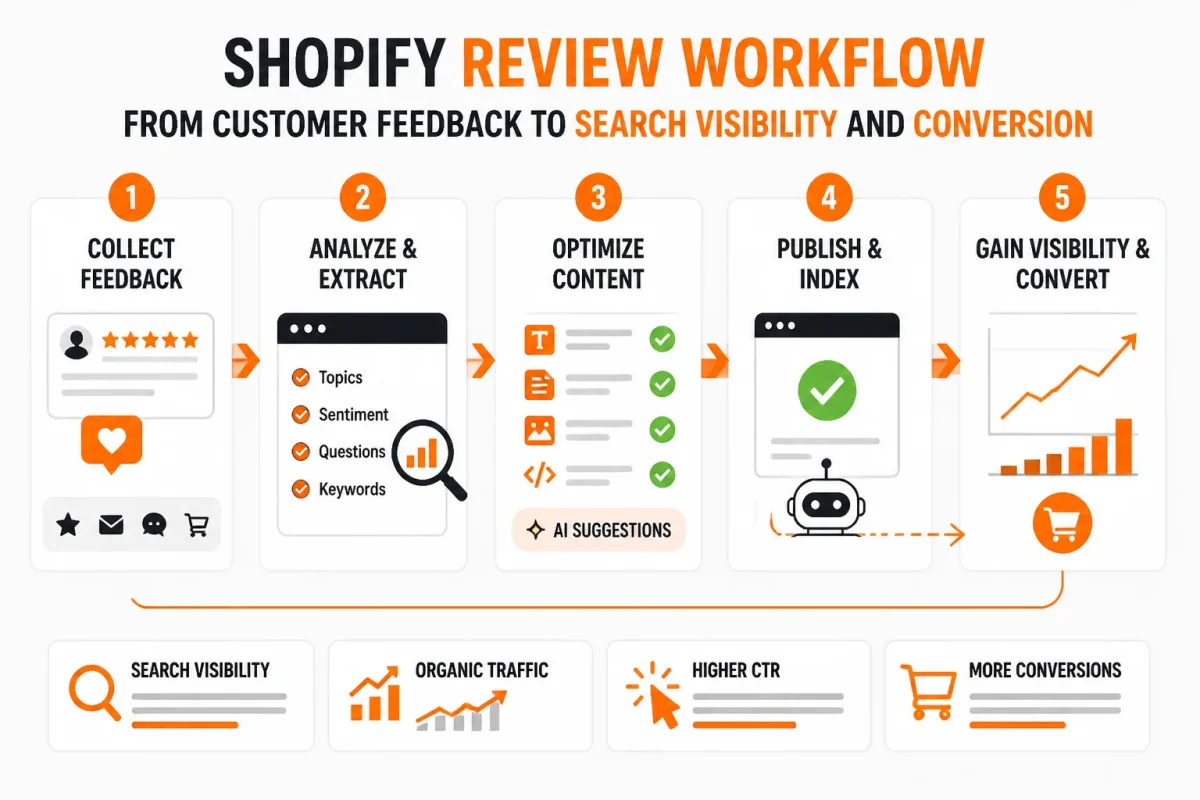
Define the result: qualified traffic, conversion confidence, or both
You need both when reviews support your Shopify store. Product-specific feedback can reduce hesitation and create visible user-generated content, while structured data and useful wording may support search visibility. wRanks can complement that work by optimizing meta tags, structured data, image alt text, and keyword tracking, though it doesn't replace the review app's collection or moderation tools.
“A review setup can complement wRanks, which handles meta tags, image alt text, keyword tracking, structured data, and Google Search Console insights,” according to the supplied publishing brief.
Using an app to review products and get paid
You can use a Shopify review app to request, moderate, and display customer feedback, but the app doesn't automatically pay you for reviews. Paid-review programs, product sampling, affiliate work, and marketplace policies are separate categories with different disclosure and authenticity requirements.
Getting paid to review a product
You may find legitimate paid-review or sampling opportunities, but your income will vary and any review must reflect your honest experience. A merchant's Shopify review app collects customer opinions. It doesn't promise consumer earnings.
Choosing a money-earning app
There is no single best money-earning app for every person. Judge an opportunity by its payment terms, disclosure rules, required work, and reputation rather than by income claims such as $100 a day.
Whether Amazon pays ordinary reviewers
Amazon doesn't generally pay ordinary customers simply to post positive reviews. Treat offers that request favorable wording, conceal compensation, or bypass marketplace rules as a trust risk.
Making $100 a day online legitimately
Legitimate online income is variable and usually depends on paid services, sales, affiliate work, or approved research rather than guaranteed review payments. Never trade an honest product opinion for an undisclosed reward.
Separating customer reviews from paid product-review opportunities
Your merchant workflow should collect feedback from real purchasers or users, apply clear moderation standards, and preserve authentic criticism. Paid opportunities belong to a separate workflow, where disclosure and truthful opinions protect both your reputation and the shopper's decision.
Practical rule: Choose a review app only if it improves buyer confidence and searchable product information without hiding compensation, criticism, or moderation work.
For a related product-page decision, the guide to why product pages need FAQ content fits the same workflow because customer questions and reviews both reveal the information shoppers need before buying.
Match the app type to your Shopify review workflow
Separate store-owned customer feedback from independent product ratings before comparing apps. The right choice depends on where your reviews originate, where buyers read them, and how much control you need over moderation and display.
Your Shopify store may need one app for on-site proof or a wider review workflow across marketplaces. That distinction affects structured data, page speed, export access, and how well review content works alongside wRanks.
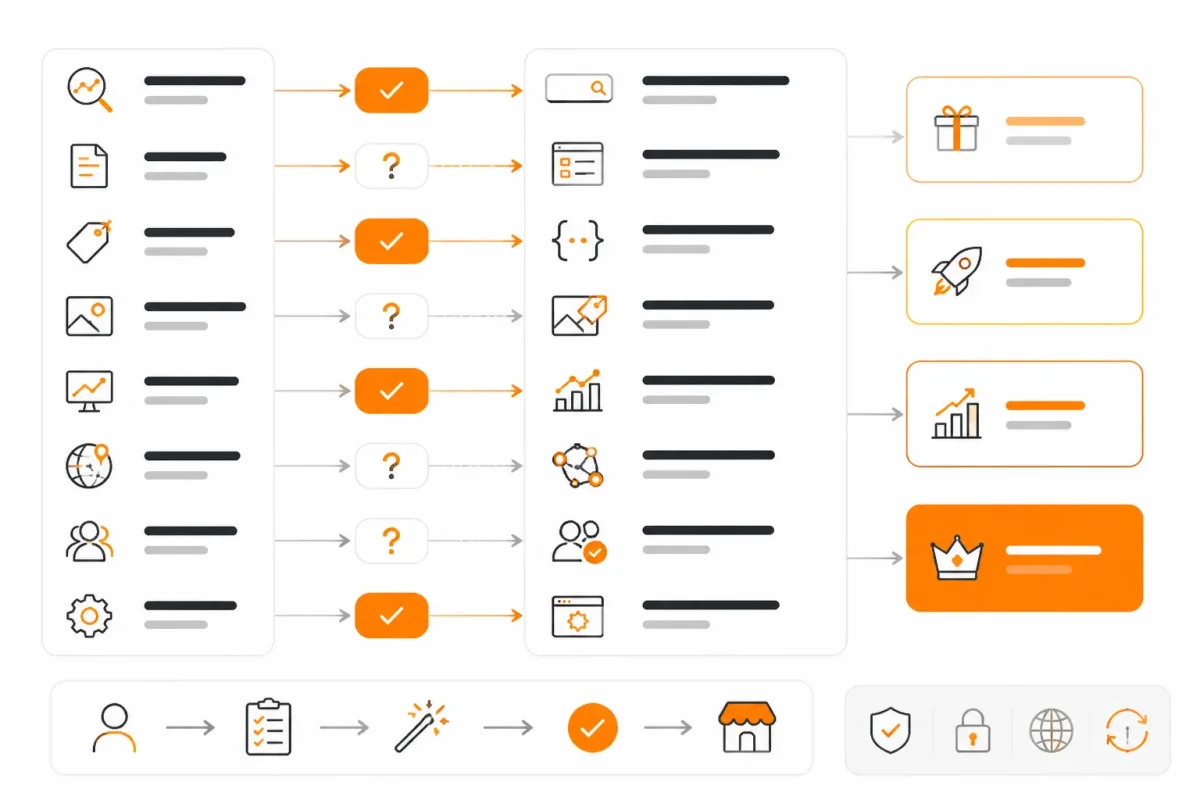
Choosing the best app for product reviews
A Shopify-native review app is usually the right choice when you need customer feedback collected and displayed directly on your product pages.
Choosing a Shopify-native app for on-site customer proof
A Shopify-native app should offer moderation controls, customizable widgets, visible review text, image or video uploads, export access, and review and product structured data. For related technical checks, see wRanks' Shopify SEO guide. Check how its scripts affect page speed, then confirm that the rendered product page exposes useful content to search engines and AI platforms. wRanks can complement this work by optimizing meta tags, structured data, and image alt text, although it doesn't replace the review app's collection or moderation tools.
Choosing an app for reviews across channels
The best review workflow for a multichannel store records where each review came from. If you sell through Shopify, Amazon, or other marketplaces, check import provenance, duplicate-content controls, channel-level moderation, and export formats. Imported reviews should remain accurate, attributed, and useful without placing repeated text across product pages.
When independent services provide the right product reviews
Independent consumer rating services are useful when you want health, ingredient, or product-safety research rather than merchant-owned social proof.
Treating independent ratings as research
Yuka is a free barcode-scanning app that rates food and cosmetics on a color-coded scale out of 100, according to Yuka's own information about its rating system. It assesses food through nutritional value, additives, and organic status, while cosmetics are assessed through ingredient safety, according to Yuka's evaluation criteria. EWG's Healthy Living App provides science-backed ratings for personal care, food, and cleaning products, according to the Environmental Working Group's app information page. These services answer whether a product appears healthier or safer, not which review app should power your Shopify page.
| symptom | likely cause | first fix |
|---|---|---|
| A merchant needs reviews collected and displayed directly on Shopify product pages | The store is considering a consumer rating app instead of a Shopify-native review workflow | Shortlist a Shopify-native app with moderation, customizable widgets, visible review text, and export access |
| The store sells through Shopify plus other marketplaces | Reviews are split across channels or imported without a clear source record | Check syndication support, import provenance, duplicate-content controls, and channel-level moderation |
| The buyer wants an independent health or ingredient assessment | A merchant review widget is being used for a consumer product-rating question | Use a transparent consumer rating service such as Yuka or EWG for that research purpose |
| Reviews appear visually but provide little SEO value | The widget hides text behind scripts or lacks appropriate structured-data implementation | Test rendered HTML, visible content, and markup eligibility on a real product page |
Source transparency and editorial independence matter more than a high star count. Choose the workflow that matches your buyer's question and your Shopify store's review ownership.
Evaluate each app in the same five-step sequence
A review app can look excellent in a demo and fail on your busiest product page. Use one repeatable test that checks trust, crawlability, speed, and daily management before you commit.
Use the same product, device, and checks for every candidate. The result should be credible review content that search engines and AI platforms can read, while you can still manage it at scale.
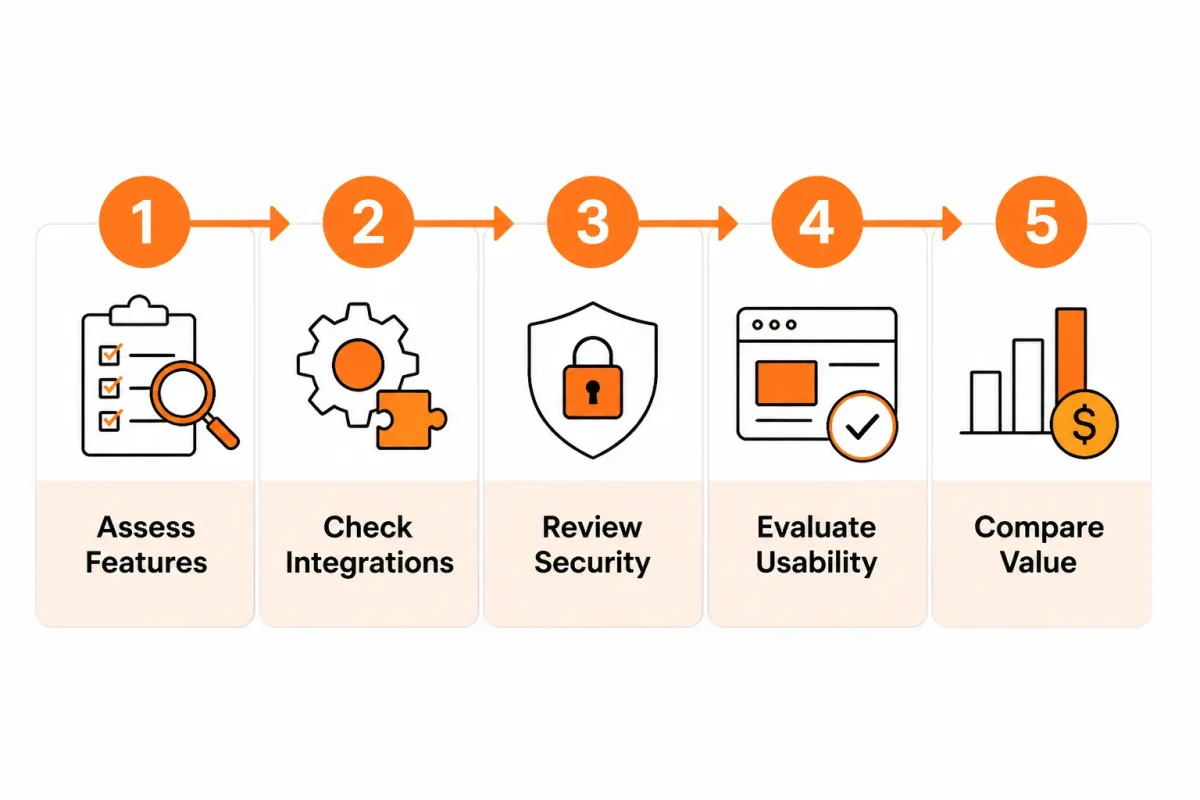
Inventory products, sources, and review ownership
List your product count, order volume, existing review sources, and one representative product page. Shopify says review apps can import feedback from Amazon, AliExpress, Etsy, and 14+ other sources, according to Shopify's product review app guidance. Confirm who owns imported content and how duplicates are handled.
Test moderation, verification, and response controls
Check verified-purchase labels, fraud filters, approval queues, replies, media handling, and disputed-claim workflows. Shopify notes that some apps automate review requests through email, SMS, and push notifications, so verify consent and message controls in your store.
Inspect visible review content and structured data
Shopify describes apps that display star, photo, and video reviews, but your test must inspect the rendered page, not just the feature list. Check visible text, source labels, duplicate blocks, and appropriate structured data.
BEFORE: “★★★★★ 4.9” loaded only after scripts run. AFTER: “4.9 out of 5 from 238 verified purchases” appears in the page content with matching review markup.
Measure widget impact on a representative product page
Test mobile loading, script weight, layout shift, and review styling on the selected page. A poor fit leaves ratings visible to shoppers but not meaningfully exposed to crawlers, or slows the page enough to damage the buying experience. Check whether you can control typography, placement, lazy loading, and media dimensions without editing theme code.
Connect review improvements to wRanks tracking and Search Console
Use wRanks to track target keywords, improve meta tags, manage image alt text, and compare Search Console impressions after the review content changes. Its AI-powered SEO tools complement review apps, but they don't replace moderation, consent, or authenticity controls. Monitor whether useful review language supports visibility in AI platforms as well as Google.
- Inventory complete: You have recorded products, order volume, sources, ownership, and one test page.
- Trust checked: You have tested verification, fraud controls, moderation, responses, and disputes.
- Markup verified: You can see review text and appropriate structured data in rendered output.
- Performance measured: You have tested mobile speed, scripts, layout shift, and customization.
- Tracking connected: You can compare keywords, Search Console data, and AI-search visibility after launch.
Fix product review app failure patterns for Shopify stores
Your review widget may appear installed while your product page still loses trust, speed, or search visibility. A high marketplace rating doesn't prove that an app fits your Shopify theme, handles moderation well, or keeps review content accessible.
Check the failure itself, not the feature list. You need useful feedback, accurate structured data, stable mobile performance, export access, and review content that helps shoppers and AI platforms understand the product.
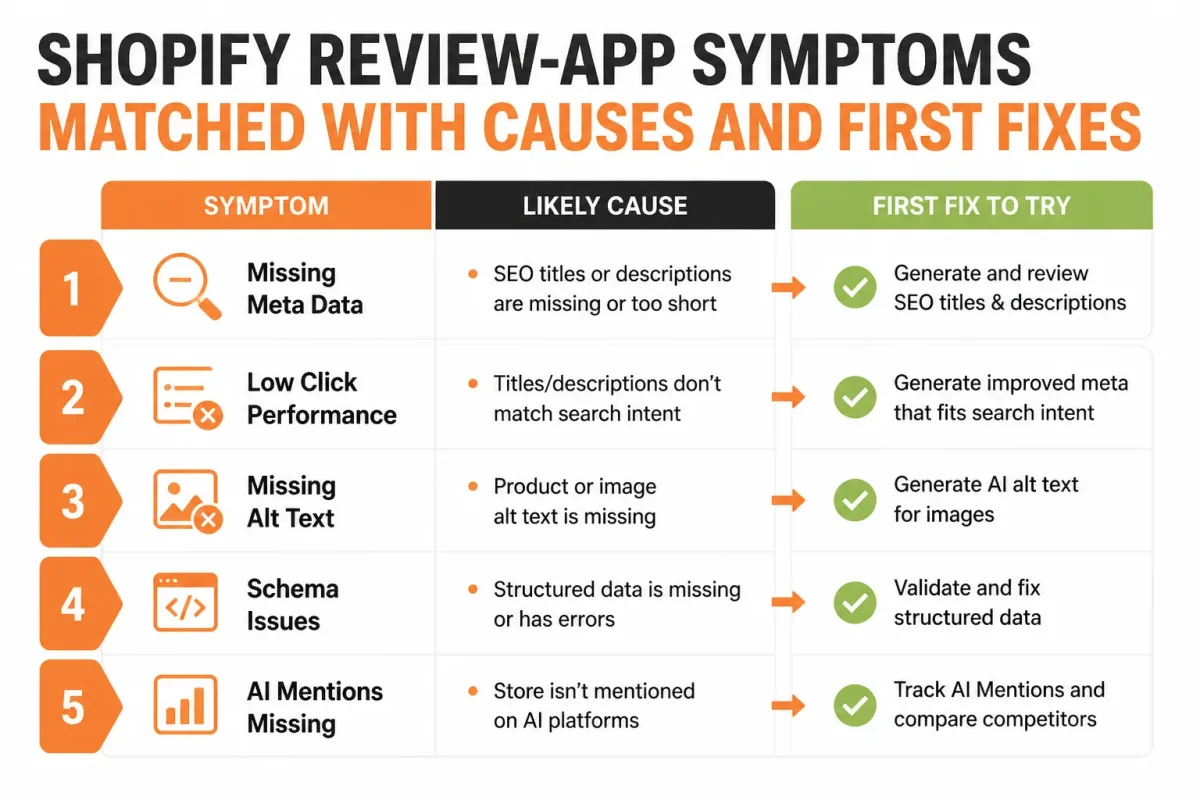
When stars appear but review content isn't useful
| symptom | likely cause | first fix |
|---|---|---|
| The app has many stars but the product page converts poorly | The store selected marketplace popularity instead of checking review quality, relevance, support, and page experience | Test one high-traffic product page and compare useful review content, speed, moderation, and conversion behavior |
| Imported reviews repeat the same wording across products | Thin or duplicated testimonials were imported without source and content-quality controls | Remove duplicates, preserve source labels, and prioritize specific first-hand feedback |
| Ratings are visible after loading but review text is absent from initial page content | A client-side widget hides content from the initial render or creates an incomplete crawl path | Inspect rendered HTML and provide a stable, visible review block with accessible text |
| Mobile product pages become slow or shift during load | The review app adds heavy scripts, images, or layout changes | Measure the page before and after installation, defer noncritical assets, and remove unnecessary widgets |
| Rich results do not appear after adding review schema | Markup is inaccurate, incomplete, or not eligible; structured data never guarantees a rich result | Match markup to visible content, validate it, and monitor Search Console instead of assuming automatic enhancement |
Weak example: “Great product. Five stars.” Strong example: “The 32-ounce insulated bottle stayed cold through a six-hour hike, and the lid didn't leak in my backpack.” You need specific, first-hand detail, not repeated praise.
When the widget slows the product page
Check mobile performance after enabling photos, lazy loading, pop-ups, and review carousels. If your app adds layout shifts or excessive JavaScript, remove decorative features before reducing visible review content.
When the markup doesn't match what shoppers can see
Your structured data must reflect visible ratings and review details. It can't force a special Google result. Compare the rendered page with the markup, then monitor Google Search Console rather than treating schema as a guarantee.
When imported reviews create trust or duplication problems
- Consent: Confirm that you have permission to publish every review.
- Disclosure: Label incentives, imports, and verified purchases clearly.
- Workflow: Set rules for medical claims, performance promises, responses, and disputes.
- Export: Confirm that you can preserve review content if you change apps.
- SEO support: After moderation is stable, wRanks can improve product metadata, image alt text, keyword tracking, collection pages, blogs, and Search Console-led diagnosis. It complements review moderation rather than replacing it.
FAQ
Which app is the best for product reviews
The best app is the one that fits your store's review workflow and displays useful content on product pages. Check moderation, import and export options, review requests, media support, structured data, speed, and theme compatibility. Test it on one representative product before installing it across every Shopify store page.
What app can I use to review products and get paid for it
Shopify review apps collect customer feedback for a store, but they generally don't pay people to write reviews. Paid review opportunities usually come through market research panels, creator programmes, or independent testing platforms. Read each programme's disclosure rules carefully, and never present sponsored or incentivised feedback as an unpaid customer opinion.
What is the best app review app
The right app review tool depends on what you want to compare. A directory may help you research software, while a Shopify review app helps you collect and publish customer feedback. Compare recent user reviews, pricing, support, integrations, and cancellation terms. A free plan available for testing can reduce the risk of a poor fit.
Who gives the best product reviews
The most useful product reviews come from people who have actually used the product in circumstances similar to yours. Look for specific details about setup, durability, results, and drawbacks rather than praise alone. Reviews with verified-purchase labels, photographs, varied ratings, and thoughtful responses from the seller usually provide stronger buying evidence.
What is the most reliable site for product reviews
No single review site is reliable for every category. Compare several independent sources, check how each handles sponsorships and incentives, and look for reviews that explain methods and limitations. For a Shopify store, your own verified customer feedback can be especially useful when it is moderated fairly, displayed clearly, and supported by accurate structured data.
Choose a Shopify product review app with a controlled test
You can spend hours comparing product review apps and still install one that slows your product page or creates review maintenance work. Your shortlist needs to connect buyer trust with crawlable content, accurate structured data, and a workflow you can manage.
The strongest choice isn't the app with the longest feature list. It's the app that produces credible, visible review content without weakening your Shopify SEO process.
Follow the five-step selection sequence
- Define the outcome: Choose one conversion and SEO result, such as more completed purchases, richer product content, or clearer Google Search Console signals.
- Classify the workflow: Decide whether you need a native Shopify review app, multi-channel syndication, or a separate consumer research tool.
- Score the shortlist: Check moderation, authenticity, visible review content, structured data, media handling, export access, and theme compatibility.
- Run a one-page test: Preview or install the leading option on one representative product page, not across your whole store.
- Connect the workflow: Use wRanks for metadata, structured data checks, image alt text, keyword tracking, collection and blog optimization, and Search Console-informed iteration. wRanks complements review management, but it doesn't replace the review app itself.
Test one representative product before a full rollout
Before choosing, record the page's current review count, conversion baseline, speed, indexed-content status, and relevant query performance. Then check whether the app displays useful review text in the page content and outputs accurate structured data.
- Moderation: Rules, approvals, replies, and dispute handling are clear.
- Performance: The page remains responsive after the widget loads.
- Export: You can preserve review content if you change apps.
Start with your highest-traffic product page
Use your highest-traffic Shopify product page as the comparison test. If the winning app adds credible, crawlable, fast content without a maintenance burden, expand gradually. That low-risk result matters more than a crowded feature list.
If you want a faster way to improve Shopify SEO, wRanks optimizes meta tags, structured data, image alt text, keywords, collections, blogs, and Search Console insights for Shopify stores. Explore Shopify SEO guidance and practical optimization workflows that complement your review app evaluation.

Senior SEO strategist with 8+ years in e-commerce search optimization. Sarah helps Shopify merchants turn organic traffic into revenue through data-driven content strategies.