What Is Breadcrumb Schema? Shopify SEO Guide
What is breadcrumb schema used for in Shopify? Understand how breadcrumb markup clarifies your store's structure and supports SEO without guaranteeing
To understand what is breadcrumb schema on a Shopify store, start with the path a shopper takes through your catalog. A jacket page might exist under your store, but its place in that catalog can still be unclear.
Most Shopify merchants don't have a rankings problem. They have a structure problem. Visible breadcrumb navigation helps shoppers orient themselves, while BreadcrumbList markup describes those relationships in machine-readable form.
This guide separates navigation from markup, walks through Home > Men's Clothing > Jackets > Leather Jacket, and shows you how to validate the result without treating schema as a ranking guarantee. If you also need the wider structured-data context, the guide to product structured data for Shopify stores fits the same workflow. wRanks can help you manage structured data alongside meta tags, image alt text, keyword tracking, and Google Search Console insights, but your store's hierarchy still has to make sense first.
Breadcrumb Schema Clarifies Structure but Does Not Guarantee Rankings
When your Shopify catalog runs several levels deep, shoppers need more than a product title to understand where they are. A clear trail can connect a leather jacket to Jackets, Men's Clothing, and your store's broader structure. Inaccurate markup creates the opposite problem: your JSON-LD may describe a hierarchy that shoppers never see.
That distinction affects your SEO decisions. Breadcrumb schema can help search engines interpret relationships between pages, but it cannot repair weak collections, confusing navigation, or thin product content. Your goal is accurate context, not markup added everywhere. For a broader foundation, read this Shopify SEO guide before reviewing your structured data.
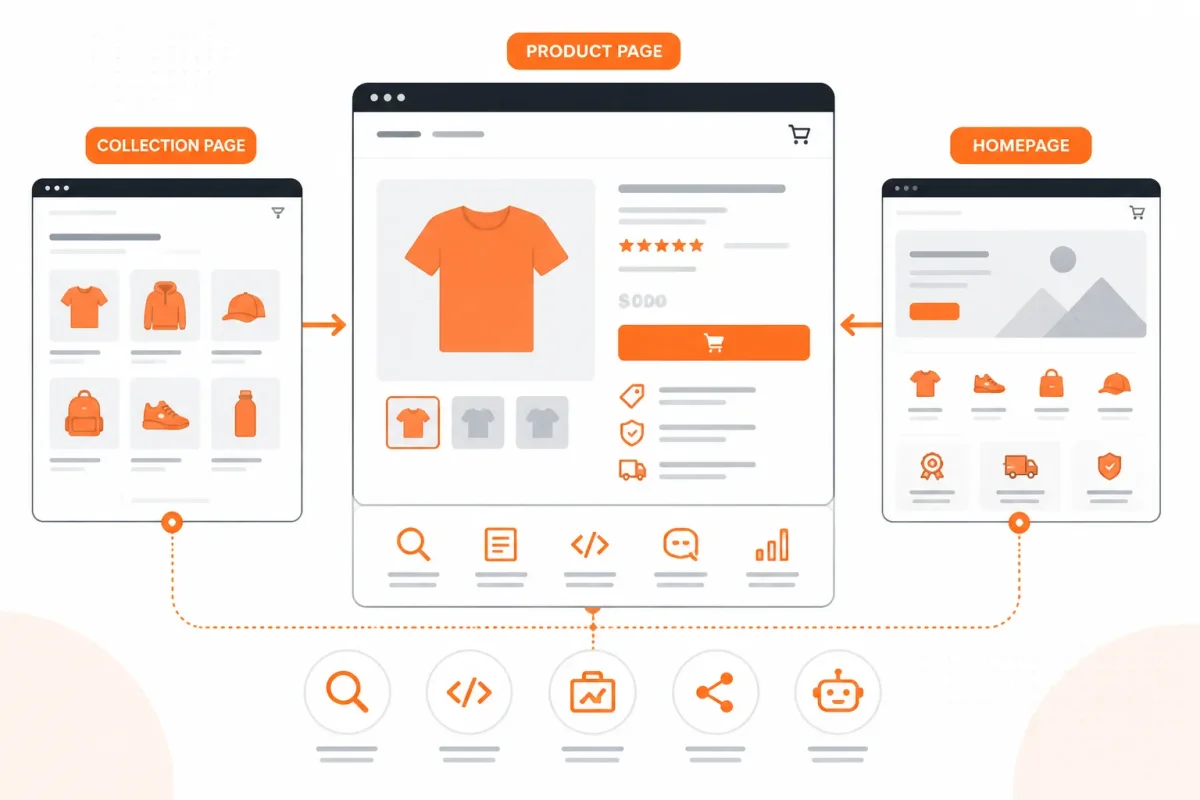
What search engines need to infer from a Shopify page
Your product page should make its position in the catalog understandable. Google says a breadcrumb trail indicates a page's place in the site hierarchy and may help people understand and explore your site effectively, according to Google's structured data documentation.
A breadcrumb trail indicates the page's position in the site hierarchy and may help users understand and explore a site effectively.
For your store, that relationship might run from Home to Men's Clothing, then Jackets, and finally Leather Jacket. A shopper receives useful navigation, while a search engine receives clearer signals about how those Shopify pages relate.
How breadcrumbs affect SEO
Breadcrumbs do not guarantee higher rankings. Schema.org reports that BreadcrumbList markup appears on more than 10 million domains in monthly aggregations from Google's web index for August 2026, but widespread adoption does not prove that breadcrumbs directly improve rankings.
That scale still matters because it shows how commonly sites describe page hierarchy with structured data. Correct markup may support clearer interpretation, yet your titles, content, links, and page quality still carry the broader SEO burden.
Why correct structure matters more than adding markup everywhere
If your visible trail says Home > Men's Clothing > Jackets > Leather Jacket, your structured data should describe that same path. Otherwise, you risk telling search engines that the product belongs under Sale or another collection that shoppers cannot reach from the displayed trail.
Weak version: Your JSON-LD lists Home > Sale > Leather Jacket while your Shopify page visibly shows Home > Men's Clothing > Jackets > Leather Jacket.
Strong version: Your JSON-LD matches Home > Men's Clothing > Jackets > Leather Jacket exactly, including the visible names and destination URLs.
The practical rule for matching visible breadcrumbs to structured data
Use the trail your shoppers can actually see, and keep every label and URL accurate. wRanks can help you review structured data alongside meta tags, image alt text, keyword tracking, and Google Search Console insights, although it cannot decide whether your catalog hierarchy reflects the way shoppers expect to browse.
Practical rule: Mark up only a visible, accurate breadcrumb trail.
With a trustworthy trail in place, compare the three breadcrumb models and identify the one your Shopify schema usually describes.
Three Breadcrumb Models and the One Shopify Schema Usually Describes
You can see three different ideas when you follow a breadcrumb trail through a Shopify store. One shows where a product belongs, another records how you arrived, and the third reflects filters you selected.
For Shopify structured data, you usually want the first model. Your BreadcrumbList should describe a stable chain of linked pages, not a temporary browsing route or a filter state.

Hierarchy trails from Home to collection to product
You use a hierarchy trail to show a product’s stable position in your store: Home > Men's Clothing > Jackets > Leather Jacket. This model helps search engines understand the relationship between your homepage, collection pages, and product page.
In Schema.org, each breadcrumb item carries a name, linked page, and integer position. Schema.org explains that the position property lets systems reconstruct the order of items in a BreadcrumbList, as shown in its BreadcrumbList documentation. The same documentation describes ascending order, with lower values appearing first, so your chain should begin with position 1.
History trails that change with the shopper’s route
You may reach a leather jacket from Google, a recommendation widget, or several collection pages. That path reflects your session, not necessarily one permanent parent for the product.
Weak example: Google > Sale Items > Men's Jackets > Leather Jacket, even though the shopper arrived through a recommendation.
Strong example: Home > Men's Clothing > Jackets > Leather Jacket, matching the store's stable category structure.
Attribute trails for filters and product facets
You create an attribute trail when you select filters such as Color: Red or Size: 9. Those values describe a product set or interface state, not your canonical category hierarchy. Keep them separate unless you have intentionally created a stable, indexable filtered page.
| situation | better move | why |
|---|---|---|
| A product belongs to a stable category and collection hierarchy | Use hierarchy-based breadcrumbs from the homepage or section root to the current product | This represents the store structure and gives search engines a consistent ordered chain |
| A shopper reaches the product through search, recommendations, or several clicks | Treat the route as path or history-based navigation, not as permanent structured-data hierarchy | The route can vary by session and does not define one canonical parent |
| A shopper applies filters such as Color: Red or Size: 9 | Keep attribute-based navigation separate unless the filtered page is a stable, intentional indexable page | Filters describe selected attributes rather than the store's permanent category structure |
| A BreadcrumbList is encoded for a Shopify page | Represent linked levels with ascending integer positions beginning at 1 | Positions allow the ordered chain to be reconstructed consistently |
The origin of the breadcrumb name
You can think of the name as a trail left through a site, helping you retrace the route toward the homepage. wRanks can check this structured data alongside your Shopify meta tags and internal page signals, although it cannot decide whether your category hierarchy matches shopper expectations.
Diagnose the Trail Before You Add or Correct Its Markup
Before you add JSON-LD, find out whether your Shopify breadcrumb trail reflects a real structure. You may be looking at a product reached through several collections, a filtered URL, or a theme-generated label that has no useful destination.
Inspect the visible trail first, choose a stable parent, and only then validate the markup. That prevents you from encoding a tidy-looking path that misrepresents your store.

Check the visible trail on products, collections, pages, and blogs
Open the page as a shopper would and record each breadcrumb level. Identify the canonical parent, confirm that every level is a real linked page, and compare the trail with your intended collection hierarchy. Shopify products may belong to several collections, so you need one defensible stable path rather than the last route someone clicked.
Weak example: Home > Sale > Running Shoes, when the product permanently belongs to Men’s Running Shoes.
Better example: Home > Men’s Shoes > Men’s Running Shoes > Trail Runner 2.
Separate stable hierarchy from temporary filters
Check whether a breadcrumb changes after you select color, size, price, or another filter. A filter describes the shopper’s current view, not necessarily a permanent indexable page. Keep it out of the stable breadcrumb unless your store intentionally maintains that filtered destination as a real collection or landing page.
- Canonical parent: You have selected the collection that best represents the product’s lasting position.
- Real destinations: You can open every breadcrumb link and reach a relevant Shopify page.
- Hierarchy match: You see the same parent-child relationship in navigation, page content, and the visible trail.
- Filter separation: You have confirmed that sorting and attribute states are not posing as permanent categories.
Confirm names, URLs, and positions before validation
| symptom | likely cause | first fix |
|---|---|---|
| The visible trail names a collection that does not represent the intended product hierarchy | The theme or navigation logic is using an incidental collection or route | Choose the canonical parent and correct the visible trail before changing structured data |
| A breadcrumb level is plain text or points nowhere | A label was added without a real linked page | Link it to an existing relevant page or remove the level |
| The trail changes after shoppers use filters | Attribute navigation is being treated as permanent hierarchy | Separate filter state from the stable category breadcrumb |
| The product appears under several collections | Shopify allows multiple discovery routes | Select one stable canonical path for the visible trail and markup |
Before validation, check that names match the visible page labels, URLs resolve correctly, and positions start at 1 in order. You can use wRanks to review structured data with related Shopify SEO signals, although it won't choose your store's canonical hierarchy for you.
Screenshot prompt: Show a Shopify product page for “Trail Runner 2” with its visible breadcrumb trail, the selected parent collection, and a browser inspection panel displaying the breadcrumb links and JSON-LD. Highlight a filter-generated URL beside the stable collection URL so you can compare the two paths.
How BreadcrumbList Markup Works on a Shopify Product Page
Your Shopify product page can display a clear trail while search engines still need structured data to interpret each relationship. For a product such as Leather Jacket, the visible path might read Home > Men’s Clothing > Jackets > Leather Jacket.
Breadcrumb schema connects those labels, URLs, and positions in a machine-readable format. You can then validate whether your markup describes the same path shoppers see, rather than assuming valid code describes the right structure.
What breadcrumb schema markup contains
Breadcrumb schema markup is structured data that describes an ordered chain of linked pages. Schema.org describes a BreadcrumbList as an ItemList containing linked web pages, usually with each page’s name and URL, and typically ending with the current page, according to Schema.org’s BreadcrumbList documentation.
For your Shopify page, each itemListElement is a ListItem. Each ListItem carries a name, an integer position, and an item URL when that level is navigable. Schema.org says position values should be integers, such as beginning with 1 for the first item, according to Schema.org’s documentation. Markup order alone does not establish order when sequence matters, so you should include explicit position values, according to Schema.org.
Before: Home > Products > Leather Jacket
After: Home > Men’s Clothing > Jackets > Leather Jacket
The second trail gives you a more precise relationship to encode. It also matches the page labels shoppers can inspect.
How breadcrumb schema is used
Breadcrumb schema helps search engines understand where your product sits within your Shopify store’s page structure. It does not guarantee rankings or a particular search appearance, but it gives crawlers clearer information about the relationship between your homepage, collections, and product page.
A worked JSON-LD trail for a Shopify product
For the Leather Jacket page, your theme or SEO app may output a compact JSON-LD representation like this:
{ "@type": "BreadcrumbList", "itemListElement": [ { "@type": "ListItem", "position": 1, "name": "Home", "item": "https://example.com/" }, { "@type": "ListItem", "position": 2, "name": "Men's Clothing", "item": "https://example.com/collections/mens-clothing" }, { "@type": "ListItem", "position": 3, "name": "Jackets", "item": "https://example.com/collections/jackets" }, { "@type": "ListItem", "position": 4, "name": "Leather Jacket", "item": "https://example.com/products/leather-jacket" } ] }
JSON-LD is the machine-readable version of the visible relationship. Your product page belongs at the end, with position 4, while each earlier level points to its corresponding page.
| situation | better move | why |
|---|---|---|
| The visible trail is Home > Men's Clothing > Jackets > Leather Jacket | Encode the same four levels as one ordered BreadcrumbList | The structured data should describe what shoppers can actually see |
| The first breadcrumb level is the store homepage | Use position 1 and the homepage URL | The chain convention starts with the top or beginning of the trail |
| A collection or category is a real linked page | Use its visible name, canonical URL, and the next integer position | Each level identifies a linked page in the relationship chain |
| The final level is the product page | Place the current product at the end with its name, URL, and final position | BreadcrumbList typically ends with the current page |
| The markup has been added or changed | Validate it with Schema.org's validator and compare it with the rendered trail | A syntactically valid list can still describe the wrong page relationship |
How to validate the markup and resolve mismatches
Open Schema.org’s validator, inspect the detected BreadcrumbList, and check each name, URL, position, and final-page placement. Then compare those fields with the rendered trail on your Shopify product page.
If the validator shows Jackets before Men’s Clothing, or a filter URL instead of the stable collection URL, correct the source markup or theme logic. Your structured data should describe the visible, canonical path, not an accidental route created by sorting or filtering.
Where Breadcrumb Schema Stops Being a Simple Shopify Category Path
Your Shopify product may belong to several collections, yet the last collection a shopper visits isn't automatically its canonical hierarchy. A customer might reach a black jacket through Men's Clothing, Winter Sale, or a brand collection, while your product page still needs one durable relationship for search engines to interpret.
You also need to separate permanent structure from temporary interface states. A breadcrumb trail should reflect the visible, durable path on your Shopify store, not every route a shopper could take to reach the same product.

Products assigned to multiple Shopify collections
When one product belongs to Men's Clothing, Jackets, and Sale, your theme may show different trails depending on the entry point. That creates a maintenance problem if structured data changes with every session or collection visit. Schema.org treats a BreadcrumbList as an ordered chain, so your markup should identify one coherent path rather than combine competing routes.
Weak example: a leather jacket shows Home > Sale > Jackets for one visitor and Home > Men's Clothing > Jackets for another.
Strong example: your product consistently uses Home > Men's Clothing > Jackets > Black Leather Jacket, while sale messaging remains visible elsewhere on the page.
Schema.org defines numberOfItems as the count for the ItemList as a whole when the description does not cover every item, according to Schema.org's BreadcrumbList documentation. That property describes the list's size. It doesn't resolve an unclear hierarchy.
Why filtered URLs are not automatically hierarchy levels
Attribute trails such as Home > Jackets > Black > Size Large may describe selected filters, not permanent sections of your Shopify store. You shouldn't add every filter URL to BreadcrumbList markup or imply that each temporary selection is a lasting category. Keep filter states separate unless your store has created a stable, useful page with its own durable role.
Choosing a stable trail when shoppers arrive by different routes
You face a trade-off: exposing every shopper route mirrors browsing behavior, but one stable path is easier for you to validate, maintain, and align with the canonical product URL. A history-based trail can also change between sessions, making the same product appear to have different parents.
- Consistency: One durable trail gives your structured data a repeatable interpretation.
- Clarity: A visible category path helps you and search engines understand the product's place.
- Scale: A single rule is easier to apply across thousands of Shopify products.
What works
- Canonical category: Choose the collection that best represents your permanent site structure.
- Visible match: Keep the marked-up trail aligned with what you display on the product page.
- Stable URLs: Use durable collection and product URLs rather than session or filter parameters.
What fails
- Route mixing: Combining sale, brand, and category paths creates competing interpretations.
- Filter inflation: Treating every selected attribute as a hierarchy level confuses navigation with structure.
- Session dependence: Changing breadcrumbs based on browsing history makes validation unreliable.
Five Shopify Breadcrumb Schema Mistakes That Make a Correct Trail Misleading
A canonical path still fails when your visible Shopify navigation and structured data tell different stories. You may see a tidy BreadcrumbList in testing while shoppers see no trail, an unstable route, or a collection link that leads somewhere else.
Use this checklist to compare your rendered product page with its markup. Validation can catch syntax and structural problems, but you still decide whether your hierarchy makes commercial and editorial sense.
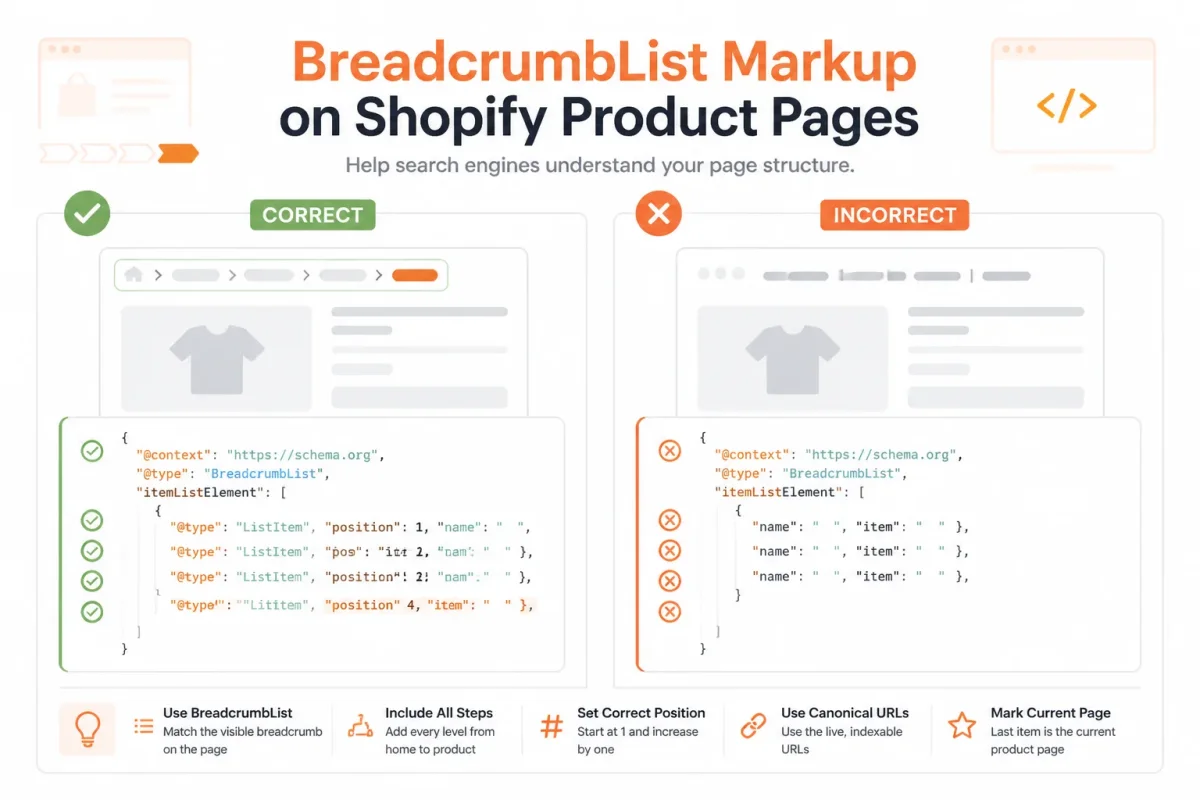
Marking up breadcrumbs shoppers cannot see
- Mistake one: You add BreadcrumbList markup for “Home,” “Shoes,” and “Leather Boots,” but your product page displays no breadcrumb trail. What fails: the structured data describes navigation your shoppers cannot verify. What works: display the same path above the product title and mark up those visible labels. Strong version: your page shows “Home > Shoes > Leather Boots,” and the JSON-LD uses those same names and destinations.
Confusing click history with site hierarchy
- Mistake two: You change the trail based on the collection a shopper visited last. A shopper may then see “Home > Sale > Leather Boots,” while another sees “Home > Men > Boots” for the same URL. What works: choose one durable category path that reflects your Shopify store structure. Strong version: every visitor sees “Home > Men > Boots > Ridge Leather Boot,” regardless of the previous click.
Breaking positions, names, or URLs
- Mistake three: You omit
position, repeat a number, or start the sequence at 0. What works: assign ascending integers beginning at 1, then confirm that each visible item follows the same order in the markup. - Mistake four: You label a destination “Boots” but link it to
/collections/sale, or you mark a collection URL that redirects elsewhere. What fails: the label, rendered link, and structured-data URL disagree. Strong version: “Boots” visibly links to/collections/boots, and the same canonical URL appears in BreadcrumbList.
Treating filters as permanent category levels
- Mistake five: You turn “Black,” “Size 10,” or “Under $100” into breadcrumb levels from temporary filter URLs. What works: keep those attributes out unless you intentionally maintain durable, indexable pages for them. Strong version: a stable “Black Leather Boots” collection has its own content and URL. A temporary filtered result does not become part of every product’s hierarchy.
wRanks can support broader structured-data and Shopify SEO workflows, but your store’s actual navigation still determines whether the markup is accurate. Check the rendered trail first, then validate the corresponding JSON-LD.
Common Breadcrumb Schema Questions for Shopify SEO
If you manage a Shopify store, breadcrumb schema can sound more technical than it is. You are describing the page’s place in your site, not adding another navigation system.
The distinction is simple: visible breadcrumbs help you and your shoppers move through the store, while structured data helps search engines interpret those page relationships.
Breadcrumb schema defined
Breadcrumb schema is structured data that describes an ordered trail of linked pages leading to your current page. For your Shopify product, it might identify Home, Men’s Clothing, Jackets, and Leather Jacket, with each item’s name, URL, and position. Schema.org describes breadcrumb data as a set of links that helps users understand and navigate a website hierarchy.
An example of breadcrumbing
Breadcrumbing means leaving or following a trail that helps someone retrace a route. On your Shopify store, a shopper may follow Home > Men’s Clothing > Jackets > Leather Jacket to return to the jackets collection.
Weak version: Home > Jackets
Strong version: Home > Men’s Clothing > Jackets > Leather Jacket
A breadcrumb schema example
A compact BreadcrumbList example describes each trail item with a name, URL, and position. Your markup might represent Home as position 1, Men’s Clothing as position 2, Jackets as position 3, and Leather Jacket as position 4. The names and URLs should match the visible trail and your preferred canonical pages.
Breadcrumbs in SEO
Breadcrumbs in SEO are both a navigation aid and a structured description of page relationships. Your visible trail shows shoppers where they are, while BreadcrumbList markup gives search engines the same hierarchy in machine-readable form. That clarity can support interpretation, but it does not guarantee higher rankings or a breadcrumb result in Google.
For your Shopify store, keep visible navigation, canonical URLs, and markup aligned. wRanks can monitor related SEO work across products, collections, pages, and blogs, although it cannot correct a site hierarchy that your store navigation does not actually support. A companion guide to FAQ schema markup for Shopify fits the same structured-data workflow.
Start With One Shopify Page and Trace Its Breadcrumb Chain
A breadcrumb problem becomes easier to fix when you inspect one real page instead of your whole Shopify catalog. You need to see the trail shoppers follow, not just the JSON-LD your theme or SEO app generates.
Choose a product or collection page with meaningful depth. You will learn more from a product inside “Outdoor Lighting” than from a homepage with no hierarchy. One accurate chain gives you a pattern worth scaling.
Choose one representative page
Open one Shopify product page today and record the exact breadcrumb trail shoppers can see. Choose a page that sits inside at least one genuine collection, then check whether every visible level leads to a useful destination.
Weak visible trail: Home > Products > Item.
Strong visible trail: Home > Outdoor Lighting > Wall Lanterns > Harbor Brass Wall Lantern.
Map and validate its ordered trail
Write the hierarchy from Home to the current page. For each level, record its displayed name, full URL, and integer position beginning at 1. Confirm that each intermediate level is a real linked page, not decorative text or a collection that returns an error.
- Visible match: The breadcrumb names and order match what shoppers see on the rendered page.
- Real destinations: Each level links to the page represented by its name.
- Ordered positions: Every BreadcrumbList item uses a unique integer position starting at 1.
- Validation result: Schema.org's validator reads the BreadcrumbList without errors or missing required values.
Compare the validator output with the live page, because valid markup can still describe the wrong trail. If “Wall Lanterns” appears visibly but the markup points to “Ceiling Lights,” correct the mismatch before checking another URL.
Expand only after the first page matches
Once one chain is accurate, test the same pattern on a nearby product and its parent collection. Scaling only makes sense after the first page proves that your navigation, URLs, names, and structured data agree.
- Open one page: Start with one representative Shopify product or collection page and record the exact breadcrumb trail shoppers can see.
- Write the hierarchy: List every level from Home to the current page and confirm each intermediate level is a real linked page.
- Map each level: Record its displayed name, URL, and integer position, beginning at 1.
- Validate the markup: Test the BreadcrumbList with Schema.org's validator and compare the output with the rendered page.
- Correct before scaling: Fix every mismatch on that page before applying the pattern to more products or collections.
wRanks can support the wider Shopify SEO workflow with structured data, metadata, image alt text, keyword tracking, and Google Search Console insights, but the immediate task remains smaller: inspect one page today and prove its chain is accurate.
If you want a faster way to do this, wRanks provides AI-powered tools to optimize structured data, metadata, image alt text, keyword tracking, and Search Console insights for Shopify stores. The Shopify SEO guides provide practical workflows for applying those checks.

AI & GEO specialist helping brands maximize visibility across AI platforms like ChatGPT, Gemini, and Claude. James pioneers generative engine optimization techniques for e-commerce.


