How to Write Shopify Buying Guides
Discover how to write Shopify buying guides that help shoppers decide and drive product discovery with clear, decision-focused content and SEO strategies.
If you're learning how to write Shopify buying guides, you've probably watched it happen: a shopper lands on your category page, compares several plausible products, then leaves without choosing one. Your products may fit the need perfectly, but your store gives the shopper no clear way to decide which option suits their budget, use case, or experience level.
Most Shopify stores don't have a content problem. They have a decision-support problem. Shopify describes consideration as the research-heavy stage where shoppers compare product types, individual products, reviews, tutorials, buying guides, and recommendations before buying.
A useful buying guide turns one comparison-stage question into a clear explanation, relevant links to product and collection pages, and a measurable path to product discovery. Build it around the decision your shopper faces, connect it to the right destination, and use SEO tools such as wRanks to support discovery in Google and AI platforms. A focused guide with purposeful internal links serves your store better than a broad article scattered with calls to action.
Build a Buying Guide Around the Decision Your Shopper Is Trying to Make
You lose the sale when your Shopify store answers “what do you sell?” but not “which option fits my situation?” A buying guide earns its place by resolving that comparison-stage uncertainty before you send the shopper to a product or collection page.
Shopify's own five-step creation model and 1,534-word guide provide a useful baseline, but your page needs one more commercial layer. It must answer a specific decision, then guide the reader to the most relevant destination without turning into a generic sales pitch. For the wider role of content in search, see our guide to AI-powered SEO.
What a buying guide is
A buying guide is a decision-support page that answers shopper questions and explains how a product or product group fits a particular need. Shopify describes buying guides as articles covering factors such as functionality, accessibility, size, maintenance, price, and differences between models or brands.
“A buyers guide is a page that answers shoppers’ questions and shows how a specific product meets their needs,” according to Shopify.
That makes it different from a product description, which focuses on one item, and a category page, which organizes inventory. A broad buyer-journey map describes stages. Your buying guide resolves one choice within one stage.
Buying guide examples
Shopify identifies three common formats: comparison guides, how-to-choose guides, and sizing or fit guides. You might compare insulated water bottles for commuters, explain how to choose a standing desk for a small home office, or help shoppers select the right running-shoe width.
For your store, the guide should also point to the right Shopify destination. A “Best Insulated Water Bottles for Commuters” guide can link to a commuter bottle collection, while “How to Choose a Standing Desk for a Small Home Office” can link to specific compact models. Shopify says store owners place buying guides on product or category pages so shoppers can review considerations before checkout without contacting support.
Weak example: “Shop our popular water bottles for everyday hydration.”
Stronger example: “Compare the 24-ounce TrailSteel Bottle for subway commutes, leak-resistant lids, and cup-holder fit.”
The cost of a guide that never resolves the buying decision
A guide that lists features without choosing a useful path can attract readers yet pass little value to your product pages. Your internal links become vague, your shopper remains uncertain, and the page reads like a longer category description.
Practical rule: Build each guide around one comparison question, then link the answer to the most relevant Shopify product or collection page.
Choose the Guide Opportunity from Your Shopify Store's Evidence
Your best topic is rarely the product with the loudest bestseller badge. Look for evidence that shoppers already want the product and a real choice they can't resolve from a product grid alone.
Use your store data to find that overlap. Then finish with a short opportunity brief before you draft, so your guide has a target, a commercial path, and useful destination pages.
What sells fast on Shopify
What sells fast on Shopify varies by your audience, season, margin, and demand signals. Shopify reports can show what shoppers view, search for, and buy, while Google Analytics 4 reveals on-site behavior and content interests, according to Shopify's buyer's guide documentation.
Prioritize products with proven store demand and meaningful differences, not a universal bestseller category. For price-conscious shoppers, make price differences between brands or styles easy to compare, as Shopify recommends.
What a $10k monthly Shopify target requires
You can model a $10k monthly target, but you can't responsibly promise it from one buying guide. Estimate the required traffic from your conversion rate, average order value, margin, and repeat purchases, then set a target your store data can support.
A guide may assist revenue, but your product fit, traffic sources, inventory, and customer retention still decide the result. Treat the guide as one commercial asset, not a guaranteed income machine.
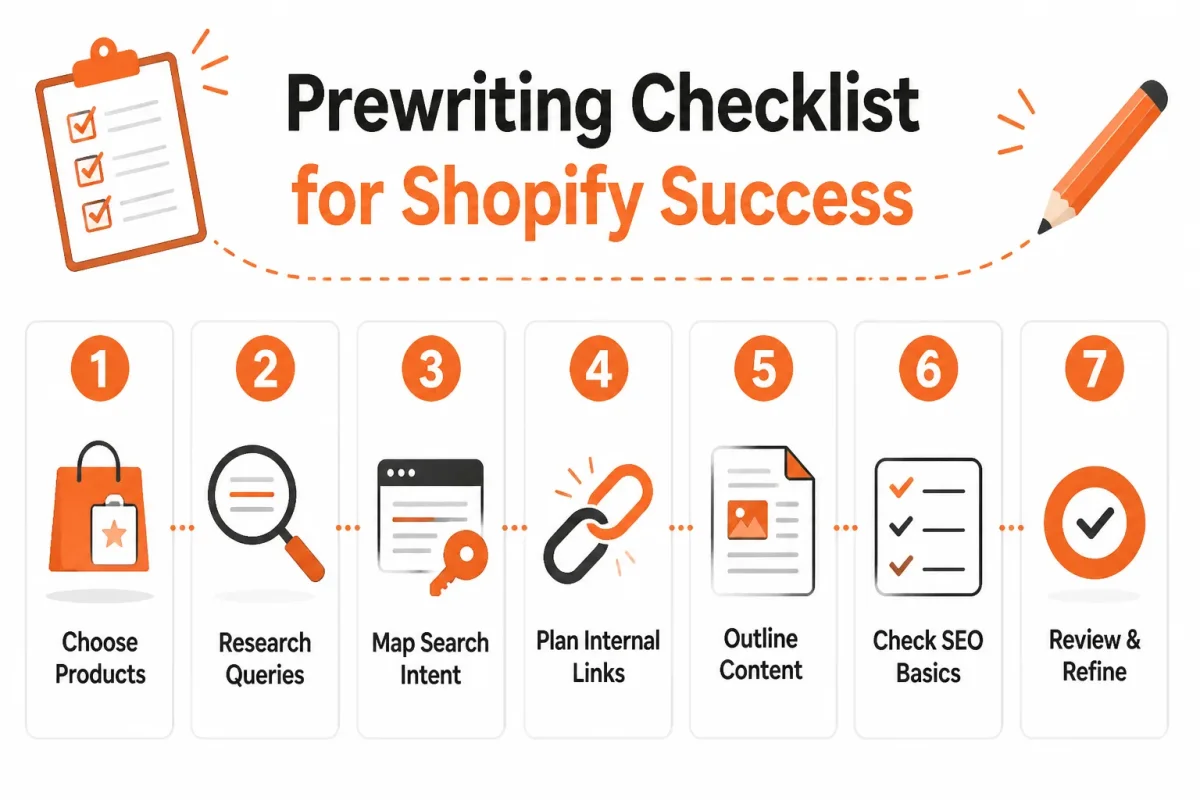
Prewriting checklist for products, queries, and destination pages
Before drafting, complete this opportunity brief:
- Target: Choose one product or collection with existing views, searches, purchases, or clear seasonal demand.
- Queries: Record comparison-stage searches such as “best insulated bottle for commuting” and related wording from your store.
- Differences: List meaningful contrasts in price, size, materials, maintenance, compatibility, warranty, or delivery.
- Evidence: Combine Shopify reports, GA4 behavior, customer surveys, and social conversations. Shopify identifies three useful audience inputs: surveys, digital analytics, and social media.
- Objections: Write down unanswered concerns about price, fit, care, compatibility, and shipping.
- Destinations: Assign each recommendation a relevant product or collection URL before writing.
- Commercial target: Record expected traffic, conversion rate, order value, margin, and repeat-purchase assumptions.
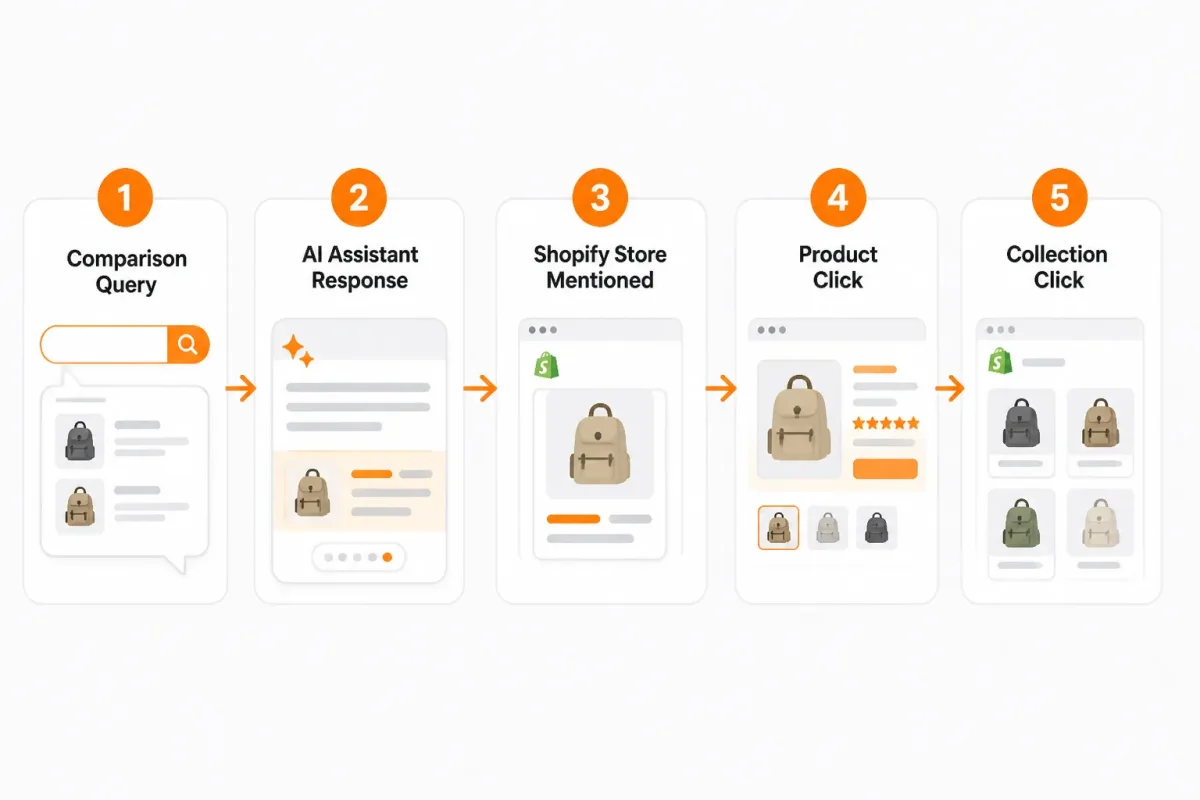
Write the Guide in Five Connected Passes from Shopper Question to Product Click
Your guide works when each sentence moves the shopper closer to a product choice. Start with one comparison decision, then connect shopper criteria to evidence, recommendations, and relevant Shopify pages.
Shopify says a strong buying guide combines audience clarity, product recommendations, scannable formatting, search-friendly structure, and a next step. These elements need to work together, not sit in five disconnected sections.
1. Choose One Comparison Decision and Its Primary Query
Replace a broad query such as “Which running shoe is best?” with “Which waterproof trail shoe is right for winter runs?” You now have a defined shopper, use case, and primary query.
Shopify recommends building the outline around audience pain points and leading with the solution. Your opening should answer the winter runner's problem before introducing products.
2. Turn Product Differences into a Decision Framework
Collect the criteria your shopper will compare: traction, waterproofing, cushioning, price, and fit. Assign each criterion to products you actually sell, then state which option suits each need.
Weak: “These trail shoes are great for winter.”
Strong: “Choose the RidgeStorm GTX for icy trails because its lugged outsole improves traction and its waterproof membrane keeps feet dry.”
3. Write Recommendations Before Inserting Links
Write the recommendation first, then add the product or collection link that supports it. A product section should begin with a definition and two or three ownership benefits, Shopify advises. You might explain that the RidgeStorm GTX is a waterproof trail shoe offering dry feet, winter traction, and cushioned support.
4. Build a Scannable Page with Comparison Evidence
Use short sections, descriptive subheadings, comparison bullets, and specific evidence such as outsole depth, temperature rating, price, or return terms. Your guide should answer the query quickly, then let shoppers inspect the detail.
- Decision: Match each section to one winter-running concern.
- Evidence: Show the product specification behind every recommendation.
- Scan path: Put the best-fit product and reason near the top.
5. Link the Guide to Products, Collections, and the Next Action
Use contextual anchor text such as waterproof trail shoes for winter conditions, not “shop now.” Link each recommendation to its product page, link broader choices to the collection, and add a collection-page link back to the guide for shoppers still comparing.
Use wRanks to check keyword coverage, structured data opportunities, and visibility in Google and AI search. You still need accurate product judgments from your catalog.
Done means: Your guide names one decision, compares real criteria, recommends specific products, supports each claim, and gives every reader a relevant next click.
Prevent Shopify Buying Guide Failure Patterns That Make Guides Look Useful but Sell Nothing
A Shopify buying guide can attract comparison-stage readers yet produce no qualified product traffic. Thorough research, polished formatting, and plenty of links won't help if the page fails to resolve one shopper's decision.
Shopify describes buying guides as resources built around the specific challenges shoppers face during the buying process. Its guidance also says a useful guide should give readers practical takeaways before an impulsive purchase. Your guide needs both: a clear choice and enough evidence to make that choice feel safe.
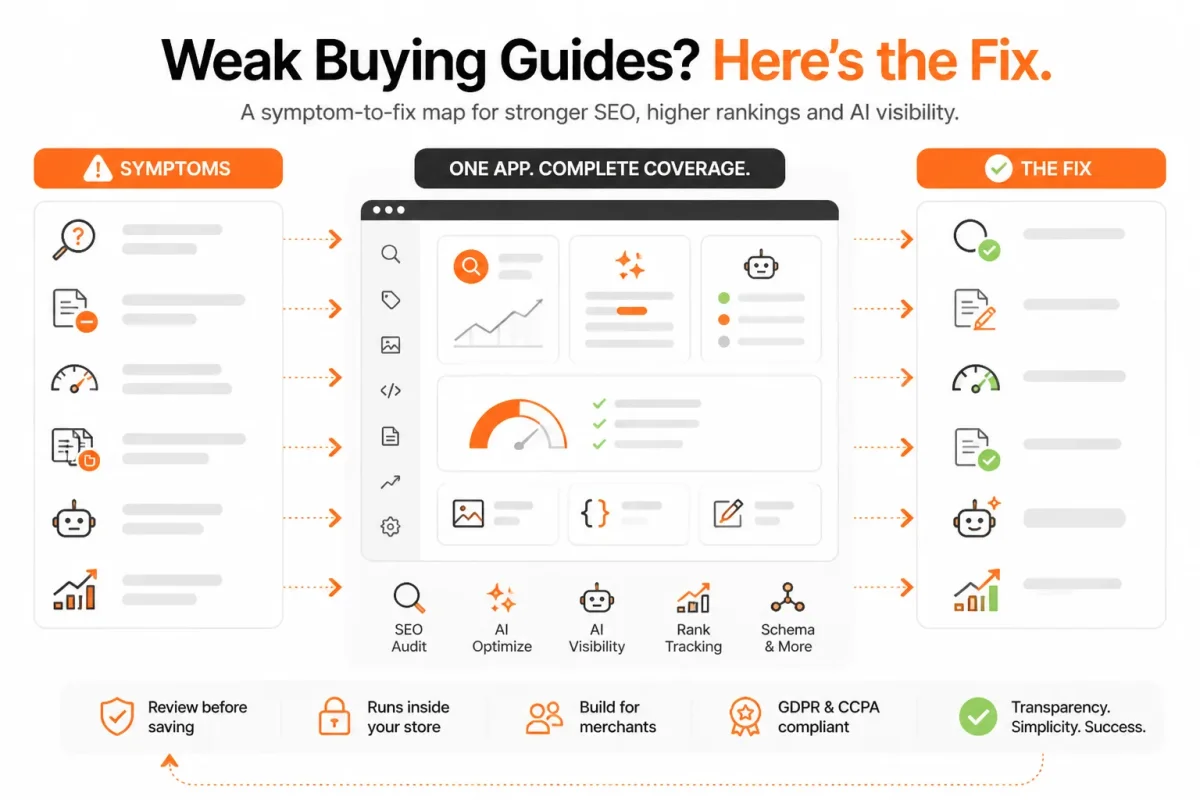
A comparison-stage guide failure table
| symptom | likely cause | first fix |
|---|---|---|
| The guide discusses an entire category without helping one shopper choose. | The audience and comparison decision are too broad. | Rewrite the brief around one use case, such as winter trail running or small-home-office work. |
| The page lists specifications but gives no product recommendation. | Features were collected without mapping them to shopper needs. | Add a best-fit recommendation for each major criterion and explain who should choose it. |
| All product links appear in one block at the bottom. | The guide treats internal linking as navigation rather than decision support. | Place contextual links beside the relevant comparison point using descriptive anchor text. |
| The CTA says to shop now but does not resolve hesitation. | The next shopper question was never answered. | Add the missing information about price, sizing, compatibility, maintenance, or delivery before the CTA. |
| Claims sound persuasive but cannot be verified in the catalog. | The draft relies on generic copy instead of store product data. | Check every recommendation against current specifications, inventory, pricing, and collection URLs. |
When broad coverage weakens product relevance
Covering 20 products may look comprehensive, but shallow descriptions force shoppers to keep comparing elsewhere. Fewer products often create a stronger decision path because you can explain the trade-off behind each recommendation. If your catalog is large, split one broad guide into focused guides by use case, budget, or compatibility.
Weak example: “These running shoes offer comfort, traction, and durable materials for many types of runners.”
Best for wet winter trails: The RidgeStep GTX suits runners who need waterproof protection and aggressive grip. Choose the TrailFlex instead if lower weight matters more than weather resistance.
How to fix a guide that attracts readers but earns no product clicks
Review each paragraph for the shopper's next question. If a recommendation says a backpack fits airline limits, add the dimensions before linking to the carry-on collection. If the guide claims easy maintenance, state whether the product is machine washable. Your CTA should follow the answer, not replace it.
Check claims against current product data before publishing. wRanks can help you review keyword coverage, internal-link opportunities, and search visibility, although you still need accurate product judgments and a manual catalog check.
Place each link beside the decision it supports, using anchor text such as waterproof trail shoes for winter conditions. Remove unverifiable superlatives, then test whether every section gives you a reason to choose one product rather than merely browse a category.
FAQ
Examples of buying guides
Examples include a guide to choosing an insulated water bottle for office use, a comparison of running shoes for wide feet, or a breakdown of laptop stands for small desks. A useful guide groups options by a real buying decision, explains the trade-offs, and links readers to relevant products or collections rather than listing items without context.
Products that sell fast on Shopify
Products that solve a specific problem, serve a clear audience, or fit a timely need can sell quickly on Shopify. The strongest opportunities depend on demand, pricing, margins, inventory, and competition. Review your store data, search queries, and product engagement before choosing what to promote. Fast sales still require a useful offer and a page that supports the purchase.
A buying guide
A buying guide is helpful content that leads shoppers through a product decision. It explains which features matter, compares suitable options, identifies limitations, and points readers to products or collections. Instead of repeating catalogue details, a good guide answers a specific question, such as which water bottle suits a long workday or which desk lamp fits a small workspace.
Making $10,000 a month on Shopify
Some Shopify stores can reach $10,000 in monthly revenue, but the result depends on product demand, average order value, conversion rate, repeat purchases, costs, and traffic. A buying guide may support that goal by bringing qualified shoppers to relevant products. It won't create sales on its own. Track clicks, add-to-cart actions, margins, and conversions before judging its contribution.
Publish One Decision-Led Shopify Guide, Then Improve Its First Destination Page
A buying guide earns its keep when it sends qualified shoppers somewhere useful. Start with one clear comparison question, one relevant destination, and enough evidence to improve both pages after publishing.
Choose the product or collection page that needs qualified comparison traffic most. It may not be your bestseller. A focused guide connected to that destination gives you a clearer test, cleaner internal linking, and a more useful path for Shopify shoppers.
-
Select One Product or Collection Page
Choose one product or collection page that already has demand but needs better comparison-stage traffic. Check product views, add-to-cart actions, collection engagement, and existing search visibility. Your first destination should solve a clear merchandising problem, not simply promote the item with the highest sales.
- Opportunity: You have selected one product or collection page with a real need for qualified comparison traffic.
- Evidence: You have recorded the search, engagement, or sales signal that supports the choice.
- Destination: You know exactly where a helpful guide should send interested readers.
-
Record One Comparison Decision
Write the shopper's exact question before drafting. For example, “Which insulated water bottle is best for a 12-hour workday?” gives you a sharper brief than “water bottle buying guide.” Record the use case, competing criteria, and product types your guide must distinguish.
Weak question: “What water bottle should someone buy?”
Strong question: “Which 32-ounce insulated water bottle keeps coffee hot during a full office day?”
-
Draft and Link the Guide
Turn the question into decision criteria, then write recommendations that point to specific products or collections. Explain why each option fits, name its limitation, and place contextual links beside the relevant claim. Link from the guide to the destination, and add a useful link back when the product or collection page needs more buying context.
Weak recommendation: “The Summit Flask is a great choice for anyone.”
Strong recommendation: “Choose the Summit Flask if you need coffee to stay hot through a full workday; its 32-ounce capacity suits office use, but its wider shape takes more room in a car cup holder.”
-
Check the Page in wRanks and Google Search Console
Before publishing, review the guide in wRanks for keyword coverage, internal-link opportunities, meta tags, structured data, and image alt text. Then use Google Search Console to check whether the page attracts the intended comparison queries after it is live. Verify every recommendation against current product data.
- Search intent: You can see that the title and sections answer the recorded comparison question.
- Links: You have one clear path to the chosen product or collection destination.
- Accuracy: You have checked prices, sizes, materials, availability, and claims manually.
-
Improve the First Destination Page That Receives Qualified Clicks
Publish the guide, then review its impressions, clicks, internal-link clicks, product views, collection engagement, add-to-cart actions, and conversions after a reasonable observation period. If readers click but don't continue, improve the destination page first. Clarify its value, strengthen its comparison details, or match its message to the guide's promise.
One decision-led guide connected to one useful destination gives you a clear place to start. Select the product or collection page that currently needs the most qualified comparison traffic.
If you want a faster way to do this, wRanks helps Shopify store owners optimize products, collections, pages, and blogs with AI-powered SEO tools, including keyword tracking, Google Search Console insights, meta tags, structured data, and image alt text. Its Shopify SEO resources support evidence-led content improvements.

Content marketing expert and Shopify ecosystem authority. Priya has helped 200+ stores grow organic traffic through strategic blog content and keyword targeting.


