How to Name Shopify Image Files for SEO
How to name Shopify image files with clear, descriptive filenames that improve asset management and support SEO without relying on rankings alone.

Your Shopify launch is ready, but your media library tells a different story. If you're learning how to name Shopify image files, start with the basics: replace IMG_1234.jpg, DSC_8471.jpg, and indistinguishable variant files with names that tell you what each asset shows. When a customer asks for the cream version from the spring campaign, you can find it without opening every file.
Most Shopify merchants don't have an image-ranking problem. They have an asset-management and search-context problem. You need filenames that identify each image clearly and give search engines useful context without treating naming as a guaranteed ranking lever.
The practical workflow starts before upload. Use a descriptive, hyphen-separated filename such as red-leather-shoes.jpg instead of IMG_1234.jpg, then apply the same logic across colors, materials, product angles, and campaigns.
You'll build a naming convention, rename files before uploading, handle variants without clutter, and fix common mistakes. The same system also supports your wider Shopify SEO process, so your catalog stays understandable after launch day.
Use filenames to identify every Shopify asset
When you manage hundreds of Shopify images, camera-generated names slow down every update. You may recognize a product, but IMG_1234.jpg tells you nothing about its color, angle, variant, or collection. A descriptive filename lets you identify the right asset before opening it, which matters during catalog edits, theme changes, and store migrations.
A file such as red-leather-crossbody-bag-front.jpg gives you clearer product context and creates a more coherent group of image signals for search engines and AI platforms. It can reduce ambiguity, but it can't promise traffic or rankings. Your filename supports the wider SEO system rather than carrying it.
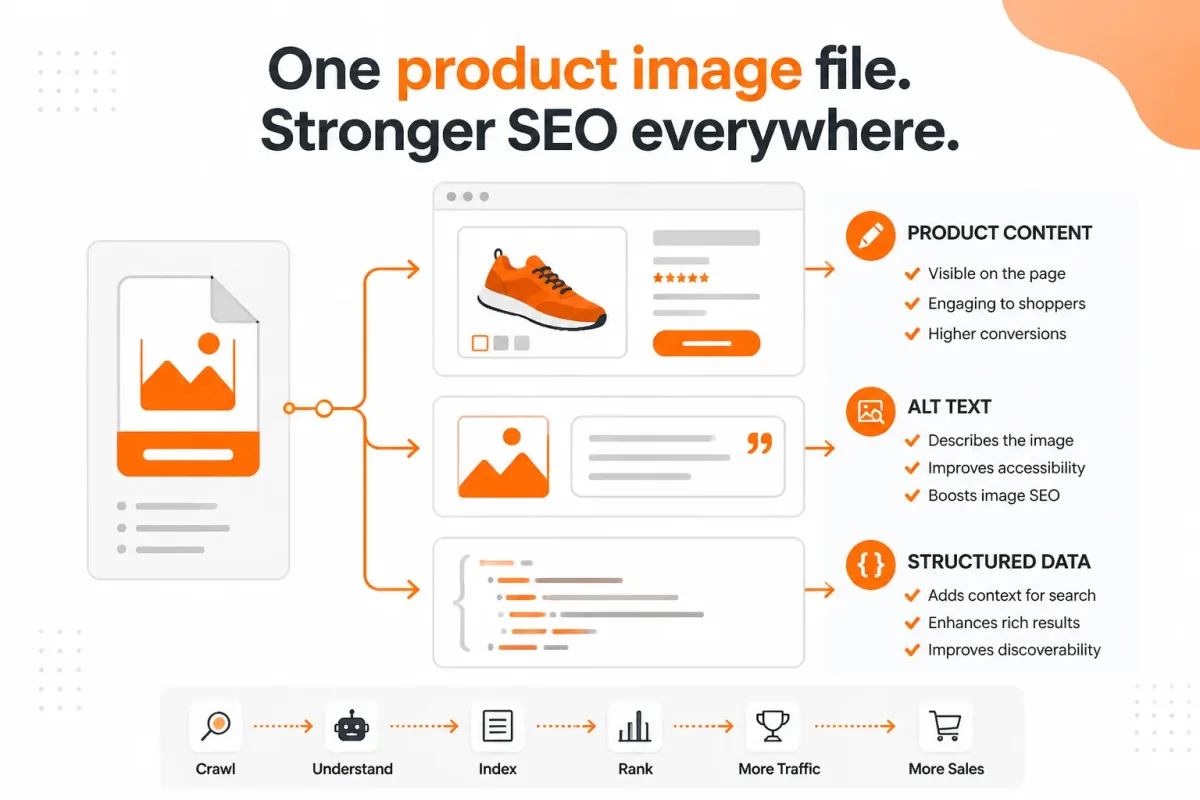
What does a Shopify image filename do for SEO
Use a short, hyphenated description to label what each Shopify image contains. Rank Math recommends clearly describing the picture when naming image files. Hyphens separate individual words so search engines can parse the description more easily.
Weak example: DSC_8471.jpg leaves you opening files to find the red leather bag's front view.
Strong example: red-leather-crossbody-bag-front.jpg identifies the product, material, color, and view at a glance.
“Describe what is in the picture clearly when naming Shopify image files,” advises Rank Math.
Your filename is still only one contextual clue. Google and AI platforms use many signals, and they may not display or rely on every filename. wRanks can connect image-related work with broader Shopify page optimization, but a clear filename alone isn't a ranking solution.
How do filenames work with alt text, product copy, and structured data
You need more than a useful file label to explain an image. Descriptive alt text serves accessibility, product copy supplies selling context, structured data clarifies product details, and internal links help systems understand how pages relate. Google Search Console reviews and keyword tracking can then show whether your broader SEO work is attracting the right visibility.
Your filename and alt text should support each other without repeating the same sentence. For guidance on the separate accessibility role, this guide to Shopify product image alt text fits the same workflow.
Practical rule: Name each Shopify image so you can identify its product and purpose without opening it, then support that context with accurate alt text, useful copy, and structured data.
How do you apply one naming rule across Shopify assets
Choose a consistent pattern for your entire store, not just product galleries. You might use product-color-material-view for product images, collection-topic-angle for collection media, and article-topic-image-purpose for blog assets. This gives you a predictable library when you update campaigns or replace outdated files.
For example, linen-shirt-sand-front.jpg, summer-linen-collection-banner.jpg, and linen-care-guide-flat-lay.jpg make each asset easier to locate and interpret. Describe the subject first, add the distinguishing context, and separate every word with hyphens.
Build one naming convention before renaming images
Your catalog structure should decide each filename, not a rigid template. A simple store may need only the product name, while a Shopify store with color, material, and gallery variants needs another identifying term.
Consistency matters more than stuffing every possible keyword into an image name. Choose a pattern you can repeat across products, collections, and blog assets, then keep each filename readable for you and your team. For related guidance, see this Shopify image file naming guide.

Choose the model that matches your catalog structure
Rank Math recommends keeping Shopify image filenames to 2 to 5 words. It also advises including the main product name, color, or material, with brand or model details added when they genuinely identify the asset. These are useful patterns, not mandatory templates.
| situation | better move |
|---|---|
| A standard catalog product has one main image and no meaningful variants | Use the concise product-focused pattern, such as red-leather-shoes.jpg |
| The product has color or material variants | Add the distinguishing variant term, such as linen-shirt-navy.jpg or linen-shirt-cotton.jpg |
| A gallery contains multiple views of the same product | Add a useful angle or role, such as linen-shirt-navy-front.jpg or linen-shirt-navy-detail.jpg |
| Brand and model information helps identify the asset | Include relevant details without clutter, such as sony-wireless-headphones-black.jpg |
Use a repeatable pattern for products and variants
For a primary product image, use the product name and role. For a variant image, insert the color or material before the role so you can identify the exact asset quickly.
Weak example: IMG_4821.jpg
Better example: linen-shirt-navy-front.jpg
You don't need every keyword. A product-focused name such as red-leather-shoes.jpg may fit a simple catalog, while linen-shirt-navy-front.jpg gives a variant-rich catalog clearer asset context.
Set rules for gallery angles, collections, and blog images
Add terms such as front, detail, lifestyle, or packaging only when they help you select the right file. Collection and blog assets can follow the same logic, such as summer-linen-collection-banner.jpg or linen-care-guide-flat-lay.jpg.
Keep filenames lowercase, hyphenated, and consistent across your Shopify store. The goal is an identifiable media library that supports clearer search context, not a promise of higher rankings from filenames alone.
Rename and upload Shopify images in the right sequence
You get cleaner results when the filename workflow starts before Shopify. Inventory each asset, define its product context, rename the source file, and then upload it to the correct product or variant.
A filename supports clearer asset management and search context, but it doesn't replace image quality, alt text, structured data, or page optimization. Verify each of those separately.
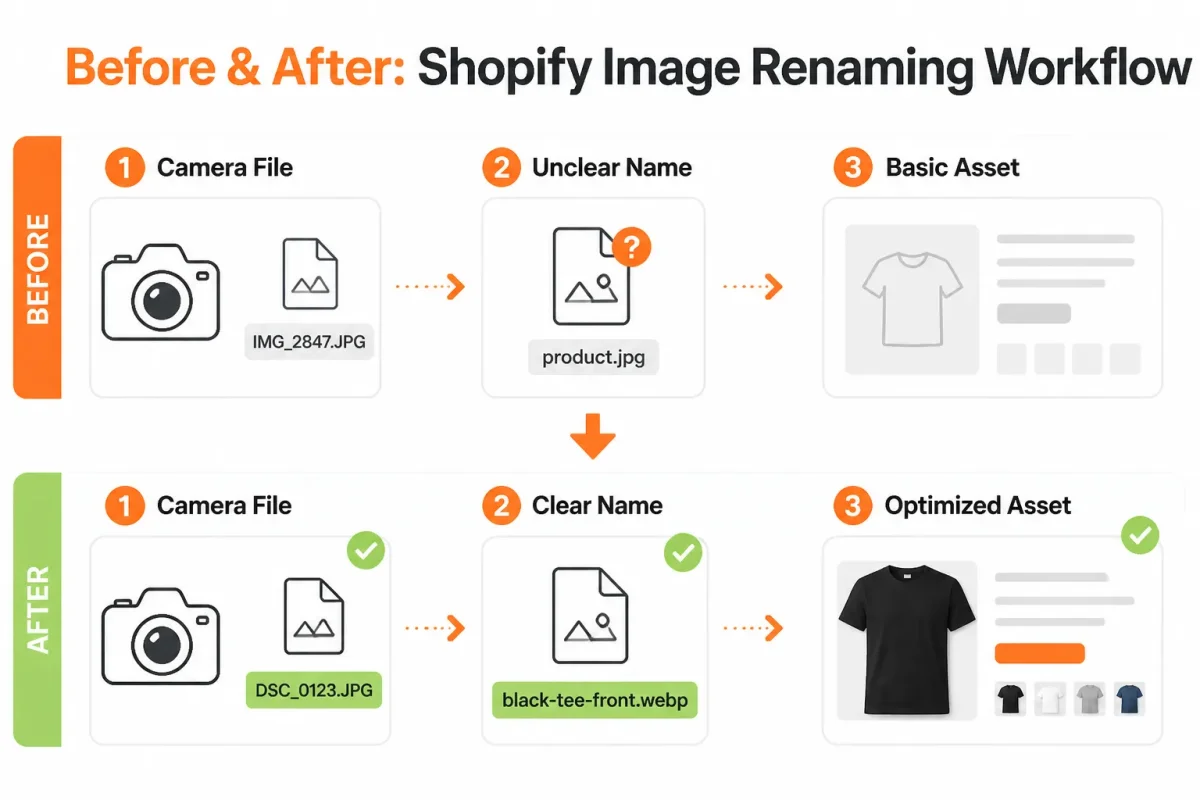
List the product, variant, and image-view details
Record the product name, variant detail, and useful image view before renaming anything. For example, you might identify a “Harbor Linen Shirt” in navy as a front view, then remove camera-generated filler from the original file.
- Inventory: Match every source file to its Shopify product and variant.
- Core terms: Keep the product name and meaningful color, material, or style detail.
- Image view: Add front, detail, lifestyle, or packaging only when it helps you identify the asset.
Name JPG files consistently
Use lowercase words separated by hyphens before the .jpg extension. Rank Math advises lowercase Shopify image filenames to help prevent URL formatting issues, so apply the format consistently.
Before: IMG_8472.JPG
After: harbor-linen-shirt-navy-front.jpg
Write an SEO-friendly image filename
A good SEO-friendly image filename gives you a concise, accurate description rather than a keyword string. Remove filler words, keep useful specifics, and avoid repeating terms unnaturally.
Before: best-cheap-blue-linen-shirt-buy-online-fashion.jpg
After: harbor-linen-shirt-navy-detail.jpg
Choose image dimensions for Shopify
Your filename doesn't determine image dimensions, so follow your current Shopify theme and product requirements for the intended placement. Check the source image's format, dimensions, and quality before upload, then compress it without making product details unclear.
- Extension: Confirm that the renamed file keeps the correct extension, such as .jpg or .png.
- Dimensions: Match the image to your theme, gallery, and product-use requirements.
- Quality: Make sure compression does not blur fabric, packaging, or product features.
Optimize images for Shopify
Optimize images for Shopify by separating filename work from format, dimensions, compression, alt text, structured data, and page-level SEO. Rename the file before upload, assign it to the correct product or variant, and inspect the storefront afterward.
wRanks can connect image alt text, structured data, keyword tracking, and broader Shopify SEO work in one workflow, although you still need to check that each filename and image accurately represents your product.
- Upload: Add the renamed source file to the intended Shopify product.
- Assignment: Check that the image appears with the correct variant, such as Navy.
- Verification: View the product page on your storefront and confirm the image, variant display, and related SEO signals.
Avoid filename patterns that create clutter, duplication, or misleading context
Messy filenames create small problems that spread through your Shopify catalog. You may see duplicate variant images, misleading asset names, or files that are difficult to identify during updates.
Your filename should stay readable, accurate, and useful for your workflow. It can't repair poor image quality, replace accurate alt text, or guarantee better rankings.
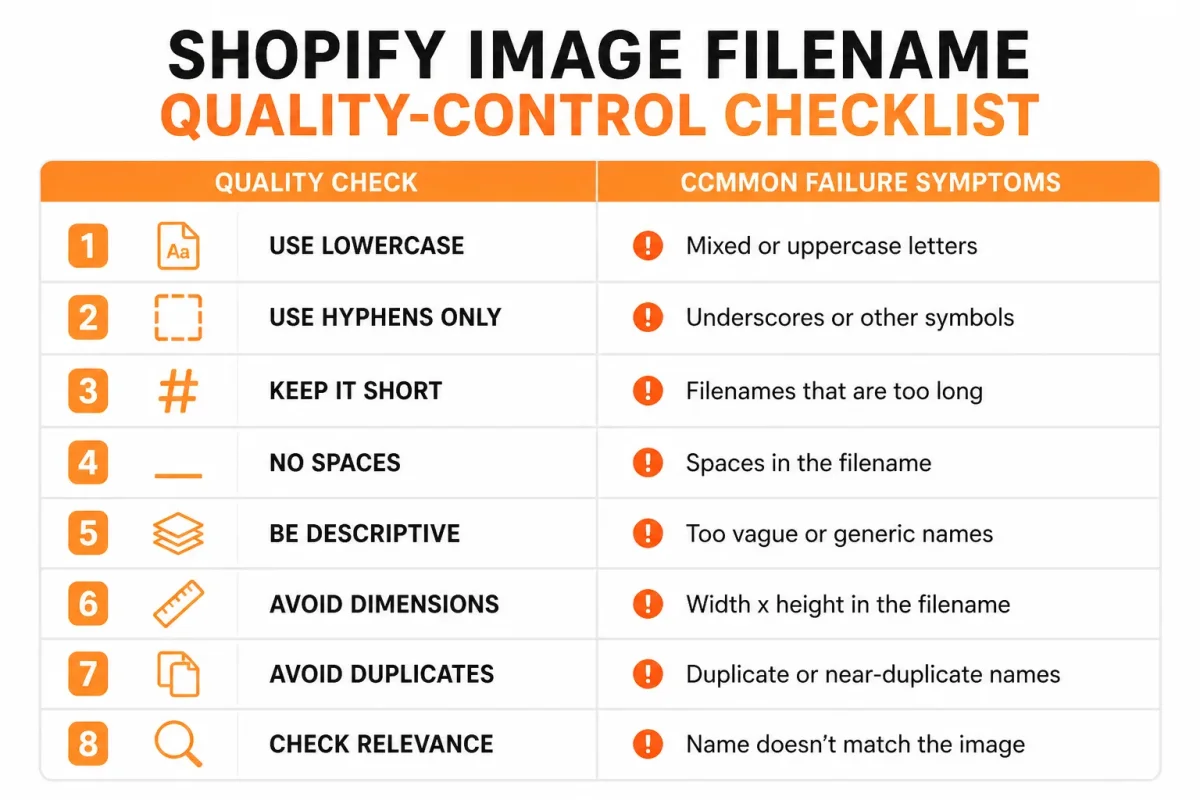
Symptom, likely cause, and first fix
Rank Math advises avoiding spaces and underscores in Shopify image filenames. Use readable words separated by hyphens instead. Check your catalog with this diagnostic table before changing files.
| symptom | likely cause | first fix |
|---|---|---|
| The filename contains spaces or underscores | Camera or desktop naming conventions were retained | Rename it with lowercase words separated by hyphens |
| One filename is repeated for several color variants | Variant identity was omitted during export | Add the specific color or material to each filename |
| The filename contains a long list of keywords | SEO terms were added without describing the actual image | Keep only the concise product, variant, and useful view terms |
| The image name no longer matches the product shown | An old asset was reused or renamed incorrectly | Compare the file with the product and replace the misleading name before upload |
| The product image looks blurry in the storefront | Low source quality, excessive scaling, theme rendering, or compression | Inspect the source and storefront rendering; do not expect a filename change to sharpen it |
Do not turn filenames into keyword lists
Keep each name focused on the product, useful variant detail, and image view. Avoid repeating terms that already appear in your product data.
Before: blue-running-shoes-mens-running-shoes-athletic-sneakers-best-running-shoes.jpg
After: navy-mens-running-shoes-side-view.jpg
This approach helps you identify the asset without making an inaccurate promise. Your image alt text should describe the image for accessibility, while the filename provides additional file context. The guide to Shopify image alt text and practical examples fits the same workflow.
Keep variant identity and gallery order unambiguous
Use the color or material when two images would otherwise look interchangeable. Check that your first gallery image still represents the selected variant, especially after replacing or reordering assets.
- Variant check: Match “cream” to the cream product image, not only to the parent product.
- Reference check: Search theme sections, custom content, and campaigns before removing a reused asset.
- Replacement check: Confirm the storefront after changing a file, rather than assuming Shopify updated every reference.
Separate blurry-image diagnosis from filename cleanup
A clean filename can't sharpen a blurry Shopify image. You may have a low-quality original, excessive enlargement, aggressive compression, or a theme that renders the asset at an unsuitable size.
- Inspect the source: Open the original file before renaming it.
- Compare rendering: Check the storefront at the displayed size on desktop and mobile.
- Review delivery settings: Check theme image handling and compression before replacing accurate filenames.
FAQ
How JPG files are named
JPG files are usually named with lowercase words separated by hyphens, such as linen-shirt-blue-front.jpg. Use terms that describe the product, variant, and view, and leave out camera defaults, random numbers, and words such as “final” or “new.” Keep the file extension accurate so Shopify and other systems can identify the format correctly.
Whether PNG or JPEG is better for Shopify
JPEG is usually the practical choice for Shopify product photos because it keeps file sizes manageable while preserving good visual quality. PNG suits graphics that need transparency, crisp text, or flat colour, such as logos and icons. Choose the format that fits the image, then compress it without making product details look soft or distorted.
What makes a good SEO-friendly image file name
A good SEO-friendly image file name describes what the image shows in plain language. Include the product and a useful detail, such as cotton-hoodie-black-back.jpg. Keep it concise, use hyphens between words, avoid keyword stuffing, and don't rely on vague names like IMG_2048.jpg. The filename should help a person identify the asset quickly.
The best image format for Shopify
There isn't one format for every Shopify image. JPEG generally works well for product photography, PNG is useful for transparent graphics, and newer formats such as WebP can reduce file weight when your workflow supports them. Check the result on the storefront after uploading. The image still needs to look sharp at the sizes your customers see.
Turn one Shopify product into a repeatable filename habit
You don't need to rename an entire Shopify catalog before seeing whether your system works. Start with one product page, especially one with multiple variants, and use it to test naming, uploads, variant assignments, and storefront display.
A filename convention won't promise rankings or revenue. It will give you a controlled way to improve asset organization, page context, and SEO coverage before you apply the process across your catalog.
Write the convention
Choose a pattern that identifies the product, variant, and image view without making filenames difficult to scan. Keep the same order for every file in the product set.
Weak: blue-final-new-2.jpg
linen-shirt-blue-front.jpg gives you a product, color, and view at a glance. Add a variant detail only when it helps distinguish the asset.
Rename one product set
Select one Shopify product with several colors or sizes. Inventory its existing images, match each file to the correct variant, and rename the source files before uploading them. Don't mix unverified files into the same batch.
- Product selected: Choose one page with multiple variants and complete image coverage.
- Files matched: Confirm each image belongs to the right product, color, and view.
- Names applied: Rename every file using the same product-specific pattern.
Verify the page signals
Upload the renamed files, assign them to the correct variants, and inspect the storefront on desktop and mobile. Change a variant and confirm the displayed image changes as expected. A useful filename is only one part of the page.
The best image optimizer for Shopify isn't necessarily a filename tool. Assess whether your workflow covers image quality, delivery, accessibility, and SEO tasks together. wRanks supports broader Shopify SEO through alt text, structured data, meta tags, keyword tracking, and Google Search Console insights.
Roll out by catalog priority
Once the first page passes inspection, repeat the process by collection priority, seasonal demand, or product revenue. Can you make $10k a month on Shopify? No filename convention can promise that target. Product-market fit, merchandising, conversion, demand, and execution still determine the result.
- Define the pattern: Write the product, variant, and view order you will use across your Shopify store.
- Inventory and rename: Start with one product page and rename its complete image set before uploading.
- Upload and assign: Add each file to Shopify and connect it to the correct product or variant.
- Verify the storefront: Test image display, variant behavior, mobile rendering, and file recognition.
- Align page signals: Review alt text, structured data, meta tags, and the page content for matching context.
- Repeat by priority: Move through your most important collection or catalog group, then measure organization and search data over time.
If you want a faster way to review filenames, alt text, structured data, meta tags, and Search Console signals, wRanks supports broader AI-powered Shopify SEO workflows for merchants managing product and catalog optimization.

Content marketing expert and Shopify ecosystem authority. Priya has helped 200+ stores grow organic traffic through strategic blog content and keyword targeting.


